
An open-source, AI-native framework for Obsidian vaults: opt-in modules, a declarative reconciliation engine, and agent-optional workflows.
Verified details
These details have been verified by PyPIProject links
GitHub Statistics
Maintainers

Project description
Onyxian


Onyxian scaffolds and operates a tailored Obsidian vault, composed from opt-in modules. Pick the domains you care about and Onyxian wires up the folders, typed frontmatter, Bases views, and templates for each. The same framework serves a researcher, a PhD student, a musician, and a product manager, with different module sets and different folder names.
Three things hold true everywhere:
- It works without any AI. Templates are plain copies, views are plain files. Optional Claude Code skills and agents amplify the vault, but nothing depends on them.
- It never clobbers your files. Every file Onyxian writes is tracked. A file you edited is yours: updates that would overwrite it arrive as a
*.newsibling instead, never a silent overwrite. There is no flag that overrides this. - It's tailored to you. Folder names, cadences, and structures are per-vault variables, not baked-in opinions.
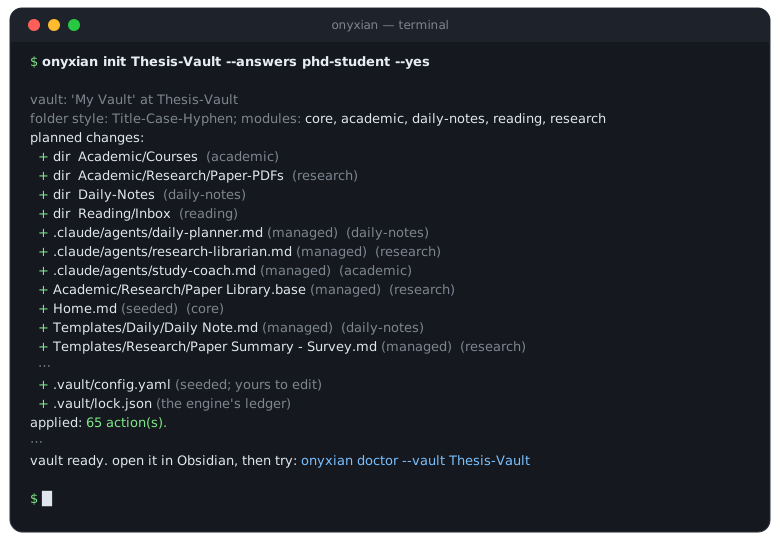
Install
In Claude Code (nothing to set up)
/plugin marketplace add odysseia06/onyxian
/plugin install onyxian@onyxian
/vault-bootstrap
The plugin ships the interview wizard. On first run it installs the CLI for you and walks you from an empty folder, or an existing vault, to a working setup.
As a command-line tool
uv tool install onyxian # or: pipx install onyxian
Then create a vault:
onyxian init my-vault                                  # interactive interview
onyxian init my-vault --answers researcher-developer   # or start from a profile
Open the folder in Obsidian and you're done.
From source
git clone https://github.com/odysseia06/onyxian && cd onyxian
python -m venv .venv
# Windows: .venv\Scripts\activate     macOS/Linux: source .venv/bin/activate
pip install -e ".[dev]"
pytest
Using it
| Command | What it does |
|---|---|
onyxian init <folder> |
Create a new vault from the interview or a profile. Refuses a non-empty folder. |
onyxian adopt <vault> |
Bring an existing vault under management. Additive only, behind a reviewed plan. |
onyxian add <module> |
Enable a module (its dependencies come with it). |
onyxian remove <module> |
Disable a module. Deletes only unmodified framework files; your edits stay. |
onyxian update |
Pull newer module and skill versions. Files you changed are never overwritten. |
onyxian plan / onyxian apply |
Preview the diff, then reconcile. Every mutating command takes --dry-run. |
onyxian doctor |
Check the vault against its declared intent. Read-only. |
onyxian modules |
List available modules with their variables and defaults. |
onyxian module new <id> |
Scaffold your own module. |
Adopting an existing vault is the safe path. onyxian adopt <vault> --dry-run is read-only: it maps your existing folders onto module variables, proposes a purely additive plan, and parks anything ambiguous on a checklist instead of touching it. Nothing is moved, renamed, deleted, or overwritten. There is no --yes on adopt — you review the plan and confirm it, by passing back the token the review prints. (Commit your vault to git first; Onyxian will remind you.)
How it works
The engine is a small CLI built on a declarative reconciliation loop:
.vault/config.yamldeclares intent — which modules, with which variables. Yours to edit..vault/lock.jsonrecords state — every file Onyxian has written, with its hash. Machine-maintained.onyxian plancomputes the difference;onyxian applyreconciles it.
Every file Onyxian writes is one of two kinds. Managed files (templates, views, skills) update themselves while you leave them alone, and turn into *.new deliveries the moment you customize them. Seeded files (your home note, a strategy note) are written once and yours from then on. Everything else in the vault is invisible to Onyxian, and it will never write there.
Modules
| Module | What it gives you |
|---|---|
core |
The shared conventions, the Templates/ root, and the home note every module builds on. |
daily-notes |
One note per day with task-rollover queries (due, scheduled, overdue, carry-over, captured) and natural-language task capture. |
academic |
Courses from a copy-per-course template; exam prep tracked through a Base. |
fitness |
Training, nutrition, and body tracking, driven by a Strategy note you own. |
research |
A typed paper pipeline: PDF to summary to topic links, over a multi-view Paper Library Base. |
reading |
An Inbox to Articles to Evergreen pipeline, with web clipping. |
projects-software |
Per-project devlogs, decision logs, subsystem notes, and a task Base. |
projects-gamedev |
Game projects as living wikis: design, mechanics, worldbuilding, devlog. |
oss |
Open-source tracking from watchlist to contribution, with staleness-aware Bases. |
music |
Theory, practice, composition, production, listening, and copy-per-piece projects. |
writing |
An editorial blog pipeline: ideas to drafts to published, with series and a calendar. |
ai-workspace |
A prompts library and an agent-skills workbench. |
Enable any combination with onyxian add, or start from a profile (a named module set): minimal, fitness-focused, student, phd-student, writer, or researcher-developer.
The agent layer (optional)
When you use Claude Code, each enabled module installs scoped skills and a per-domain agent into .claude/ — daily-planner, research-librarian, study-coach, fitness-coach, and so on, each with a documented read/write scope it operates within. A generated CLAUDE.md orients Claude the moment you open the vault, pointing at the agents and the operating rules so a plain request reaches the right one; other runtimes get a generated AGENTS.md.
These agents don't only suggest — they operate the live vault through Obsidian's official command-line interface: scaffold and triage the day, capture a task from a sentence ("add a task to fix this by Friday"), log a coding session or record a decision ("we decided X because Y"), file a typed paper summary, and so on — you reach the right agent just by saying what you want. Every write follows one contract (the vault-operations skill): additive by default, inside the agent's scope, escalating rather than guessing. These scopes are conventions the agents are instructed to honor, not a filesystem sandbox — the user guide says exactly what kind of guarantee that is. Delete .claude/ entirely and the vault still works as plain files; the agent layer is power, never a dependency.
Documentation
- docs/user-guide.md — the user guide: install, quickstart, adopting an existing vault, everyday operations,
*.newfiles, the agent layer, a full module reference, and troubleshooting. Start here. - KICKSTART.md — the design charter: vision, architecture, the module system, and the write/lock/update contract. Internal, but the deep read on why the engine works the way it does.
- CONTRIBUTING.md — how to work on Onyxian and author modules.
- RELEASING.md — how releases are cut and published.
License
MIT.
Project details
Verified details
These details have been verified by PyPIProject links
GitHub Statistics
Maintainers
Release history Release notifications | RSS feed

Download files
Download the file for your platform. If you're not sure which to choose, learn more about installing packages.
Source Distribution
Built Distribution
Filter files by name, interpreter, ABI, and platform.
If you're not sure about the file name format, learn more about wheel file names.
Copy a direct link to the current filters
File details
Details for the file onyxian-1.1.0.tar.gz.
File metadata
- Download URL: onyxian-1.1.0.tar.gz
- Upload date:
- Size: 518.1 kB
- Tags: Source
- Uploaded using Trusted Publishing? Yes
- Uploaded via: twine/6.1.0 CPython/3.13.12
File hashes
| Algorithm | Hash digest | |
|---|---|---|
| SHA256 |
f56eb4c303b77f3286012bdeaffb8b031966d5702e9314ccf45751aff47363a8
|
|
| MD5 |
574cb9f2cac2bdddcc58793702212e44
|
|
| BLAKE2b-256 |
75afd67aefdd9d210242d0ecb37c6e4c44cf73c56e9a8d707ca10c1e06ce71c1
|
Provenance
The following attestation bundles were made for onyxian-1.1.0.tar.gz:
Publisher:
publish.yml on odysseia06/onyxian
-
Statement:
-
Statement type:
https://in-toto.io/Statement/v1 -
Predicate type:
https://docs.pypi.org/attestations/publish/v1 -
Subject name:
onyxian-1.1.0.tar.gz -
Subject digest:
f56eb4c303b77f3286012bdeaffb8b031966d5702e9314ccf45751aff47363a8 - Sigstore transparency entry: 2048535495
- Sigstore integration time:
-
Permalink:
odysseia06/onyxian@80a2c8071970e54dc1d9b57153ce778a15801def -
Branch / Tag:
refs/tags/v1.1.0 - Owner: https://github.com/odysseia06
-
Access:
public
-
Token Issuer:
https://token.actions.githubusercontent.com -
Runner Environment:
github-hosted -
Publication workflow:
publish.yml@80a2c8071970e54dc1d9b57153ce778a15801def -
Trigger Event:
push
-
Statement type:
File details
Details for the file onyxian-1.1.0-py3-none-any.whl.
File metadata
- Download URL: onyxian-1.1.0-py3-none-any.whl
- Upload date:
- Size: 186.5 kB
- Tags: Python 3
- Uploaded using Trusted Publishing? Yes
- Uploaded via: twine/6.1.0 CPython/3.13.12
File hashes
| Algorithm | Hash digest | |
|---|---|---|
| SHA256 |
d5bdfc76eabf24b35439810ee6ec91f1259e45d524866175c4b4cf977e63ca31
|
|
| MD5 |
73c7c74886e345bfc2035a1372d81dad
|
|
| BLAKE2b-256 |
dcffbdeaf5de2306d953c19421f4ebba5d9f823cce1c4abb7338cb275be55a5e
|
Provenance
The following attestation bundles were made for onyxian-1.1.0-py3-none-any.whl:
Publisher:
publish.yml on odysseia06/onyxian
-
Statement:
-
Statement type:
https://in-toto.io/Statement/v1 -
Predicate type:
https://docs.pypi.org/attestations/publish/v1 -
Subject name:
onyxian-1.1.0-py3-none-any.whl -
Subject digest:
d5bdfc76eabf24b35439810ee6ec91f1259e45d524866175c4b4cf977e63ca31 - Sigstore transparency entry: 2048535510
- Sigstore integration time:
-
Permalink:
odysseia06/onyxian@80a2c8071970e54dc1d9b57153ce778a15801def -
Branch / Tag:
refs/tags/v1.1.0 - Owner: https://github.com/odysseia06
-
Access:
public
-
Token Issuer:
https://token.actions.githubusercontent.com -
Runner Environment:
github-hosted -
Publication workflow:
publish.yml@80a2c8071970e54dc1d9b57153ce778a15801def -
Trigger Event:
push
-
Statement type:






