

OPAL Fetcher for Postgres
Check out OPAL main repo here.
What's in this repo?
An OPAL custom fetch provider to bring authorization state from Postgres.
This fetcher is both:
- A fully functional fetch-provider for Postgres: can be used by OPAL to fetch data from Postgres DB.
- Serving as an example how to write custom fetch providers for OPAL and how to publish them as pip packages.
How to try this custom fetcher in one command? (Example docker-compose configuration)
You can test this fetcher with the example docker compose file in this repository root. Clone this repo, cd into the cloned repo, and then run:
docker compose up
this docker compose configuration already correctly configures OPAL to load the Postgres Fetch Provider, and correctly configures OPAL_DATA_CONFIG_SOURCES to include an entry that uses this fetcher.
✏️ How to use this fetcher in your OPAL Setup
1) Build a custom opal-client Dockerfile
The official docker image only contains the built-in fetch providers. You need to create your own Dockerfile (that is based on the official docker image), that includes this fetcher's pip package.
Your Dockerfile should look like this:
FROM permitio/opal-client:latest
RUN pip install --no-cache-dir --user opal-fetcher-postgres
2) Build your custom opal-client container
Say your special Dockerfile from step one is called custom_client.Dockerfile.
You must build a customized OPAL container from this Dockerfile, like so:
docker build -t yourcompany/opal-client -f custom_client.Dockerfile .
3) When running OPAL, set OPAL_FETCH_PROVIDER_MODULES
Pass the following environment variable to the OPAL client docker container (comma-separated provider modules):
OPAL_FETCH_PROVIDER_MODULES=opal_common.fetcher.providers,opal_fetcher_postgres.provider
Notice that OPAL receives a list from where to search for fetch providers.
The list in our case includes the built-in providers (opal_common.fetcher.providers) and our custom postgres provider.
4) Using the custom provider in your DataSourceEntry objects
Your DataSourceEntry objects (either in OPAL_DATA_CONFIG_SOURCES or in dynamic updates sent via the OPAL publish API) can now include this fetcher's config.
Example value of OPAL_DATA_CONFIG_SOURCES (formatted nicely, but in env var you should pack this to one-line and no-spaces):
{
    "config": {
        "entries": [
            {
                "url": "postgresql://postgres@example_db:5432/postgres",
                "config": {
                    "fetcher": "PostgresFetchProvider",
                    "query": "SELECT * from city;",
                    "connection_params": {
                        "password": "postgres"
                    }
                },
                "topics": [
                    "policy_data"
                ],
                "dst_path": "cities"
            }
        ]
    }
}
Notice how config is an instance of PostgresFetcherConfig (code is in opal_fetcher_postgres/provider.py).
Values for this fetcher config:
- The
urlis actually a postgres dsn. You can set the postgres password in the dsn itself if you want. connection_paramsare optional, if you want to include certain overrides outside the dsn.- Your
configmust include thefetcherkey to indicate to OPAL that you use a custom fetcher. - Your
configmust include thequerykey to indicate what query to run against postgres.
🚩 Possible User Issues
While trying to send requests to a Postgres data source, you may encounter that the request fails. This can be caused by the format of the config entry URL for which the standard is:
postgresql://<user>:<password>@<host>/<db>
It might be most common that this request fails due to the password field being incorrectly parsed by the underlying library called asyncpg, which is one of the required libraries used within our OPAL custom data fetcher.
In order to solve the issue, you need to change the data source config entry URL to the format shown below:
postgresql://<host>/<db>?user=<user>&password=<password>
📖 About OPAL (Open Policy Administration Layer)
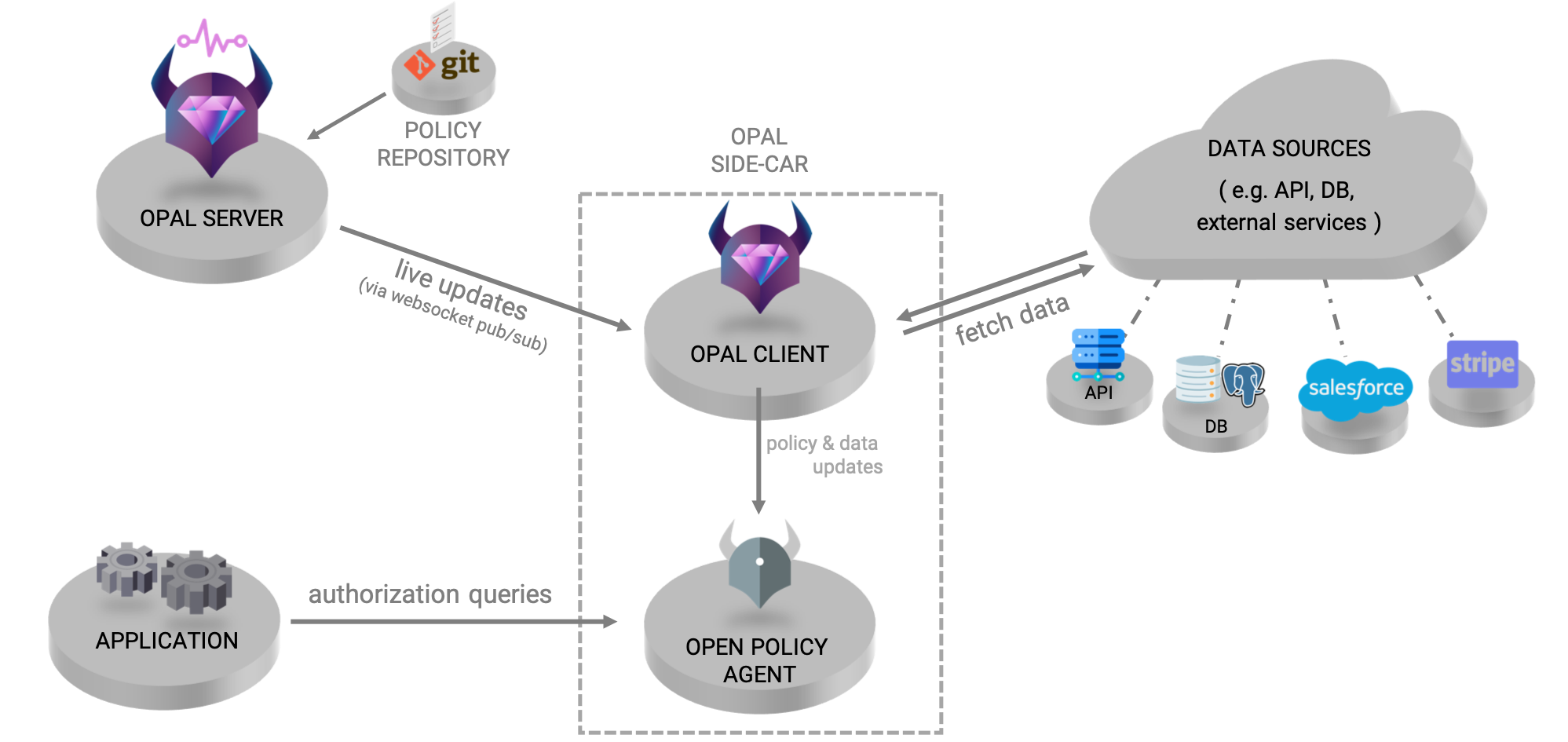
OPAL is an administration layer for Open Policy Agent (OPA), detecting changes to both policy and policy data in realtime and pushing live updates to your agents.
OPAL brings open-policy up to the speed needed by live applications. As your application state changes (whether it's via your APIs, DBs, git, S3 or 3rd-party SaaS services), OPAL will make sure your services are always in sync with the authorization data and policy they need (and only those they need).
Check out OPAL's main site at OPAL.ac.
2 maintainers


Metadata
2 maintainers
Release files for opal-fetcher-postgres 0.0.4
For a detailed explanation of source distributions (sdists) and built distributions (wheels), please see the package formats documentation.
Source distribution (sdist)
| File | Size | Uploaded | |
|---|---|---|---|
| opal-fetcher-postgres-0.0.4.tar.gz | 10.5 kB | Details |
Built distribution (wheel)
| File | Interpreter | ABI | Platform | Reset |
|---|---|---|---|---|
| opal_fetcher_postgres-0.0.4-py3-none-any.whl | Python 3 | none | any | Details |
Total release size: 21.2 kB
Release files / opal-fetcher-postgres-0.0.4.tar.gz
| Download URL | opal-fetcher-postgres-0.0.4.tar.gz |
|---|---|
| Size | 10.5 kB |
| Tags | Source |
|
SHA-256 checksum How to use checksums |
55a953dac28e04b1c92f34222f770a12f3bec604226fbeed9a5e44fdf081599a
|
|
BLAKE2b-256 checksum How to use checksums |
4aeb7870c9ccf8a9f89d6ccc4a0c85b95282961d2247377f79a420502c7d4884
|
| Upload date | |
|
Uploaded using Trusted Publishing? What is trusted publishing? |
No |
| Uploaded via |
twine/4.0.2 CPython/3.11.2
|
Release files / opal_fetcher_postgres-0.0.4-py3-none-any.whl
| Download URL | opal_fetcher_postgres-0.0.4-py3-none-any.whl |
|---|---|
| Size | 10.7 kB |
| Tags | Python 3 |
|
SHA-256 checksum How to use checksums |
7ccda6d44c01b1a466871ab33fc9921042ed6119745921f72ac1e2b793db3567
|
|
BLAKE2b-256 checksum How to use checksums |
eb0526445575a3d104e7069fc8813ffc5992c1d6cabe4c87eb71226f42a2f298
|
| Upload date | |
|
Uploaded using Trusted Publishing? What is trusted publishing? |
No |
| Uploaded via |
twine/4.0.2 CPython/3.11.2
|














