
Generative AI Components (GenAIComps)
Build Enterprise-grade Generative AI Applications with Microservice Architecture
This initiative empowers the development of high-quality Generative AI applications for enterprises via microservices, simplifying the scaling and deployment process for production. It abstracts away infrastructure complexities, facilitating the seamless development and deployment of Enterprise AI services.
GenAIComps
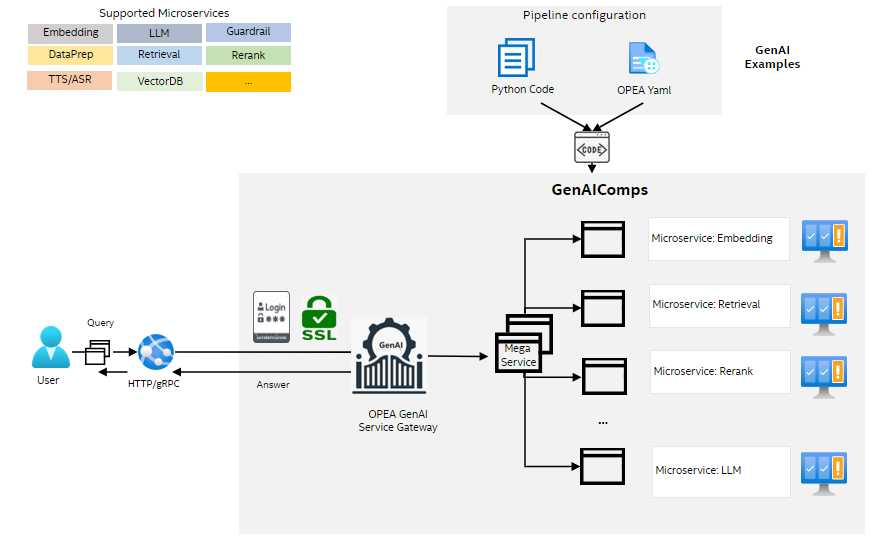
GenAIComps provides a suite of microservices, leveraging a service composer to assemble a mega-service tailored for real-world Enterprise AI applications. All the microservices are containerized, allowing cloud native deployment. Check out how the microservices are used in GenAIExamples or Getting Start with OPEA to deploy the ChatQnA application from OPEA GenAIExamples across multiple cloud platforms.
Installation
- Install from Pypi
pip install opea-comps
- Build from Source
git clone https://github.com/opea-project/GenAIComps
cd GenAIComps
pip install -e .
MicroService
Microservices are akin to building blocks, offering the fundamental services for constructing RAG (Retrieval-Augmented Generation) and other Enterprise AI applications.
Each Microservice is designed to perform a specific function or task within the application architecture. By breaking down the system into smaller, self-contained services, Microservices promote modularity, flexibility, and scalability.
This modular approach allows developers to independently develop, deploy, and scale individual components of the application, making it easier to maintain and evolve over time. Additionally, Microservices facilitate fault isolation, as issues in one service are less likely to impact the entire system.
The initially supported Microservices are described in the below table. More Microservices are on the way.
A Microservices can be created by using the decorator register_microservice. Taking the embedding microservice as an example:
from comps import register_microservice, EmbedDoc, ServiceType, TextDoc


@register_microservice(
    name="opea_service@embedding_tgi_gaudi",
    service_type=ServiceType.EMBEDDING,
    endpoint="/v1/embeddings",
    host="0.0.0.0",
    port=6000,
    input_datatype=TextDoc,
    output_datatype=EmbedDoc,
)
def embedding(input: TextDoc) -> EmbedDoc:
    embed_vector = embeddings.embed_query(input.text)
    res = EmbedDoc(text=input.text, embedding=embed_vector)
    return res
MegaService
A Megaservice is a higher-level architectural construct composed of one or more Microservices, providing the capability to assemble end-to-end applications. Unlike individual Microservices, which focus on specific tasks or functions, a Megaservice orchestrates multiple Microservices to deliver a comprehensive solution.
Megaservices encapsulate complex business logic and workflow orchestration, coordinating the interactions between various Microservices to fulfill specific application requirements. This approach enables the creation of modular yet integrated applications, where each Microservice contributes to the overall functionality of the Megaservice.
Here is a simple example of building Megaservice:
from comps import MicroService, ServiceOrchestrator

EMBEDDING_SERVICE_HOST_IP = os.getenv("EMBEDDING_SERVICE_HOST_IP", "0.0.0.0")
EMBEDDING_SERVICE_PORT = os.getenv("EMBEDDING_SERVICE_PORT", 6000)
LLM_SERVICE_HOST_IP = os.getenv("LLM_SERVICE_HOST_IP", "0.0.0.0")
LLM_SERVICE_PORT = os.getenv("LLM_SERVICE_PORT", 9000)


class ExampleService:
    def __init__(self, host="0.0.0.0", port=8000):
        self.host = host
        self.port = port
        self.megaservice = ServiceOrchestrator()

    def add_remote_service(self):
        embedding = MicroService(
            name="embedding",
            host=EMBEDDING_SERVICE_HOST_IP,
            port=EMBEDDING_SERVICE_PORT,
            endpoint="/v1/embeddings",
            use_remote_service=True,
            service_type=ServiceType.EMBEDDING,
        )
        llm = MicroService(
            name="llm",
            host=LLM_SERVICE_HOST_IP,
            port=LLM_SERVICE_PORT,
            endpoint="/v1/chat/completions",
            use_remote_service=True,
            service_type=ServiceType.LLM,
        )
        self.megaservice.add(embedding).add(llm)
        self.megaservice.flow_to(embedding, llm)
self.gateway = ChatQnAGateway(megaservice=self.megaservice, host="0.0.0.0", port=self.port)
## Check Mega/Micro Service health status and version number

Use the command below to check Mega/Micro Service status.

```bash
curl http://${your_ip}:${service_port}/v1/health_check\
  -X GET \
  -H 'Content-Type: application/json'
Users should get output like below example if Mega/Micro Service works correctly.
{"Service Title":"ChatQnAGateway/MicroService","Version":"1.0","Service Description":"OPEA Microservice Infrastructure"}
Contributing to OPEA
Welcome to the OPEA open-source community! We are thrilled to have you here and excited about the potential contributions you can bring to the OPEA platform. Whether you are fixing bugs, adding new GenAI components, improving documentation, or sharing your unique use cases, your contributions are invaluable.
Together, we can make OPEA the go-to platform for enterprise AI solutions. Let's work together to push the boundaries of what's possible and create a future where AI is accessible, efficient, and impactful for everyone.
Please check the Contributing Guidelines for a detailed guide on how to contribute a GenAI example and all the ways you can contribute!
Thank you for being a part of this journey. We can't wait to see what we can achieve together!
uv pip compile usage
To update the existing requirements files, follow the steps below:
- Update
requirements.infile with the dependencies you want to add or modify. - Install
uvpackage withpip install uv, suggest to work in the same python version used by your dockerfile. - Edit and run
freeze_dependency.shto update therequirements*.txtfile.
To add a new requirements file, create a new requirements.in file and an empty requirements.txt or requirements-cpu.txt or requirements-gpu.txt, then follow the same steps above.
Additional Content
1 maintainer

Metadata
1 maintainer
Release files for opea-comps 1.5
For a detailed explanation of source distributions (sdists) and built distributions (wheels), please see the package formats documentation.
Source distribution (sdist)
| File | Size | Uploaded | |
|---|---|---|---|
| opea_comps-1.5.tar.gz | 70.2 kB | Details |
Built distribution (wheel)
| File | Interpreter | ABI | Platform | Reset |
|---|---|---|---|---|
| opea_comps-1.5-py3-none-any.whl | Python 3 | none | any | Details |
Total release size: 147.6 kB
Release files / opea_comps-1.5.tar.gz
| Download URL | opea_comps-1.5.tar.gz |
|---|---|
| Size | 70.2 kB |
| Tags | Source |
|
SHA-256 checksum How to use checksums |
22cc44f06abccef5678cfcacd7adddc2e4501f981fe71ed3e720ce4e004fa1dc
|
|
BLAKE2b-256 checksum How to use checksums |
eee1f7c8ead8355ddc82bb02756d9ab05c676f33ec5cd95b0ac52cdcdca36c90
|
| Upload date | |
|
Uploaded using Trusted Publishing? What is trusted publishing? |
No |
| Uploaded via |
twine/6.2.0 CPython/3.10.19
|
Release files / opea_comps-1.5-py3-none-any.whl
| Download URL | opea_comps-1.5-py3-none-any.whl |
|---|---|
| Size | 77.4 kB |
| Tags | Python 3 |
|
SHA-256 checksum How to use checksums |
205f5ab2401741e90db5cc8d45267b7064d25f077967aa977778c90ae85e7d9b
|
|
BLAKE2b-256 checksum How to use checksums |
784de1554bc081e2748e8b1514cd81edf037560d071130a37ba7899b0f83ccda
|
| Upload date | |
|
Uploaded using Trusted Publishing? What is trusted publishing? |
No |
| Uploaded via |
twine/6.2.0 CPython/3.10.19
|














