
open-agent-router




This is an early alpha (v0.1.0); interfaces and configuration may change.
Why
You pay for several AI coding subscriptions, but each one has its own limits and pace. You do not want a job to fail mid-run because a limit ran out, and you do not want to spend a strong model on a task a cheap one handles fine. open-agent-router is a local gateway that keeps your subscriptions busy without surprises:
- Subscriptions do not sit idle. The gateway tracks usage in every limit window and prefers the pool that is furthest behind its expected pace.
- Limits do not surprise you. A pool that reports a limit is blocked until its reset;
on a usage limit and on an executor error the job moves to another route. A writing
attempt that already changed files ends
partialand is not retried. - Jobs go where they are cheap enough. Each job gets a tier —
cheap,standardorstrong— and the gateway picks a route for that tier by priority and by how far each subscription is behind its pace. An optional classifier — a local model or a cloud one — can assign the tier for you.
It is for you if you have two or more subscriptions to agentic coding CLIs (such as Claude Code, Kimi Code, OpenCode or Cline) and an orchestrator agent that delegates jobs to others.
How is this different from LiteLLM or OpenRouter?
LiteLLM and OpenRouter route API requests using API keys, with usage billed per token. open-agent-router hands whole jobs to the subscriptions you already pay for through their official CLIs. It keeps track of every limit window and its pace, and never sees provider keys.
Quick start
You need Python 3.12, uv, git, and at least one harness CLI (Kimi Code, OpenCode, Cline or Claude Code), installed and signed in.
uv tool install open-agent-router
agent-router init --allowed-root <directory>
agent-router serve
To run the latest main instead, install with uv tool install git+https://github.com/kdenischenko/open-agent-router. If
agent-router is not found after the install, run uv tool update-shell and open a new
terminal. serve keeps running in its terminal; stop it with Ctrl+C.
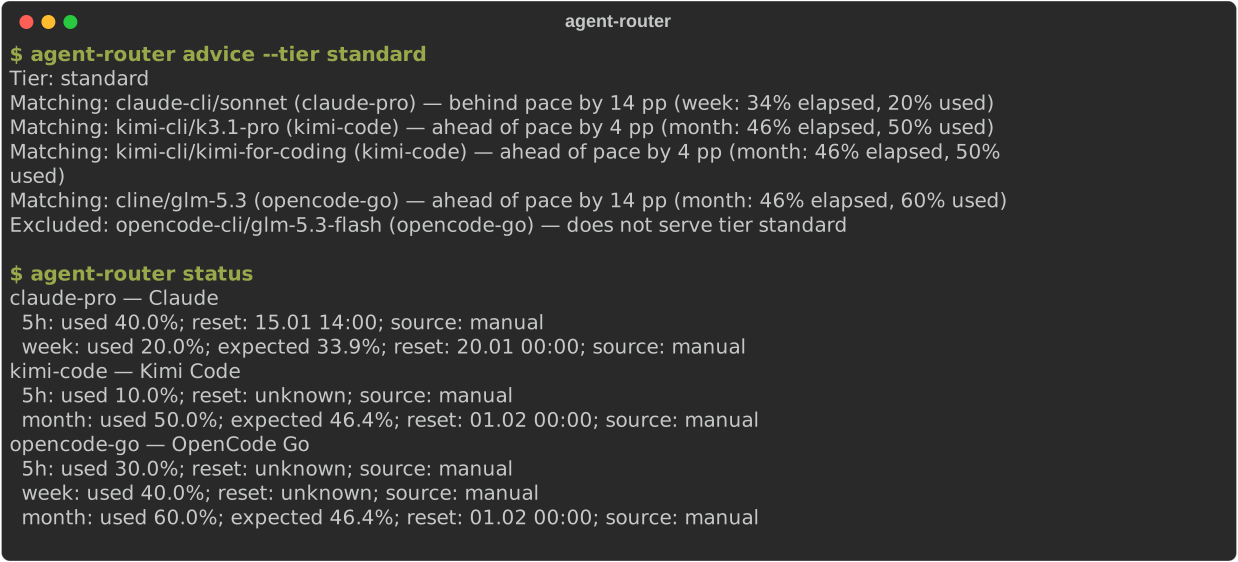
With the gateway running, agent-router advice --tier standard shows which routes can take a
job. The opencode-go limits in the template are placeholders; replace them with your plan
limits.
The open-agent-router package installs the agent-router command. init creates the
gateway home directory with config.toml and two tokens, adds <directory> to
tasks.allowed_roots (repeat init --allowed-root to allow more directories, also on an
existing config, then restart a running serve) and prints the next steps. Routes are enabled
for the harnesses init finds, except Claude Code and Cline: set enabled = true on the
claude-cli/sonnet or cline/glm-5.3 route in config.toml to let jobs use them. Jobs run before you calibrate the pools; record
your real usage later with agent-router calibrate. Ready-made configs for typical setups are
in docs/examples/. Then submit a job from another terminal:
agent-router run --no-wait --cwd <directory> --mode read "Describe the structure of this repository"
agent-router approve <job-id>
agent-router wait <job-id>
wait exits 4 while the job is still running; run it again, or use --timeout to wait longer.
A job that needs approval returns at once with
job awaits approval: agent-router approve <id> before <time>, then agent-router wait <id>.
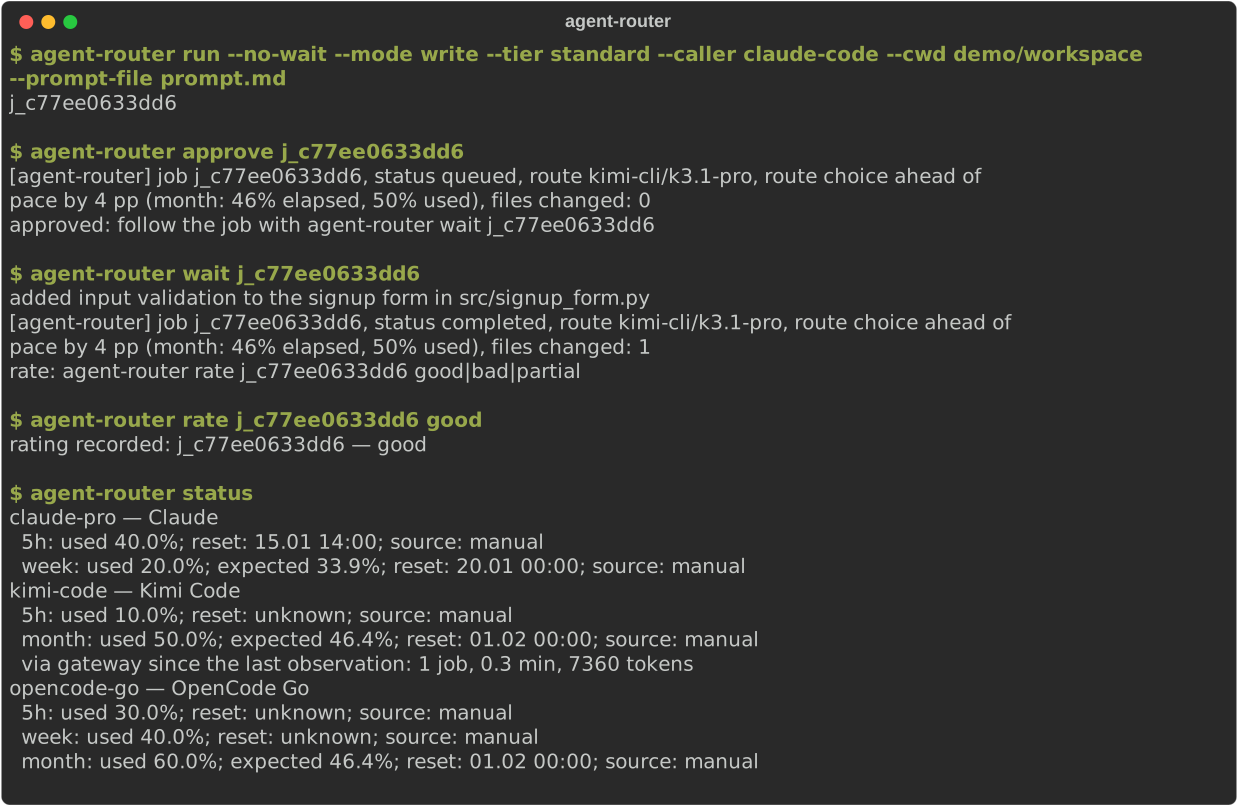
Every route in the init template has confirm = true, so a job waits until you approve it
with approve or in the dashboard. Set confirm = false on a route to let its jobs start
right away. Without a decision the approval expires after tasks.approval_timeout_s
(default 600 s): the job ends as declined with error approval_expired and does not move
to another route.
The full guide — harness sign-in, limit calibration, Windows autostart, the web dashboard and the delegation skills for orchestrators — is in docs/INSTALL.md.
Use from your agent
An orchestrator agent can work through the gateway in two ways.
The first is the MCP server. Register it with your orchestrator, for example with
claude mcp add agent-router -- agent-router mcp: it exposes job operations as MCP
tools, and it needs the running gateway. Setup for every supported harness is in
docs/MCP.md.
The second way is a delegation skill: ready-made delegation instructions for
orchestrators live in integrations/: clone or download the
repository and copy the agent-router-delegate folder of your harness into its skills directory.
How it works
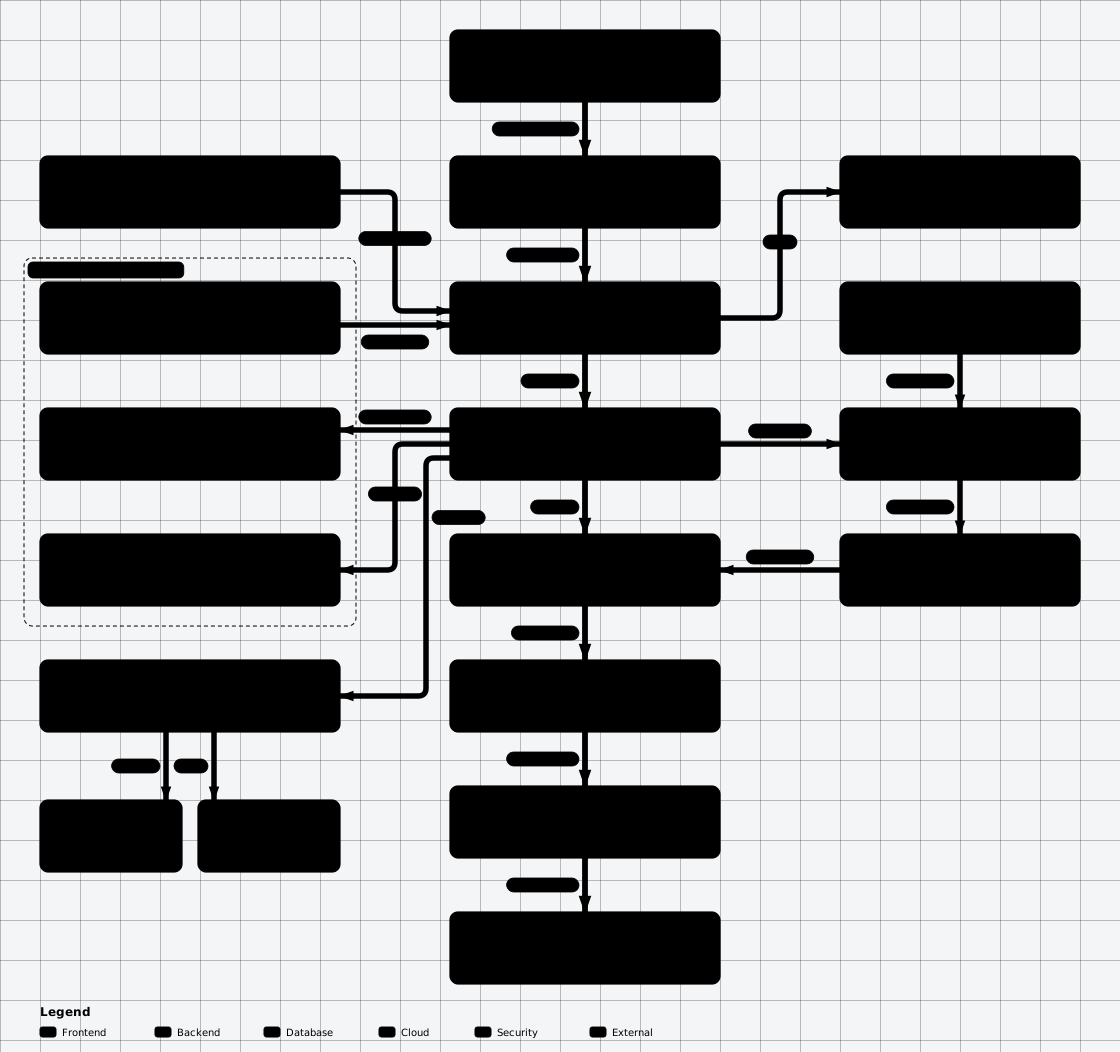
You submit a job: a prompt, a directory, a mode and optional hints. The gateway estimates
the tier, checks the remaining limits and pace of every pool, picks a route, queues the
job and — for routes with confirm = true — waits until you approve it. It then runs the
harness CLI as a child process, records the spend and returns the result. See
docs/DESIGN.md for the full architecture.
Tier classifier
A job submitted without --tier can get its tier from a classifier model. It can be local —
a decision or chat model in Ollama, or any OpenAI-compatible server
such as LM Studio — or a cloud provider over HTTPS with a key from an environment variable.
Several models can vote side by side: in shadow mode they only record votes, and
agent-router classifier report compares them with the tiers you confirm before you let one
of them decide. Configuration examples, what the classifier receives and measured results are
in docs/CLASSIFIER.md.
Dashboard
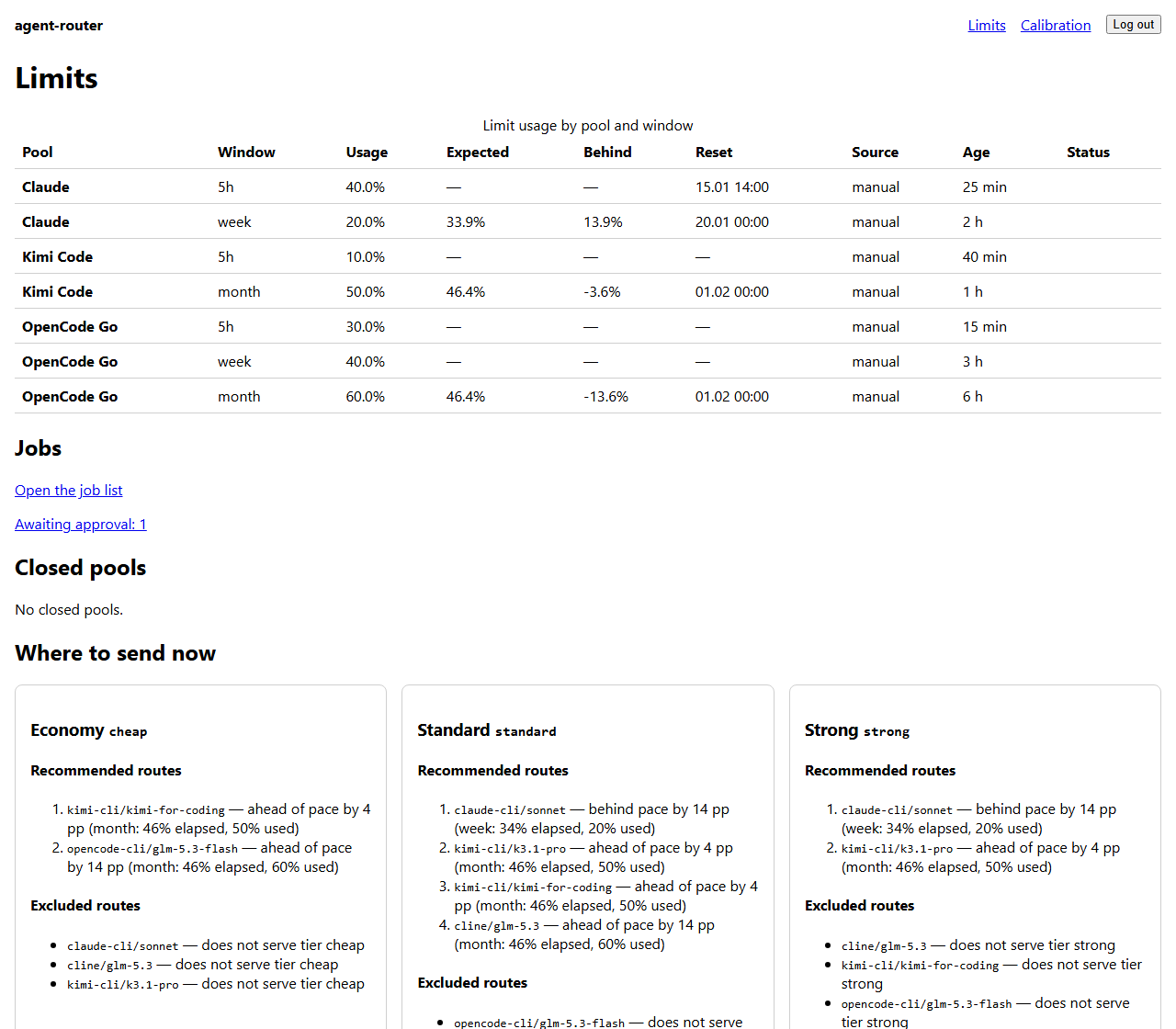
The gateway also serves a dashboard at http://127.0.0.1:<port>/ (the port is
server.port, default 8787). Log in with the admin token: paste the contents of the
admin.token file whose path init prints. The job page refreshes itself, shows the
error, and lets you rate a finished job.
Harnesses
The gateway runs each harness CLI with the sign-in you already made in it; it never sees provider keys.
| Harness | CLI command | Usage source | Status |
|---|---|---|---|
| Kimi Code | kimi |
journal | tested live on Windows |
| OpenCode | opencode |
counter (opencode stats) |
tested live on Windows |
| Cline | cline or cline-cli |
journal | tested live on Windows |
| Claude Code | claude |
journal | not tested live: covered by tests with recorded output only |
Platforms
Windows is supported and tested in CI and live. Linux and macOS are experimental: the test suite runs on them in CI, but the gateway has not been run live there, and autostart is Windows-only. Help wanted — see ROADMAP.
Commands
All commands are agent-router <command>. Run agent-router <command> --help for every
option.
| Command | What it does |
|---|---|
init |
Create the gateway home, config.toml, tokens; --allowed-root DIR allows job dirs |
serve |
Run the gateway on 127.0.0.1 (--port overrides server.port) |
mcp |
Run an MCP server over stdio for orchestrator agents |
status |
Show pool usage, expected pace and window resets in local time |
advice |
Show matching routes for a tier (and --mode read or write) and why the others are excluded |
calibrate POOL WINDOW PERCENT |
Record the usage your subscription shows; --resets-at or --resets-in 10d sets the reset of a fixed window, a rolling window takes none (admin token) |
unblock POOL |
Remove a pool block set after a limit hit (admin token) |
run [TEXT] |
Submit a job and wait up to 100 s; --no-wait prints the job id, - reads the prompt from stdin |
wait JOB_ID |
Wait for a job and print its result; retries for up to 10 s while the gateway restarts |
result JOB_ID |
Print the status and result of a job without waiting |
rate JOB_ID good|bad|partial |
Rate a finished job; the last rating wins, a --note is stored as hash and length only |
jobs |
List jobs with status, route, tier and creation time, optionally by --status |
cancel JOB_ID |
Cancel a queued or running job |
approve JOB_ID / deny JOB_ID |
Approve or deny a job that awaits confirmation (admin token) |
doctor |
Check config, store, harnesses and gateway; --live runs one read job per harness on routes without confirm |
export --since DATE |
Export jobs, attempts, ratings, classifier votes and usage as JSON Lines or CSV; texts are replaced by hash and length |
classifier report |
Show classifier votes, errors and accuracy against ratings; --json adds the tier matrix and latency |
classifier eval --models ID,... |
Replay past prompts through offline classifier models |
doctor --statusline-snippet prints the settings for the Claude Code status line, which reports
Claude usage to the gateway; see docs/INSTALL.md.
Exit codes
Commands that call the gateway exit 5 when the gateway is unavailable or rejects the
token, 6 when the request is denied with HTTP 4xx (including a full queue), and 1 on
other errors. For run, wait and result, once the job state is known: 0 —
completed, 2 — partial, 3 — failed, declined or cancelled, 4 — the job is
not finished yet. run --no-wait exits 0 after a successful submit. Local errors
(configuration, store, reading the prompt, a malformed --resets-at) exit 1; doctor --live
exits 1 unless every probe completes.
Common failures and their fixes are in docs/TROUBLESHOOTING.md.
Environment variables
AGENT_ROUTER_HOME— directory withconfig.toml, tokens and stores; defaults to the per-useragent-routerconfiguration directory.AGENT_ROUTER_URL— gateway address for client commands and the Claude Code status line; defaults tohttp://127.0.0.1:<server.port>.
Adding a subscription or harness
- Pool. Add a
[[pools]]section with[[pools.windows]]for your plan:unit = "percent"for subscriptions that show a percentage, orunit = "usd"withlimit_usdfor subscriptions billed in dollars. Optional:priority,weight(a nudge in percentage points of lag) andprice_file— a TOML table"<model>" = [input, output](USD per 1M tokens) used when the harness does not report a cost. - Harness. For a new CLI, write an adapter module like
src/agent_router/adapters/opencode.pyexposingHARNESS = HarnessSpec(...)(name, adapter, executable names, spend sourcecounter/journal), register an entry point in theagent_router.harnessesgroup inpyproject.toml, thenuv sync. Adapter tests use redacted output samples intests/fixtures/and never run the real CLI. If the executable is not in PATH, set[backends.<name>] executable. - Routes. Add
[[routes]]withpool,backend,model,tiers,quality,modes; start a new route withenabled = false. - Models. To share one model across pools, give its routes a common
model_keyand order the pools in[models."<model_key>"] prefer = [...]. - Verify.
agent-router doctorshows the harness, its version and enabled routes;agent-router doctor --liveruns one short job per harness (needs a non-emptyallowed_roots);agent-router statusshows pool usage.
Security
agent-router is a local tool for a single user and not a sandbox: in --mode write
the harness starts with auto-approved tools and can change any file your user can touch.
The threat model and how to report a vulnerability are in
SECURITY.md.
A read_mode_files_changed violation on a read-mode job means the working tree changed
while the job ran. If someone else wrote to the same repository in parallel, the
violation is attributed to the job even though the executor changed nothing.
Subscriptions
Use only official ways to access the providers and follow their terms. You are responsible for complying with them. The project is not affiliated with the providers and does not bypass their restrictions.
Contributing and roadmap
Contributions are welcome: open an issue before a large change, follow
CONTRIBUTING.md, and keep the gates green
(uv run ruff check, uv run ruff format --check, uv run pytest -q). Plans — Linux
and macOS support, an OpenAI-compatible proxy, data retention — are in
ROADMAP.md.
License
MIT.
1 maintainer

Metadata
1 maintainer
Release files for open-agent-router 0.1.0
For a detailed explanation of source distributions (sdists) and built distributions (wheels), please see the package formats documentation.
Source distribution (sdist)
| File | Size | Uploaded | Provenance | Actions |
|---|---|---|---|---|
| open_agent_router-0.1.0.tar.gz | 661.4 kB | Without provenance | Details for open_agent_router-0.1.0.tar.gz |
Built distribution (wheel)
| File | Interpreter | ABI | Platform | Actions Reset |
|---|---|---|---|---|
| open_agent_router-0.1.0-py3-none-any.whl | Python 3 | none | any | Details for open_agent_router-0.1.0-py3-none-any.whl |
Total release size: 813.4 kB
Release files / open_agent_router-0.1.0.tar.gz
| Download URL | open_agent_router-0.1.0.tar.gz |
|---|---|
| Size | 661.4 kB |
| Tags | Source |
|
SHA-256 checksum How to use checksums |
973e67d146636ba4a2d8c78dda9cfc07978e0396e0eee812af18fd701676e113
|
|
BLAKE2b-256 checksum How to use checksums |
62171329f301baa514738b674c3896da1f9aeaf123ea2122f42174e8bcdaee83
|
| Upload date | |
|
Uploaded using Trusted Publishing? What is trusted publishing? |
Yes |
| Uploaded via |
uv/0.11.7 {"installer":{"name":"uv","version":"0.11.7","subcommand":["publish"]},"python":null,"implementation":{"name":null,"version":null},"distro":null,"system":{"name":null,"release":null},"cpu":null,"openssl_version":null,"setuptools_version":null,"rustc_version":null,"ci":true}
|
Release files / open_agent_router-0.1.0-py3-none-any.whl
| Download URL | open_agent_router-0.1.0-py3-none-any.whl |
|---|---|
| Size | 152.1 kB |
| Tags | Python 3 |
|
SHA-256 checksum How to use checksums |
a5be6d2bc7c612bbedfe31187570e1d2e0e52e4cf1671fd3be43ed59c117d1d4
|
|
BLAKE2b-256 checksum How to use checksums |
a162019a2d9435406d7e01b064df3dab9a244924b0a9a465f96fc6c4bab131aa
|
| Upload date | |
|
Uploaded using Trusted Publishing? What is trusted publishing? |
Yes |
| Uploaded via |
uv/0.11.7 {"installer":{"name":"uv","version":"0.11.7","subcommand":["publish"]},"python":null,"implementation":{"name":null,"version":null},"distro":null,"system":{"name":null,"release":null},"cpu":null,"openssl_version":null,"setuptools_version":null,"rustc_version":null,"ci":true}
|
Security for open-agent-router 0.1.0
Provenance
Provenance describes where a file came from. On PyPI, provenance is shared via attestations, which provide a verifiable record of the build or publishing details. View details, limitations and caveats.
No provenance found
None of the files in this release were uploaded with provenance metadata.
A note on package security
PyPI is a repository for distributing packages, not a service for auditing them. While third-party security researchers and our staff do their best to detect and remove malicious packages, PyPI cannot guarantee the quality, security or suitability of any given package.
To learn more about protecting yourself from malicious actors, visit our package security documentation.














