

Open Agent Search
One self-hostable search and content layer for AI agents and applications.




What is OAS? · Agent setup · Capabilities · Architecture · API surface · Contributing
Set up with your agent
Copy this prompt into your coding agent:
Set up Open Agent Search for this project using
https://github.com/Jayanth-MKV/open-agent-search. Read its README and
skills/open-agent-search-setup/SKILL.md. Reuse uv if installed, otherwise
install it using the official uv instructions for my OS. Configure the
local stdio MCP server with the pinned package and managed Python version
from the repository's MCP manifest. Merge the server into this agent's
configuration without replacing existing servers. Install the
open-agent-search-setup and open-agent-search skills for this agent in
project scope. Verify the MCP connection and available tools, then try
one web search. Tell me if a client restart is needed. No API key is required.
Installation commands
With Node.js 22+ and uv installed:
npx --yes open-agent-search@1.0.4 --version
npx --yes open-agent-search@1.0.4 mcp
# Or start the HTTP API:
npx --yes open-agent-search@1.0.4 serve
The npm launcher uses the pinned Python core. It requires uv on PATH; uv manages Python 3.12 and dependencies.
With uv installed, run the MCP server in an isolated environment:
uvx --python 3.12 --from open-agent-search==1.0.4 oas-mcp
uv can download Python 3.12 when it is missing. The first run downloads dependencies; the client starts and stops this stdio process after configuration.
For a persistent PyPI installation and HTTP server:
uv tool install --python 3.12 open-agent-search==1.0.4
open-agent-search
The HTTP server listens on port 8000 on all interfaces. Use stdio for an agent that only needs local tools.
Install both skills for Codex in the current project:
npx --yes skills add Jayanth-MKV/open-agent-search --skill open-agent-search-setup open-agent-search --agent codex --copy --yes
Replace codex with claude-code, cursor, opencode, or your supported agent. Add --global only for installation across projects. Plugin and manual setup. Use either npm or PyPI above; both start the same Python implementation.
In Claude Code 2.1.275+, install both skills and the MCP configuration in one step:
/plugin install open-agent-search --marketplace Jayanth-MKV/open-agent-search --scope project
What is Open Agent Search?
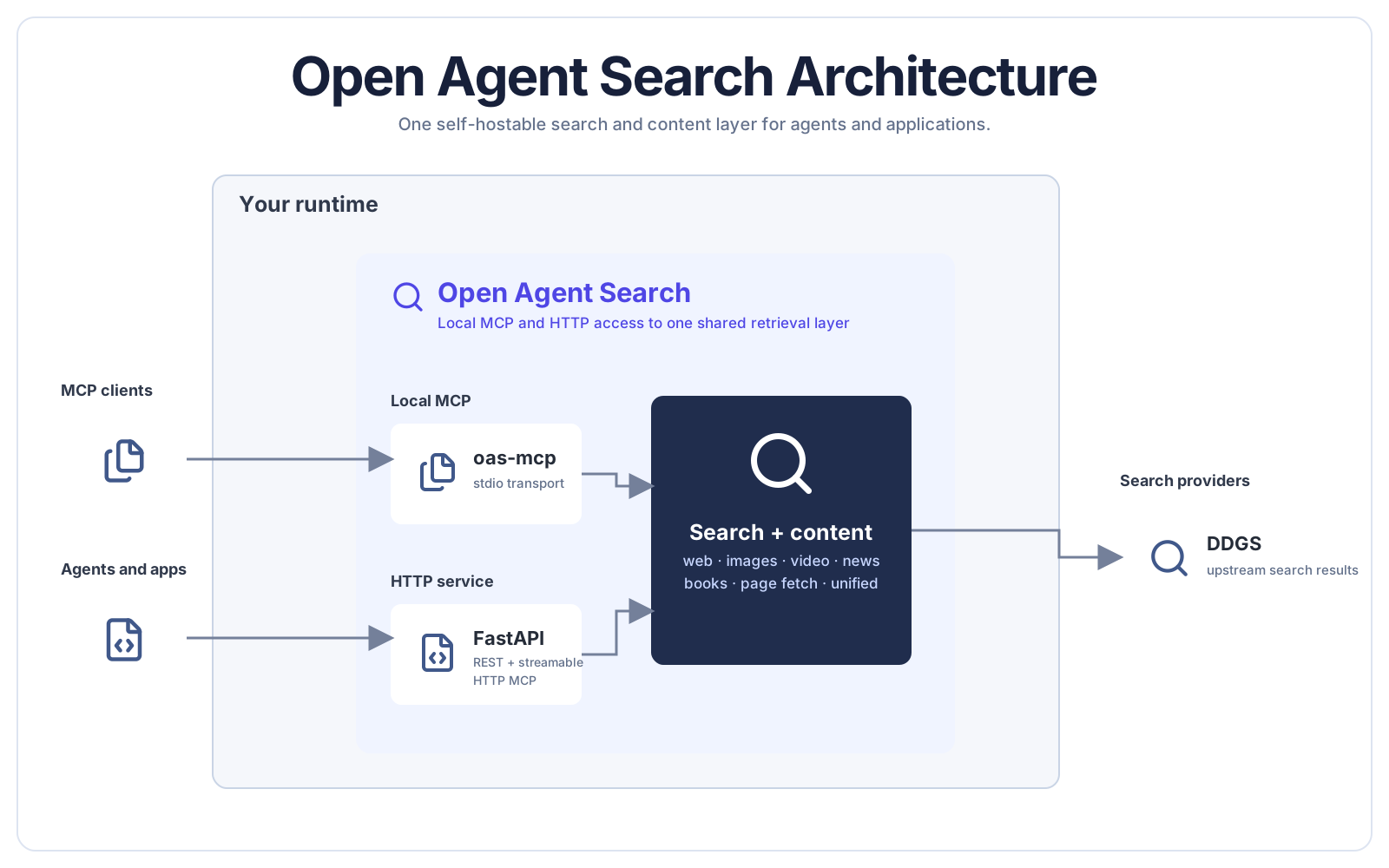
Open Agent Search (OAS) is an independent retrieval layer for AI agents and applications. It provides one consistent search and content surface across local and deployed integrations.
OAS replaces separate adapters for every search vertical with one consistent tool surface. Run it locally for a single coding agent or deploy the HTTP service for shared agent and application workloads.
Search sources, transports, and client integrations can evolve without changing the repository's core goal: give agents and applications a dependable retrieval boundary they can control.
Connect MCP or HTTP
Add search to Claude Code
claude mcp add oas -- uvx --python 3.12 --from open-agent-search==1.0.4 oas-mcp
Restart Claude Code, then ask it to search the web, news, images, videos, or books. The same uvx command works with Cursor, VS Code, Windsurf, OpenClaw, and other MCP clients.
Generic MCP configuration
{
  "mcpServers": {
    "open-agent-search": {
      "command": "uvx",
      "args": ["--python", "3.12", "--from", "open-agent-search==1.0.4", "oas-mcp"]
    }
  }
}
Run the HTTP API
uv tool install --python 3.12 open-agent-search==1.0.4
open-agent-search
Make a first search:
curl "http://localhost:8000/api/search/text?q=python+programming&max_results=5"
The server exposes REST endpoints at http://localhost:8000, interactive API docs at /docs, and streamable HTTP MCP at /ai/mcp.
Capabilities
- One search layer, multiple transports. Use stdio MCP locally or serve REST and MCP over HTTP.
- No provider API key required. Search is powered by the
ddgslibrary. - Self-hostable. Run locally, in Docker, or deploy the HTTP service to Vercel.
- Framework-independent. The protocol surface works across major MCP clients and agent stacks.
- Production-minded defaults. Typed FastAPI routes, rate limiting, health checks, tests, and deployment guides are included.
Architecture
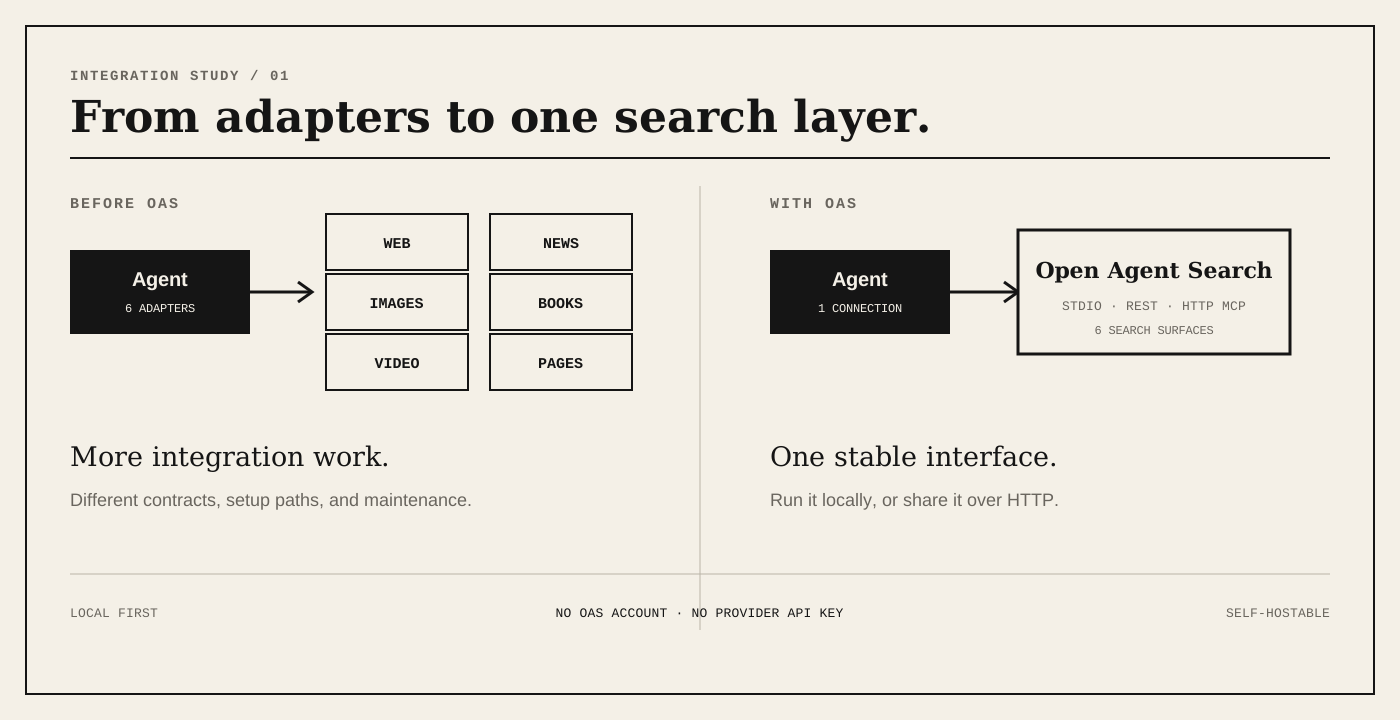
The local MCP command and the HTTP service share the same search and content capabilities. Choose the connection path that matches where the consuming agent or application runs.
Two deployment paths
| Path | Command or endpoint | Best for |
|---|---|---|
| Local MCP | uvx --python 3.12 --from open-agent-search==1.0.4 oas-mcp |
Giving a desktop or coding agent search with no persistent server |
| HTTP service | open-agent-search |
Applications, shared agent environments, REST clients, and remote MCP |
Search surface
| Capability | REST endpoint | MCP availability |
|---|---|---|
| Text search | GET /api/search/text |
Yes |
| Image search | GET /api/search/images |
Yes |
| Video search | GET /api/search/videos |
Yes |
| News search | GET /api/search/news |
Yes |
| Book search | GET /api/search/books |
Yes |
| Unified search | GET /api/search/all |
Yes |
| Fetch one page | GET /api/content/fetch |
Yes |
| Fetch multiple pages | POST /api/content/fetch-multiple |
Yes |
See the API reference and MCP tool reference for parameters and response shapes.
Privacy model
OAS does not require an OAS account or a search-provider API key, and it can run on infrastructure you control. Search queries still have to reach upstream search providers through DDGS, so this project should not be treated as an anonymity network. Review your deployment logs, network policy, and upstream-provider terms for sensitive workloads.
Install and deploy
From source
git clone https://github.com/jayanth-mkv/open-agent-search.git
cd open-agent-search
uv sync
uv run open-agent-search
Docker
docker compose up -d

Deployment details: Docker · Vercel
Documentation
Development
uv sync --group dev
uv run pytest
uv run ruff check .
Open Agent Search is currently beta software. Bug reports and focused pull requests are welcome; see CONTRIBUTING.md.
License
Maintained by Xplormity Collective.
1 maintainer

Metadata
1 maintainer
Release files for open-agent-search 1.0.4
For a detailed explanation of source distributions (sdists) and built distributions (wheels), please see the package formats documentation.
Source distribution (sdist)
| File | Size | Uploaded | Provenance | |
|---|---|---|---|---|
| open_agent_search-1.0.4.tar.gz | 191.1 kB | Without provenance | Details |
Built distribution (wheel)
| File | Interpreter | ABI | Platform | Reset |
|---|---|---|---|---|
| open_agent_search-1.0.4-py3-none-any.whl | Python 3 | none | any | Details |
Total release size: 222.6 kB
Release files / open_agent_search-1.0.4.tar.gz
| Download URL | open_agent_search-1.0.4.tar.gz |
|---|---|
| Size | 191.1 kB |
| Tags | Source |
|
SHA-256 checksum How to use checksums |
0588d1c359d4579280f94b9606a01c38112563232689e2fde1ec67bcc4fdd37a
|
|
BLAKE2b-256 checksum How to use checksums |
08e396d28094afcd54071c69f280920cc819b74256c7cc778bb0d964804d02fb
|
| Upload date | |
|
Uploaded using Trusted Publishing? What is trusted publishing? |
Yes |
| Uploaded via |
uv/0.13.0 {"installer":{"name":"uv","version":"0.13.0","subcommand":["publish"]},"python":null,"implementation":{"name":null,"version":null},"distro":{"name":"Ubuntu","version":"24.04","id":"noble","libc":null},"system":{"name":null,"release":null},"cpu":null,"openssl_version":null,"setuptools_version":null,"rustc_version":null,"ci":true}
|
Release files / open_agent_search-1.0.4-py3-none-any.whl
| Download URL | open_agent_search-1.0.4-py3-none-any.whl |
|---|---|
| Size | 31.5 kB |
| Tags | Python 3 |
|
SHA-256 checksum How to use checksums |
6fdca5cc34ed03b6b5bedc75acf42adf14be74d6c79d643c847854314bc554f4
|
|
BLAKE2b-256 checksum How to use checksums |
f7fdf0a9448053ee18835f6f128398a08f53157f6b1a4c78c467f67d3668e8f3
|
| Upload date | |
|
Uploaded using Trusted Publishing? What is trusted publishing? |
Yes |
| Uploaded via |
uv/0.13.0 {"installer":{"name":"uv","version":"0.13.0","subcommand":["publish"]},"python":null,"implementation":{"name":null,"version":null},"distro":{"name":"Ubuntu","version":"24.04","id":"noble","libc":null},"system":{"name":null,"release":null},"cpu":null,"openssl_version":null,"setuptools_version":null,"rustc_version":null,"ci":true}
|
Security for open-agent-search 1.0.4
Provenance
Provenance describes where a file came from. On PyPI, provenance is shared via attestations, which provide a verifiable record of the build or publishing details. View details, limitations and caveats.
No provenance found
None of the files in this release were uploaded with provenance metadata.
A note on package security
PyPI is a repository for distributing packages, not a service for auditing them. While third-party security researchers and our staff do their best to detect and remove malicious packages, PyPI cannot guarantee the quality, security or suitability of any given package.














