
GTK application to control camera settings via gphoto2
Verified details
These details have been verified by PyPIProject links
GitHub Statistics
Maintainers

Project description
open-camera-control




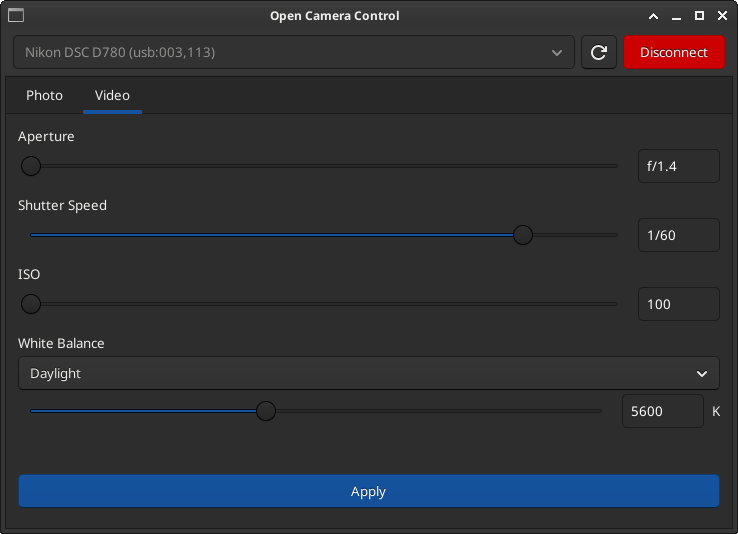
A GTK application to control camera settings (ISO, aperture, shutter speed, white balance) via gphoto2. Keeps a persistent USB session so changing settings doesn't interrupt the camera's live view.
Requirements
- Python 3.10+
- libgphoto2 (system package)
- GTK 3 + PyGObject (system package)
- A gphoto2-compatible camera connected via USB
System dependencies (Fedora)
sudo dnf install libgphoto2 gtk3 gobject-introspection-devel cairo-gobject-devel
System dependencies (Debian/Ubuntu)
sudo apt install libgphoto2-6 gir1.2-gtk-3.0 python3-gi libgirepository1.0-dev
Installation
pip install open-camera-control
Or install from source:
git clone https://github.com/jcubic/open-camera-control.git
cd open-camera-control
pip install -e .
Usage
Connect your camera via USB and run:
camera-control
The application opens a window with a camera selector at the top and two tabs (Photo / Video) below.
Camera selector
The top bar shows all detected cameras in a dropdown. Select a camera and click Connect to start controlling it. The button turns green when connected and changes to Disconnect. Disconnecting preserves the camera's live view. Use the refresh button to re-scan for newly connected cameras.
Settings tabs
Each tab (Photo / Video) contains:
- ISO — slider + text input
- Aperture — slider + text input
- Shutter Speed — slider + text input
- White Balance — preset dropdown + Kelvin slider + text input
Moving a slider updates the text input. Type a value directly into the text input and press Enter — it will snap to the nearest valid value. Click Apply to send all changes to the camera at once.
For white balance, selecting a preset from the dropdown sets the Kelvin value. Moving the Kelvin slider or typing a value switches the dropdown to "Custom".
Configuration
On first run, the app creates ~/.open-camera-control/config.json with default white balance presets:
{
  "white_balance_presets": {
    "Daylight": 5600,
    "Cloudy": 6500,
    "Shade": 7500,
    "Tungsten": 3200,
    "Fluorescent": 4000,
    "Flash": 5400
  },
  "kelvin_range": {
    "min": 2500,
    "max": 10000,
    "step": 100
  }
}
Edit this file to add, remove, or rename white balance presets, or to change the Kelvin slider range.
Camera model support
Different camera models expose different gphoto2 widget names for the same settings. The app ships with per-model JSON mapping files in src/opencameracontrol/models/.
Supported models
- Nikon D780
- Fuji Fujifilm X-Pro3
- Sony RX10 IV
Using an unsupported camera
If your camera model is not yet supported, run the detection tool:
camera-control-detect
This connects to your camera, lists all available widgets, and outputs a suggested JSON mapping. You can then either:
Option A — Personal use: Add the mapping to your ~/.open-camera-control/config.json:
{
  "models": {
    "My Camera Model": {
      "video_widgets": true,
      "photo": {
        "shutterspeed": "shutterspeed2"
      }
    }
  }
}
If a model is found in the user config, the bundled model file is not used.
Option B — Contribute: Save the JSON output as a model file and submit a pull request (see Contributing below).
Contributing camera models
To add support for a new camera model:
- Connect your camera via USB
- Run
camera-control-detect - Review the suggested widget mapping — the tool guesses based on widget labels, but you should verify:
- The widget is not read-only (the tool marks these)
- The choices look correct for that setting
- For shutter speed, prefer
shutterspeed2overshutterspeedif both exist (the former uses1/125format and is usually writable)
- Save the JSON output to
src/opencameracontrol/models/<normalized_name>.json - Submit a pull request
Model file format
Model files only need to specify settings that differ from the defaults. The default widget names are:
| Setting | Default widget name |
|---|---|
| iso | iso |
| aperture | f-number |
| shutterspeed | shutterspeed |
| whitebalance | whitebalance |
For cameras with separate video widgets (e.g., Nikon DSLRs), set "video_widgets": true. This auto-generates video widget names by adding the movie prefix (e.g., movieiso, movief-number). Add a "video" section only for video widgets that don't follow this pattern.
Minimal model file (camera uses all default widget names, same for photo and video):
{
    "model": "Fuji Fujifilm X-Pro3"
}
Model with overrides (photo shutterspeed differs, camera has separate video widgets):
{
    "model": "Nikon DSC D780",
    "video_widgets": true,
    "photo": {
        "shutterspeed": "shutterspeed2"
    }
}
The filename is the model name normalized to lowercase with special characters replaced by underscores (e.g., "Nikon DSC D780" becomes nikon_dsc_d780.json).
How it works
The app uses python-gphoto2 to maintain a persistent PTP/USB session with the camera — equivalent to running gphoto2 --shell. This means settings can be changed freely without the camera dropping live view or reconnecting, which is a known issue with individual gphoto2 CLI commands.
License
Copyright (c) 2026 Jakub T. Jankiewicz
This program is free software: you can redistribute it and/or modify it under the terms of the GNU General Public License as published by the Free Software Foundation, either version 3 of the License, or (at your option) any later version.
See LICENSE for details.
Project details
Verified details
These details have been verified by PyPIProject links
GitHub Statistics
Maintainers
Release history Release notifications | RSS feed

Download files
Download the file for your platform. If you're not sure which to choose, learn more about installing packages.
Source Distribution
Built Distribution
Filter files by name, interpreter, ABI, and platform.
If you're not sure about the file name format, learn more about wheel file names.
Copy a direct link to the current filters
File details
Details for the file open_camera_control-0.1.0.tar.gz.
File metadata
- Download URL: open_camera_control-0.1.0.tar.gz
- Upload date:
- Size: 29.8 kB
- Tags: Source
- Uploaded using Trusted Publishing? Yes
- Uploaded via: twine/6.1.0 CPython/3.13.12
File hashes
| Algorithm | Hash digest | |
|---|---|---|
| SHA256 |
f2ebe4194dd39b55e533d5c5f8bc28a19780ab373400aed5cf9c594611027c1f
|
|
| MD5 |
5e03a32e01beb3e242e5b1f070764f9b
|
|
| BLAKE2b-256 |
690f21404d291d7be281cb6bf718db620324f5def92d579c0063d20ddccd4bb9
|
Provenance
The following attestation bundles were made for open_camera_control-0.1.0.tar.gz:
Publisher:
publish.yml on jcubic/open-camera-control
-
Statement:
-
Statement type:
https://in-toto.io/Statement/v1 -
Predicate type:
https://docs.pypi.org/attestations/publish/v1 -
Subject name:
open_camera_control-0.1.0.tar.gz -
Subject digest:
f2ebe4194dd39b55e533d5c5f8bc28a19780ab373400aed5cf9c594611027c1f - Sigstore transparency entry: 1748702029
- Sigstore integration time:
-
Permalink:
jcubic/open-camera-control@d4b02fc3063804543cc91cea6210cad3608f8953 -
Branch / Tag:
refs/tags/0.1.0 - Owner: https://github.com/jcubic
-
Access:
public
-
Token Issuer:
https://token.actions.githubusercontent.com -
Runner Environment:
github-hosted -
Publication workflow:
publish.yml@d4b02fc3063804543cc91cea6210cad3608f8953 -
Trigger Event:
release
-
Statement type:
File details
Details for the file open_camera_control-0.1.0-py3-none-any.whl.
File metadata
- Download URL: open_camera_control-0.1.0-py3-none-any.whl
- Upload date:
- Size: 31.9 kB
- Tags: Python 3
- Uploaded using Trusted Publishing? Yes
- Uploaded via: twine/6.1.0 CPython/3.13.12
File hashes
| Algorithm | Hash digest | |
|---|---|---|
| SHA256 |
743bf26cf53634b4f239fadd26838394998022f0bc4c49111c25bc8ae537642a
|
|
| MD5 |
2e5b9861029579ce0f352dcdfe7b0e0f
|
|
| BLAKE2b-256 |
db76eccd4206590653f7caa3f3e5dfd2a5ab9c4906eaffb21a3468225aa50116
|
Provenance
The following attestation bundles were made for open_camera_control-0.1.0-py3-none-any.whl:
Publisher:
publish.yml on jcubic/open-camera-control
-
Statement:
-
Statement type:
https://in-toto.io/Statement/v1 -
Predicate type:
https://docs.pypi.org/attestations/publish/v1 -
Subject name:
open_camera_control-0.1.0-py3-none-any.whl -
Subject digest:
743bf26cf53634b4f239fadd26838394998022f0bc4c49111c25bc8ae537642a - Sigstore transparency entry: 1748702177
- Sigstore integration time:
-
Permalink:
jcubic/open-camera-control@d4b02fc3063804543cc91cea6210cad3608f8953 -
Branch / Tag:
refs/tags/0.1.0 - Owner: https://github.com/jcubic
-
Access:
public
-
Token Issuer:
https://token.actions.githubusercontent.com -
Runner Environment:
github-hosted -
Publication workflow:
publish.yml@d4b02fc3063804543cc91cea6210cad3608f8953 -
Trigger Event:
release
-
Statement type:






