
Open Dash packages Plotly dash applications for deployment to AWS S3 and Lambda. Developed by Zonké.

Project description
OpenDash
OpenDash prepares a Plotly Dash application into artifacts that can be deployed to AWS. A Dash application is a Flask application that uses Plotly.js and React.js to create interactive web visualizations. OpenDash's core functionality extracts static assets from Dash's internal Flask server and prepares them for deployment to S3.
Features
The output folder structure is similar to OpenNext's folder structure. The main artifacts are:
.open-dash/static- A static artifact that can be deployed to an S3 bucket. Assets include anindex.htmlfile that can be used as the CloudFront default root object. Assets are fingerprinted for cache invalidation..open-dash/server-functions/default- A Lambda artifact that contains the Dash application, an index.py file, and a Dockerfile. This is a fallback server in case your Dash application is not a SPA. Most usecases will not trigger the deployed lambda function..open-dash/warmer-function- Contains a handler that can be used to ping the Dash server lambda to keep it warm..open-dash/data- Contains the data directory from the source code. This directory can be used to store data files that are used by the Dash application (see Data Triggered Deployments).
Getting Started
Preparing Your Dash Application
Define a create_app function in app.py that returns a Dash app instance.
from dash import Dash

def create_app():
    app = Dash(__name__)
    app.layout = html.Div("Hello, World!") # Do your magic here...
    return app
If you want the ability to run your Dash application locally, you can add the following code to the bottom of your app.py file.
# Make sure to set the DEBUG and PORT environment variables.
if __name__ == "__main__" and os.getenv('DEBUG') == 'True':
    create_app().run_server(debug=True, port=os.getenv('PORT', 8050))
Configuring OpenDash
Create an open-dash.config.json file in the root of your project. The configuration file should contain the following fields:
{
    "warmer": true, // Optional - Whether to include a warmer function in the output bundle.
    "export-static": true, // Optional - Whether to include an index.html and other static files in the output bundle.
    "data-path": "path/to/data", // Optional - The path to the data directory.
    "venv-path": "path/to/venv", // Optional - The path to the virtual environment. If not provided, the system Python interpreter is used.
    "excluded-directories": ["__pycache__", ".git"], // Optional - Directories to exclude from the output bundle.
    "domain-name": "example.com", // Optional - The domain name of the deployed application.
    "target-base-path": "path/to/target", // Optional - The path to the target directory. If not provided, the source path's parent folder is used.
    "source-path": "path/to/source", // Optional - The path to the source directory. If not provided, the current working directory is used.
    "fingerprint": {
        "version": true, // Whether to include the system package version in the fingerprint.
        "method": "last-modified" // The method to use for fingerprinting. Options: "none", "global", "last-modified"
    }
}
If you do not provide a configuration file, OpenDash will use the default configuration:
{
    "warmer": true,
    "source-path": ".",
    "export-static": true,
    "target-base-path": "..",
    "excluded-directories": [],
    "fingerprint": {
        "version": true,
        "method": "last-modified"
    }
}
Generating Artifacts
Run the following commands to generate the artifacts.
python -m pip install open-dash

# NOTE: Run the next command in virtual environment because open-dash installs your application's dependencies.
#   --config-path -> Path to the configuration file. If not provided, the fallback will be an open-dash.config.json file in the current directory, or a default configuration if neither is found.
open-dash bundle --config-path path/to/open-dash.config.json

# The output .open-dash folder will be a sibling of the source folder.
File Fingerprinting
Dash fingerprints JS and CSS files to help with cache invalidation. The fingerprint is generated based on each file's last modified time. This fingerprint approach works if assets are fetched from the same server. However, if you deploy your assets to S3 and your server to Lambda, the fingerprint will be different for each. To give devs flexibility, OpenDash supports multiple fingerprinting approaches:
- Last Modified Time - The last modified time is used to generate the fingerprint if the index.html file is generated at the same time as the static assets. This is the default fingerprinting method used by Dash.
- Global Fingerprint - The fingerprint is generated based on the build time of the assets. This is ideal if you are going to serve assets from S3, the index page from Lambda, and override the fingerprints returned by the index.html.
Suggested Architecture (Not Included in OpenDash)
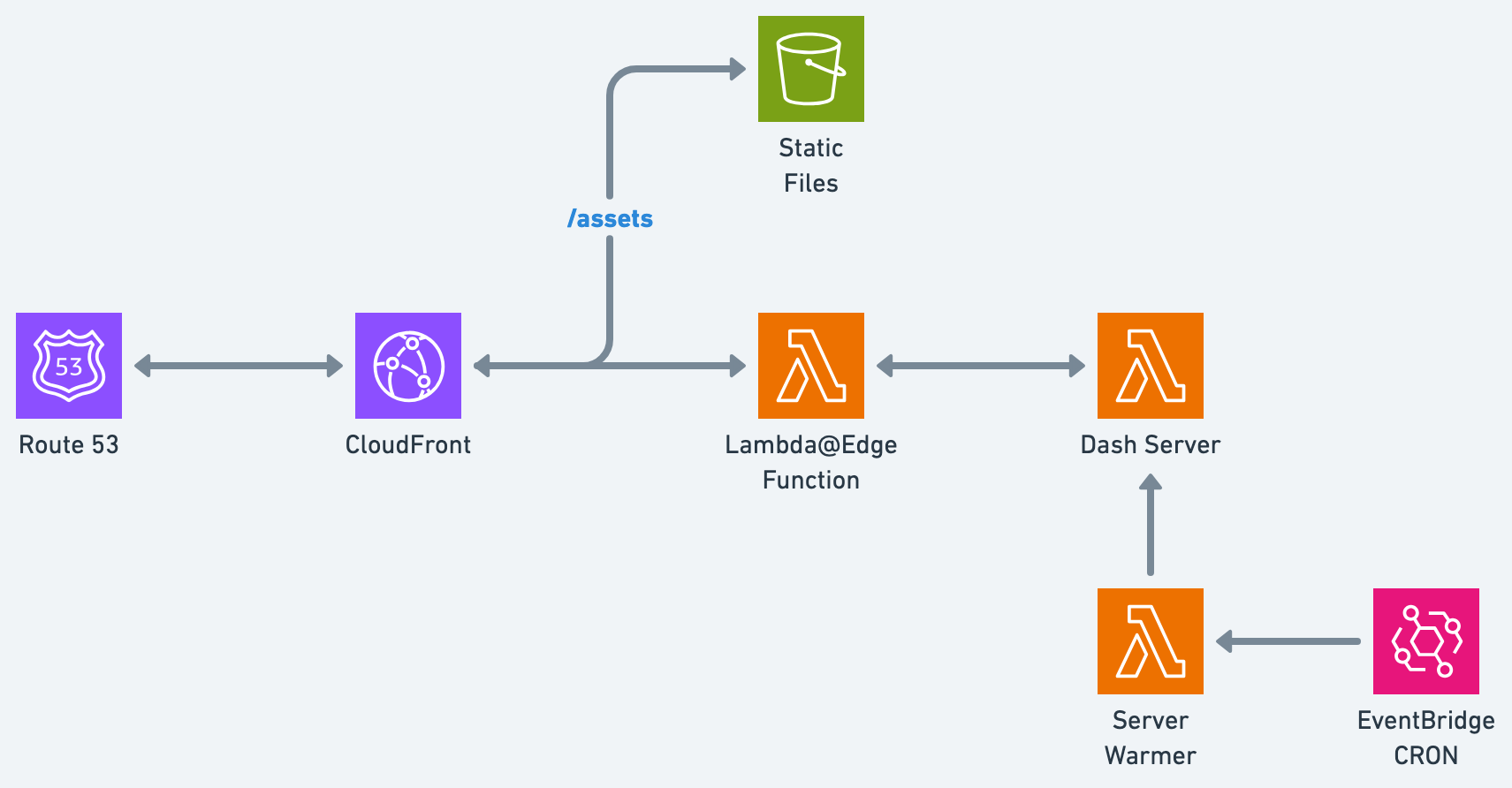
- CloudFront - Serves static assets from the S3 bucket and falls back to the Dash server lambda for other requests. Remember to set the default root object to
index.html. - S3 Bucket - Stores the static assets. Make sure to block public access and give CloudFront read access to the bucket. See this AWS Guide for more information.
Optional infrastructure, depending on your application:
-
Lambda@Edge Origin Request Function - A Lambda function triggered by CloudFront to sign the Dash server lambda requests and configure headers.
-
Dash Server Lambda - A Lambda function that runs the Dash server. This function is triggered by CloudFront when the requested path does not match a static asset. Make sure you define the
DOMAIN_NAMEenvironment variable.NOTE: It is possible for the server lambda to not get called if your application is a SPA without a backend. Monitor your function's logs and adjust your architecture accordingly.
-
Warmer Function - A Lambda function that pings the Dash server lambda to keep it warm. This function is triggered by the EventBridge CRON.
-
EventBridge CRON - A CloudWatch event that triggers the warmer function every 5 minutes.
Zero-Config Deployments
You can deploy your Dash application to AWS using the Zonké dashboard. The dashboard offers the following features:
- Zero-Config - Deploy your Dash application to AWS without any configuration.
- Continuous Deployment - Automatically deploy your Dash application when you push to your Git repository.
- Other Deployment Options - Deploy your Dash application to other configurations, such as ECS Fargate/EC2.
Acknowledgments
OpenDash was heavily inspired by, but not affiliated with, OpenNext.
Maintained by the Zonké team | Discord | Twitter | LinkedIn
Release history Release notifications | RSS feed

Download files
Download the file for your platform. If you're not sure which to choose, learn more about installing packages.
Source Distribution
Built Distribution
Filter files by name, interpreter, ABI, and platform.
If you're not sure about the file name format, learn more about wheel file names.
Copy a direct link to the current filters
File details
Details for the file open_dash-0.1.0.tar.gz.
File metadata
- Download URL: open_dash-0.1.0.tar.gz
- Upload date:
- Size: 15.9 kB
- Tags: Source
- Uploaded using Trusted Publishing? No
- Uploaded via: twine/6.0.1 CPython/3.12.0
File hashes
| Algorithm | Hash digest | |
|---|---|---|
| SHA256 |
3b93664536f976830188edba880c8e3f57da56ebebc1f11c8f9296864b8fe7b9
|
|
| MD5 |
2d68bc35705a44fe786839592dc2d239
|
|
| BLAKE2b-256 |
29e018a168b252f4c5cccf119a1385ebe9458f5f70b0ae1d7544dce8e7807fc1
|
File details
Details for the file open_dash-0.1.0-py3-none-any.whl.
File metadata
- Download URL: open_dash-0.1.0-py3-none-any.whl
- Upload date:
- Size: 18.6 kB
- Tags: Python 3
- Uploaded using Trusted Publishing? No
- Uploaded via: twine/6.0.1 CPython/3.12.0
File hashes
| Algorithm | Hash digest | |
|---|---|---|
| SHA256 |
cebbbf676774bbe89c84292975bdf28625b2c423956f094e34383176dc9ea4d8
|
|
| MD5 |
93733fcbb3ad778da4309a27399b9310
|
|
| BLAKE2b-256 |
f1ecbeab8dfc8428a5e0dba6a5ffe1927fca0249f46f9be06354492f6b171e55
|






