
Open Deep Research
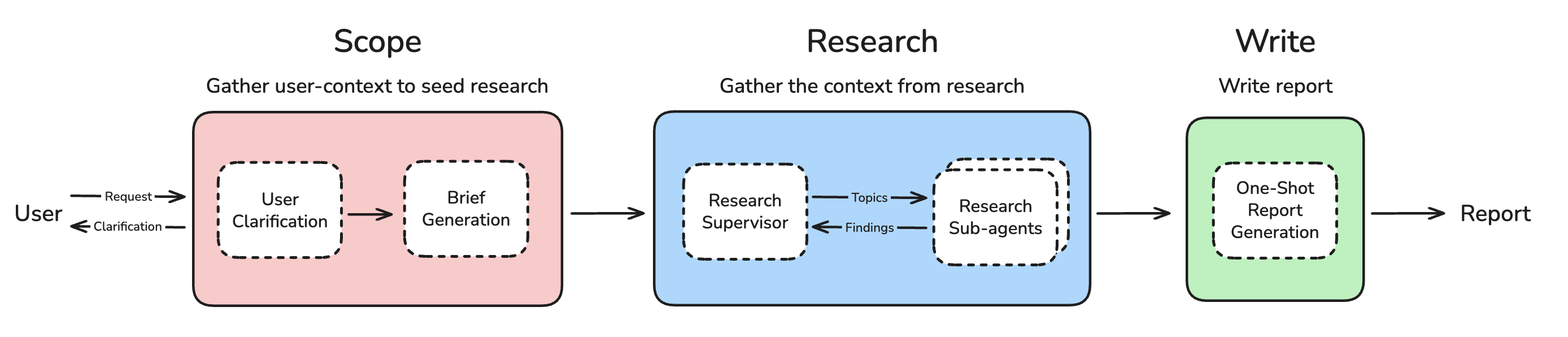
Deep research has broken out as one of the most popular agent applications. This is a simple, configurable, fully open source deep research agent that works across many model providers, search tools, and MCP servers.
- Read more in our blog
- See our video for a quick overview
🚀 Quickstart
- Clone the repository and activate a virtual environment:
git clone https://github.com/langchain-ai/open_deep_research.git
cd open_deep_research
uv venv
source .venv/bin/activate  # On Windows: .venv\Scripts\activate
- Install dependencies:
uv pip install -r pyproject.toml
- Set up your
.envfile to customize the environment variables (for model selection, search tools, and other configuration settings):
cp .env.example .env
- Launch the assistant with the LangGraph server locally to open LangGraph Studio in your browser:
# Install dependencies and start the LangGraph server
uvx --refresh --from "langgraph-cli[inmem]" --with-editable . --python 3.11 langgraph dev --allow-blocking
Use this to open the Studio UI:
- 🚀 API: http://127.0.0.1:2024
- 🎨 Studio UI: https://smith.langchain.com/studio/?baseUrl=http://127.0.0.1:2024
- 📚 API Docs: http://127.0.0.1:2024/docs
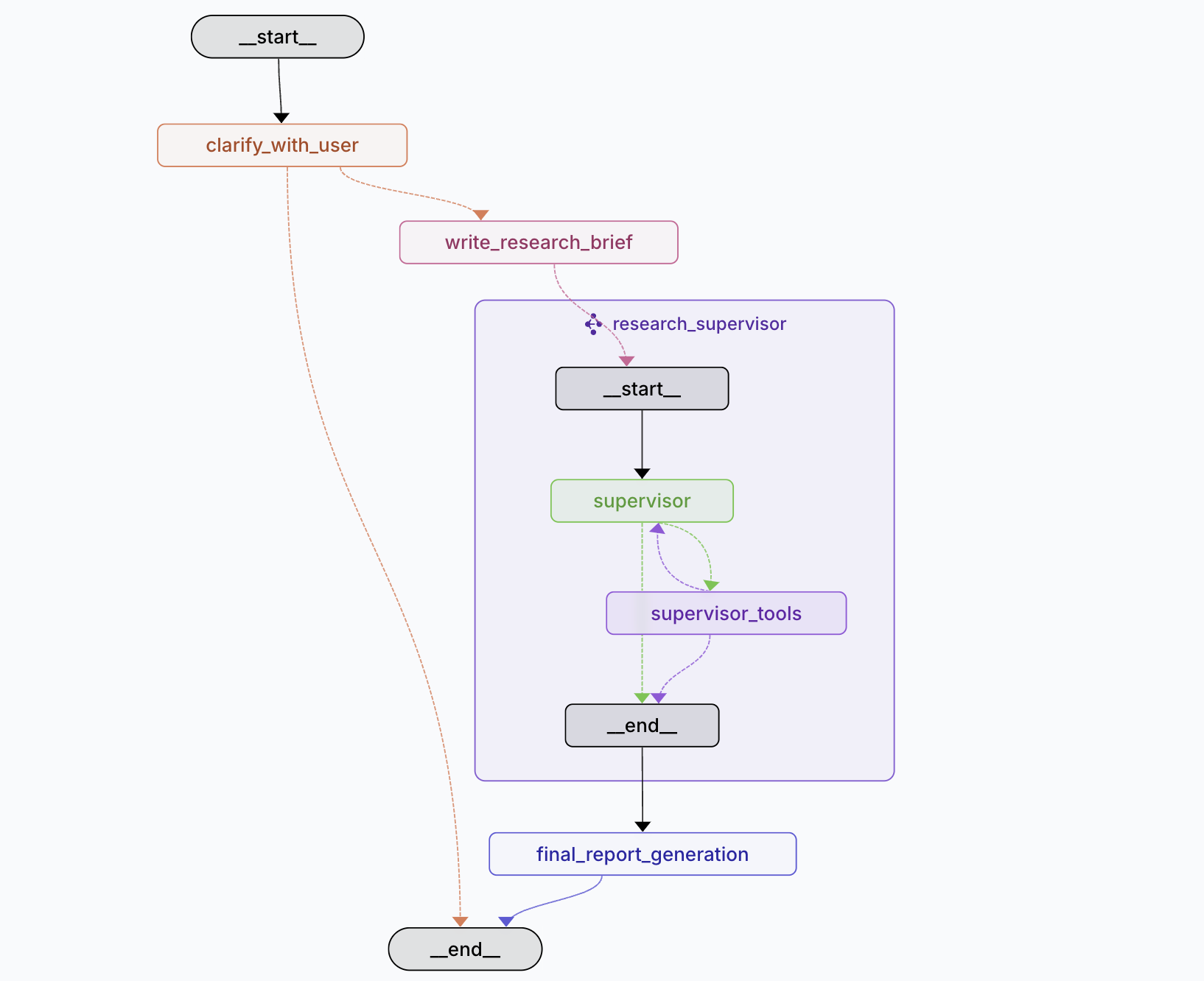
Ask a question in the messages input field and click Submit.
Configurations
Open Deep Research offers extensive configuration options to customize the research process and model behavior. All configurations can be set via the web UI, environment variables, or by modifying the configuration directly.
General Settings
- Max Structured Output Retries (default: 3): Maximum number of retries for structured output calls from models when parsing fails
- Allow Clarification (default: true): Whether to allow the researcher to ask clarifying questions before starting research
- Max Concurrent Research Units (default: 5): Maximum number of research units to run concurrently using sub-agents. Higher values enable faster research but may hit rate limits
Research Configuration
- Search API (default: Tavily): Choose from Tavily (works with all models), OpenAI Native Web Search, Anthropic Native Web Search, or None
- Max Researcher Iterations (default: 3): Number of times the Research Supervisor will reflect on research and ask follow-up questions
- Max React Tool Calls (default: 5): Maximum number of tool calling iterations in a single researcher step
Models
Open Deep Research uses multiple specialized models for different research tasks:
- Summarization Model (default:
openai:gpt-4.1-nano): Summarizes research results from search APIs - Research Model (default:
openai:gpt-4.1): Conducts research and analysis - Compression Model (default:
openai:gpt-4.1-mini): Compresses research findings from sub-agents - Final Report Model (default:
openai:gpt-4.1): Writes the final comprehensive report
All models are configured using init_chat_model() API which supports providers like OpenAI, Anthropic, Google Vertex AI, and others.
Important Model Requirements:
-
Structured Outputs: All models must support structured outputs. Check support here.
-
Search API Compatibility: Research and Compression models must support your selected search API:
- Anthropic search requires Anthropic models with web search capability
- OpenAI search requires OpenAI models with web search capability
- Tavily works with all models
-
Tool Calling: All models must support tool calling functionality
-
Special Configurations:
- For OpenRouter: Follow this guide
- For local models via Ollama: See setup instructions
Example MCP (Model Context Protocol) Servers
Open Deep Research supports MCP servers to extend research capabilities.
Local MCP Servers
Filesystem MCP Server provides secure file system operations with robust access control:
- Read, write, and manage files and directories
- Perform operations like reading file contents, creating directories, moving files, and searching
- Restrict operations to predefined directories for security
- Support for both command-line configuration and dynamic MCP roots
Example usage:
mcp-server-filesystem /path/to/allowed/dir1 /path/to/allowed/dir2
Remote MCP Servers
Remote MCP servers enable distributed agent coordination and support streamable HTTP requests. Unlike local servers, they can be multi-tenant and require more complex authentication.
Arcade MCP Server Example:
{
  "url": "https://api.arcade.dev/v1/mcps/ms_0ujssxh0cECutqzMgbtXSGnjorm",
  "tools": ["Search_SearchHotels", "Search_SearchOneWayFlights", "Search_SearchRoundtripFlights"]
}
Remote servers can be configured as authenticated or unauthenticated and support JWT-based authentication through OAuth endpoints.
Evaluation
A comprehensive batch evaluation system designed for detailed analysis and comparative studies.
Features:
- Multi-dimensional Scoring: Specialized evaluators with 0-1 scale ratings
- Dataset-driven Evaluation: Batch processing across multiple test cases
Usage:
# Run comprehensive evaluation on LangSmith datasets
python tests/run_evaluate.py
Key Files:
tests/run_evaluate.py: Main evaluation scripttests/evaluators.py: Specialized evaluator functionstests/prompts.py: Evaluation prompts for each dimension
Deployments and Usages
LangGraph Studio
Follow the quickstart to start LangGraph server locally and test the agent out on LangGraph Studio.
Hosted deployment
You can easily deploy to LangGraph Platform.
Open Agent Platform
Open Agent Platform (OAP) is a UI from which non-technical users can build and configure their own agents. OAP is great for allowing users to configure the Deep Researcher with different MCP tools and search APIs that are best suited to their needs and the problems that they want to solve.
We've deployed Open Deep Research to our public demo instance of OAP. All you need to do is add your API Keys, and you can test out the Deep Researcher for yourself! Try it out here
You can also deploy your own instance of OAP, and make your own custom agents (like Deep Researcher) available on it to your users.
Updates 🔥
Legacy Implementations 🏛️
The src/legacy/ folder contains two earlier implementations that provide alternative approaches to automated research:
1. Workflow Implementation (legacy/graph.py)
- Plan-and-Execute: Structured workflow with human-in-the-loop planning
- Sequential Processing: Creates sections one by one with reflection
- Interactive Control: Allows feedback and approval of report plans
- Quality Focused: Emphasizes accuracy through iterative refinement
2. Multi-Agent Implementation (legacy/multi_agent.py)
- Supervisor-Researcher Architecture: Coordinated multi-agent system
- Parallel Processing: Multiple researchers work simultaneously
- Speed Optimized: Faster report generation through concurrency
- MCP Support: Extensive Model Context Protocol integration
See src/legacy/legacy.md for detailed documentation, configuration options, and usage examples for both legacy implementations.


Release files for open-deep-research 0.0.16
For a detailed explanation of source distributions (sdists) and built distributions (wheels), please see the package formats documentation.
Source distribution (sdist)
| File | Size | Uploaded | |
|---|---|---|---|
| open_deep_research-0.0.16.tar.gz | 64.4 kB | Details |
Built distribution (wheel)
| File | Interpreter | ABI | Platform | Reset |
|---|---|---|---|---|
| open_deep_research-0.0.16-py3-none-any.whl | Python 3 | none | any | Details |
Total release size: 135.3 kB
Release files / open_deep_research-0.0.16.tar.gz
| Download URL | open_deep_research-0.0.16.tar.gz |
|---|---|
| Size | 64.4 kB |
| Tags | Source |
|
SHA-256 checksum How to use checksums |
26f2c141aede2239de3637c5d40cb0ef3a92277bd5cfa2fa9445d2c314dec957
|
|
BLAKE2b-256 checksum How to use checksums |
2c8609b10bb6278f1c92c6eca89e18f000661bd0f7709b8a54a3b8414630cacc
|
| Upload date | |
|
Uploaded using Trusted Publishing? What is trusted publishing? |
No |
| Uploaded via |
twine/6.1.0 CPython/3.11.11
|
Release files / open_deep_research-0.0.16-py3-none-any.whl
| Download URL | open_deep_research-0.0.16-py3-none-any.whl |
|---|---|
| Size | 70.9 kB |
| Tags | Python 3 |
|
SHA-256 checksum How to use checksums |
58c62a7849763a5f0241dcd31ca9703a6a985a9b3b9529ec2fa1e3c06b065cfe
|
|
BLAKE2b-256 checksum How to use checksums |
11878d11e0e45ab0710958ceeef9133c497ab2eb46f40313a32bb67c6a09750f
|
| Upload date | |
|
Uploaded using Trusted Publishing? What is trusted publishing? |
No |
| Uploaded via |
twine/6.1.0 CPython/3.11.11
|














