
Fault Detection and Diagnostics for HVAC systems — config-driven, pandas-based
Verified details
These details have been verified by PyPIProject links
GitHub Statistics
Maintainers

Project description
Open-FDD








Open-FDD is an open-source knowledge graph fault-detection platform for HVAC systems that helps facilities optimize their energy usage and cost-savings. Because it runs on-prem, facilities never have to worry about a vendor hiking prices, going dark, or walking away with their data. The platform is an AFDD stack designed to run inside the building, behind the firewall, under the owner’s control. It transforms operational data into actionable, cost-saving insights and provides a secure integration layer that any cloud platform can use without vendor lock-in. U.S. Department of Energy research reports median energy savings of roughly 8–9% from FDD programs—meaningful annual savings depending on facility size and energy spend.
The building is modeled in a unified graph: Brick (sites, equipment, points), BACnet discovery RDF, platform config, and—as the project evolves—other ontologies such as ASHRAE 223P, in one semantic model queried via SPARQL and serialized to config/data_model.ttl.
Quick Starts
Open-FDD Engine-only (rules engine, no Docker) PyPi
If you only want the Python rules engine (without the full platform stack), you can use it in standard Python environments.
pip install open-fdd
Open-FDD AFDD Platform Manually by the Human
Open-FDD uses Docker and Docker Compose to orchestrate and manage all platform services within a unified containerized environment. The bootstrap script (./scripts/bootstrap.sh) is Linux-only and intended for IoT edge applications using Docker exclusively.
Debian / Ubuntu setup
- Git: Install Git if needed, e.g.
sudo apt update && sudo apt install git. - Docker: Follow the official guide to install Docker Engine (and Compose): Install Docker Engine on Ubuntu.
Prerequisites (Ubuntu / Debian-style)
After Docker is installed, add your Linux user to the docker group so you can run docker without sudo (log out and back in, or use newgrp, for the group change to apply):
sudo usermod -aG docker "$USER"
newgrp docker
docker ps
Create a Python virtual environment and install argon2-cffi (used to hash passwords for bootstrap):
python3 -m venv .venv
source .venv/bin/activate
pip install argon2-cffi
Clone the repository:
git clone https://github.com/bbartling/open-fdd.git
Standard HTTP bootstrap (no TLS) and app login
The --bacnet-address value is the static bind address for BACnet, which is the usual setup for BACnet/IP on operations technology (OT) LANs. Bootstrap supports dual-NIC hosts: use this address on the OT interface; your other interface can use DHCP for outbound internet access.
cd open-fdd

printf '%s' 'YourSecurePassword' | ./scripts/bootstrap.sh \
  --bacnet-address 192.168.204.16/24:47808 \
  --bacnet-instance 12345 \
  --user ben \
  --password-stdin
NOTE: Both the DIY BACnet server and Open-FDD API in the Standard HTTP bootstrap (no TLS) configuration still require bearer tokens for authorization. These are defined in
open-fdd/stack/.envand are set during the bootstrapping process.
Standard hardened stack — self-signed TLS (Caddy) and app login
Open-FDD runs over TLS with self-signed certificates, and there is no access to the Open-FDD API or the DIY BACnet server Docker container APIs.
cd open-fdd

printf '%s' 'YourSecurePassword' | ./scripts/bootstrap.sh \
  --bacnet-address 192.168.204.16/24:47808 \
  --bacnet-instance 12345 \
  --user ben \
  --password-stdin \
  --caddy-self-signed
Bootstrap Troubleshooting
./scripts/bootstrap.sh --doctor
Also available is the partial stack mode: ./scripts/bootstrap.sh --mode collector, --mode model, or --mode engine. See the Docs below for more information.
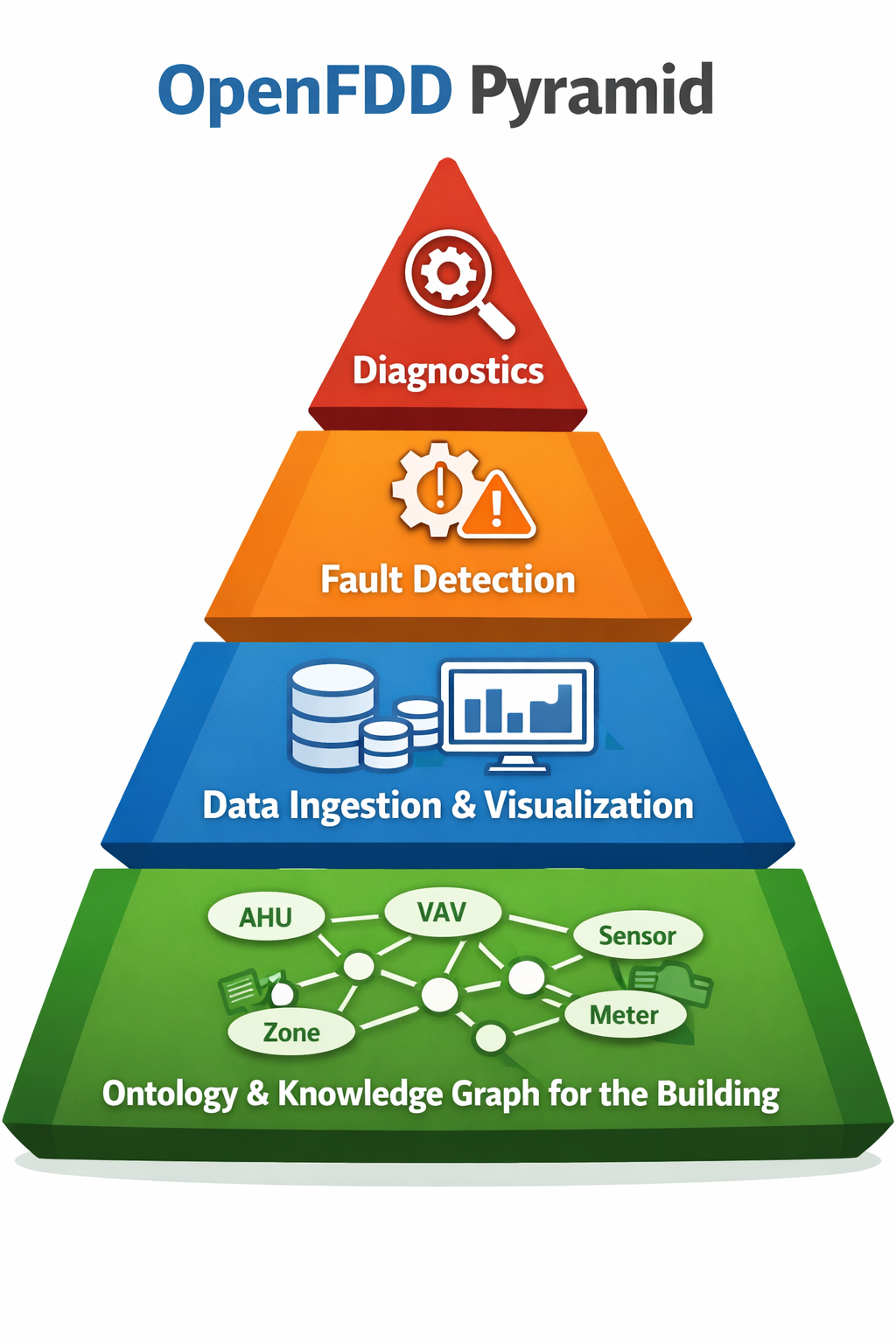
The open-fdd Pyramid
If OpenFDD nails the ontology, the project will be a huge success: an open-source knowledge graph for buildings. Everything else is just a nice add-on.
Online Documentation
- 📖 Docs — GitHub Pages (Linux quick start, stack, reference).
- 📕 Documentation PDF — offline, Kindle-friendly documentation
- ✨ LLM prompt (copy/paste template) — export the data model (knowledge graph) as JSON, run an external LLM-assisted tagging workflow outside Open‑FDD, then re-import the JSON; the backend parses it on import.
- 🤖 Open‑Claw / external agents —
GET /model-context/docs,GET /mcp/manifest, data-model export/import for your own OpenAI-compatible stack.
Dependencies
Authoritative lists and version pins: pyproject.toml (dependencies and [project.optional-dependencies]).
Core (installed with pip install open-fdd): pandas · PyYAML · PyJWT · argon2-cffi (password hashing for auth).
Platform / API (extras e.g. pip install "open-fdd[platform]" or .[dev] in a clone): FastAPI · Uvicorn · pydantic-settings · httpx · python-multipart · psycopg2-binary · requests · openai (optional AI client).
Brick / SPARQL / TTL (extra [brick] or bundled in .[dev]): rdflib · pyparsing (pinned range for SPARQL compatibility).
BACnet (extra [bacnet]): bacpypes3 · ifaddr · httpx.
Viz (extra [viz]): matplotlib.
Contributing
Open PRs against the current integration branch (e.g. develop or develop/vX.Y.Z), not master — master is release-only and protected.
Tests: ./scripts/bootstrap.sh --test (frontend + pytest + Caddy; frontend tries Docker then host npm), or from repo root:
python3 -m venv .venv
source .venv/bin/activate
pip install -e ".[dev]"
pytest -v
.[dev] pulls in the full Python test deps; pyproject.toml sets default test paths. More detail: docs/contributing.md. Ask in #dev-chat on Discord if the active integration branch is unclear.
Fork sync (once add upstream, then as needed):
git remote add upstream https://github.com/bbartling/open-fdd.git
git fetch upstream && git checkout develop && git merge upstream/develop && git push origin develop
(Use your real integration branch name instead of develop if the project is on a versioned line.)
License
MIT
Project details
Verified details
These details have been verified by PyPIProject links
GitHub Statistics
Maintainers
Release history Release notifications | RSS feed


Download files
Download the file for your platform. If you're not sure which to choose, learn more about installing packages.
Source Distribution
Built Distribution
Filter files by name, interpreter, ABI, and platform.
If you're not sure about the file name format, learn more about wheel file names.
Copy a direct link to the current filters
File details
Details for the file open_fdd-2.0.13.tar.gz.
File metadata
- Download URL: open_fdd-2.0.13.tar.gz
- Upload date:
- Size: 166.9 kB
- Tags: Source
- Uploaded using Trusted Publishing? Yes
- Uploaded via: twine/6.1.0 CPython/3.13.7
File hashes
| Algorithm | Hash digest | |
|---|---|---|
| SHA256 |
fcdcfce5ff969700d05784c6bb0ddd7dc0394ba557f92438b1a36bf246f1a445
|
|
| MD5 |
26f79c4cbb1ebc48be4ea9fed0533195
|
|
| BLAKE2b-256 |
4da0ef1adb444fe6439d3fa40726611d7f4c49d7d0f6041d2cda5a4774da84f4
|
Provenance
The following attestation bundles were made for open_fdd-2.0.13.tar.gz:
Publisher:
publish-open-fdd.yml on bbartling/open-fdd
-
Statement:
-
Statement type:
https://in-toto.io/Statement/v1 -
Predicate type:
https://docs.pypi.org/attestations/publish/v1 -
Subject name:
open_fdd-2.0.13.tar.gz -
Subject digest:
fcdcfce5ff969700d05784c6bb0ddd7dc0394ba557f92438b1a36bf246f1a445 - Sigstore transparency entry: 1239259950
- Sigstore integration time:
-
Permalink:
bbartling/open-fdd@71d27d81fa5e52a96bea106a924978ad662fa912 -
Branch / Tag:
refs/tags/open-fdd-v2.0.13 - Owner: https://github.com/bbartling
-
Access:
public
-
Token Issuer:
https://token.actions.githubusercontent.com -
Runner Environment:
github-hosted -
Publication workflow:
publish-open-fdd.yml@71d27d81fa5e52a96bea106a924978ad662fa912 -
Trigger Event:
push
-
Statement type:
File details
Details for the file open_fdd-2.0.13-py3-none-any.whl.
File metadata
- Download URL: open_fdd-2.0.13-py3-none-any.whl
- Upload date:
- Size: 206.9 kB
- Tags: Python 3
- Uploaded using Trusted Publishing? Yes
- Uploaded via: twine/6.1.0 CPython/3.13.7
File hashes
| Algorithm | Hash digest | |
|---|---|---|
| SHA256 |
9db1e16c66a2a16d3772c50b2e7e4a7beef7313e2788366f5a55df53a20f6078
|
|
| MD5 |
16fb77a0902c028320cafdcda63748f6
|
|
| BLAKE2b-256 |
a44db1012ab02a1f0b58266df79ee951e06a30000f48f792e76b4e8180e0e5f0
|
Provenance
The following attestation bundles were made for open_fdd-2.0.13-py3-none-any.whl:
Publisher:
publish-open-fdd.yml on bbartling/open-fdd
-
Statement:
-
Statement type:
https://in-toto.io/Statement/v1 -
Predicate type:
https://docs.pypi.org/attestations/publish/v1 -
Subject name:
open_fdd-2.0.13-py3-none-any.whl -
Subject digest:
9db1e16c66a2a16d3772c50b2e7e4a7beef7313e2788366f5a55df53a20f6078 - Sigstore transparency entry: 1239259951
- Sigstore integration time:
-
Permalink:
bbartling/open-fdd@71d27d81fa5e52a96bea106a924978ad662fa912 -
Branch / Tag:
refs/tags/open-fdd-v2.0.13 - Owner: https://github.com/bbartling
-
Access:
public
-
Token Issuer:
https://token.actions.githubusercontent.com -
Runner Environment:
github-hosted -
Publication workflow:
publish-open-fdd.yml@71d27d81fa5e52a96bea106a924978ad662fa912 -
Trigger Event:
push
-
Statement type:






