

Fast terminal social media profile downloader and TUI.
Bulk download photos, videos, stories, and highlights from Instagram, TikTok, Facebook, and X.


Key Features
- Interactive Terminal UI: Keyboard-driven navigation with auto, dark, and light themes (
Ctrl+T). - Auto-Provisioned Engines: Automatically downloads standalone
gallery-dlandyt-dlpexecutables into~/.open-nami/bin/on first launch if not installed. - In-Place Scraper Updates: Run
nami -Uanytime to fetch the latest scraper engine releases. - Four Command Aliases:
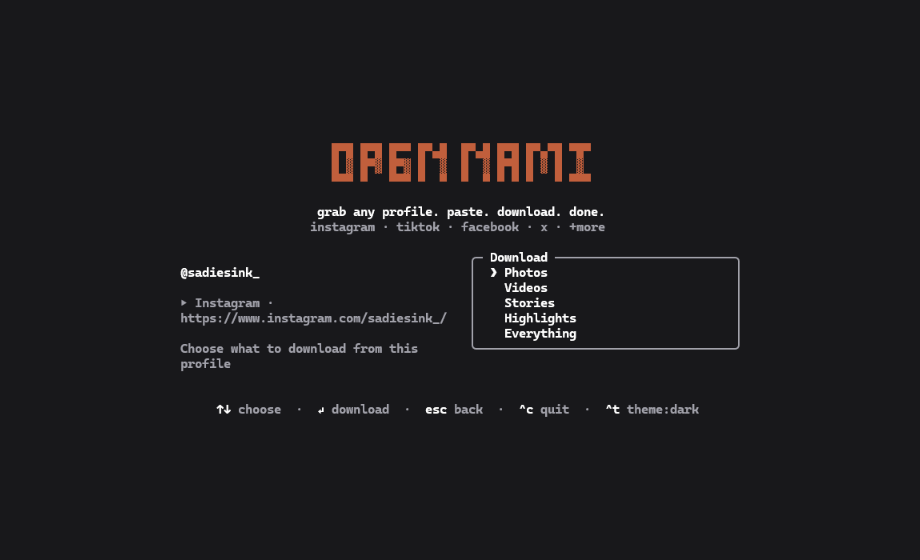
open-nami,opennami,nami, andon. - Targeted Category Extraction: Download photos, videos, stories, highlights, or complete profile archives.
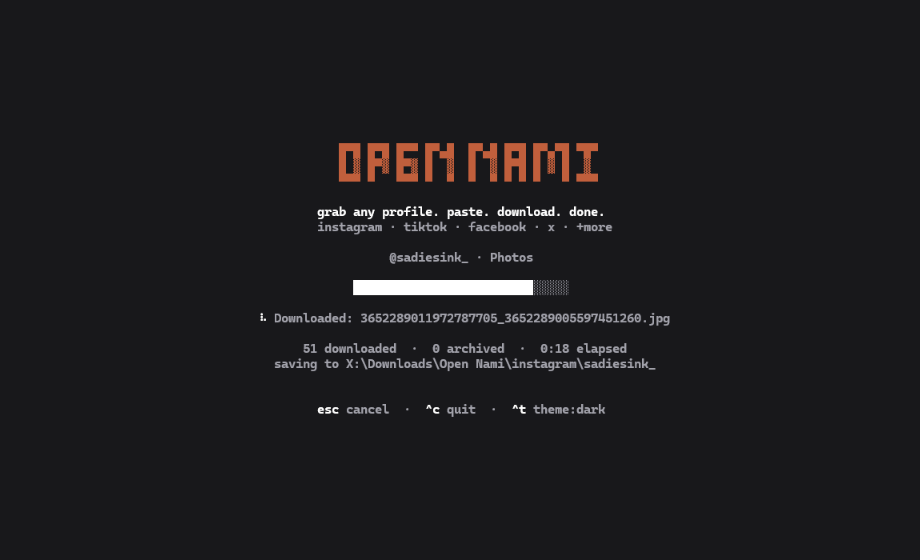
- Automatic Directory Sorting: Saves to your system Downloads folder under
<platform>/<username>/<category>/. Override anytime with-o, --output <dir>. - Anti-Bot & Anti-Ban Hardening:
- TikTok carousels: disables video extraction flags to prevent 403 errors on photo slides.
- TikTok videos: passes Chrome TLS impersonation (
--impersonate chrome) through yt-dlp to clear Akamai WAF challenges. - Instagram: throttles GraphQL pagination with jittered intervals (
2.0s–2.8s) and downloads directly from Meta CDN edges.
- Isolated Cookie Sessions: Clones Netscape cookie files to an ephemeral temporary directory (
chmod 0600) with automatic cleanup to prevent session corruption. - 100% Local & Private: Direct connections between your machine and platform servers. Zero telemetry, zero external tracking servers.
Installation & Quick Start
Installation
# npm (global)
npm install -g open-nami

# pip (Python)
pip install open-nami

# Homebrew (macOS & Linux)
brew install OpenSelena/tap/open-nami

# One-liner script (macOS & Linux)
curl -fsSL https://raw.githubusercontent.com/OpenSelena/open-nami/main/install.sh | sh

# Run without installing
npx open-nami [profile-or-url]
Quick Start
Launch the interactive interface using any alias:
nami
# or
on
# or
open-nami
Jump straight to a profile:
nami https://www.instagram.com/natgeo/
on @taylorswift
nami tt:zachking
Direct headless downloads:
# Photos only
nami @creator --photos

# Videos only
nami tt:creator --videos

# Instagram stories
nami ig:username --stories

# Full profile archive
nami @username --all

# Update engines
nami -U
Hotkeys in TUI
| Key | Action |
|---|---|
[Tab] |
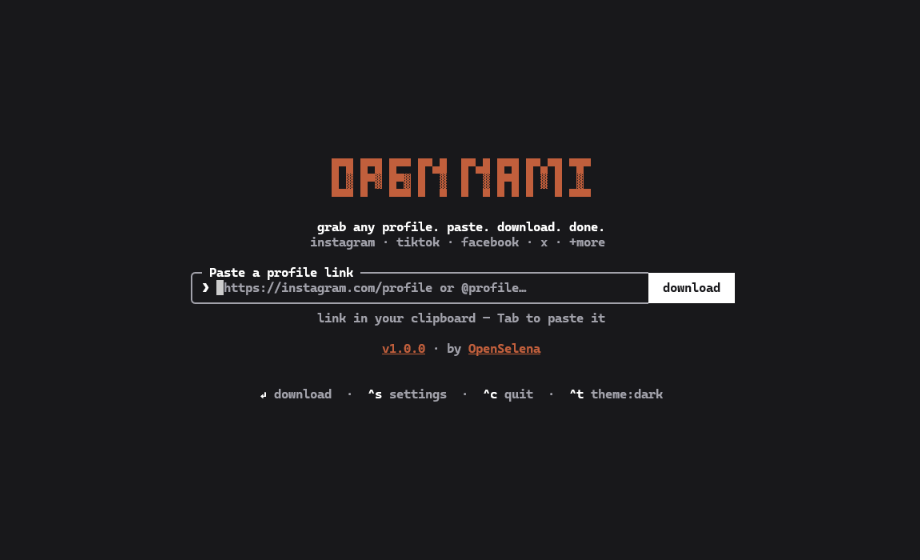
Paste URL from clipboard |
[Enter] |
Submit URL / Start download |
[↑ / ↓] |
Navigate format options |
[^s] (Ctrl+S) |
Settings (cookies & download directory) |
[^t] (Ctrl+T) |
Cycle theme (auto / light / dark) |
[o] |
Open destination folder in file manager |
[Esc] |
Back to URL input |
[^c] (Ctrl+C) |
Quit |
Interface Demo
1. Paste Profile URL
2. Select Media Category
3. Real-Time Download Progress
Documentation
Full guides and technical specifications are available in the docs/ directory:
- CLI Reference: Command flags, options, exit codes, and non-interactive scripting.
- Configuration Guide:
~/.open-nami/config.jsonschema, settings menu, and environment variables. - Cookie Authentication: Authenticated downloads for stories, highlights, private profiles, and ephemeral isolation.
- Anti-Bot Hardening: WAF mitigations, TLS fingerprint impersonation, request jitter, and 429 backoff.
- Shell Autocompletion: Autocomplete configuration for Bash, Zsh, Fish, and PowerShell.
- Fair Use Notice: Section 107 copyright principles, personal archiving, and legal disclosures.
License & Inquiries
Open Nami is released under the MIT License.
- Organization: OpenSelena
- Email: igect@vk.com
1 maintainer

Release files for open-nami 1.0.0
For a detailed explanation of source distributions (sdists) and built distributions (wheels), please see the package formats documentation.
Source distribution (sdist)
| File | Size | Uploaded | |
|---|---|---|---|
| open_nami-1.0.0.tar.gz | 368.5 kB | Details |
Built distribution (wheel)
| File | Interpreter | ABI | Platform | Reset |
|---|---|---|---|---|
| open_nami-1.0.0-py3-none-any.whl | Python 3 | none | any | Details |
Total release size: 741.6 kB
Release files / open_nami-1.0.0.tar.gz
| Download URL | open_nami-1.0.0.tar.gz |
|---|---|
| Size | 368.5 kB |
| Tags | Source |
|
SHA-256 checksum How to use checksums |
562bafbbd41b98e73f10fd056e79b3dc0b6a05dbf186af52c930bfc39d713021
|
|
BLAKE2b-256 checksum How to use checksums |
002da60859d710773fcc7e6088b54de27be76325455897c233dbc08f80281f3b
|
| Upload date | |
|
Uploaded using Trusted Publishing? What is trusted publishing? |
Yes |
| Uploaded via |
twine/7.0.0 CPython/3.13.14
|
Provenance
Provenance describes where a file came from. On PyPI, provenance is shared via attestations, which provide a verifiable record of the build or publishing details. View details, limitations and caveats.


PyPI Publish Attestation
PyPI verified that this artifact, at this checksum, originated from the publisher listed below.
Signed by GitHub Actions, verified by PyPI on Sep 24, 2026.
Transparency logRelease files / open_nami-1.0.0-py3-none-any.whl
| Download URL | open_nami-1.0.0-py3-none-any.whl |
|---|---|
| Size | 373.0 kB |
| Tags | Python 3 |
|
SHA-256 checksum How to use checksums |
47a4c4471804f9df55c002371b108c46d8dfc7d31fb670d8aaf917668ca735c3
|
|
BLAKE2b-256 checksum How to use checksums |
b433a1a3f1816b8b463bf05192e39214ec9c2ba24c1f75f33ee17664cdc36765
|
| Upload date | |
|
Uploaded using Trusted Publishing? What is trusted publishing? |
Yes |
| Uploaded via |
twine/7.0.0 CPython/3.13.14
|
Provenance
Provenance describes where a file came from. On PyPI, provenance is shared via attestations, which provide a verifiable record of the build or publishing details. View details, limitations and caveats.
PyPI Publish Attestation
PyPI verified that this artifact, at this checksum, originated from the publisher listed below.
Signed by GitHub Actions, verified by PyPI on Sep 24, 2026.
Transparency log













