
CLI to manage the OpenAI Responses Server that bridges chat completions to responses API calls
Project description
🚀 open-responses-server
A plug-and-play server that speaks OpenAI’s Responses API—no matter which AI backend you’re running.
Ollama? vLLM? LiteLLM? Even OpenAI itself?
This server bridges them all to the OpenAI ChatCompletions & Responses API interface.
In plain words:
👉 Want to run OpenAI’s Coding Assistant (Codex) or other OpenAI API clients against your own models?
👉 Want to experiment with self-hosted LLMs but keep OpenAI’s API compatibility?
This project makes it happen.
It handles stateful chat, tool calls, and future features like file search & code interpreter—all behind a familiar OpenAI API.
⸻
✨ Why use this?
✅ Acts as a drop-in replacement for OpenAI’s Responses API.
✅ Lets you run any backend AI (Ollama, vLLM, Groq, etc.) with OpenAI-compatible clients.
✅ Supports OpenAI’s new Coding Assistant / Codex that requires Responses API.
✅ Built for innovators, researchers, OSS enthusiasts.
✅ Enterprise-ready: scalable, reliable, and secure for production workloads.
⸻
🔥 What’s in & what’s next?
✅ Done 📝 Coming soon
- ✅ Tool call support .env file support
- ✅ Manual & pipeline tests
- ✅ Docker image build
- ✅ PyPI release
- 📝 Persistent state (not just in-memory)
- ✅ CLI validation
- 📝 hosted tools:
- 📝 MCPs support
- 📝 Web search: crawl4ai
- 📝 File upload + search: graphiti
- 📝 Code interpreter
- 📝 Computer use APIs
⸻
🏗️ Quick Install
Latest release on PyPI:
pip install open-responses-server
Or install from source:
uv venv
uv pip install .
uv pip install -e ".[dev]"  # dev dependencies
Run the server:
# Using CLI tool (after installation)
otc start

# Or directly from source
uv run src/open_responses_server/cli.py start
Docker deployment:
# Run with Docker
docker run -p 8080:8080 \
  -e OPENAI_BASE_URL_INTERNAL=http://your-llm-api:8000 \
  -e OPENAI_BASE_URL=http://localhost:8080 \
  -e OPENAI_API_KEY=your-api-key \
  open-responses-server
Works great with docker-compose.yaml for Codex + your own model.
⸻
🛠️ Configure
Minimal config to connect your AI backend:
OPENAI_BASE_URL_INTERNAL=http://localhost:11434  # Ollama, vLLM, Groq, etc.
OPENAI_BASE_URL=http://localhost:8080            # This server's endpoint
OPENAI_API_KEY=sk-mockapikey123456789            # Mock key tunneled to backend
Server binding:
API_ADAPTER_HOST=0.0.0.0
API_ADAPTER_PORT=8080
Optional logging:
LOG_LEVEL=INFO
LOG_FILE_PATH=./log/api_adapter.log
Configure with CLI tool:
# Interactive configuration setup
otc configure
Verify setup:
# Check if the server is working
curl http://localhost:8080/v1/models
⸻
💬 We’d love your support!
If you think this is cool:
⭐ Star the repo.
🐛 Open an issue if something’s broken.
🤝 Suggest a feature or submit a pull request!
This is early-stage but already usable in real-world demos.
Let’s build something powerful—together.
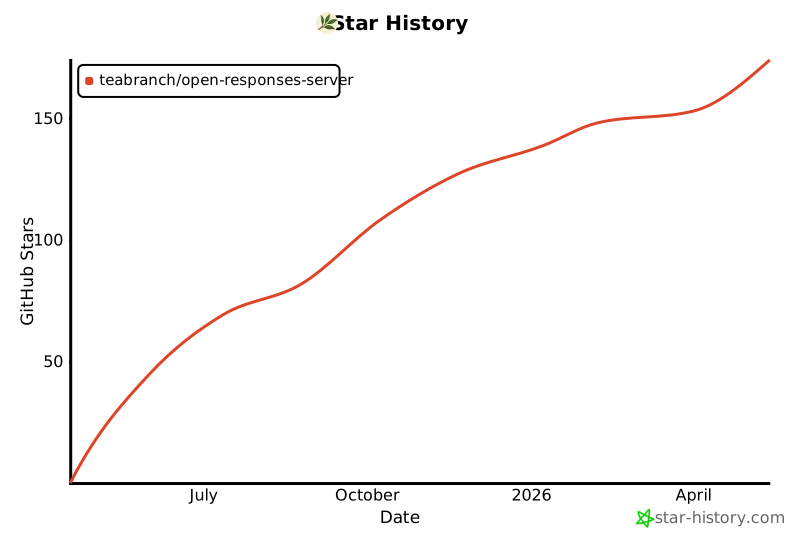
Star History
Projects using this middleware
- Nvidia jetson devices - docker compose with ollama
⸻
📚 Citations & inspirations
Referenced projects
- Crawl4AI – LLM-friendly web crawler
- UncleCode. (2024). Crawl4AI: Open-source LLM Friendly Web Crawler & Scraper [Computer software]. GitHub. https://github.com/unclecode/crawl4ai
Cite this project
Code citation
@software{open-responses-server,
  author = {TeaBranch},
  title = {open-responses-server: Open-source server bridging any AI provider to OpenAI’s Responses API},
  year = {2025},
  publisher = {GitHub},
  journal = {GitHub Repository},
  howpublished = {\url{https://github.com/teabranch/open-responses-server}},
  commit = {use the commit hash you’re working with}
}
Text citation
TeaBranch. (2025). open-responses-server: Open-source server the serves any AI provider with OpenAI ChatCompletions as OpenAI's Responses API and hosted tools. [Computer software]. GitHub. https://github.com/teabranch/open-responses-server
Project details


Download files
Download the file for your platform. If you're not sure which to choose, learn more about installing packages.
Source Distribution
Built Distribution
Filter files by name, interpreter, ABI, and platform.
If you're not sure about the file name format, learn more about wheel file names.
Copy a direct link to the current filters
File details
Details for the file open_responses_server-0.3.1.tar.gz.
File metadata
- Download URL: open_responses_server-0.3.1.tar.gz
- Upload date:
- Size: 19.9 kB
- Tags: Source
- Uploaded using Trusted Publishing? Yes
- Uploaded via: twine/6.1.0 CPython/3.12.9
File hashes
| Algorithm | Hash digest | |
|---|---|---|
| SHA256 |
f620914e1137a572e716cf3df921e53495b2741b44f877fdc586e96361565bfb
|
|
| MD5 |
3324d57349ddcf49e48fd9831f4e7dfb
|
|
| BLAKE2b-256 |
a1b5ce4ca57d8693fc34d45aa118a9fb0f8f5159fe116e07457a1f9e120b0075
|
Provenance
The following attestation bundles were made for open_responses_server-0.3.1.tar.gz:
Publisher:
publish.yml on teabranch/open-responses-server
-
Statement:
-
Statement type:
https://in-toto.io/Statement/v1 -
Predicate type:
https://docs.pypi.org/attestations/publish/v1 -
Subject name:
open_responses_server-0.3.1.tar.gz -
Subject digest:
f620914e1137a572e716cf3df921e53495b2741b44f877fdc586e96361565bfb - Sigstore transparency entry: 212717771
- Sigstore integration time:
-
Permalink:
teabranch/open-responses-server@8f3f82ebb0eab0e272d5ba179a56e8a8305ed534 -
Branch / Tag:
refs/tags/v0.3.1 - Owner: https://github.com/teabranch
-
Access:
public
-
Token Issuer:
https://token.actions.githubusercontent.com -
Runner Environment:
github-hosted -
Publication workflow:
publish.yml@8f3f82ebb0eab0e272d5ba179a56e8a8305ed534 -
Trigger Event:
release
-
Statement type:
File details
Details for the file open_responses_server-0.3.1-py3-none-any.whl.
File metadata
- Download URL: open_responses_server-0.3.1-py3-none-any.whl
- Upload date:
- Size: 14.8 kB
- Tags: Python 3
- Uploaded using Trusted Publishing? Yes
- Uploaded via: twine/6.1.0 CPython/3.12.9
File hashes
| Algorithm | Hash digest | |
|---|---|---|
| SHA256 |
a7149d00d7a7d4d06c6f12a5fa5e7b61d9d2ace8c7e0c892d7aa4117bd72363f
|
|
| MD5 |
e192c05f00a2ef490291a9bd885588e9
|
|
| BLAKE2b-256 |
30cb2283a5428959780aa30f75cce38d49809e9a64cb26cb362754ae1ecea33c
|
Provenance
The following attestation bundles were made for open_responses_server-0.3.1-py3-none-any.whl:
Publisher:
publish.yml on teabranch/open-responses-server
-
Statement:
-
Statement type:
https://in-toto.io/Statement/v1 -
Predicate type:
https://docs.pypi.org/attestations/publish/v1 -
Subject name:
open_responses_server-0.3.1-py3-none-any.whl -
Subject digest:
a7149d00d7a7d4d06c6f12a5fa5e7b61d9d2ace8c7e0c892d7aa4117bd72363f - Sigstore transparency entry: 212717778
- Sigstore integration time:
-
Permalink:
teabranch/open-responses-server@8f3f82ebb0eab0e272d5ba179a56e8a8305ed534 -
Branch / Tag:
refs/tags/v0.3.1 - Owner: https://github.com/teabranch
-
Access:
public
-
Token Issuer:
https://token.actions.githubusercontent.com -
Runner Environment:
github-hosted -
Publication workflow:
publish.yml@8f3f82ebb0eab0e272d5ba179a56e8a8305ed534 -
Trigger Event:
release
-
Statement type:






