
Open WebUI PostgreSQL Migration Tool
A robust, straightforward and fully interactive tool for migrating Open WebUI databases from SQLite to PostgreSQL. Designed for reliability and ease of use.
Preview
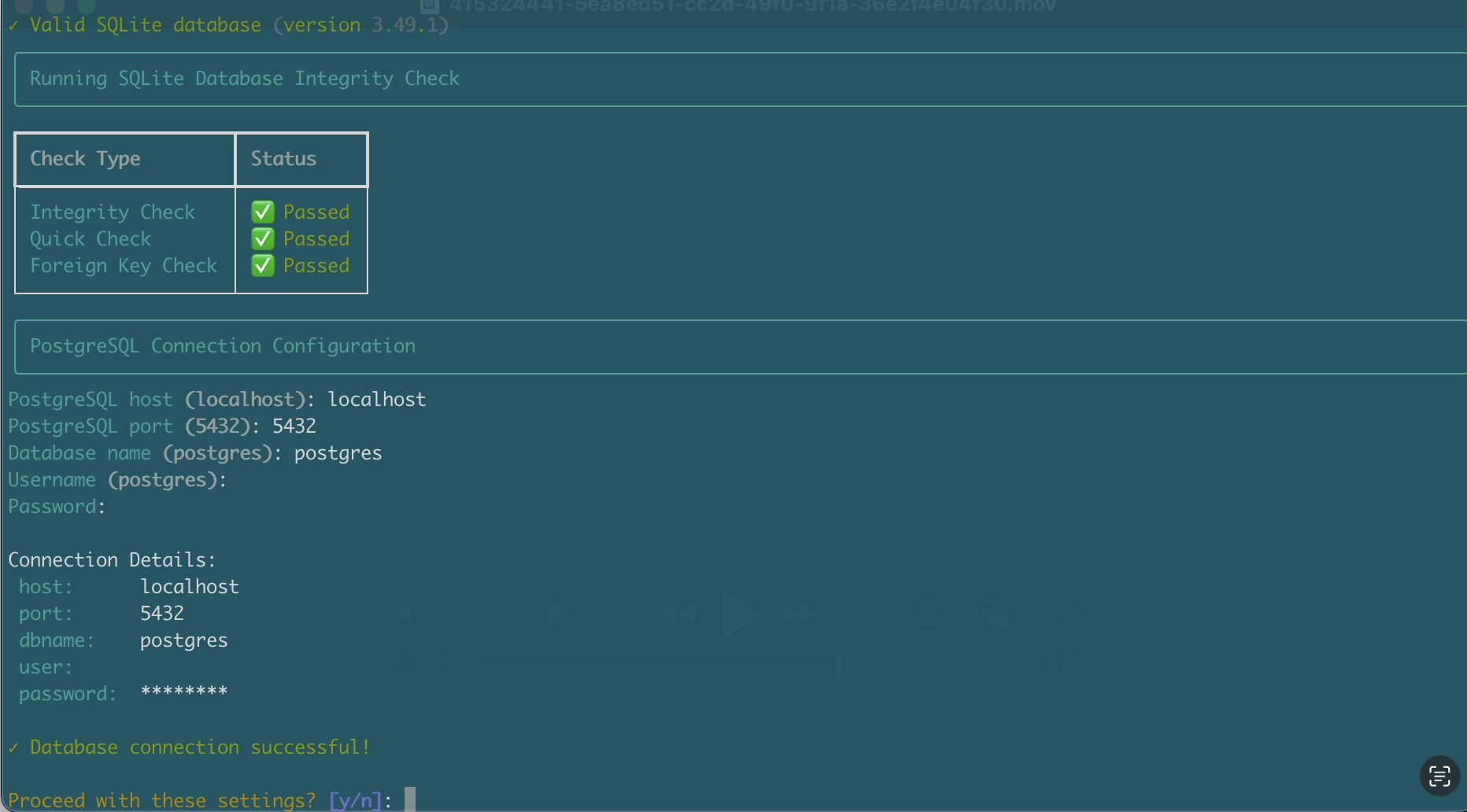
Migration Demo
https://github.com/user-attachments/assets/5ea8ed51-cc2d-49f0-9f1a-36e2f4e04f30
Features
- Interactive command line interface with clear prompts
- Pre-migration integrity and foreign key verification
- Automatic table structure conversion, including Unicode and JSON columns
- Configurable batch processing with real-time progress
- Per-row error isolation, so one bad row cannot abort a table
- Failed row tracking and a reconciliation summary at the end
- Non-zero exit status when source and target row counts disagree
Supported Open WebUI Versions
All of them, including 0.11.3. There is no version pin and no supported-version list to keep current.
The tool never hard-codes a schema. It discovers the tables in your SQLite file, reads each column type from PostgreSQL, and derives the migration order from PostgreSQL's own foreign key graph, so whatever schema your Open WebUI release created is what gets migrated.
The only requirement is that both databases are created by the same Open WebUI version: bootstrap PostgreSQL by starting your existing Open WebUI build with DATABASE_URL set, then run the migration. If a table in your SQLite file is missing from PostgreSQL, the pre-flight check stops and names it, which usually means the two sides were created by different versions.
Quick Start
Easy Installation with uvx (Recommended)
Run directly without installation:
uvx open-webui-postgres-migration
Manual Installation
-
Clone the repository:
git clone https://github.com/taylorwilsdon/open-webui-postgres-migration.git
cd open-webui-postgres-migration
-
Set up environment:
python -m venv venv
source venv/bin/activate  # Windows: venv\Scripts\activate
pip install -r requirements.txt
-
Run the migration:
python migrate.py
Requirements
- Python 3.8+
- PostgreSQL server, running and reachable from the host running the script
- Sufficient disk space for both databases
Best Practices
Before migration
- Back up your SQLite database.
- Critical: create the PostgreSQL database and tables first. The migration script verifies this before proceeding.
- Set the
DATABASE_URLenvironment variable to your PostgreSQL connection string:- macOS and Linux:
export DATABASE_URL="postgresql://user:password@host:port/dbname" - Windows:
set DATABASE_URL="postgresql://user:password@host:port/dbname"
- macOS and Linux:
- Start Open WebUI with that
DATABASE_URLconfigured so it creates the tables. - Stop Open WebUI once the tables exist.
- Set the
- Confirm PostgreSQL is reachable from the host running the script.
- Check available disk space.
During migration
- Don't interrupt the process.
- Monitor system resources.
- Keep the network connection stable.
After migration
- Verify data integrity.
- Test application functionality.
- Keep the SQLite backup until you have verified the result.
Configuration Options
During the migration, you'll be prompted to configure:
-
SQLite database
- Path to your existing SQLite database
- Automatic validation and integrity checking
-
PostgreSQL connection
- Host and port
- Database name
- Username and password
- Connection testing before proceeding
-
Performance settings
- Batch size (100-5000 recommended)
- Automatic memory usage warnings
Troubleshooting
| Issue | Solution |
|---|---|
| Connection failed | Check PostgreSQL credentials and firewall settings |
| Permission denied | Verify PostgreSQL user privileges |
| Memory errors | Reduce batch size in configuration |
| Encoding issues | Ensure proper database character encoding |
| Missing tables reported before migration starts | PostgreSQL was never bootstrapped, or it was bootstrapped by a different Open WebUI version than the one that created your SQLite file |
Failed Foreign Key Check for chat_file or knowledge_file |
The migration skips orphaned attachment rows that reference deleted chats or knowledge bases and reports how many rows were skipped |
Contributing
Contributions are welcome. Please feel free to submit a pull request.
License
This project is licensed under the MIT License. See the LICENSE file for details.
Support
If you encounter issues:
- Check the troubleshooting section above.
- Search existing GitHub issues.
- Open a new issue with the error messages, your Open WebUI and database versions, and your system information.
1 maintainer

Metadata
1 maintainer
Release files for open-webui-postgres-migration 1.1.0
For a detailed explanation of source distributions (sdists) and built distributions (wheels), please see the package formats documentation.
Source distribution (sdist)
| File | Size | Uploaded | |
|---|---|---|---|
| open_webui_postgres_migration-1.1.0.tar.gz | 14.2 kB | Details |
Built distribution (wheel)
| File | Interpreter | ABI | Platform | Reset |
|---|---|---|---|---|
| open_webui_postgres_migration-1.1.0-py3-none-any.whl | Python 3 | none | any | Details |
Total release size: 38.0 kB
Release files / open_webui_postgres_migration-1.1.0.tar.gz
| Download URL | open_webui_postgres_migration-1.1.0.tar.gz |
|---|---|
| Size | 14.2 kB |
| Tags | Source |
|
SHA-256 checksum How to use checksums |
2cf68e111a6d7e82140eb225afd609008e64b52bfb5aae0e160c8c4d71953bf9
|
|
BLAKE2b-256 checksum How to use checksums |
d92ef02308f148a4b5b5725b557cd37beee9860336dd3dffde251dac1cc5ef17
|
| Upload date | |
|
Uploaded using Trusted Publishing? What is trusted publishing? |
Yes |
| Uploaded via |
twine/7.0.0 CPython/3.13.14
|
Provenance
Provenance describes where a file came from. On PyPI, provenance is shared via attestations, which provide a verifiable record of the build or publishing details. View details, limitations and caveats.


PyPI Publish Attestation
PyPI verified that this artifact, at this checksum, originated from the publisher listed below.
Signed by GitHub Actions, verified by PyPI on Sep 20, 2026.
Transparency logRelease files / open_webui_postgres_migration-1.1.0-py3-none-any.whl
| Download URL | open_webui_postgres_migration-1.1.0-py3-none-any.whl |
|---|---|
| Size | 23.8 kB |
| Tags | Python 3 |
|
SHA-256 checksum How to use checksums |
bfe6e8271160c87e59537a448bcd4ddbea74897abfa133cde374708a0dbe52b0
|
|
BLAKE2b-256 checksum How to use checksums |
23a2ead75265b4d2b24cc3d54dfdb2958832ca2dbb7004de1ae86510d99ea4df
|
| Upload date | |
|
Uploaded using Trusted Publishing? What is trusted publishing? |
Yes |
| Uploaded via |
twine/7.0.0 CPython/3.13.14
|
Provenance
Provenance describes where a file came from. On PyPI, provenance is shared via attestations, which provide a verifiable record of the build or publishing details. View details, limitations and caveats.
PyPI Publish Attestation
PyPI verified that this artifact, at this checksum, originated from the publisher listed below.
Signed by GitHub Actions, verified by PyPI on Sep 20, 2026.
Transparency log













