
OpenAclI
Wanted a tool to use OpenAI on the command line. Also supports showing images.
Installation
> pip install openacli
Usage
You'll need an OpenAI API key to use this library.
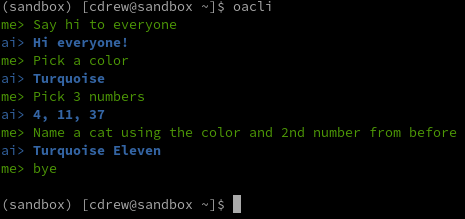
Chat
> oacli
me> "<prompt with quotes>"
ai> <some response>
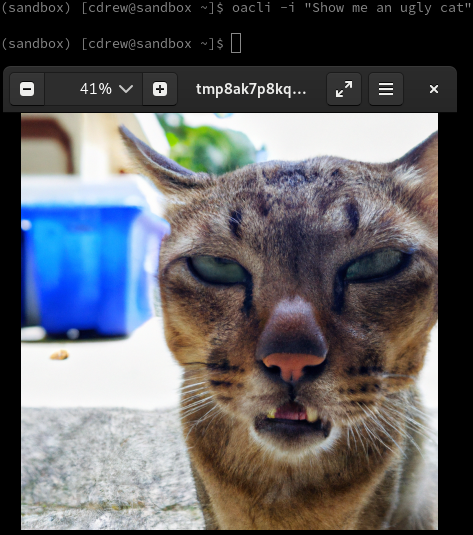
Image
> oacli -i "<some prompt with quotes>"
Python Pillow will bring up and image
Prompt
> oacli "<some prompt with quotes>"
<response from OpenAI>
Settings
Several configuration settings are exposed through environment variables. If they aren't provided, the defaults below will be applied.
# OpenAI Settings
OPENAI_DEFAULT_ENGINE="text-davinci-003"
OPENAI_DEFAULT_TEMPERATURE=.5
OPENAI_DEFAULT_FREQUENCY_PENALTY=0
OPENAI_DEFAULT_PRESENCE_PENALTY=0
OPENAI_DEFAULT_MAX_TOKENS=2048
OPENAI_DEFAULT_IMAGE_NUMBER=1
OPENAI_DEFAULT_IMAGE_SIZE="1024x1024"

# OAclI Settings
OACLI_INPUT_COLOR=Green
OACLI_OUTPUT_COLOR=Red
Examples
Chat
Image
Prompt

1 maintainer

Metadata
1 maintainer
Release files for openacli 0.2
For a detailed explanation of source distributions (sdists) and built distributions (wheels), please see the package formats documentation.
Source distribution (sdist)
| File | Size | Uploaded | Provenance | |
|---|---|---|---|---|
| openacli-0.2.tar.gz | 4.6 kB | Without provenance | Details |
Built distribution (wheel)
| File | Interpreter | ABI | Platform | Reset |
|---|---|---|---|---|
| openacli-0.2-py3-none-any.whl | Python 3 | none | any | Details |
Total release size: 9.8 kB
Release files / openacli-0.2.tar.gz
| Download URL | openacli-0.2.tar.gz |
|---|---|
| Size | 4.6 kB |
| Tags | Source |
|
SHA-256 checksum How to use checksums |
8a0dc7422f6e9364e0177e951d8f93c825ea767e54004288389d04ba980e0bcd
|
|
BLAKE2b-256 checksum How to use checksums |
081e43bb1c87f267cc3f3e1e11e962d4632229a3ae934b40265b4a276f214b71
|
| Upload date | |
|
Uploaded using Trusted Publishing? What is trusted publishing? |
No |
| Uploaded via |
twine/4.0.2 CPython/3.10.9
|
Release files / openacli-0.2-py3-none-any.whl
| Download URL | openacli-0.2-py3-none-any.whl |
|---|---|
| Size | 5.2 kB |
| Tags | Python 3 |
|
SHA-256 checksum How to use checksums |
12a6eb70629b82ca0bda7d03ee626c8f0507fd6d6209f99fd7f3088ad465770c
|
|
BLAKE2b-256 checksum How to use checksums |
1fe241706aeac6fabf9a3305f1a890f0f6c7cced80846c61858f0639a073b822
|
| Upload date | |
|
Uploaded using Trusted Publishing? What is trusted publishing? |
No |
| Uploaded via |
twine/4.0.2 CPython/3.10.9
|
Security for openacli 0.2
Provenance
Provenance describes where a file came from. On PyPI, provenance is shared via attestations, which provide a verifiable record of the build or publishing details. View details, limitations and caveats.
No provenance found
None of the files in this release were uploaded with provenance metadata.
A note on package security
PyPI is a repository for distributing packages, not a service for auditing them. While third-party security researchers and our staff do their best to detect and remove malicious packages, PyPI cannot guarantee the quality, security or suitability of any given package.














