
OpenAdapt Desktop



OpenAdapt Desktop automates repeated data entry in the apps your team already
uses: web apps, electronic medical records (EMRs), insurance portals, desktop
apps, and apps reached over RDP or Citrix. You, or an AI agent, do the task
while OpenAdapt records it. An agent running on your computer can drive the
recording (openadapt-agent serve --authoring) in native Windows apps, through the same Windows input layer replay
uses, and over RDP or Citrix, from the client window's pixels alone. The
recording marks each step as done by the agent or by a person, and a person
accepts it before it's used. A ChatGPT or Claude.ai session that connects
through Desktop guides a person in those apps instead of driving them.
OpenAdapt compiles one or more recordings into a program that runs on your computer
and repeats the task for each item on a list. Before it types, it checks that
the screen shows the right record. After it saves, it reads the record back to
confirm the save, once you've told it how. When something doesn't match, it
stops and asks a person. A healthy run makes no calls to a generative AI model.
It's for teams that type the same fields into the same systems every day, and for the developers and IT staff who set it up for them. This repository holds the desktop app (Tauri and React) and the Python engine it runs locally. The compiler and runtime are in openadapt-flow.
Quick start
To see it work without building the app, run the same sample as the app's See it work on a sample app button. It takes about two minutes and needs Python 3.10, 3.11, or 3.12.
pip install openadapt
openadapt flow tutorial --break-it
It starts a made-up clinic app in a hidden browser, records a task, compiles
it, and runs it twice. The first run saves a note and confirms the save by
reading the record back. The second run uses a backend that drops the save
after the screen says "saved", and OpenAdapt stops instead of reporting
success. The reports are written under tutorials/. The first run downloads
Chromium (about 300 MB).
In the output, system of record means the sample app's database, VERIFIED
means the save was read back, and HALTED means it stopped. A warning that
patient data isn't scrubbed is expected, because the sample's patients are
made up.
There's no signed installer yet, so the desktop app runs from source. Install uv, Rust, Node.js 22, and the Tauri prerequisites for your operating system. Then:
git clone https://github.com/OpenAdaptAI/openadapt-desktop.git
cd openadapt-desktop
uv sync --python 3.12 --extra dev --extra build
npm ci
uv run python scripts/dev_sidecar.py
npm run tauri dev
scripts/dev_sidecar.py connects the app to the engine in your checkout. On
Windows, run it with --frozen to build the packaged engine instead; that
takes several minutes.
How it works
- Show it. Do the task, or let an AI agent do it, on a test record, in the app where you already do it.
- Check it. Confirm what the task changes, how OpenAdapt makes sure it's on the right record, and how it confirms the save. Run one practice item, then approve the task.
- Run it. Paste a list, open a spreadsheet saved as CSV, or type one item. OpenAdapt works through the list. Before each save, it shows you the filled form and waits for you to approve. After each save, it checks the record.
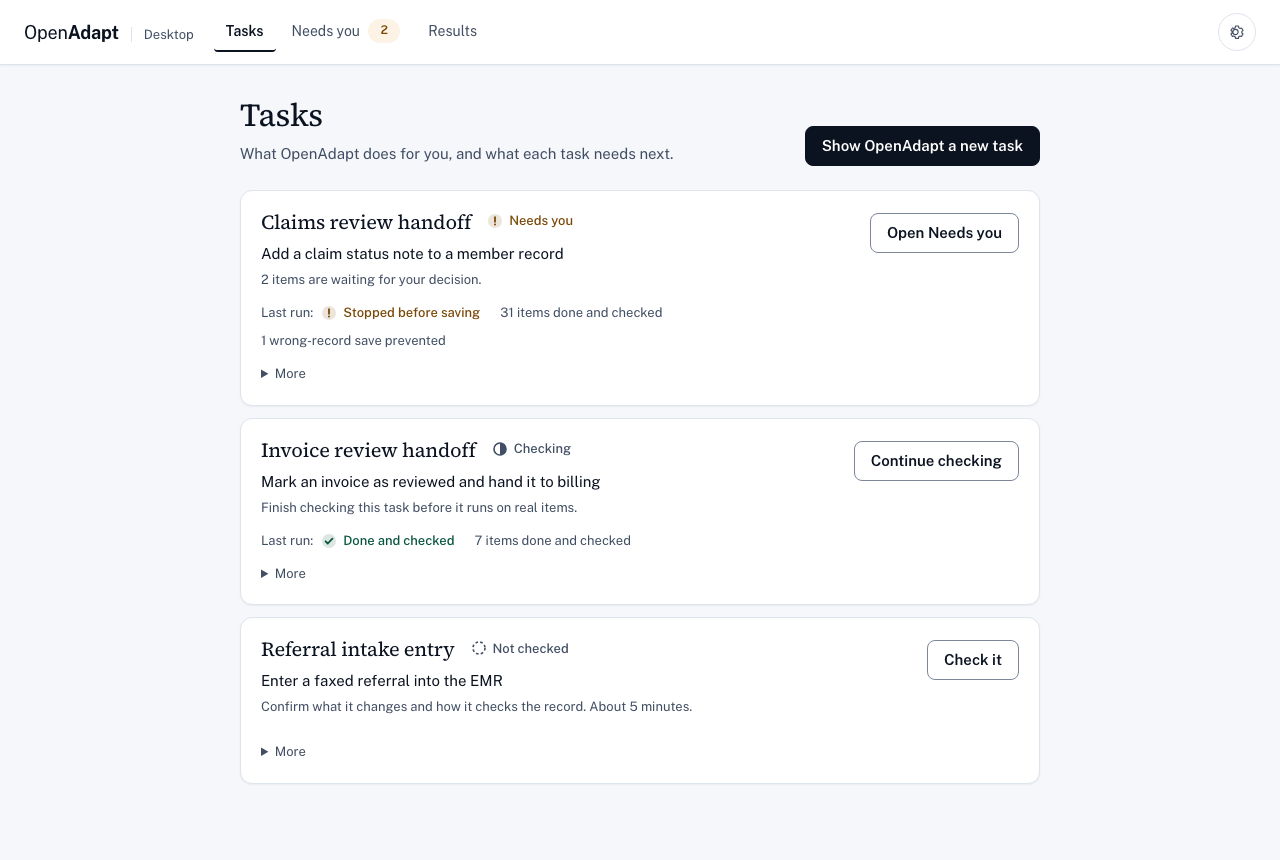
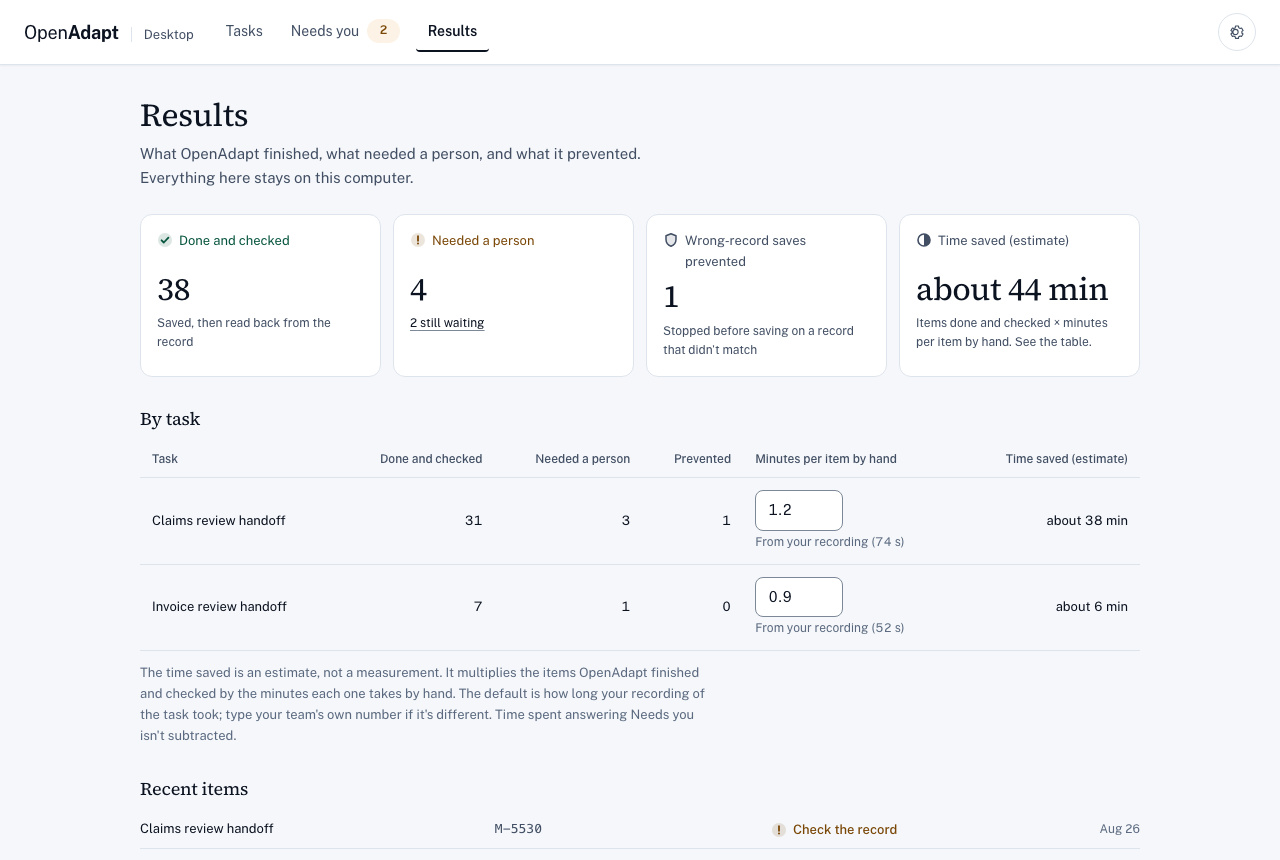
The app has three main tabs. Tasks shows each task's next step. Needs you holds every item OpenAdapt stopped on, each with one question to answer. Results shows what got done and checked, what needed a person, the wrong-record saves it prevented, and an estimate of time saved that shows its own baseline. Settings and the advanced tools are behind the gear menu.
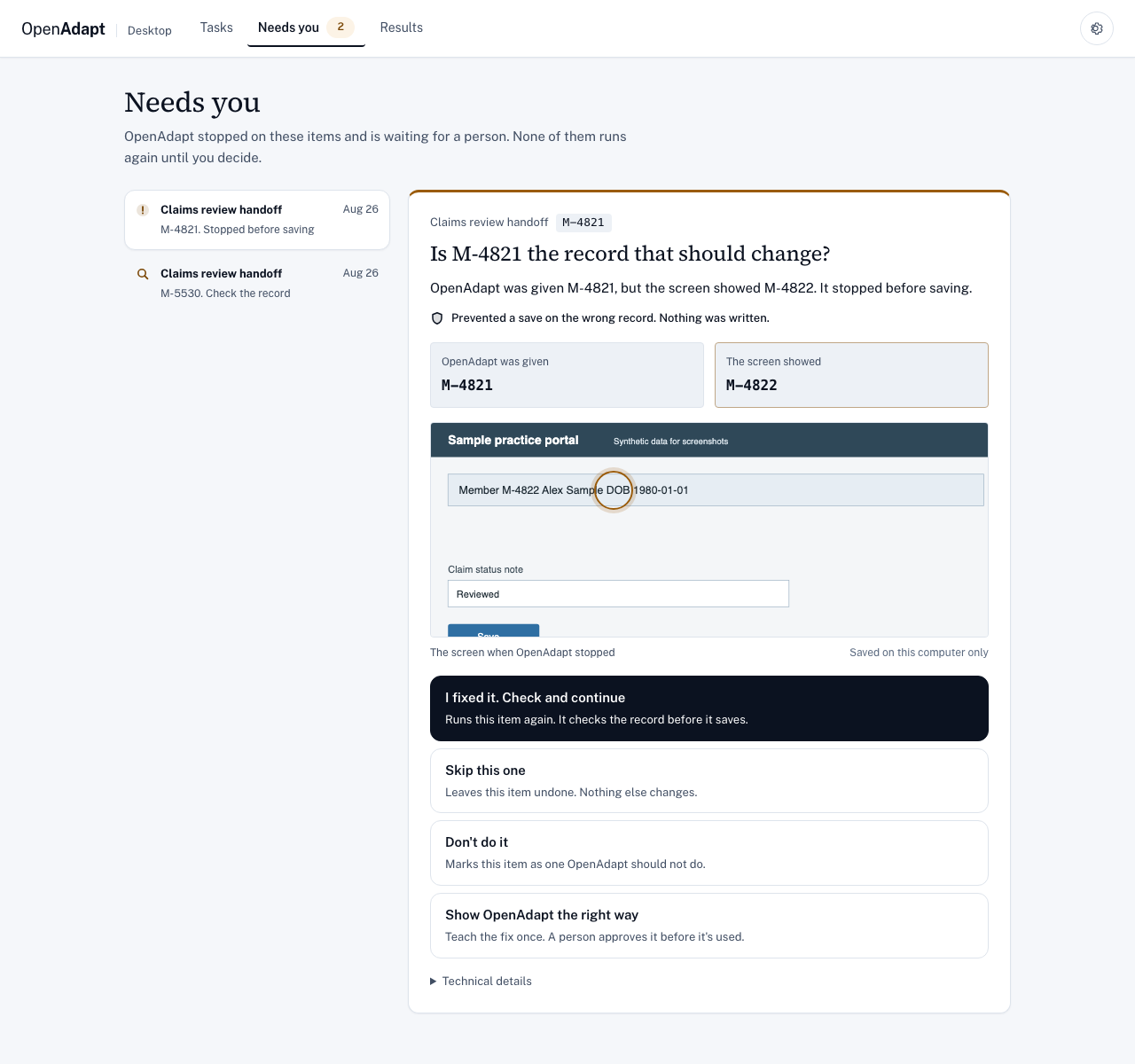
Each item ends with one of these results, taken from the engine's outcome for that run:
| Result | What it means |
|---|---|
| Done and checked | It saved the entry and read the record back to confirm it. |
| Stopped before saving | Something didn't match, so it stopped before changing anything. Nothing was written. |
| Check the record | A save may have gone through. A person checks the record before anything is retried. OpenAdapt never retries it on its own. |
| Finished, not checked | It did the steps but didn't confirm the saved result. |
| Didn't finish | It couldn't complete the task. The result says whether anything could have been written. |
| Didn't start | It refused before it touched the app. Nothing was written. |
The app shows "Nothing was written" only when the engine's outcome proves it. The screenshots use synthetic data from the app's fixture harness.
When the app's screen changes
A recorded browser script, such as one from Playwright codegen, finds each target with one locator and fails when that locator stops matching. OpenAdapt keeps several ways to find each target: the app's structure (the web page's elements or the accessibility tree) when there is one, then the target's appearance, its text, and its position on screen. When a layout, label, or theme changes, the run tries them in that order and continues on a valid match. If nothing matches, it stops at that step instead of clicking something that looks close, and a person can show OpenAdapt the right way from Needs you. OpenAdapt records each fallback as a proposed repair and never changes the task on its own.
In Flow's drift benchmark, a synthetic page of 21 buttons was redrawn with 15 of them moved, relabeled, and re-themed. Every button kept its element ID. Lookup by structure found all 21. Matching on the screen alone found only the 6 that didn't change. On apps with no structure to read, such as a Citrix window, OpenAdapt has only the screen to go on, so a redesign is more likely to stop a run.
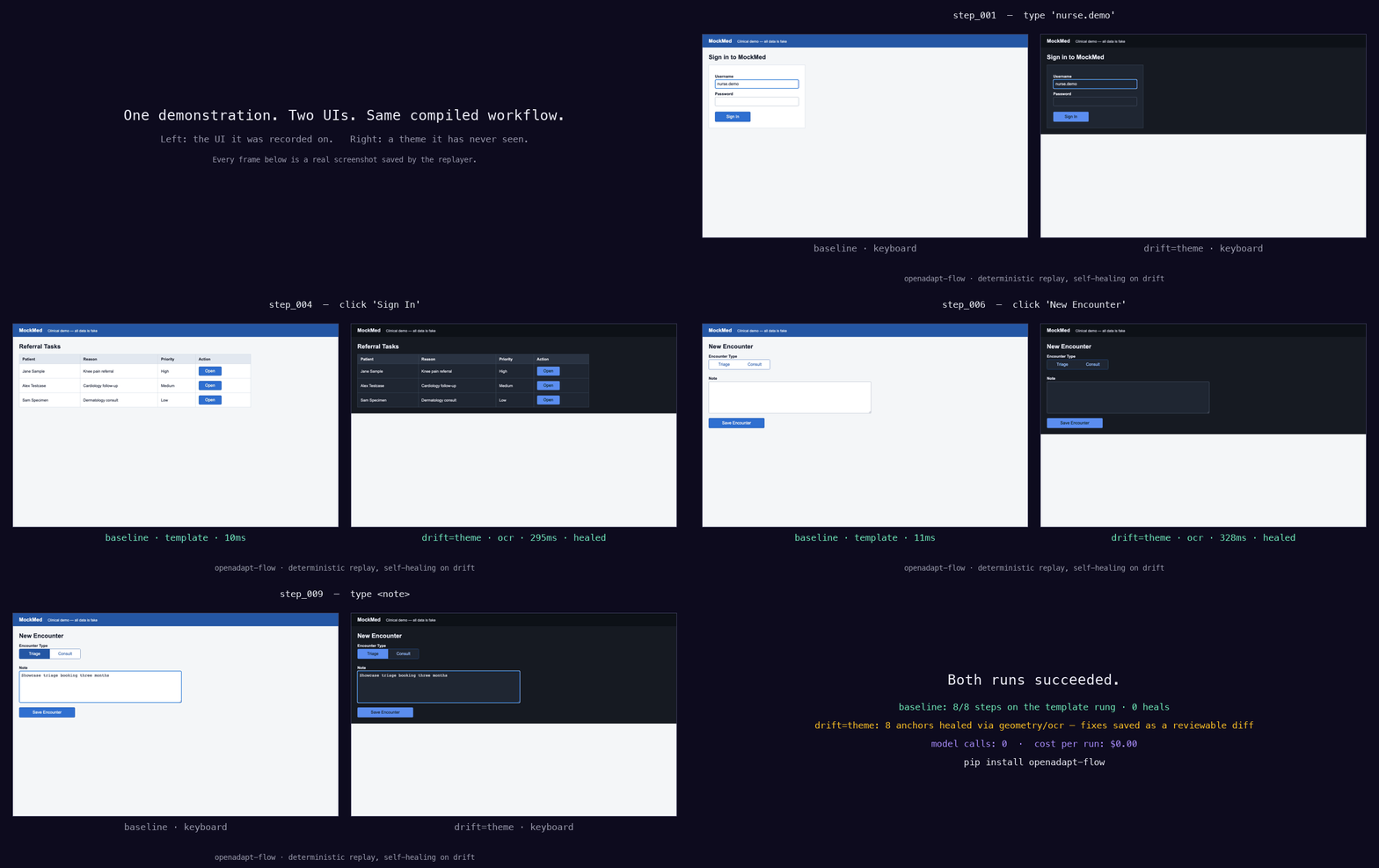
The recording above comes from openadapt-flow, the runtime this app runs. Every frame is a screenshot the replayer saved.
How it confirms a save
The right-record check before typing reads the screen, so it needs no other access. Confirming the save afterwards needs a way to read the record back. Check it asks how for each step that saves:
- From the system's records: an API or database read (REST, GraphQL, FHIR, or SQL), a file, or a document hash. This checks the record from outside the app. IT connects it once per system in the deployment settings file that Run it takes.
- By opening the saved record again on screen, for systems where you have no API or database access. This is a weaker check than an outside read, because it shows only what the app displays.
Without one of these, a completed run shows Finished, not checked and doesn't count as done.
Answering a stop from your phone
When a run stops and needs a person, you can answer from your phone. The app pairs the phone with a one-time QR code and a matching code. The phone shows what the run stopped on, as far as your settings allow, and only the choices allowed at that point. Your answer goes back to the computer running the task, which checks the live app again before it acts. If that check fails, the run stays paused.
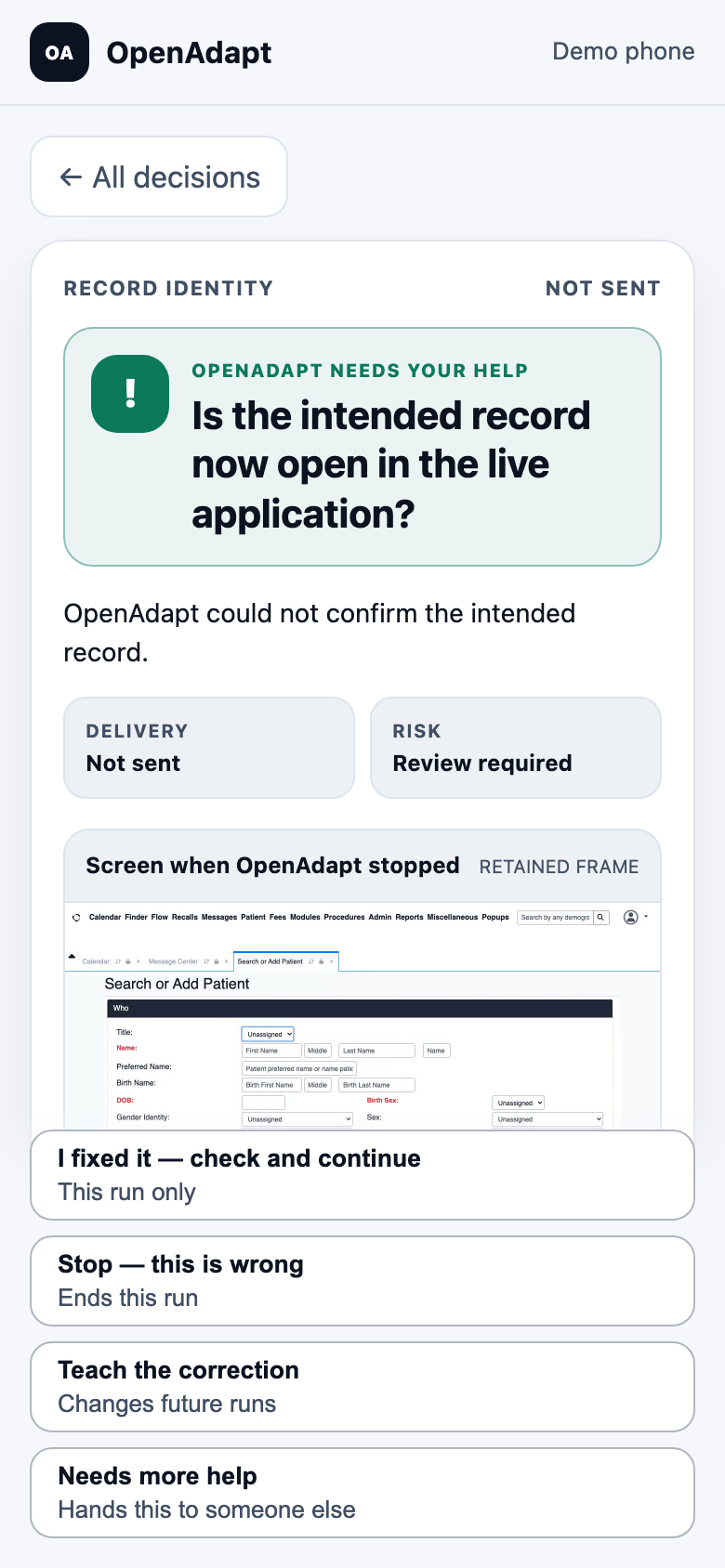
docs/DECISION_PORTAL.md covers pairing, what the phone can see, and how a decision is applied.
Engine command line
The engine also runs without the app. In a source checkout, put uv run in
front of each command. From PyPI, with Python 3.11 or 3.12, install the exact
Flow release this Desktop was built for alongside it. The engine runs only that
release, never another openadapt-flow it finds on your PATH, and doctor
says which one it found:
pip install openadapt-desktop "openadapt-flow[browser,console]==2.1.0"
openadapt-desktop doctor
To run another Flow, such as a source checkout, set
OPENADAPT_DESKTOP_FLOW_BIN to its openadapt-flow program. doctor then
reports it as an unpinned developer override. The installed app ignores this
setting.
| Command | What it does |
|---|---|
doctor, capabilities |
Check dependencies, and which app types (browser, Windows, macOS, Linux, RDP, Citrix) this computer can drive |
record, list, info |
Record a task and inspect recordings |
compile, qualify, replay, run |
Compile a recording, fill in its checks from the recording, replay it, or run it with a deployment settings file |
scrub, review, approve, dismiss |
Remove personal data from a recording and review it before anything leaves the computer |
login, credential, rotate, push, report-break |
Sign in to OpenAdapt Cloud, manage the stored sign-in, send a recording or task, or report a stopped run |
storage, health, cleanup, config |
Inspect and maintain local storage and settings |
upload, backends |
Older upload commands. upload --backend hosted_ingest runs push; upload to your own S3 storage is turned off in this release. |
Recordings stay on your computer unless you choose to send one to OpenAdapt
Cloud with push.
Develop
uv sync --python 3.12 --extra dev --extra build
uv run pytest tests -q
uv run ruff check openadapt_desktop tests scripts
npm run test:ui
Recording needs the operating-system permissions that openadapt-capture asks for:
uv run openadapt-desktop record --task "Inspect capture path"
The app and the engine are two processes:
Desktop app (Tauri + React)
        |
        | JSON lines over the engine's stdin and stdout
        v
Python engine (recording, review, sign-in, sync)
        |  ^
        |  | token-protected local socket for openadapt-tray
        |
        | separate process
        v
openadapt-flow: record -> compile -> check -> run -> stop or repair
openadapt_desktop/  Python engine: recording, review, sign-in, sync, and the Flow bridge
src-tauri/          Rust shell: starts and restarts the engine, tray socket wiring
src/                React screens and the engine client
scripts/            Build, release, screenshot, and development scripts
tests/              Python unit and end-to-end tests
DESIGN.md is a historical design record. Where it disagrees with this file or with openadapt-flow, this file and openadapt-flow are current.
Limits
- There's no signed installer yet. The next macOS and Windows packages wait on code-signing certificates, so run the app from source for now.
- Lists run one item at a time, as one Flow process per item.
- Each app type needs its own driver. Windows apps run through an agent from
openadapt-flow on the Windows computer, and Citrix needs the Citrix Workspace
app.
openadapt-desktop capabilitiessays what's missing on your computer. - Run it reads CSV and TSV files, not
.xlsx. - The practice run in Check it saves for real, so use a test record.
- Phone pairing identifies the device, not a named person.
Release status, signing, CI evidence, and data handling for security and IT reviewers are in docs/COMPLIANCE.md.
More documentation
- The operator screens: what each screen calls in the engine and the safety rules it keeps
- Implementation status, area by area
- Which release to download
- OpenAdapt documentation
License
1 maintainer

Metadata
1 maintainer
Release files for openadapt-desktop 0.18.0
For a detailed explanation of source distributions (sdists) and built distributions (wheels), please see the package formats documentation.
Source distribution (sdist)
| File | Size | Uploaded | |
|---|---|---|---|
| openadapt_desktop-0.18.0.tar.gz | 2.4 MB | Details |
Built distribution (wheel)
| File | Interpreter | ABI | Platform | Reset |
|---|---|---|---|---|
| openadapt_desktop-0.18.0-py3-none-any.whl | Python 3 | none | any | Details |
Total release size: 2.7 MB
Release files / openadapt_desktop-0.18.0.tar.gz
| Download URL | openadapt_desktop-0.18.0.tar.gz |
|---|---|
| Size | 2.4 MB |
| Tags | Source |
|
SHA-256 checksum How to use checksums |
a63ce2d39c57dbd229f647076a8abee958709227e01d3787194489f299fb2821
|
|
BLAKE2b-256 checksum How to use checksums |
e92facc3b2f9471ec7e4e9809f71b8962b8d8f0e3e7d64565221e92fd5e347a5
|
| Upload date | |
|
Uploaded using Trusted Publishing? What is trusted publishing? |
Yes |
| Uploaded via |
twine/7.0.0 CPython/3.13.14
|
Provenance
Provenance describes where a file came from. On PyPI, provenance is shared via attestations, which provide a verifiable record of the build or publishing details. View details, limitations and caveats.


PyPI Publish Attestation
PyPI verified that this artifact, at this checksum, originated from the publisher listed below.
Signed by GitHub Actions, verified by PyPI on Oct 17, 2026.
Transparency logRelease files / openadapt_desktop-0.18.0-py3-none-any.whl
| Download URL | openadapt_desktop-0.18.0-py3-none-any.whl |
|---|---|
| Size | 344.5 kB |
| Tags | Python 3 |
|
SHA-256 checksum How to use checksums |
6b522c8ad3fb38597535354a6d16df1c9f3abb2a29f05eb2de5fe8880e99121f
|
|
BLAKE2b-256 checksum How to use checksums |
3edc9cf9c81895913570643d531fcd22f6d3449786477da2feb16a72249c0fb0
|
| Upload date | |
|
Uploaded using Trusted Publishing? What is trusted publishing? |
Yes |
| Uploaded via |
twine/7.0.0 CPython/3.13.14
|
Provenance
Provenance describes where a file came from. On PyPI, provenance is shared via attestations, which provide a verifiable record of the build or publishing details. View details, limitations and caveats.
PyPI Publish Attestation
PyPI verified that this artifact, at this checksum, originated from the publisher listed below.
Signed by GitHub Actions, verified by PyPI on Oct 17, 2026.
Transparency log













