
openadapt-privacy



Remove names, email addresses, phone numbers, SSNs, card numbers, medical record numbers, and other personal or health data from GUI recordings before you store or share them. It scrubs typed text, window titles, accessibility trees, event payloads, and screenshots. Detection uses Microsoft Presidio with a local spaCy model, and scrubbing runs on your machine.
Use it if you record desktop or browser sessions for test automation, robotic
process automation (RPA), or training data. It also includes
openadapt-privacy-scan, a CI check that runs without Presidio and fails when a
repository holds health-data identifiers or recording files.
Quick start
pip install "openadapt-privacy[presidio]"
python -m spacy download en_core_web_sm
from openadapt_privacy import PresidioScrubbingProvider

scrubber = PresidioScrubbingProvider()
print(scrubber.scrub_text("Contact John Smith at john.smith@example.com or 555-123-4567"))
# Contact <PERSON> at <EMAIL_ADDRESS> or <PHONE_NUMBER>
If the spaCy model or a Presidio package is missing, the scrubber raises
PrivacyModelUnavailable or ImportError instead of returning text. It doesn't
fall back to another model, and it never downloads a model at run time.
You need Python 3.10 or later. Screenshot scrubbing also needs the
Tesseract OCR binary on your
PATH, for example from brew install tesseract or
apt-get install tesseract-ocr.
Scrub element trees and event payloads
scrub_dict walks nested dicts and lists and scrubs the string values of
known keys:
from openadapt_privacy import PresidioScrubbingProvider, scrub_dict

scrubber = PresidioScrubbingProvider()
scrub_dict(
    {
        "title": "User Profile - John Smith",
        "tooltip": "Click to contact john@example.com",
        "value": "Call 555-123-4567",
        "coordinates": {"x": 100, "y": 200},
    },
    scrubber,
)
# {'title': 'User Profile - <PERSON>',
#  'tooltip': 'Click to contact <EMAIL_ADDRESS>',
#  'value': 'Call <PHONE_NUMBER>',
#  'coordinates': {'x': 100, 'y': 200}}
Only the keys in config.SCRUB_KEYS_HTML are scrubbed, and non-string values
pass through unchanged. Pass scrub_all=True to scrub every string.
Recorded keystrokes often arrive one character at a time, as in
j-o-h-n-@-e-x-a-m-p-l-e-.-c-o-m, where no detector can see the address. Under
the text and canonical_text keys, the scrubber joins a value in that form,
scrubs it, and splits it again. Prose under the same keys is scrubbed as prose:
scrub_dict({"text": "Email: john@example.com"}, scrubber)
# {'text': 'Email: <EMAIL_ADDRESS>'}

scrub_dict({"text": "-".join("john@example.com")}, scrubber)
# {'text': '<-E-M-A-I-L-_-A-D-D-R-E-S-S->'}
Pass separated_keys=["keys"] to use your own field name, or
separated_keys=[] to turn keystroke handling off.
Scrub screenshots
from PIL import Image
from openadapt_privacy import PresidioScrubbingProvider

scrubber = PresidioScrubbingProvider()
scrubber.scrub_image(Image.open("screenshot.png")).save("screenshot_scrubbed.png")
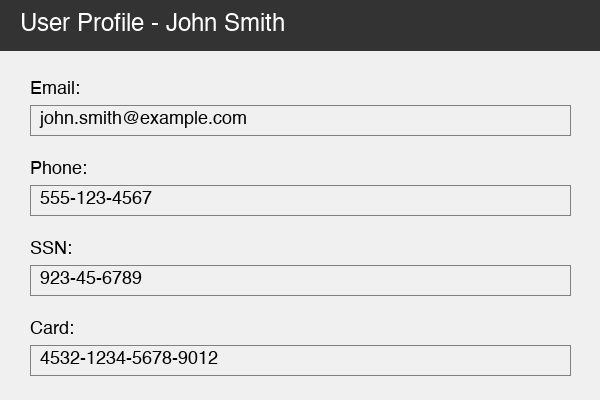
Tesseract finds the text, Presidio classifies it, and each detected region is
filled with solid red. scripts/generate_demo_images.py produced this output:
| Before | After |
|---|---|
 |
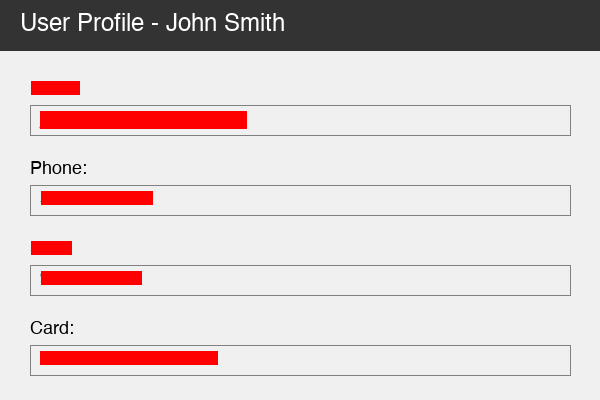 |
The name in the dark title bar is still visible because Tesseract did not read light text on a dark background. See Limits.
Scrub a whole recording
Recording.scrub scrubs the task description, every action, and every
screenshot in one call:
from openadapt_privacy import DictRecordingLoader, PresidioScrubbingProvider

loader = DictRecordingLoader()
recording = loader.load_from_dict({
    "task_description": "Send email to John Smith at john@example.com",
    "actions": [
        {"id": 1, "action_type": "click", "text": "Compose", "timestamp": 1000},
        {"id": 2, "action_type": "type", "text": "-".join("john@example.com"), "timestamp": 2000},
    ],
})
scrubbed = recording.scrub(PresidioScrubbingProvider())
scrubbed.task_description
# 'Send email to <PERSON> at <EMAIL_ADDRESS>'
A screenshot must have its pixels loaded in Screenshot.image. One that has
only a path raises UnscrubbedScreenshot instead of passing through
unredacted; pass scrub_images=False to leave screenshots out on purpose. The
scrubbed recording's metadata["_openadapt_privacy"] records the provider, the
package version, and a hash of the settings used.
DictRecordingLoader also reads and writes JSON files with load and save.
For your own storage, subclass RecordingLoader and implement load and
save, and load_and_scrub works too:
from openadapt_privacy import Recording, RecordingLoader

class SQLiteRecordingLoader(RecordingLoader):
    def load(self, source: str) -> Recording: ...
    def save(self, recording: Recording, destination: str) -> None: ...
Block identifiers in CI
openadapt-privacy-scan checks the files in a directory for health-data
identifiers (Ontario health card numbers, chart IDs, and MRNs), remote-desktop
hostnames, UNC paths, and recording, screenshot, or database files. In a git
repository it checks tracked files and untracked files that aren't ignored; it
doesn't read the history. It uses only the Python standard library, so the base
package is enough:
pip install openadapt-privacy
openadapt-privacy-scan --self-test   # check that every rule fires on planted fixtures
openadapt-privacy-scan --root .      # scan the tree
The scan exits with:
0when it read every file and no rule fired.1when a rule fired or a file couldn't be read.2when the scan couldn't run: the root is missing or unreadable, a directory under it can't be listed, or it has no files. Pass--allow-emptyif an empty tree is expected.
The same check is available from Python. Importing openadapt_privacy.scan
does not load Presidio, spaCy, or Pillow:
from pathlib import Path
from openadapt_privacy.scan import scan_tree

hits = scan_tree(Path("."))   # for example ["mrn-assigned\tnotes.txt:3"]
openadapt_privacy/gitleaks.toml and openadapt_privacy/phi-patterns.txt
carry the same text patterns for gitleaks and git-secrets. They don't include
the file-type checks.
Configuration
Settings live on the module-level config object. Change them before you
scrub:
from openadapt_privacy.config import config

config.SCRUB_PRESIDIO_IGNORE_ENTITIES = ["DATE_TIME"]  # keep dates
config.SCRUB_FILL_COLOR = 0x000000                     # black boxes; 0xBBGGRR, default red
config.SCRUB_KEYS_HTML = [*config.SCRUB_KEYS_HTML, "label"]
The fields are SCRUB_CHAR, SCRUB_LANGUAGE, SCRUB_FILL_COLOR,
SCRUB_KEYS_HTML, SCRUB_KEYS_SEPARATED, ACTION_TEXT_NAME_PREFIX,
ACTION_TEXT_NAME_SUFFIX, ACTION_TEXT_SEP, SCRUB_CONFIG_TRF,
SCRUB_PRESIDIO_IGNORE_ENTITIES, and SPACY_MODEL_NAME. The entity types come
from Presidio (PERSON, EMAIL_ADDRESS, PHONE_NUMBER, US_SSN,
CREDIT_CARD, DATE_TIME, LOCATION, IP_ADDRESS, URL, and others), plus
ORGANIZATION from spaCy and MEDICAL_RECORD_NUMBER and STREET_ADDRESS from
this package.
Limits
- The test set is 27 synthetic identifiers in
tests/test_phi_recall.py. Every one must be redacted with the right entity type. The data is synthetic, not clinical, so measure recall on your own data before you rely on it. - English only, with the
en_core_web_smspaCy model. - Detection depends on context. A card number that fails the Luhn check is not
labeled
<CREDIT_CARD>, and other detectors decide how much of it is redacted.4532-1234-5678-9012becomes<DATE_TIME>, but4111 1111 1111 1112keeps its first eight digits. If your code acts on placeholder names, check them against your own data. - Street addresses are found only after a label such as
Address:orMail to. - In screenshots, text that Tesseract can't read is not redacted.
openadapt-privacy-scanmatches regular expressions. It does not claim clinical validation.
If you deploy this where recordings can hold protected health information, read docs/COMPLIANCE.md for the fail-closed behavior, the provenance record each scrub writes, and the review steps around it.
Development
git clone https://github.com/OpenAdaptAI/openadapt-privacy
cd openadapt-privacy
uv sync --extra dev --extra presidio
uv pip install pip    # spacy download installs the model with pip
uv run python -m spacy download en_core_web_sm
uv run pytest
License
MIT. openadapt-privacy is part of OpenAdapt and works without it.
1 maintainer

Metadata
1 maintainer
Release files for openadapt-privacy 1.1.2
For a detailed explanation of source distributions (sdists) and built distributions (wheels), please see the package formats documentation.
Source distribution (sdist)
| File | Size | Uploaded | |
|---|---|---|---|
| openadapt_privacy-1.1.2.tar.gz | 81.1 kB | Details |
Built distribution (wheel)
| File | Interpreter | ABI | Platform | Reset |
|---|---|---|---|---|
| openadapt_privacy-1.1.2-py3-none-any.whl | Python 3 | none | any | Details |
Total release size: 113.6 kB
Release files / openadapt_privacy-1.1.2.tar.gz
| Download URL | openadapt_privacy-1.1.2.tar.gz |
|---|---|
| Size | 81.1 kB |
| Tags | Source |
|
SHA-256 checksum How to use checksums |
d90287edaa13470955f15d5f6eeb37b075678aeb55de324f8b8207682009bcc2
|
|
BLAKE2b-256 checksum How to use checksums |
2c67c5ab780dd460b2830b35ac5ed763f5b3e565ba63d3fcbb5fc2e1a260e256
|
| Upload date | |
|
Uploaded using Trusted Publishing? What is trusted publishing? |
Yes |
| Uploaded via |
twine/7.0.0 CPython/3.13.14
|
Provenance
Provenance describes where a file came from. On PyPI, provenance is shared via attestations, which provide a verifiable record of the build or publishing details. View details, limitations and caveats.


PyPI Publish Attestation
PyPI verified that this artifact, at this checksum, originated from the publisher listed below.
Signed by GitHub Actions, verified by PyPI on Oct 14, 2026.
Transparency logRelease files / openadapt_privacy-1.1.2-py3-none-any.whl
| Download URL | openadapt_privacy-1.1.2-py3-none-any.whl |
|---|---|
| Size | 32.6 kB |
| Tags | Python 3 |
|
SHA-256 checksum How to use checksums |
6e542b2fea44bdf8872430687946ec805fef22dc7d228a56a1e65871beebe47a
|
|
BLAKE2b-256 checksum How to use checksums |
27ee8ee2ae415bd5364268252ebfdcf672a32f68078f94df70b15bf77d7766c3
|
| Upload date | |
|
Uploaded using Trusted Publishing? What is trusted publishing? |
Yes |
| Uploaded via |
twine/7.0.0 CPython/3.13.14
|
Provenance
Provenance describes where a file came from. On PyPI, provenance is shared via attestations, which provide a verifiable record of the build or publishing details. View details, limitations and caveats.
PyPI Publish Attestation
PyPI verified that this artifact, at this checksum, originated from the publisher listed below.
Signed by GitHub Actions, verified by PyPI on Oct 14, 2026.
Transparency log













