
OpenAdapt






Automate the work your systems still make people do.
OpenAdapt provides verified automation from demonstration. Show it a repeated
task and it compiles the demonstration into an inspectable, deterministic
program for browser, Windows, macOS, Linux, RDP, or Citrix/VDI. Healthy runs
make no generative-model calls. OpenAdapt checks identities before
consequential actions and checks the declared result before it reports
VERIFIED.
OpenAdapt fits repeated work where the interface is unavoidable and the result needs proof. If the required evidence is missing or disagrees with the live state, the run stops for review.
Website · Documentation · Desktop downloads · OpenAdapt Cloud · OpenAdapt Execute · Qualify a workflow
Repository role: this is the flagship OpenAdapt project, the source of
pip install openadapt, and the stable community entry point. The compiler and governed runtime are implemented inopenadapt-flow. This repository provides the unifiedopenadaptCLI and compatibility surface, not a second engine.
Built for qualified production workflows. Current OpenAdapt admission state: Not actively admitted. The exact signed ledger has no active admission for this target. The path to Production requires active signed admissions for all seven product targets and an active signed, expiring, revocable workflow admission for the exact compiled workflow version. The workflow admission binds the organization and workflow identity; bundle version and digest; admitted runtime release; application and environment; input, action, identity, effect, and policy contracts; evidence authority; and its issue, expiry, and revocation state. Qualification requires at least three trials for each task and condition. A closed result schema must report silent incorrect success and over-halt. Any bound change requires a new qualification. Check the live signed Production record.
Try it locally
OpenAdapt requires Python 3.10–3.12. Install the complete local quickstart:
python -m pip install --upgrade openadapt
openadapt quickstart
The base package includes the browser driver for the tutorial. It downloads its matching Chromium build only when the first browser action starts. You do not need an account, an API key, or a second package extra.
For an isolated command-line installation, use the public installer:
curl -fsSL https://openadapt.ai/install.sh | sh
Then run the complete bundled tutorial with one command:
openadapt quickstart
The tutorial records and compiles a task in MockMed (a synthetic
practice-management fixture), certifies it with the
shipped clinical-write policy, and runs it under the Standard profile. A
separate read-only API confirms the saved record outside the screen that
performed the write. The healthy run returns VERIFIED with no model or Cloud
call.
You now have:
openadapt-quickstart/recording/: the demonstrated interaction and retained target evidenceopenadapt-quickstart/bundle/: the inspectable compiled workflowopenadapt-quickstart/run/REPORT.md: the ordered actions, evidence, outcome, and any halt reasonopenadapt-quickstart/run/receipt.json: the privacy-safe local receipt for the synthetic verified run
Inspect the program and its deployment gaps:
openadapt flow visualize openadapt-quickstart/bundle --out graph.html
openadapt flow lint openadapt-quickstart/bundle
The bundled workflow is a tutorial, not a production certification. Qualifying a real workflow adds its application boundary, action risks, identities, effect verifiers, fault cases, and deployment policy. Continue with the five-minute walkthrough.
Record your workflow
The base package includes the Playwright driver for the bundled tutorial. Chromium downloads only when the first browser action starts. Native and remote workflows do not start or download Chromium:
openadapt flow record --backend web --url https://your-app.example --out rec
openadapt flow compile rec --out bundle --name my-workflow
openadapt flow replay bundle --url https://your-app.example --run-dir run
The first browser action downloads its matching Chromium build once. A native desktop, RDP, or Citrix workflow never downloads or imports it.
Install only the capabilities needed for native or remote work:
python -m pip install "openadapt[capture]"          # local human demonstration
python -m pip install "openadapt[capture,windows]"  # Windows UI Automation
python -m pip install "openadapt[capture,macos]"    # macOS Accessibility
python -m pip install "openadapt[capture,linux]"    # Linux AT-SPI
python -m pip install "openadapt[capture,rdp]"      # RDP transport
python -m pip install "openadapt[privacy]"          # PII/PHI scrubbing
For the visual authoring and review experience, install OpenAdapt Desktop.
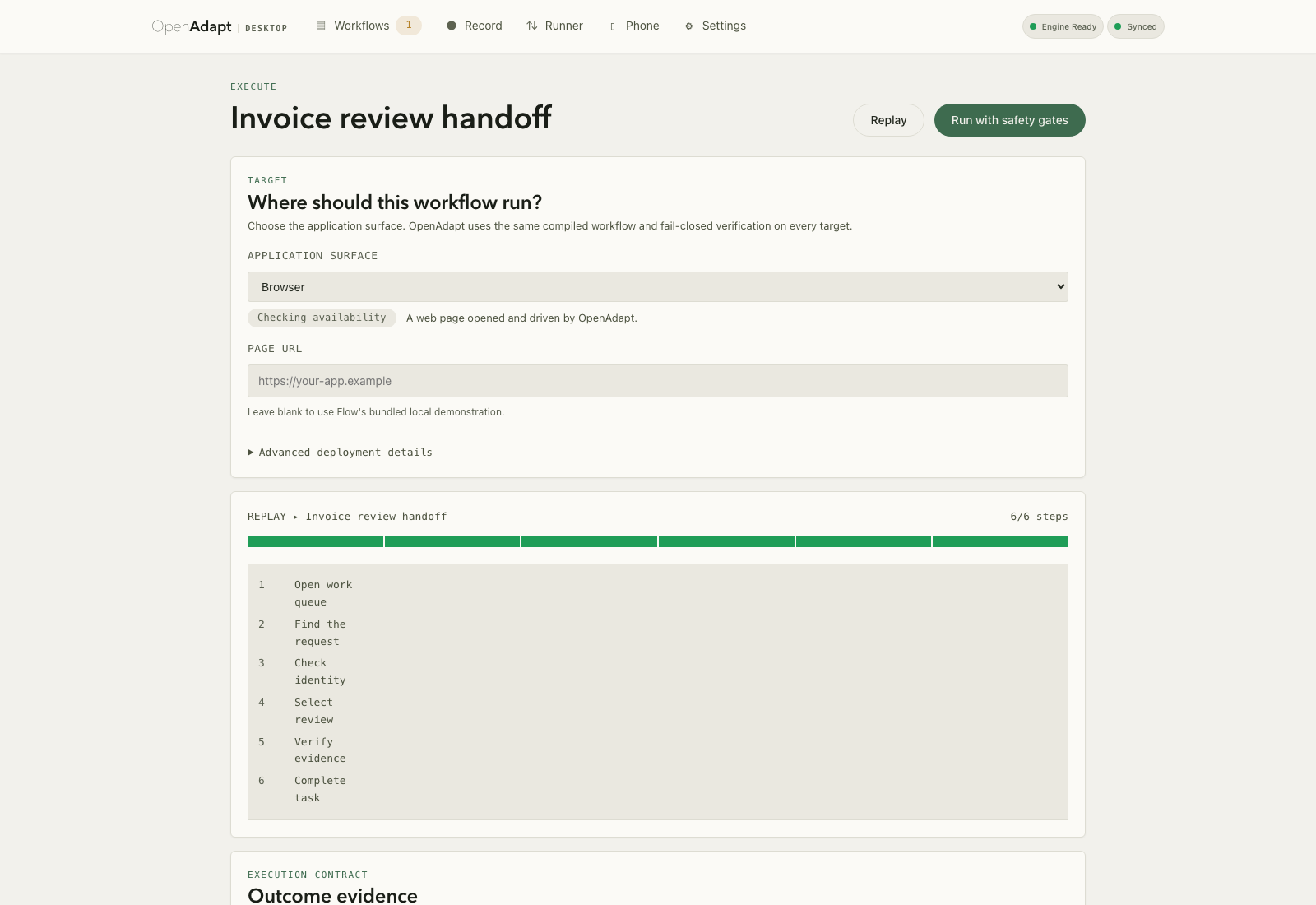
Image provenance: headless synthetic fixture from Desktop PR #93 commit 1f50259ffb052776742b284a493eb9c735caa122; no live run, engine sidecar, account, customer data, or physical input. SHA-256: 5616f0b0812a5e366f58e448689600e16eeab234aaf92ec6d49133efa0be33ee. The final release hash will be updated after Desktop 0.15.
What the runtime checks
Verified business effects
A click succeeding is not proof that the intended transaction committed.
OpenAdapt separates action delivery from outcome verification. Workflows can
bind consequential writes to an independent interface, a separate read-only
session, or persisted-state reacquisition before reporting VERIFIED.
Fail-closed execution
Before a consequential action, the runtime can check authorization, workflow state, record identity, target uniqueness, and the fresh application view. Afterward it waits for settled state and evaluates the declared effect. If the contract cannot be established, it returns evidence and halts.
Complete run outcomes
Every terminal run records what the runtime knows about the business effect:
| Outcome | Meaning |
|---|---|
VERIFIED |
Every declared effect and collateral-effect check passed at the required evidence tier. This is the only production success. |
HALTED_BEFORE_EFFECT |
The run stopped and positive evidence established that no consequential effect occurred. |
RECONCILIATION_REQUIRED |
Delivery or persistence is uncertain, conflicting, or temporarily unverifiable. The runtime never blind-retries it. |
FAILED_PLATFORM |
An OpenAdapt platform failure occurred before any possible business effect. |
CANCELED |
The run was canceled before any business effect. |
REJECTED_POLICY |
Authorization, identity, qualification, or environment policy refused execution before any effect. |
COMPLETED_UNVERIFIED |
A Demo run completed without production-grade effect evidence. |
ROLLED_BACK |
A detected duplicate or collateral write was compensated and re-verified. |
These terminal outcomes are not interchangeable. A resumed
RECONCILIATION_REQUIRED run must first reacquire and reconcile the live state.
Authorized human decisions
A halted run can send one signed task to the OpenAdapt phone view. The task can ask about record identity, target ambiguity, a required human step, a saved result, uncertain delivery, or an optional step. The phone shows only the actions that the current sealed pause capability permits. It does not click the application or declare success.
After an answer, the customer-controlled runner reads the live application again. It checks the current pause, session, workflow state, identity, target, and effect requirements before it continues. Protected screenshots stay on the runner. The hosted path carries closed status values and counts; a customer-run local portal can show the full evidence inside the customer's boundary.
Try the interactive mobile decision demo
with synthetic application data. A domain label in the demo comes from that
fixture. A production workflow uses the reviewed entity class in its exact
qualification contract, or the neutral record or item label.
Deterministic healthy runs
The compiler retains structural, accessibility, visual, OCR, spatial, and transition evidence from the demonstration. The runtime uses the strongest signals available on each surface. A generative model may propose a governed repair when explicitly allowed, but it is not on the healthy execution path.
Governed repair
Repairs are versioned changes, not permission to improvise. Candidate repairs can be reviewed, tested against the workflow’s qualification contract, promoted, and rolled back.
One workflow model, multiple surfaces
OpenAdapt keeps portable workflow intent separate from environment-specific bindings:
| Product family | Execution surfaces | Strongest available evidence |
|---|---|---|
| Browser | Chromium-based web applications | DOM, accessibility, visual, OCR |
| Native desktop | Windows, macOS, Linux | UI Automation, Accessibility, AT-SPI, visual |
| Remote applications | RDP, Citrix Workspace, VDI | External pixels, OCR, anchors, keyboard, mouse |
Remote execution operates from a customer-controlled runner through the visible client. It does not require OpenAdapt software inside the remote session. Every workflow is qualified against its exact application, version, environment, identity contract, and effect verifier rather than inheriting a blanket platform claim.
Each qualification binds the exact surface, application, version, environment, identity contract, and effect verifier:
| Substrate | Evidence available to a qualified workflow |
|---|---|
| Browser (web) | DOM, accessibility, visual, OCR, field geometry, and source-time secret exclusion |
| Native desktop (Windows, macOS, Linux) | Visual, OCR, and local window scope, plus adapter-supplied UI Automation, Accessibility, or AT-SPI evidence when present |
| Remote display (RDP) | External pixels, OCR, anchors, keyboard, mouse, and fresh-frame verification |
| Citrix / VDI | External pixels, OCR, anchors, keyboard, mouse, and deployment-bound verification |
See the substrate model, qualification evidence, and CLI reference for the full contracts.
Local, customer-controlled, or managed
| Operating model | Best for | Where application data and execution live |
|---|---|---|
| Local / self-hosted | Community use and local automation | Your machine or infrastructure |
| Customer-controlled | Sensitive data, native apps, RDP, Citrix, private networks | Your declared boundary; Cloud can coordinate approved metadata and artifacts |
| Managed execution | Approved browser and non-sensitive workflows | OpenAdapt-managed runners and control plane |
Raw recordings and live observations stay local by default. Artifacts cross a boundary only through explicit sanitization and exact-byte approval. Review the trust center before choosing a deployment.
The local launcher, compiler/runtime, Desktop application, substrate adapters, verification interfaces, and basic qualification tools are MIT licensed. OpenAdapt Cloud is the commercial multi-tenant control plane for managed operation, fleet governance, billing, and enterprise integrations. Local safety-critical verification is not paywalled.
OpenAdapt Execute for partners
OpenAdapt Execute is the private partner
service for software and service providers that need to complete an authorized
transaction in an application they cannot directly integrate with. The partner
supplies structured input and business authorization. OpenAdapt runs the exact
qualified workflow in the customer-controlled environment, verifies the
declared business effect, and returns an asynchronous receipt with VERIFIED
or a precise non-success outcome.
OpenAdapt Execute starts with one named transaction and one qualified customer environment. It is a private pilot service, not a public self-service API. See the OpenAdapt Execute guide for the partner contract and qualification process.
Evidence
| Evidence | Result |
|---|---|
| Public OpenEMR reference workflow | 19/20 effect-verified runs (run 20 was a safe halt under the corrected saved-row oracle), 39.2s median, 0 model calls |
| Heart-care RVU audit customer case | Approximately $75,000/year in recovered billables and several hours of monthly audit work saved |
Read the benchmark method and comparison and the RVU audit case study. Results belong to their named task and environment; workflow qualification defines what can be claimed for a new deployment.
Project map
- This repository: installer, unified CLI, release compatibility, and stable project URL
openadapt-flow: canonical compiler, governed runtime, CLI implementation, and conformance testsopenadapt-capture: native screen, mouse, keyboard, timing, window-scope, and media capture component used by the Flow desktop recording pathopenadapt-privacy: local sanitization and review mechanisms for approved derivatives- Documentation: installation, workflow authoring, qualification, operation, deployment, and reference material
- Desktop: native record, inspect, qualify, execute, and review application
The pre-1.0 monolith remains available under legacy/ for migration
history. New compiler and runtime development belongs in openadapt-flow.
Research and legacy history
These surfaces are preserved for continuity and are not part of the supported product. None of them are required to record, compile, replay, or verify a workflow, and the compiler makes no generative-model calls on its healthy path.
Research packages. A separate research line studies whether human demonstrations can improve the accuracy of general computer-use models. It is a different question from compiling one demonstration into a deterministic script.
| Package | Research focus | Repository |
|---|---|---|
openadapt-ml |
Training and inference for multimodal GUI-action models | openadapt-ml |
openadapt-evals |
Benchmark evaluation for GUI agents | openadapt-evals |
openadapt-retrieval |
Multimodal demonstration retrieval | openadapt-retrieval |
openadapt-grounding |
UI element localization / grounding models | openadapt-grounding |
Install with pip install "openadapt[ml,evals]". See the
research thesis
for methodology, results, and limits.
Development and operations tooling. openadapt-wright, openadapt-herald,
openadapt-crier, openadapt-consilium, openadapt-telemetry, and
openadapt-viewer support development and operations. They are not required by
the compiler runtime.
Pre-1.0 monolith. The historical monolithic codebase (v0.46.0) is frozen
under legacy/ and remains installable with
pip install openadapt==0.46.0. See
docs/LEGACY_FREEZE.md for the migration guide. Early
demonstrations:
Twitter and
Loom.
Contributing and support
Launcher, packaging, and unified-CLI changes belong here. Compiler, runtime,
verification, repair, and backend changes belong in openadapt-flow.
- Contribution guide
- Open an issue
- GitHub Discussions
- Discord community
- Report a vulnerability privately
OpenAdapt is maintained by OpenAdaptAI and released under the MIT License.
1 maintainer

Metadata
1 maintainer
Release files for openadapt 1.16.0
For a detailed explanation of source distributions (sdists) and built distributions (wheels), please see the package formats documentation.
Source distribution (sdist)
| File | Size | Uploaded | |
|---|---|---|---|
| openadapt-1.16.0.tar.gz | 47.0 kB | Details |
Built distribution (wheel)
| File | Interpreter | ABI | Platform | Reset |
|---|---|---|---|---|
| openadapt-1.16.0-py3-none-any.whl | Python 3 | none | any | Details |
Total release size: 69.6 kB
Release files / openadapt-1.16.0.tar.gz
| Download URL | openadapt-1.16.0.tar.gz |
|---|---|
| Size | 47.0 kB |
| Tags | Source |
|
SHA-256 checksum How to use checksums |
39d01612417dff5981b536b324a63498df1ea6f0128c723276609ebbe18d9a18
|
|
BLAKE2b-256 checksum How to use checksums |
d270cb1908c3f219a8b926cdd7148a6d62e12f29710db27e14fba6389b1f5e1c
|
| Upload date | |
|
Uploaded using Trusted Publishing? What is trusted publishing? |
No |
| Uploaded via |
twine/7.0.0 CPython/3.13.14
|
Release files / openadapt-1.16.0-py3-none-any.whl
| Download URL | openadapt-1.16.0-py3-none-any.whl |
|---|---|
| Size | 22.5 kB |
| Tags | Python 3 |
|
SHA-256 checksum How to use checksums |
371693e7607d1cdc1ea360ef5d657c1af791a0af39677fa2ce5933e7ba712719
|
|
BLAKE2b-256 checksum How to use checksums |
3bf4caed31cb24c112c517c14eee5171a5a8d8a083512274a4b9d1af9ff7901e
|
| Upload date | |
|
Uploaded using Trusted Publishing? What is trusted publishing? |
No |
| Uploaded via |
twine/7.0.0 CPython/3.13.14
|














