
Cost tracking and budget enforcement for Azure OpenAI API calls

Project description
openai-cost-guard
Track Azure OpenAI cost per call and enforce budgets - decorators, FastAPI middleware, and reporters, with streaming and async support.






What it does - Install - Quickstart - Architecture - Python API - CLI - Configuration - Default pricing - Design decisions - Known limitations - Roadmap - Contributing - License
What it does
Azure OpenAI bills by token. Without instrumentation, the first sign of a cost problem is the invoice - by which point you have already spent the money. openai-cost-guard wraps your API calls and records cost per call, per endpoint, and per model, so you can see spending before it becomes a surprise - and stop it with a configured budget.
It is a small library plus CLI, not a service. You add it to an existing Python application:
- Decorators (
@track_cost, plus class-method, async, and streaming variants) wrap any function that returns an OpenAI-style response and record its cost. - FastAPI / Starlette middleware binds a fresh tracker to every HTTP request and surfaces per-request cost as response headers.
- Reporters turn recorded usage into a console table, JSON, or live OpenTelemetry metrics for Azure Monitor / Application Insights.
- A CLI (
openai-cost-guard) inspects saved JSON reports offline.
The core package depends only on Pydantic. There is no Azure SDK dependency - it works with the standard openai package - and FastAPI and Azure Monitor support live behind optional extras.
Install
pip install openai-cost-guard
Requires Python 3.11+. Optional integrations:
pip install "openai-cost-guard[fastapi]"   # FastAPI / Starlette middleware
pip install "openai-cost-guard[azure]"     # Azure Monitor / OpenTelemetry reporter
Quickstart
from openai_cost_guard import CostTracker, track_cost
from openai_cost_guard.reporters import print_report

tracker = CostTracker()

@track_cost(tracker=tracker, endpoint="summarise")
def summarise(client, text):
    return client.chat.completions.create(
        model="gpt-4o",
        messages=[{"role": "user", "content": text}],
    )

summarise(client, "...")
print_report(tracker.report())
openai-cost-guard report
+------------------------------+---------+------------+------------+--------------+--------------+
| Model                        |   Calls |     Prompt | Completion | Total Tokens |   Cost (USD) |
+------------------------------+---------+------------+------------+--------------+--------------+
| gpt-4o                       |       1 |        512 |        128 |          640 |      $0.0026 |
+------------------------------+---------+------------+------------+--------------+--------------+
| TOTAL                        |       1 |        512 |        128 |          640 |      $0.0026 |
+------------------------------+---------+------------+------------+--------------+--------------+
Architecture
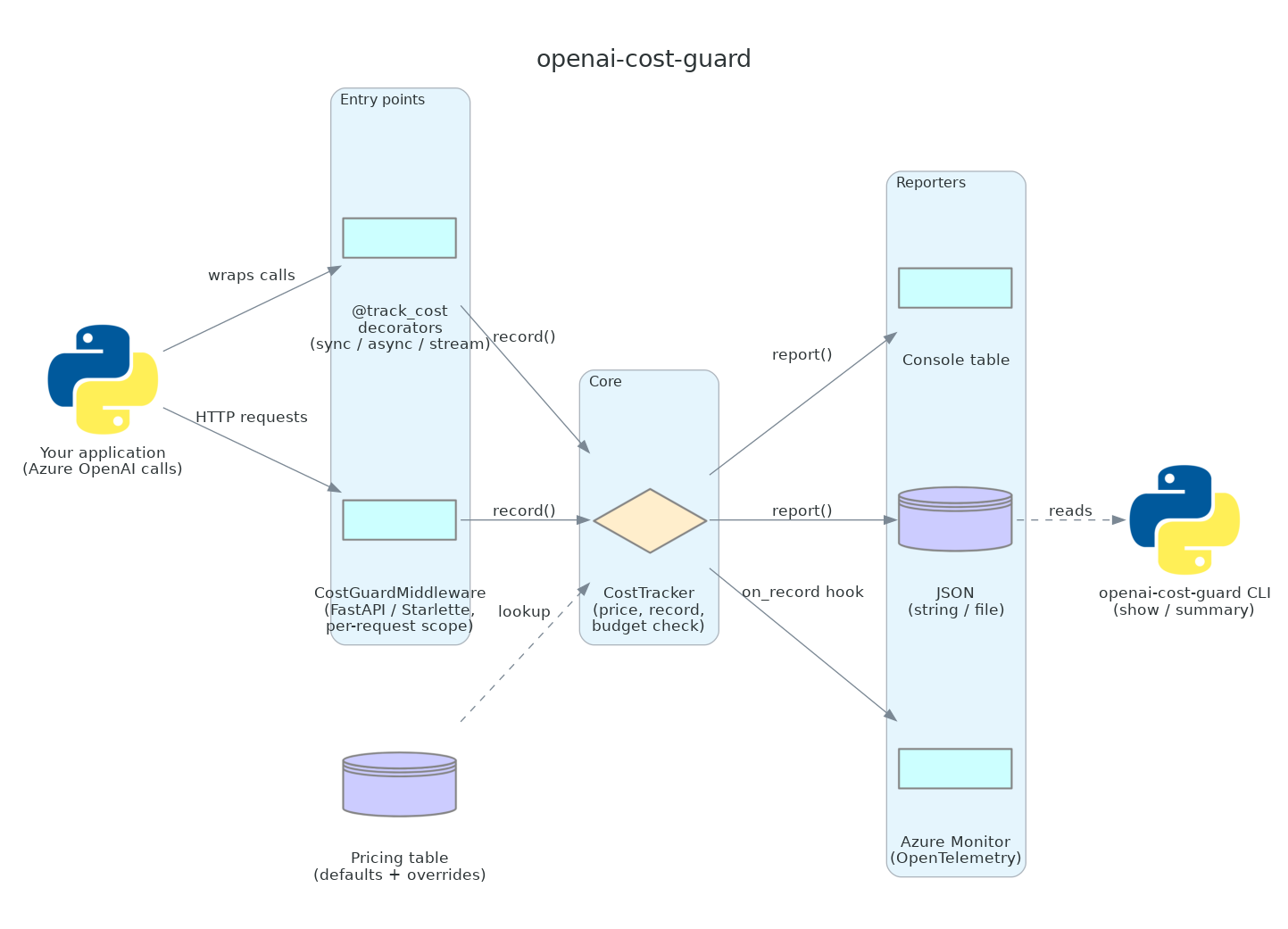
Your application records usage through one of the entry points - the @track_cost decorator family or the FastAPI middleware. Both funnel into a CostTracker, which prices each call against the pricing table (built-in defaults plus any overrides) and stores a UsageRecord. Recorded usage is then turned into output by the reporters: a console table, JSON (string or file), or live OpenTelemetry metrics for Azure Monitor. An optional on_record hook lets a reporter receive each record as it is made; the CLI reads the JSON a reporter writes.
Python API
Decorator
The fastest integration. Wrap any function that returns an OpenAI response object:
from openai_cost_guard import CostTracker, track_cost

tracker = CostTracker()

@track_cost(tracker=tracker, endpoint="chat")
def chat(client, messages):
    return client.chat.completions.create(model="gpt-4o", messages=messages)
endpoint is an optional label stored on each record - use it to distinguish between different call sites in your reports. If omitted, the wrapped function's qualified name is used.
Class-method decorator
When the tracker lives on a service class:
from openai_cost_guard import CostTracker, track_cost_method

class SummaryService:
    def __init__(self):
        self.cost_tracker = CostTracker()

    @track_cost_method(endpoint="summary")
    def summarise(self, text):
        return self.client.chat.completions.create(...)
track_cost_method reads the tracker from self.cost_tracker by default; pass tracker_attr="..." to use a different attribute name.
Async
track_cost_async and track_cost_method_async are the coroutine equivalents. Tracker resolution is identical (explicit > request scope > default), and they work inside the FastAPI middleware too:
from openai_cost_guard import track_cost_async

@track_cost_async(endpoint="chat")
async def call_openai(client, messages):
    return await client.chat.completions.create(model="gpt-4o", messages=messages)
Streaming responses
A streamed completion returns an iterator of chunks, not a response with a .usage field, so the plain decorators record nothing. track_cost_stream wraps the iterator and records cost from the final usage chunk as you consume it. You must ask the API for usage with stream_options={"include_usage": True}:
from openai_cost_guard import track_cost_stream

@track_cost_stream(endpoint="chat")
def stream_chat(client, messages):
    return client.chat.completions.create(
        model="gpt-4o",
        messages=messages,
        stream=True,
        stream_options={"include_usage": True},   # required for cost capture
    )

for chunk in stream_chat(client, [...]):   # cost is recorded on the final chunk
    ...
Recording is lazy - it happens as you consume the stream, not when the call returns. track_cost_stream_async is the async-iterator version, consumed with async for.
Direct recording
For cases where you control the response object manually:
tracker = CostTracker()
tracker.record(
    model="gpt-4o",
    prompt_tokens=response.usage.prompt_tokens,
    completion_tokens=response.usage.completion_tokens,
    endpoint="my-pipeline",
    metadata={"user_id": "abc123"},
)
Budget enforcement
Raise an exception when spending exceeds a configured limit:
from openai_cost_guard import CostTracker, BudgetConfig, BudgetExceededError

tracker = CostTracker(
    budget=BudgetConfig(limit_usd=5.00, warn_at_percent=80)
)

try:
    tracker.record("gpt-4o", prompt_tokens=..., completion_tokens=...)
except BudgetExceededError as e:
    print(f"Stopped: ${e.spent:.4f} exceeds ${e.limit:.2f} limit")
A warning is logged at warn_at_percent (default 80%) before the limit is hit.
Custom pricing
Override built-in prices or add pricing for deployment names not in the default table:
from openai_cost_guard import CostTracker, ModelPricing

# Override at construction
tracker = CostTracker(pricing={
    "gpt-4o": ModelPricing(model="gpt-4o", input_per_million=2.00, output_per_million=8.00),
})

# Or register a deployment name at runtime
tracker.add_pricing(
    ModelPricing(model="my-gpt4o-deployment", input_per_million=2.50, output_per_million=10.00)
)
Deployment names that start with a known model name (e.g. gpt-4o-mini-2024-07-18) are matched by prefix automatically, longest prefix first.
FastAPI middleware
Track cost per HTTP request automatically. The middleware binds a fresh tracker to each request, so any @track_cost-decorated call made while handling that request records into it - no need to thread a tracker through your handlers.
from fastapi import FastAPI, Request
from openai_cost_guard import track_cost, BudgetConfig
from openai_cost_guard.middleware import CostGuardMiddleware

app = FastAPI()
app.add_middleware(
    CostGuardMiddleware,
    budget_per_request=BudgetConfig(limit_usd=0.50),  # optional per-request cap
)

@track_cost(endpoint="chat")          # no explicit tracker - uses the request scope
def call_model(client, messages):
    return client.chat.completions.create(model="gpt-4o", messages=messages)

@app.post("/chat")
async def chat(request: Request):
    call_model(client, [...])
    report = request.state.cost_tracker.report()   # this request's usage
    return {"cost_usd": report.total_cost}
Every response gets cost headers:
X-OpenAI-Cost-USD: 0.007500
X-OpenAI-Total-Tokens: 1500
Requires the fastapi extra:
pip install "openai-cost-guard[fastapi]"
Options: budget_per_request (per-request BudgetConfig), add_headers (default True), strict (raise on unknown model), and on_complete(scope, report) (callback fired after each request - use it to push metrics or persist usage).
Reporting
from openai_cost_guard.reporters import print_report, to_json, write_json, to_summary_dict

report = tracker.report()

print_report(report)                          # logs a formatted table
print_report(report, logger_name="my.app")    # logs to your own logger

to_json(report)                                # JSON string (records + totals)
write_json(report, "runs/usage.json")          # write to file, creates parent dirs
to_summary_dict(report)                        # compact aggregate dict, grouped by model
tracker.report() returns a CostReport Pydantic model - iterate report.records or access report.total_cost directly for custom reporting.
Azure Monitor / Application Insights
Stream cost and token metrics to Application Insights via OpenTelemetry. Configure the exporter once at startup, then wire the reporter's emit as the tracker's on_record hook so every call is reported as it happens:
from openai_cost_guard import CostTracker
from openai_cost_guard.reporters.azure_monitor import (
    AzureMonitorReporter,
    configure_azure_monitor,
)

# Reads APPLICATIONINSIGHTS_CONNECTION_STRING if no arg is passed
configure_azure_monitor()

reporter = AzureMonitorReporter()
tracker = CostTracker(on_record=reporter.emit)   # metrics emit per call
Metrics emitted (each tagged with model and endpoint dimensions):
| Metric | Unit | Meaning |
|---|---|---|
openai.cost.usd |
USD | cost per call |
openai.tokens |
token | total tokens per call |
openai.calls |
call | call count |
Requires the azure extra:
pip install "openai-cost-guard[azure]"
The reporter itself is vendor-neutral - it records to standard OpenTelemetry instruments. If you already run an OTel MeterProvider, pass your own Meter to AzureMonitorReporter(meter=...) and skip configure_azure_monitor.
Reset
tracker.reset() # clears all records, keeps budget config
CLI
Inspect a saved JSON report (from write_json) without writing any code:
openai-cost-guard show runs/usage.json       # formatted per-model table
openai-cost-guard summary runs/usage.json    # aggregate totals as JSON
| Command | Argument | Output |
|---|---|---|
show |
path to a JSON report | the same formatted per-model table as print_report |
summary |
path to a JSON report | aggregate totals as JSON (to_summary_dict) |
Output goes to stdout. A missing file or a file that is not a valid cost report exits non-zero with a clear error.
Configuration
There are no required environment variables for the core library - configuration is in code (constructor arguments, custom ModelPricing). Two areas have install-time and environment configuration:
| Concern | How to configure |
|---|---|
| FastAPI middleware | Install the fastapi extra. Construct via app.add_middleware(CostGuardMiddleware, ...); tune with budget_per_request, add_headers, strict, on_complete. |
| Azure Monitor export | Install the azure extra. Set APPLICATIONINSIGHTS_CONNECTION_STRING (or pass connection_string= to configure_azure_monitor). Tune export_interval_millis. |
| Strict unknown-model handling | CostTracker(strict=True) (or strict=True on the middleware) raises UnknownModelError instead of recording at $0.00. |
| Logging | The package logs through the standard logging module under the openai_cost_guard namespace. Configure handlers/levels in your application. |
Default pricing
Prices are USD per 1 million tokens, Azure OpenAI Global Standard, verified against the Azure pricing page on 2026-06-08.
| Model | Input | Output |
|---|---|---|
| gpt-4o | $2.50 | $10.00 |
| gpt-4o-mini | $0.15 | $0.60 |
| gpt-4.1 | $2.00 | $8.00 |
| gpt-4.1-mini | $0.40 | $1.60 |
| gpt-4.1-nano | $0.10 | $0.40 |
| gpt-4-turbo | $11.00 | $33.00 |
| gpt-35-turbo | $0.55 | $1.65 |
| text-embedding-3-small | $0.022 | - |
| text-embedding-3-large | $0.143 | - |
| text-embedding-ada-002 | $0.11 | - |
Prices drift over time, and Regional and Data Zone deployments cost roughly 10% more than Global Standard. Pass your own ModelPricing objects (via CostTracker(pricing=...) or tracker.add_pricing(...)) to stay accurate.
Design decisions
- Pure-ASGI middleware, not
BaseHTTPMiddleware. The middleware sets a per-request tracker in acontextvar. Starlette'sBaseHTTPMiddlewareruns the endpoint in a separate task where that contextvar would not propagate, so the decorator could not find the request-scoped tracker. A pure-ASGI middleware keeps the endpoint in the same context, which is what makes "no explicit tracker needed" work. Seeopenai_cost_guard/middleware.py:9. - Contextvar tracker resolution.
@track_costresolves its tracker at call time in the order explicit argument > request-scoped tracker > module default. The same decorated function records into a per-request tracker inside a request and the global tracker otherwise, with no plumbing at the call site. Seeopenai_cost_guard/decorators.py:50andopenai_cost_guard/context.py. - Longest-prefix pricing match. Versioned deployment names (
gpt-4o-mini-2024-07-18) are matched against pricing keys by longest prefix, so a specific entry (gpt-4o-mini) wins over a shorter one that is also a prefix (gpt-4o). Otherwise a mini model could be mispriced as its more expensive parent. Seeopenai_cost_guard/tracker.py:123. on_recordhook fired outside the lock. The tracker holds an internal lock while appending and checking the budget, but invokeson_recordafter releasing it, so a slow sink (for example a network metric exporter) cannot stall other recorders. Seeopenai_cost_guard/tracker.py:90.- Optional extras keep the core thin.
CostGuardMiddlewareandAzureMonitorReporterare intentionally not imported in the package__init__, so the core package has no web-framework or telemetry dependency - only Pydantic. Seeopenai_cost_guard/__init__.py:16. - Logging, never
print. All output goes through theloggingmodule, including the console reporter and CLI (which routes the package logger to stdout). This keeps the library quiet by default and lets the host application control output.
Known limitations
- Pricing is curated, not discovered.
openai-cost-guardalways tracks token usage for every model (that comes from the API response). It can only attach a dollar cost to models in its price table, because providers do not return price-per-token through the API. Unknown models are tracked at$0.00with a warning rather than a guessed price (or raise withstrict=True). Override or extend the table withCostTracker(pricing=...)/tracker.add_pricing(...). - Static prices drift. The default table reflects Azure Global Standard pricing on the verification date above. Prices change and vary by region/SKU; verify against current Azure pricing for anything cost-critical. (The roadmap item below addresses this.)
- Streaming cost needs
include_usage. A streamed call records nothing unless you passstream_options={"include_usage": True}; without it the API never sends a usage chunk.
Roadmap
- FastAPI middleware (v0.2)
- JSON export reporter (v0.2)
- Azure Monitor / Application Insights reporter (v0.3)
- Async support (v0.3)
- Streaming response cost capture (v0.4)
- CLI for offline report inspection (v0.4)
- Live pricing via the Azure Retail Prices API (v0.5) - fetch current Azure OpenAI prices from
prices.azure.com(public, no auth) so the static table is a fallback, not the source of truth. Removes the staleness risk for Azure models. The fiddly part is mapping each model to its Azure meter name; must cache, and fall back to the static table on any uncertainty so it never reports a wrong price.
Benchmarks
Hot-path throughput, measured with scripts/benchmark.py (fake response objects, no live Azure). Run it yourself with python scripts/benchmark.py.
Measured on this machine with 100,000 iterations per case, fake responses, no network.
| Operation | Iterations | Calls/sec | us/call |
|---|---|---|---|
| CostTracker.record() | 100,000 | 56,663 | 17.65 |
| CostTracker.record() + budget check | 100,000 | 57,678 | 17.34 |
| @track_cost-wrapped call (fake response) | 100,000 | 52,739 | 18.96 |
| record() via prefix-match pricing | 100,000 | 46,001 | 21.74 |
Contributing
git clone https://github.com/TemidireAdesiji/openai-cost-guard
cd openai-cost-guard
pip install -e ".[dev]"
pytest
Lint and type-check before opening a PR:
ruff check .
mypy .
pytest --cov
PRs welcome. Open an issue before starting work on a new feature.
License
Release history Release notifications | RSS feed

Download files
Download the file for your platform. If you're not sure which to choose, learn more about installing packages.
Source Distribution
Built Distribution
Filter files by name, interpreter, ABI, and platform.
If you're not sure about the file name format, learn more about wheel file names.
Copy a direct link to the current filters
File details
Details for the file openai_cost_guard-0.4.0.tar.gz.
File metadata
- Download URL: openai_cost_guard-0.4.0.tar.gz
- Upload date:
- Size: 38.8 kB
- Tags: Source
- Uploaded using Trusted Publishing? No
- Uploaded via: twine/6.2.0 CPython/3.12.5
File hashes
| Algorithm | Hash digest | |
|---|---|---|
| SHA256 |
e2b757e22f12fa17966e5f85a266a99baab774325eda71aa87d7b1887cf3558a
|
|
| MD5 |
91bcdae5baa369776afdb361c4b036b0
|
|
| BLAKE2b-256 |
2ec96205f4ed287fd1df16aca449300ae4e2719a588eb1aae85b8de37c41082e
|
File details
Details for the file openai_cost_guard-0.4.0-py3-none-any.whl.
File metadata
- Download URL: openai_cost_guard-0.4.0-py3-none-any.whl
- Upload date:
- Size: 25.5 kB
- Tags: Python 3
- Uploaded using Trusted Publishing? No
- Uploaded via: twine/6.2.0 CPython/3.12.5
File hashes
| Algorithm | Hash digest | |
|---|---|---|
| SHA256 |
723aeaed8f5b3b64e77be3f0130915ebd8392b46f5021781345cbcc7b0bea8ad
|
|
| MD5 |
4901a776fb7dc629ad41f745b510fb77
|
|
| BLAKE2b-256 |
620244c69ed9b3e545a912753ff752577594c877c976783c268db48d5175b43d
|






