
OpenAI Guardrails: Python (Preview)
This is the Python version of OpenAI Guardrails, a package for adding configurable safety and compliance guardrails to LLM applications. It provides a drop-in wrapper for OpenAI's Python client, enabling automatic input/output validation and moderation using a wide range of guardrails.
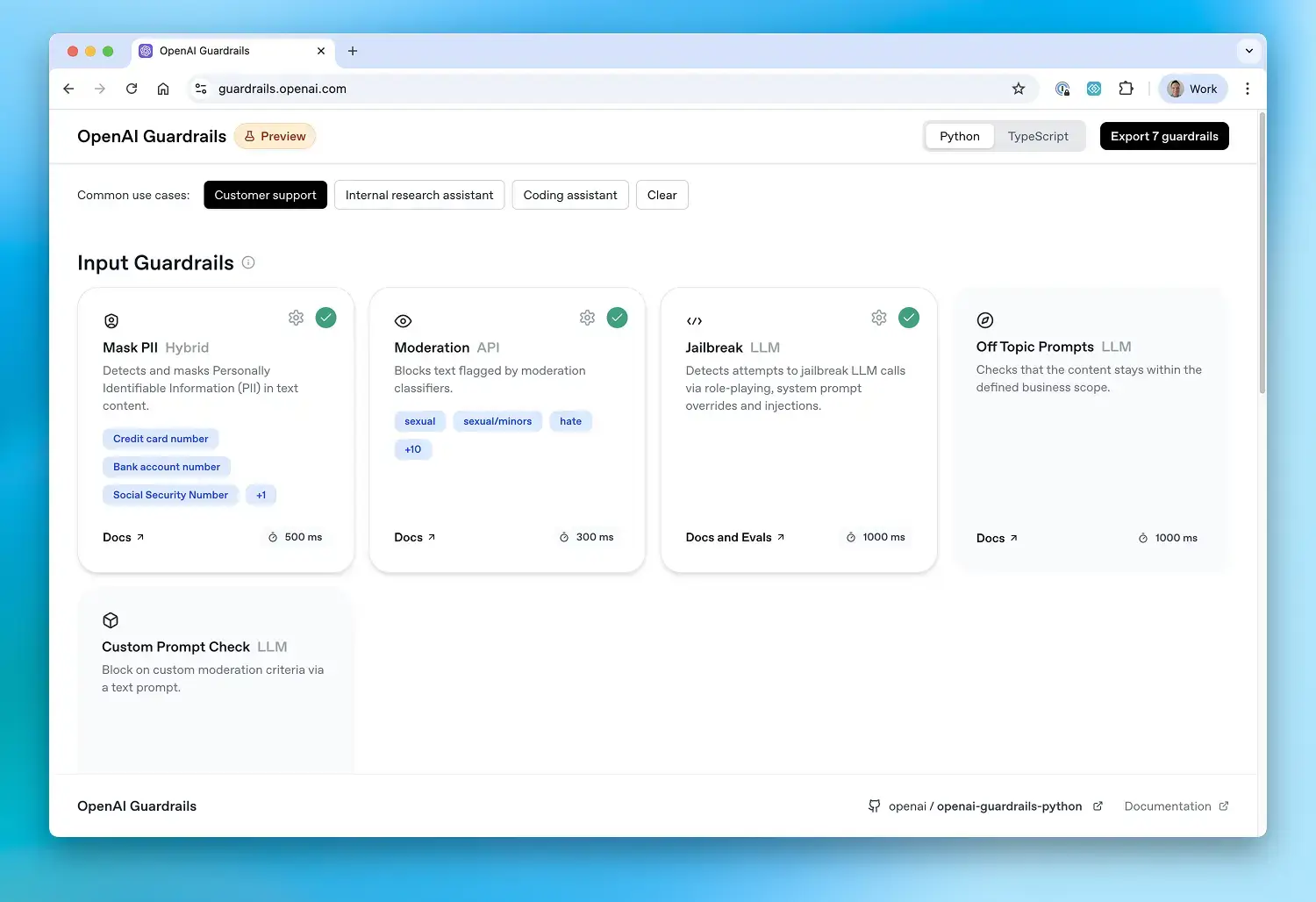
Most users can simply follow the guided configuration and installation instructions at guardrails.openai.com.
Installation
You can download openai-guardrails package this way:
pip install openai-guardrails
If you enable Contains PII, install its spaCy model while building or deploying the application:
# With pip
python -m spacy download en_core_web_sm

# With uv and spaCy 3.8
uv pip install https://github.com/explosion/spacy-models/releases/download/en_core_web_sm-3.8.0/en_core_web_sm-3.8.0-py3-none-any.whl
Contains PII validates and loads this model during client initialization, so an absent or unloadable model fails configuration before any request.
Usage
Follow the configuration and installation instructions at guardrails.openai.com.
Local Development
Clone the repository and install locally:
# Clone the repository
git clone https://github.com/openai/openai-guardrails-python.git
cd openai-guardrails-python

# Install the package (editable), plus example extras if desired
pip install -e .
pip install -e ".[examples]"
pip install https://github.com/explosion/spacy-models/releases/download/en_core_web_sm-3.8.0/en_core_web_sm-3.8.0-py3-none-any.whl
Integration Details
Drop-in OpenAI Replacement
The easiest way to use Guardrails Python is as a drop-in replacement for the OpenAI client:
from pathlib import Path
from guardrails import GuardrailsOpenAI, GuardrailTripwireTriggered

# Use GuardrailsOpenAI instead of OpenAI
client = GuardrailsOpenAI(config=Path("guardrail_config.json"))

try:
    # Works with standard Chat Completions
    chat = client.chat.completions.create(
        model="gpt-5",
        messages=[{"role": "user", "content": "Hello world"}],
    )
    print(chat.choices[0].message.content)

    # Or with the Responses API
    resp = client.responses.create(
        model="gpt-5",
        input="What are the main features of your premium plan?",
    )
    print(resp.output_text)
except GuardrailTripwireTriggered as e:
    print(f"Guardrail triggered: {e}")
Agents SDK Integration
You can integrate guardrails with the OpenAI Agents SDK via GuardrailAgent:
import asyncio
from pathlib import Path
from agents import InputGuardrailTripwireTriggered, OutputGuardrailTripwireTriggered, Runner
from agents.run import RunConfig
from guardrails import GuardrailAgent

# Create agent with guardrails automatically configured
agent = GuardrailAgent(
    config=Path("guardrails_config.json"),
    name="Customer support agent",
    instructions="You are a customer support agent. You help customers with their questions.",
)

async def main():
    try:
        result = await Runner.run(agent, "Hello, can you help me?", run_config=RunConfig(tracing_disabled=True))
        print(result.final_output)
    except (InputGuardrailTripwireTriggered, OutputGuardrailTripwireTriggered):
        print("🛑 Guardrail triggered!")

if __name__ == "__main__":
    asyncio.run(main())
For more details, see
docs/agents_sdk_integration.md.
Evaluation Framework
Evaluate guardrail performance on labeled datasets and run benchmarks.
Running Evaluations
# Basic evaluation
python -m guardrails.evals.guardrail_evals \
  --config-path guardrails_config.json \
  --dataset-path data.jsonl

# Benchmark mode (compare models, generate ROC curves, latency)
python -m guardrails.evals.guardrail_evals \
  --config-path guardrails_config.json \
  --dataset-path data.jsonl \
  --mode benchmark \
  --models gpt-5 gpt-5-mini gpt-4.1-mini
Dataset Format
Datasets must be in JSONL format, with each line containing a JSON object:
{
  "id": "sample_1",
  "data": "Text or conversation to evaluate",
  "expected_triggers": {
    "Moderation": true,
    "NSFW Text": false
  }
}
Programmatic Usage
from pathlib import Path
from guardrails.evals.guardrail_evals import GuardrailEval

eval = GuardrailEval(
    config_path=Path("guardrails_config.json"),
    dataset_path=Path("data.jsonl"),
    batch_size=32,
    output_dir=Path("results"),
)

import asyncio
asyncio.run(eval.run())
Project Structure
src/guardrails/- Python source codesrc/guardrails/checks/- Built-in guardrail checkssrc/guardrails/evals/- Evaluation frameworkexamples/- Example usage and sample configs
Examples
The package includes examples in the examples/ directory:
examples/basic/hello_world.py— Basic chatbot with guardrails usingGuardrailsOpenAIexamples/basic/agents_sdk.py— Agents SDK integration withGuardrailAgentexamples/basic/local_model.py— Using local models with guardrailsexamples/basic/structured_outputs_example.py— Structured outputsexamples/basic/pii_mask_example.py— PII maskingexamples/basic/suppress_tripwire.py— Handling violations gracefully
Running Examples
Prerequisites
pip install -e .
pip install "openai-guardrails[examples]"
pip install https://github.com/explosion/spacy-models/releases/download/en_core_web_sm-3.8.0/en_core_web_sm-3.8.0-py3-none-any.whl
Run
python examples/basic/hello_world.py
python examples/basic/agents_sdk.py
Available Guardrails
The Python implementation includes the following built-in guardrails:
- Keyword Filter: Detects configured banned keywords and phrases
- Competitors: Detects mentions of configured competitors
- Moderation: Content moderation using OpenAI's moderation API
- URL Filter: URL filtering and domain allowlist/blocklist
- Secret Keys: Detects potential API keys, secrets, and credentials
- Contains PII: Personally Identifiable Information detection
- Hallucination Detection: Detects hallucinated content using vector stores
- Jailbreak: Detects jailbreak attempts
- Prompt Injection Detection: Detects malicious instructions in tool calls and tool outputs
- NSFW Text: Detects workplace-inappropriate content in model outputs
- Off Topic Prompts: Ensures responses stay within business scope
- Custom Prompt Check: Custom LLM-based guardrails
For full details, advanced usage, and API reference, see: OpenAI Guardrails Documentation.
License
MIT License - see LICENSE file for details.
Disclaimers
Please note that Guardrails may use Third-Party Services such as the Presidio open-source framework, which are subject to their own terms and conditions and are not developed or verified by OpenAI.
Developers are responsible for implementing appropriate safeguards to prevent storage or misuse of sensitive or prohibited content (including but not limited to personal data, child sexual abuse material, or other illegal content). OpenAI disclaims liability for any logging or retention of such content by developers. Developers must ensure their systems comply with all applicable data protection and content safety laws, and should avoid persisting any blocked content generated or intercepted by Guardrails. Guardrails calls paid OpenAI APIs, and developers are responsible for associated charges.
1 maintainer

Metadata
1 maintainer
Release files for openai-guardrails 0.3.3
For a detailed explanation of source distributions (sdists) and built distributions (wheels), please see the package formats documentation.
Source distribution (sdist)
| File | Size | Uploaded | |
|---|---|---|---|
| openai_guardrails-0.3.3.tar.gz | 2.6 MB | Details |
Built distribution (wheel)
| File | Interpreter | ABI | Platform | Reset |
|---|---|---|---|---|
| openai_guardrails-0.3.3-py3-none-any.whl | Python 3 | none | any | Details |
Total release size: 2.8 MB
Release files / openai_guardrails-0.3.3.tar.gz
| Download URL | openai_guardrails-0.3.3.tar.gz |
|---|---|
| Size | 2.6 MB |
| Tags | Source |
|
SHA-256 checksum How to use checksums |
b6c048623d9e231891dab8d1dce8d3f3081bfb4fe405efc349da7c283caba144
|
|
BLAKE2b-256 checksum How to use checksums |
fa5be413093bb3b680a236b243eed80d07e812f3a1a867960d7297dcb43a53e8
|
| Upload date | |
|
Uploaded using Trusted Publishing? What is trusted publishing? |
Yes |
| Uploaded via |
twine/7.0.0 CPython/3.13.14
|
Provenance
Provenance describes where a file came from. On PyPI, provenance is shared via attestations, which provide a verifiable record of the build or publishing details. View details, limitations and caveats.


PyPI Publish Attestation
PyPI verified that this artifact, at this checksum, originated from the publisher listed below.
Signed by GitHub Actions, verified by PyPI on Sep 10, 2026.
Transparency logRelease files / openai_guardrails-0.3.3-py3-none-any.whl
| Download URL | openai_guardrails-0.3.3-py3-none-any.whl |
|---|---|
| Size | 177.7 kB |
| Tags | Python 3 |
|
SHA-256 checksum How to use checksums |
2fc423176f9ad3e8bc694adafd5be9a763e8c159e9daffdbddebff7d4b544902
|
|
BLAKE2b-256 checksum How to use checksums |
bc3678d6fc4245443659d5b5ddb64bab0e291e0f7c50f417cafa83198455ed9f
|
| Upload date | |
|
Uploaded using Trusted Publishing? What is trusted publishing? |
Yes |
| Uploaded via |
twine/7.0.0 CPython/3.13.14
|
Provenance
Provenance describes where a file came from. On PyPI, provenance is shared via attestations, which provide a verifiable record of the build or publishing details. View details, limitations and caveats.
PyPI Publish Attestation
PyPI verified that this artifact, at this checksum, originated from the publisher listed below.
Signed by GitHub Actions, verified by PyPI on Sep 10, 2026.
Transparency log













