
GPT Image and OpenAI APIs by Ace Data Cloud — CLI
Install the Ace integration
This integration is maintained by Ace Data Cloud and uses your Ace API key. It is not an official client published by the model owner. Check the PyPI package and its AceDataCloud repository before installing.
python -m pip install openai-pro-cli
openai-cli --help
openai-cli image --help
The commands above show local help/reference information and do not submit a generation. Then follow Get API Token below: register/sign in, initialize General application if needed, create/copy an application key, and store it in the terminal's ACEDATACLOUD_API_TOKEN environment variable. Do not use a platform management token.
Generation follows your account's current service access, balance and pricing. Save the returned task ID and query that same ID; do not repeat generation while a task is pending.
OpenAI image generation/editing catalog entries and their companion guides are hidden in mainland China (cn). This is regional catalog visibility, not global retirement of the image APIs. Local CLI help/model references do not establish regional availability; check your account's current catalog and permissions before submitting an image request.
openai-cli tasks retrieve --id <task-id>
A successful command or running preview does not prove a completed media result. Check the task's terminal outcome and returned media link. 中文首次使用指南 · Service-name package directory
GPT Image-only MCP service entry
The GPT Image service guide and official Registry entry io.github.AceDataCloud/mcp-gpt-image use the existing mcp-openai-pro package with --profile gpt-image. Install version 2026.10.18.2 or newer and preserve those arguments to expose five image/task tools. This is a dedicated service profile, not a new PyPI package and not the generic hosted OpenAI MCP URL.
uvx --from 'mcp-openai-pro>=2026.10.18.2' mcp-openai-pro --profile gpt-image
Configure the raw application key in this server's environment. The free gpt_image_list_models is local reference information; generation still requires an explicit model, current permissions/balance/price and same-task retrieval.
A command-line tool for OpenAI-compatible APIs via AceDataCloud.
Installation
pip install openai-pro-cli
Quick Start
1. Get API Token
- Open Ace Data Cloud → Applications. Sign in, or register an account first.
- Find General application. If it has not been created, choose Initialize General Application. A general key can use the services available to your account; a dedicated application's key is limited to its service. Check the required service/model access and current pricing.
- Copy the API Key from the application card, or open Keys / Manage Keys → Create to create a separate key for this integration. Give it a recognizable name so you can revoke or rotate it independently.
- When creating a key, review Expiration Time, Set Usage Limitation, and Allowed APIs. Enable only the restrictions you need, allow the operations you will call, then click Create and copy the token from the key list. Task lookup does not grant permission to submit a generation. Confirm the application's balance can cover your first request; any trial allowance is whatever your account currently displays.
- Copy only the token value, without quotation marks, spaces, or
Bearer. An API Key / API Token field expects this raw value; only a manually configured HTTPAuthorizationheader needs theBearerprefix. Aplatform-...account-management token cannot replace a generation API key.
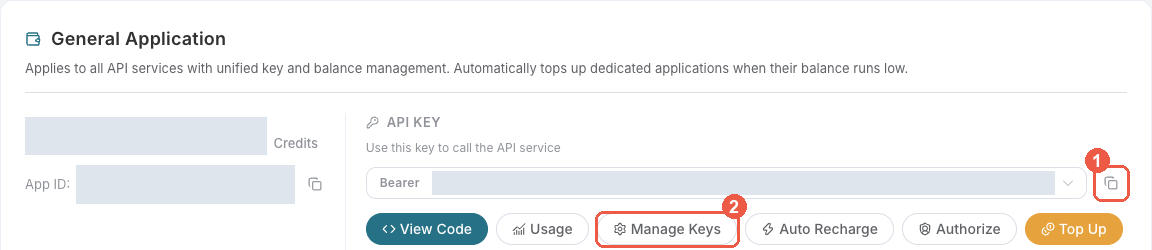
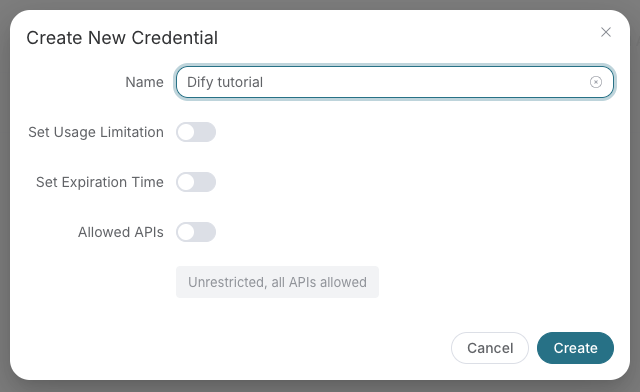
Save the key in the client's credential store or the environment variable shown below. Never put it in a prompt, shared workflow, screenshot, or Git commit. If authentication fails, check the full copied value, application/service access, expiration, usage limit, and balance before creating another key.
2. Configure
export ACEDATACLOUD_API_TOKEN=your_token_here
Or save it to a .env file:
cp .env.example .env
# Edit .env and set ACEDATACLOUD_API_TOKEN
3. Use
# Chat with a model
openai-cli chat "What is the capital of France?"

# Chat with a specific model
openai-cli chat "Explain quantum computing" -m gpt-5.4

# Generate embeddings
openai-cli embed "Hello, world!" -m text-embedding-3-small

# Generate an image
openai-cli image "A futuristic city skyline at night"

# Edit an image
openai-cli edit "Add a rainbow" --image-url https://example.com/photo.jpg

# Use the Responses API
openai-cli response "Summarize this article" -m gpt-4o

# Synthesize speech audio
openai-cli speech "Hello from AceDataCloud" --voice nova --output hello.mp3

# Show realtime WebSocket connection details
openai-cli realtime --model gpt-realtime

# Retrieve an async task result
openai-cli tasks retrieve --id 7489df4c-ef03-4de0-b598-e9a590793434
openai-cli tasks retrieve --trace-id my-custom-trace-001

# Retrieve a batch of task results
openai-cli tasks batch --trace-ids trace-001 trace-002

# List available models
openai-cli models

# Show configuration
openai-cli config
Commands
| Command | Description |
|---|---|
chat |
Chat completions (/openai/chat/completions) |
embed |
Text embeddings (/openai/embeddings) |
image |
Image generation (/openai/images/generations) |
edit |
Image editing (/openai/images/edits) |
response |
Responses API (/openai/responses) |
speech |
Speech synthesis (/v1/audio/speech) |
transcribe |
Audio transcription (/v1/audio/transcriptions) |
realtime |
Realtime WebSocket connection info (/v1/realtime) |
tasks retrieve |
Retrieve a single async task result (/openai/tasks) |
tasks batch |
Retrieve multiple async task results (/openai/tasks) |
models |
List available models (/openai/models) |
config |
Show current configuration |
Chat and Responses billing
Accepted compatible-model requests are billed for the selected model's input, output and cache usage, not a fixed fee per request. Switching between Chat Completions and Responses does not change this to per-request billing. Check current model prices in the console and the returned usage.cost for the charge; billing support alone does not establish model availability or account access.
For Chat Completions, usage.prompt_tokens includes cached tokens. Responses input totals also include reported cached tokens. Reported cache usage is settled at the corresponding cache price, so do not add cached tokens to these input totals again.
Use --json to inspect the full returned usage, including cache details and usage.cost when present; the default terminal summary is not a billing breakdown. These commands submit billable requests:
openai-cli chat "Hello" -m gpt-4o-mini --json | jq '.usage'
openai-cli response "Hello" -m gpt-4o-mini --json | jq '.usage'
Embedding models
embed supports text-embedding-3-small (the default) and text-embedding-3-large. The legacy text-embedding-ada-002 model is retired. When migrating an existing index, regenerate its vectors and rebuild the index; do not mix vectors from the old and new models.
GPT Image quality
image and edit accept --quality auto, low, medium or high for GPT Image models. Only gpt-image-2.5-flare and gpt-image-2.5-sunburst, including their :official variants, additionally support xhigh and max. Editing supports these values with either JSON image URLs or multipart image files. :official requests are billed on actual token usage; size and quality affect that usage.
These commands submit billable requests:
openai-cli image "A blue ceramic vase on a cream background" -m gpt-image-2.5-flare --quality xhigh
openai-cli edit "Make the vase green" --image-url https://example.com/photo.jpg -m gpt-image-2.5-sunburst --quality max
openai-cli edit "Make the vase green" --image-file photo.png -m gpt-image-2.5-flare:official --quality max
Legacy DALL-E quality options are unchanged: dall-e-3 generation accepts hd or standard, and dall-e-2 accepts standard.
Nano Banana 2.1 images
Use the public nano-banana-2.1 model ID for generation or editing. There is no nano-banana-2.1:official variant; specify the model explicitly to use it instead of the existing default.
openai-cli image "A blue ceramic vase on a cream background" -m nano-banana-2.1 -n 2
openai-cli edit "Make the vase green" --image-url https://example.com/photo.jpg -m nano-banana-2.1
openai-cli edit "Make the vase green" --image-file photo.png -m nano-banana-2.1
Use --image-url for JSON requests or --image-file for multipart uploads, not both. For dedicated 1K/2K/4K resolution controls, use nano-banana-pro generate or nano-banana-pro edit from the NanoBanana CLI; the OpenAI-compatible commands use their own request fields.
Environment Variables
| Variable | Description | Default |
|---|---|---|
ACEDATACLOUD_API_TOKEN |
Your API token (required) | — |
ACEDATACLOUD_API_BASE_URL |
API base URL | https://api.acedata.cloud |
OPENAI_REQUEST_TIMEOUT |
Request timeout in seconds | 30 |
Docker
docker compose run --rm openai-cli chat "Hello!" -m gpt-4o
1 maintainer

Metadata
1 maintainer
Release files for openai-pro-cli 2026.10.31.0
For a detailed explanation of source distributions (sdists) and built distributions (wheels), please see the package formats documentation.
Source distribution (sdist)
| File | Size | Uploaded | Provenance | Actions |
|---|---|---|---|---|
| openai_pro_cli-2026.10.31.0.tar.gz | 31.0 kB | Without provenance | Details for openai_pro_cli-2026.10.31.0.tar.gz |
Built distribution (wheel)
| File | Interpreter | ABI | Platform | Actions Reset |
|---|---|---|---|---|
| openai_pro_cli-2026.10.31.0-py3-none-any.whl | Python 3 | none | any | Details for openai_pro_cli-2026.10.31.0-py3-none-any.whl |
Total release size: 61.6 kB
Release files / openai_pro_cli-2026.10.31.0.tar.gz
| Download URL | openai_pro_cli-2026.10.31.0.tar.gz |
|---|---|
| Size | 31.0 kB |
| Tags | Source |
|
SHA-256 checksum How to use checksums |
38f6d1369ce1dc02bed9bdc316ac09dc8006cda3159a904231d8a4499bf52023
|
|
BLAKE2b-256 checksum How to use checksums |
3505c16a002baf5187862a99ab8a7c04c8f27c8ffc85c10e5c3535e9c6d0600f
|
| Upload date | |
|
Uploaded using Trusted Publishing? What is trusted publishing? |
No |
| Uploaded via |
twine/7.0.0 CPython/3.14.4
|
Release files / openai_pro_cli-2026.10.31.0-py3-none-any.whl
| Download URL | openai_pro_cli-2026.10.31.0-py3-none-any.whl |
|---|---|
| Size | 30.6 kB |
| Tags | Python 3 |
|
SHA-256 checksum How to use checksums |
5e811d14ac64f632a5c1ec717476764c2348b7d2d7690aa2c3aac29d88c8754b
|
|
BLAKE2b-256 checksum How to use checksums |
a10db79a3b20afb1c8d8f137d5178887056475676155894a9b5392b35faec4c3
|
| Upload date | |
|
Uploaded using Trusted Publishing? What is trusted publishing? |
No |
| Uploaded via |
twine/7.0.0 CPython/3.14.4
|
Security for openai-pro-cli 2026.10.31.0
Provenance
Provenance describes where a file came from. On PyPI, provenance is shared via attestations, which provide a verifiable record of the build or publishing details. View details, limitations and caveats.
No provenance found
None of the files in this release were uploaded with provenance metadata.
A note on package security
PyPI is a repository for distributing packages, not a service for auditing them. While third-party security researchers and our staff do their best to detect and remove malicious packages, PyPI cannot guarantee the quality, security or suitability of any given package.
To learn more about protecting yourself from malicious actors, visit our package security documentation.














