
Generative mutation for tabular calculation
Verified details
These details have been verified by PyPIProject links
GitHub Statistics
Maintainers

Project description
openaivec
AI text processing for pandas and Spark. Apply one prompt to many rows with automatic batching and caching.
Quick start
pip install openaivec
Apply one prompt to many values:
import os
import pandas as pd
from openaivec import pandas_ext

os.environ["OPENAI_API_KEY"] = "your-api-key"

fruits = pd.Series(["apple", "banana", "cherry"])
french_names = fruits.ai.responses("Translate this fruit name to French.")
print(french_names.tolist())
# ['pomme', 'banane', 'cerise']
For Azure OpenAI and custom client setup, see pandas authentication options.
Pandas tutorial (GitHub Pages): https://microsoft.github.io/openaivec/examples/pandas/
Benchmarks
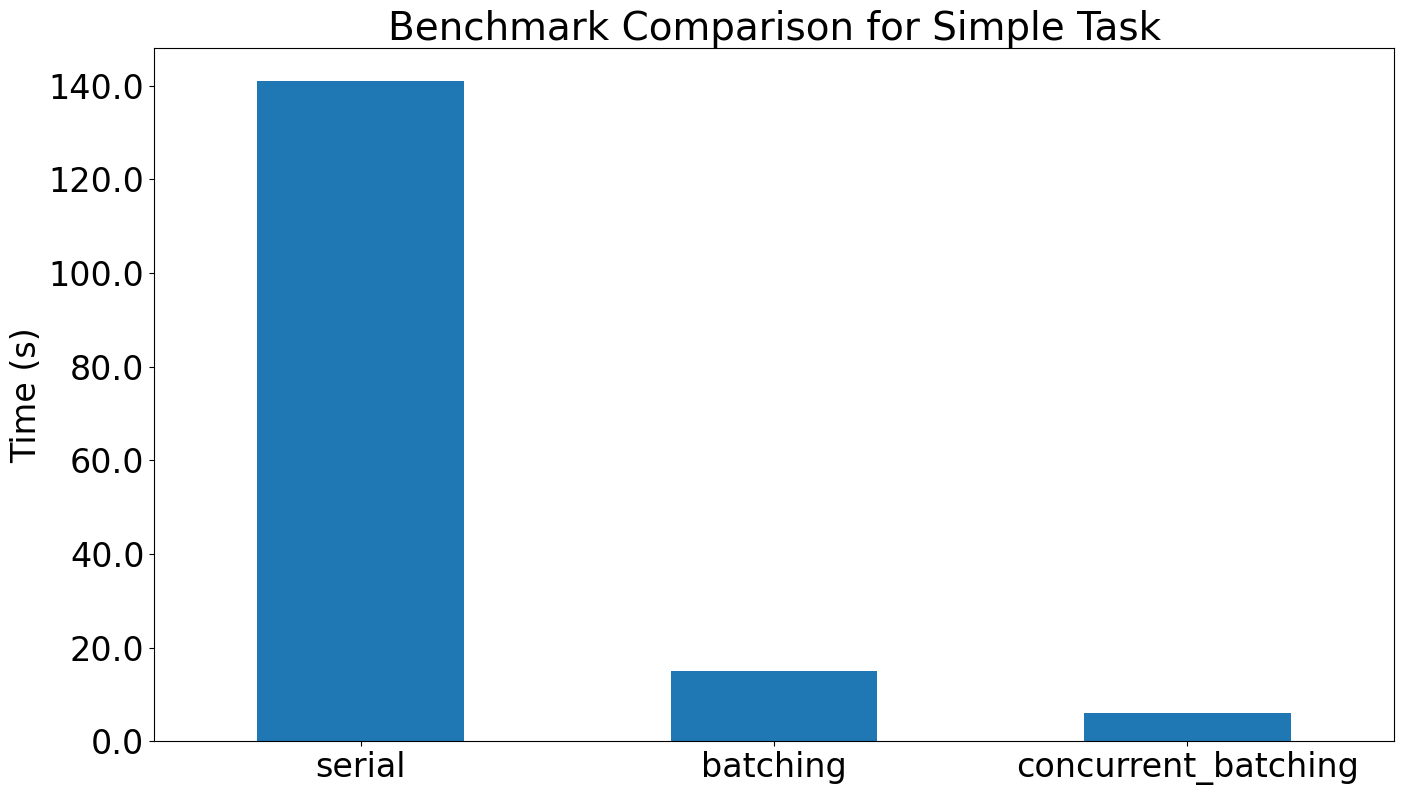
Simple task benchmark from benchmark.ipynb (100 numeric strings → integer literals, Series.aio.responses, model gpt-5.1):
| Mode | Settings | Time (s) |
|---|---|---|
| Serial | batch_size=1, max_concurrency=1 |
~141 |
| Batching | default batch_size, max_concurrency=1 |
~15 |
| Concurrent batching | default batch_size, default max_concurrency |
~6 |
Batching alone removes most HTTP overhead, and letting batching overlap with concurrency cuts total runtime to a few seconds while still yielding one output per input.
Contents
- Why openaivec?
- Overview
- Core Workflows
- Pandas authentication options
- Using with Apache Spark UDFs
- Spark authentication options
- Using with DuckDB
- Building Prompts
- Using with Microsoft Fabric
- Contributing
- Additional Resources
- Community
Why openaivec?
- Drop-in
.aiand.aioaccessors keep pandas analysts in familiar tooling. - OpenAI batch-optimized:
BatchCache/AsyncBatchCachecoalesce requests, dedupe prompts, preserve order, and release waiters on failure. - Reasoning support mirrors the OpenAI SDK; structured outputs accept Pydantic
response_format. - Built-in caches and retries remove boilerplate; pandas and async helpers can share caches explicitly, while Spark UDFs dedupe repeated inputs within each partition.
- Spark UDFs, DuckDB integration, and Microsoft Fabric guides move notebooks into production-scale ETL.
- Prompt tooling (
FewShotPromptBuilder,improve) and the task library ship curated prompts with validated outputs.
Overview
Vectorized OpenAI batch processing so you handle many inputs per call instead of one-by-one. Batching proxies dedupe inputs, enforce ordered outputs, and unblock waiters even on upstream errors. Shared-cache helpers reuse expensive prompts across pandas and async flows, while Spark UDF builders dedupe repeated inputs within each partition. Reasoning models honor SDK semantics. Requires Python 3.10+.
Core Workflows
Direct API usage
For maximum control over batch processing:
import os
from openai import OpenAI
from openaivec import BatchResponses

# Initialize the batch client
client = BatchResponses.of(
    client=OpenAI(),
    model_name="gpt-5.1",
    system_message="Please answer only with 'xx family' and do not output anything else.",
    # batch_size defaults to None (automatic optimization)
)

result = client.parse(
    ["panda", "rabbit", "koala"],
    reasoning={"effort": "none"},
)
print(result)  # Expected output: ['bear family', 'rabbit family', 'koala family']
pandas authentication options
Configure authentication once before using .ai or .aio.
OpenAI (API key)
import os

os.environ["OPENAI_API_KEY"] = "your-openai-api-key"
Azure OpenAI (API key)
import os

os.environ["AZURE_OPENAI_API_KEY"] = "your-azure-openai-api-key"
os.environ["AZURE_OPENAI_BASE_URL"] = "https://YOUR-RESOURCE-NAME.services.ai.azure.com/openai/v1/"
os.environ["AZURE_OPENAI_API_VERSION"] = "v1"
Use AZURE_OPENAI_API_VERSION="v1" together with the /openai/v1/ base URL.
Azure OpenAI with Entra ID (no API key)
import os

os.environ["AZURE_OPENAI_BASE_URL"] = "https://YOUR-RESOURCE-NAME.services.ai.azure.com/openai/v1/"
os.environ["AZURE_OPENAI_API_VERSION"] = "v1"
os.environ.pop("AZURE_OPENAI_API_KEY", None)
openaivec uses DefaultAzureCredential when AZURE_OPENAI_API_KEY is not set.
Custom clients (optional)
import openaivec
from openai import AsyncOpenAI, OpenAI
from openaivec import pandas_ext

openaivec.set_client(OpenAI())
openaivec.set_async_client(AsyncOpenAI())
pandas integration (recommended)
The easiest way to get started with your DataFrames (after authentication):
import openaivec
import pandas as pd
from openaivec import pandas_ext

openaivec.set_responses_model("gpt-5.1")

df = pd.DataFrame({"name": ["panda", "rabbit", "koala"]})

result = df.assign(
    family=lambda df: df.name.ai.responses(
        "What animal family? Answer with 'X family'",
        reasoning={"effort": "none"},
    )
)
| name | family |
|---|---|
| panda | bear family |
| rabbit | rabbit family |
| koala | marsupial family |
📓 Interactive pandas examples →
Using with reasoning models
Reasoning models (o1-preview, o1-mini, o3-mini, etc.) follow OpenAI SDK semantics. Pass reasoning when you want to override model defaults.
import openaivec

openaivec.set_responses_model("o1-mini")  # Set your reasoning model

result = df.assign(
    analysis=lambda df: df.text.ai.responses(
        "Analyze this text step by step",
        reasoning={"effort": "none"},  # Optional: mirrors the OpenAI SDK argument
    )
)
You can omit reasoning to use the model defaults or tune it per request with the same shape (dict with effort) as the OpenAI SDK.
Using pre-configured tasks
For common text processing operations, openaivec provides ready-to-use tasks that eliminate the need to write custom prompts:
from openaivec.task import nlp, customer_support

text_df = pd.DataFrame({
    "text": [
        "Great product, fast delivery!",
        "Need help with billing issue",
        "How do I reset my password?"
    ]
})

results = text_df.assign(
    sentiment=lambda df: df.text.ai.task(
        nlp.sentiment_analysis(),
        reasoning={"effort": "none"},
    ),
    intent=lambda df: df.text.ai.task(
        customer_support.intent_analysis(),
        reasoning={"effort": "none"},
    ),
)

# Extract structured results into separate columns
extracted_results = results.ai.extract("sentiment")
Asynchronous processing with .aio
High-throughput workloads use the .aio accessor for async versions of all operations:
import asyncio
import openaivec
import pandas as pd
from openaivec import pandas_ext

openaivec.set_responses_model("gpt-5.1")

df = pd.DataFrame({"text": [
    "This product is amazing!",
    "Terrible customer service",
    "Good value for money",
    "Not what I expected"
] * 250})  # 1000 rows for demonstration

async def process_data():
    return await df["text"].aio.responses(
        "Analyze sentiment and classify as positive/negative/neutral",
        reasoning={"effort": "none"},  # Recommended for reasoning models
        max_concurrency=12    # Allow up to 12 concurrent requests
    )

sentiments = asyncio.run(process_data())
Performance benefits: Parallel processing with automatic batching/deduplication, built-in rate limiting and error handling, and memory-efficient streaming for large datasets.
Using with Apache Spark UDFs
Scale to enterprise datasets with distributed processing.
Spark authentication options
Choose one setup path before registering UDFs.
OpenAI (API key)
from pyspark.sql import SparkSession
from openaivec.spark_ext import setup

spark = SparkSession.builder.getOrCreate()
setup(
    spark,
    api_key="your-openai-api-key",
    responses_model_name="gpt-5.1",
    embeddings_model_name="text-embedding-3-small",
)
Azure OpenAI (API key)
from pyspark.sql import SparkSession
from openaivec.spark_ext import setup_azure

spark = SparkSession.builder.getOrCreate()
setup_azure(
    spark,
    api_key="your-azure-openai-api-key",
    base_url="https://YOUR-RESOURCE-NAME.services.ai.azure.com/openai/v1/",
    api_version="v1",
    responses_model_name="my-gpt-deployment",
    embeddings_model_name="my-embedding-deployment",
)
Use api_version="v1" with a base URL that ends in /openai/v1/.
Azure OpenAI with Entra ID (no API key)
import os

os.environ["AZURE_OPENAI_BASE_URL"] = "https://YOUR-RESOURCE-NAME.services.ai.azure.com/openai/v1/"
os.environ["AZURE_OPENAI_API_VERSION"] = "v1"
os.environ.pop("AZURE_OPENAI_API_KEY", None)
openaivec uses DefaultAzureCredential when AZURE_OPENAI_API_KEY is not set.
Create and register UDFs using the provided helpers:
from openaivec.spark_ext import responses_udf

spark.udf.register(
    "extract_brand",
    responses_udf(
        instructions="Extract the brand name from the product. Return only the brand name.",
        reasoning={"effort": "none"},
    )
)

products = spark.createDataFrame(
    [("Nike Air Max",), ("Apple iPhone 15",)],
    ["product_name"],
)
products.selectExpr("product_name", "extract_brand(product_name) AS brand").show()
Other helper UDFs are available: task_udf, embeddings_udf, count_tokens_udf, similarity_udf, and parse_udf.
Spark performance tips
- Duplicate detection automatically caches repeated inputs per partition for UDFs.
batch_size=Noneauto-optimizes; set 32–128 for fixed sizes if needed.max_concurrencyis per executor; total concurrency = executors × max_concurrency. Start with 4–12.- Monitor rate limits and adjust concurrency to your OpenAI tier.
Using with DuckDB
Register AI-powered functions as DuckDB UDFs and use them in pure SQL. Structured outputs are returned as native STRUCT types with direct field access.
import openaivec
import duckdb
from pydantic import BaseModel
from typing import Literal
from openaivec import duckdb_ext

openaivec.set_responses_model("gpt-5.4")


class Sentiment(BaseModel):
    label: Literal["positive", "negative", "neutral"]
    confidence: float
    summary: str


conn = duckdb.connect()

duckdb_ext.responses_udf(
    conn,
    "analyze_sentiment",
    instructions="Analyze customer sentiment. Return label, confidence (0-1), and a one-sentence summary.",
    response_format=Sentiment,
)

# Query CSV directly — structured fields, no JSON parsing
conn.sql("""
    SELECT
        customer,
        analyze_sentiment(response).label      AS sentiment,
        analyze_sentiment(response).confidence AS confidence,
        analyze_sentiment(response).summary    AS summary
    FROM 'survey.csv'
""")

# Aggregate with standard SQL
conn.sql("""
    WITH results AS (
        SELECT analyze_sentiment(response).label AS sentiment
        FROM 'survey.csv'
    )
    SELECT sentiment, COUNT(*) AS count
    FROM results
    GROUP BY sentiment
""")
Embedding UDFs work the same way:
duckdb_ext.embeddings_udf(conn, "embed")

conn.sql("""
    SELECT text, list_cosine_similarity(embed(a.text), embed(b.text)) AS similarity
    FROM docs a, queries b
""")
All UDFs use Arrow vectorized execution — DuckDB sends batches of rows that are processed with async concurrency and automatic deduplication.
Building Prompts
Few-shot prompts improve LLM quality. FewShotPromptBuilder structures purpose, cautions, and examples; improve() iterates with OpenAI to remove contradictions.
from openaivec import FewShotPromptBuilder

prompt = (
    FewShotPromptBuilder()
    .purpose("Return the smallest category that includes the given word")
    .caution("Never use proper nouns as categories")
    .example("Apple", "Fruit")
    .example("Car", "Vehicle")
    .improve(max_iter=1)  # optional
    .build()
)
📓 Advanced prompting techniques →
Using with Microsoft Fabric
Microsoft Fabric is a unified, cloud-based analytics platform. Add openaivec from PyPI in your Fabric environment, select it in your notebook, and use openaivec.spark_ext like standard Spark.
Contributing
We welcome contributions! Please:
- Fork and branch from
main. - Add or update tests when you change code.
- Run formatting and tests before opening a PR.
Install dev deps:
uv sync --all-extras --dev
Lint and format:
uv run ruff check . --fix
Quick test pass:
uv run pytest -m "not slow and not requires_api"
Additional Resources
📓 Customer feedback analysis → - Sentiment analysis & prioritization
📓 Survey data transformation → - Unstructured to structured data
📓 Asynchronous processing examples → - High-performance async workflows
📓 Auto-generate FAQs from documents → - Create FAQs using AI
📓 All examples → - Complete collection of tutorials and use cases
Community
Join our Discord community for support and announcements: https://discord.gg/hXCS9J6Qek
Project details
Verified details
These details have been verified by PyPIProject links
GitHub Statistics
Maintainers
Release history Release notifications | RSS feed


Download files
Download the file for your platform. If you're not sure which to choose, learn more about installing packages.
Source Distribution
Built Distribution
Filter files by name, interpreter, ABI, and platform.
If you're not sure about the file name format, learn more about wheel file names.
Copy a direct link to the current filters
File details
Details for the file openaivec-2.1.0.tar.gz.
File metadata
- Download URL: openaivec-2.1.0.tar.gz
- Upload date:
- Size: 361.4 kB
- Tags: Source
- Uploaded using Trusted Publishing? Yes
- Uploaded via: twine/6.1.0 CPython/3.13.12
File hashes
| Algorithm | Hash digest | |
|---|---|---|
| SHA256 |
9e4252932d78fb7935ac4270caa5295f6f86de8e6d0808ab466ad4ae90ccdf73
|
|
| MD5 |
caf93d5847e7eb63af4eda987efe2854
|
|
| BLAKE2b-256 |
d78e670859ddc72b3d476ee2ec80ae4ced1281f07ab45a6a01c29e067c187af1
|
Provenance
The following attestation bundles were made for openaivec-2.1.0.tar.gz:
Publisher:
publish.yml on microsoft/openaivec
-
Statement:
-
Statement type:
https://in-toto.io/Statement/v1 -
Predicate type:
https://docs.pypi.org/attestations/publish/v1 -
Subject name:
openaivec-2.1.0.tar.gz -
Subject digest:
9e4252932d78fb7935ac4270caa5295f6f86de8e6d0808ab466ad4ae90ccdf73 - Sigstore transparency entry: 1280436349
- Sigstore integration time:
-
Permalink:
microsoft/openaivec@75a600eff7b758c70795db396e524d3db2735cab -
Branch / Tag:
refs/tags/v2.1.0 - Owner: https://github.com/microsoft
-
Access:
public
-
Token Issuer:
https://token.actions.githubusercontent.com -
Runner Environment:
github-hosted -
Publication workflow:
publish.yml@75a600eff7b758c70795db396e524d3db2735cab -
Trigger Event:
push
-
Statement type:
File details
Details for the file openaivec-2.1.0-py3-none-any.whl.
File metadata
- Download URL: openaivec-2.1.0-py3-none-any.whl
- Upload date:
- Size: 117.6 kB
- Tags: Python 3
- Uploaded using Trusted Publishing? Yes
- Uploaded via: twine/6.1.0 CPython/3.13.12
File hashes
| Algorithm | Hash digest | |
|---|---|---|
| SHA256 |
e1a436fb7ccd67e88668fe014db14819065ac87b7638f9a5d4c190ba0f1f9d0c
|
|
| MD5 |
928a4e2cf954079a9c10d9ec16fa09ef
|
|
| BLAKE2b-256 |
4d6f309cb4278a990d2137047e3827e09a5ca34c21e912ad47b0bbea4cf5a9cf
|
Provenance
The following attestation bundles were made for openaivec-2.1.0-py3-none-any.whl:
Publisher:
publish.yml on microsoft/openaivec
-
Statement:
-
Statement type:
https://in-toto.io/Statement/v1 -
Predicate type:
https://docs.pypi.org/attestations/publish/v1 -
Subject name:
openaivec-2.1.0-py3-none-any.whl -
Subject digest:
e1a436fb7ccd67e88668fe014db14819065ac87b7638f9a5d4c190ba0f1f9d0c - Sigstore transparency entry: 1280436353
- Sigstore integration time:
-
Permalink:
microsoft/openaivec@75a600eff7b758c70795db396e524d3db2735cab -
Branch / Tag:
refs/tags/v2.1.0 - Owner: https://github.com/microsoft
-
Access:
public
-
Token Issuer:
https://token.actions.githubusercontent.com -
Runner Environment:
github-hosted -
Publication workflow:
publish.yml@75a600eff7b758c70795db396e524d3db2735cab -
Trigger Event:
push
-
Statement type:






