
全能自进化AI Agent - 基于Ralph Wiggum模式,永不放弃

Project description

OpenAkita
Open-Source Multi-Agent AI Assistant — Not Just Chat, an AI Team That Gets Things Done





Multi-Agent Collaboration · 30+ LLMs · 6 IM Platforms · 89+ Tools · Desktop / Web / Mobile
Quick-Start • Capabilities • 5-Min Setup • Multi-Platform • Multi-Agent • Docs
English | 中文
What is OpenAkita?
Other AIs just chat. OpenAkita gets things done.
OpenAkita is an open-source, all-in-one AI assistant — multiple AI Agents work together, search the web, operate your computer, manage files, run scheduled tasks, and respond instantly across Telegram / Slack / DingTalk / Feishu / QQ. It remembers your preferences, teaches itself new skills, and never gives up on a task.
Fully GUI-based setup. Ready in 5 minutes. Zero command line required.
Download: GitHub Releases — Windows / macOS / Linux
Quick-Start Guide
🚀 For First-Time Users (3 Minutes)
No installation required — download the desktop app and start chatting:
- Download the installer from GitHub Releases
- Install and follow the onboarding wizard
- Enter your API Key (get one from Anthropic or DeepSeek)
- Try your first task: Type "Create a calculator" and watch it work
💻 For Developers (5 Minutes)
# Install
pip install openakita[all]

# Quick setup (interactive wizard)
openakita init

# Run your first task
openakita run "Build a weather scraper"
✨ What You Can Do Right Away
| Category | Examples |
|---|---|
| 💬 Chat | Text + images + files, voice messages, stickers |
| 🤖 Multi-Agent | "Create a competitive analysis" → research + analysis + writing agents work together |
| 🌐 Web | Search news, scrape websites, automate browser tasks |
| 📁 Files | Read/write/edit files, batch rename, search content |
| 🖥️ Desktop | Click buttons, type text, take screenshots, automate apps |
| ⏰ Scheduled | "Remind me every Monday at 9am" — cron-based reminders |
➡️ Next Steps
- Configure LLM: Add multiple providers for automatic failover
- Set up IM channels: Connect Telegram/Feishu/DingTalk for instant access
- Explore skills: Install from marketplace or create your own
- Join community: Discord | WeChat Group
Core Capabilities
🤝 Multi-Agent CollaborationMultiple AI agents with specialized skills work in parallel. Say one thing — a coding Agent writes code, a writing Agent drafts docs, a testing Agent verifies — all at the same time. 📋 Plan ModeComplex tasks auto-decomposed into step-by-step plans with real-time progress tracking and automatic rollback on failure. 🧠 ReAct Reasoning EngineThink → Act → Observe. Explicit three-phase reasoning with checkpoint/rollback. Fails? Tries a different strategy. 🔧 89+ Tools — Actually Does ThingsWeb search · Desktop automation · File management · Browser automation · Scheduled tasks · MCP extensions … |
🚀 5-Min Setup — Zero Command LineDownload → Install → Follow the wizard → Enter API Key → Start chatting. Fully GUI-based, no terminal needed. 🌐 30+ LLM ProvidersDeepSeek / Qwen / Kimi / Claude / GPT / Gemini … One goes down, the next picks up automatically. 💬 6 IM PlatformsTelegram / Feishu / WeCom / DingTalk / QQ / OneBot — use AI right inside your daily chat tools. 💾 Long-Term MemoryThree-layer memory system + AI extraction. Remembers your preferences, habits, and task history. |
Full Feature List
| Feature | Description | |
|---|---|---|
| 🤝 | Multi-Agent | Specialized agents, parallel delegation, automatic handoff, failover, real-time visual dashboard |
| 📋 | Plan Mode | Auto task decomposition, per-step tracking, floating progress bar in UI |
| 🧠 | ReAct Reasoning | Explicit 3-phase loop, checkpoint/rollback, loop detection, strategy switching |
| 🚀 | Zero-Barrier Setup | Full GUI config, onboarding wizard, 5 minutes from install to chat, zero CLI |
| 🔧 | 89+ Built-in Tools | 16 categories: Shell / Files / Browser / Desktop / Search / Scheduler / MCP … |
| 🛒 | Skill Marketplace | Search & one-click install, GitHub direct install, AI-generated skills on the fly |
| 🌐 | 30+ LLM Providers | Anthropic / OpenAI / DeepSeek / Qwen / Kimi / MiniMax / Gemini … smart failover |
| 💬 | 6 IM Platforms | Telegram / Feishu / WeCom / DingTalk / QQ / OneBot, voice recognition, smart group chat |
| 💾 | 3-Layer Memory | Working + Core + Dynamic retrieval, 7 memory types, AI-driven extraction & review |
| 🎭 | 8 Personas | Default / Tech Expert / Boyfriend / Girlfriend / Jarvis / Butler / Business / Family |
| 🤖 | Proactive Engine | Greetings, task follow-ups, idle chat, goodnight — adapts frequency to your feedback |
| 🧬 | Self-Evolution | Daily self-check & repair, failure root cause analysis, auto skill generation |
| 🔍 | Deep Thinking | Controllable thinking mode, real-time chain-of-thought display, IM streaming |
| 🛡️ | Runtime Supervision | Tool thrashing detection, resource budgets, policy engine, deterministic validators |
| 🔒 | Safety & Governance | POLICIES.yaml, dangerous ops require confirmation, local data storage |
| 🖥️ | Multi-Platform | Desktop (Win/Mac/Linux) · Web (PC & mobile browser) · Mobile App (Android/iOS), 11 panels, dark theme |
| 📊 | Observability | 12 trace span types, full-chain token statistics panel |
| 😄 | Stickers | 5700+ stickers, mood-aware, persona-matched |
5-Minute Setup
Option 1: Desktop App (Recommended)
Fully GUI-based, no command line — this is what sets OpenAkita apart from other open-source AI assistants:

| Step | What You Do | Time |
|---|---|---|
| 1 | Download installer, double-click to install | 1 min |
| 2 | Follow the onboarding wizard, enter API Key | 2 min |
| 3 | Start chatting | Now |
- No Python installation, no git clone, no config file editing
- Isolated runtime — won't mess with your existing system
- Chinese users get automatic mirror switching
- Models, IM channels, skills, schedules — all configured in the GUI
Download: GitHub Releases — Windows (.exe) / macOS (.dmg) / Linux (.deb)
Option 2: pip Install
pip install openakita[all]    # Install with all optional features
openakita init                # Run setup wizard
openakita                     # Launch interactive CLI
Option 3: Source Install
git clone https://github.com/openakita/openakita.git
cd openakita
python -m venv venv && source venv/bin/activate
pip install -e ".[all]"
openakita init
Commands
openakita                              # Interactive chat
openakita run "Build a calculator"     # Execute a single task
openakita serve                        # Service mode (IM channels)
openakita serve --dev                  # Dev mode with hot reload
openakita daemon start                 # Background daemon
openakita status                       # Check status
Multi-Platform Access
OpenAkita supports Desktop, Web, and Mobile — use it anywhere, on any device:
| Platform | Details |
|---|---|
| 🖥️ Desktop App | Windows / macOS / Linux — native app built with Tauri 2.x |
| 🌐 Web Access | PC & mobile browser — enable remote access, open in any browser |
| 📱 Mobile App | Android (APK) / iOS (TestFlight) — native wrapper via Capacitor |
Desktop App

Cross-platform desktop app built with Tauri 2.x + React + TypeScript:
| Panel | Function |
|---|---|
| Chat | AI chat, streaming output, Thinking display, drag & drop upload, image lightbox |
| Agent Dashboard | Neural network visualization, real-time multi-Agent status tracking |
| Agent Manager | Create, manage, and configure multiple Agents |
| IM Channels | One-stop setup for all 6 platforms |
| Skills | Marketplace search, install, enable/disable |
| MCP | MCP server management |
| Memory | Memory management + LLM-powered review |
| Scheduler | Scheduled task management |
| Token Stats | Token usage statistics |
| Config | LLM endpoints, system settings, advanced options |
| Feedback | Bug reports + feature requests |
Dark/light theme · Onboarding wizard · Auto-update · Bilingual (EN/CN) · Start on boot
Mobile App

▶ Click to watch the Mobile App demo on Bilibili
- Connect your phone to the desktop backend over local network
- Full-featured: chat, multi-Agent collaboration, memory, skills, MCP — all on mobile
- Supports real-time streaming and Thinking chain display
- Preview mode available without connecting to a server
Multi-Agent Collaboration

▶ Click to watch the Multi-Agent collaboration demo on Bilibili
OpenAkita has a built-in multi-Agent orchestration system — not just one AI, but an AI team:
You: "Create a competitive analysis report"
    │
    ▼
┌──────────────────────────────────────┐
│      AgentOrchestrator (Director)     │
│   Decomposes task → Assigns to Agents │
└───┬────────────┬──────────────┬──────┘
    ▼            ▼              ▼
 Search Agent  Analysis Agent  Writing Agent
 (web research) (data crunching) (report drafting)
    │            │              │
    └────────────┴──────────────┘
                 ▼
         Results merged, delivered to you
- Specialization: Different Agents for different domains, auto-matched to tasks
- Parallel Processing: Multiple Agents work simultaneously
- Auto Handoff: If one Agent gets stuck, it hands off to a better-suited one
- Failover: Agent failure triggers automatic switch to backup
- Depth Control: Max 5 delegation levels to prevent runaway recursion
- Visual Tracking: Agent Dashboard shows real-time status of every Agent
30+ LLM Providers
No vendor lock-in. Mix and match freely:
| Category | Providers |
|---|---|
| Local | Ollama · LM Studio |
| International | Anthropic · OpenAI · Google Gemini · xAI (Grok) · Mistral · OpenRouter · NVIDIA NIM · Groq · Together AI · Fireworks · Cohere |
| China | Alibaba DashScope · Kimi (Moonshot) · MiniMax · DeepSeek · SiliconFlow · Volcengine · Zhipu AI · Baidu Qianfan · Tencent Hunyuan · Yunwu · Meituan LongCat · iFlow |
7 capability dimensions: Text · Vision · Video · Tool use · Thinking · Audio · PDF
Smart failover: One model goes down, the next picks up seamlessly.
Recommended Models
| Model | Provider | Notes |
|---|---|---|
claude-sonnet-4-5-* |
Anthropic | Default, balanced |
claude-opus-4-5-* |
Anthropic | Most capable |
qwen3-max |
Alibaba | Strong Chinese support |
deepseek-v3 |
DeepSeek | Cost-effective |
kimi-k2.5 |
Moonshot | Long-context |
minimax-m2.1 |
MiniMax | Great for dialogue |
For complex reasoning, enable Thinking mode — add
-thinkingsuffix to the model name.
6 IM Platforms
Talk to your AI right inside the chat tools you already use:
| Platform | Connection | Highlights |
|---|---|---|
| Telegram | Webhook / Long Polling | Pairing verification, Markdown, proxy support |
| Feishu | WebSocket / Webhook | Card messages, event subscriptions |
| WeCom | Smart Robot callback | Streaming replies, proactive push |
| DingTalk | Stream WebSocket | No public IP needed |
| QQ Official | WebSocket / Webhook | Groups, DMs, channels |
| OneBot | WebSocket | Compatible with NapCat / Lagrange / go-cqhttp |
- 📷 Vision: Send screenshots/photos — AI understands them
- 🎤 Voice: Send voice messages — auto-transcribed and processed
- 📎 File Delivery: AI-generated files pushed directly to chat
- 👥 Group Chat: Replies when @mentioned, stays quiet otherwise
- 💭 Chain-of-Thought: Real-time reasoning process streamed to IM
Memory System
Not just a "context window" — true long-term memory:
- Three layers: Working memory (current task) + Core memory (user profile) + Dynamic retrieval (past experience)
- 7 memory types: Fact / Preference / Skill / Error / Rule / Persona trait / Experience
- AI-driven extraction: Automatically distills valuable information after each conversation
- Multi-path recall: Semantic + full-text + temporal + attachment search
- Gets smarter over time: Preferences you mentioned two months ago? Still remembered.
Self-Evolution
OpenAkita keeps getting stronger:
Daily 04:00   →  Self-check: analyze error logs → AI diagnosis → auto-fix → push report
After failure →  Root cause analysis (context loss / tool limitation / loop / budget) → suggestions
Missing skill →  Auto-search GitHub for skills, or AI generates one on the spot
Missing dep   →  Auto pip install, auto mirror switching for China
Every chat    →  Extract preferences and experience → long-term memory
Safety & Governance
- Policy Engine: POLICIES.yaml for tool permissions, shell command blocklist, path restrictions
- Confirmation: Dangerous operations (file deletion, system commands) require user approval
- Resource Budgets: Token / cost / duration / iteration / tool call limits per task
- Runtime Supervision: Auto-detection of tool thrashing, reasoning loops, token anomalies
- Local Data: Memory, config, and chat history stored on your machine only
- Open Source: Apache 2.0, fully transparent codebase
Architecture
Desktop App (Tauri + React)
    │
Identity ─── SOUL.md · AGENT.md · POLICIES.yaml · 8 Persona Presets
    │
Core     ─── ReasoningEngine(ReAct) · Brain(LLM) · ContextManager
    │        PromptAssembler · RuntimeSupervisor · ResourceBudget
    │
Agents   ─── AgentOrchestrator(Coordination) · AgentInstancePool(Pooling)
    │        AgentFactory · FallbackResolver(Failover)
    │
Memory   ─── UnifiedStore(SQLite+Vector) · RetrievalEngine(Multi-path)
    │        MemoryExtractor · MemoryConsolidator
    │
Tools    ─── Shell · File · Browser · Desktop · Web · MCP · Skills
    │        Plan · Scheduler · Sticker · Persona · Agent Delegation
    │
Evolution ── SelfCheck · FailureAnalyzer · SkillGenerator · Installer
    │
Channels ─── CLI · Telegram · Feishu · WeCom · DingTalk · QQ · OneBot
    │
Tracing  ─── AgentTracer(12 SpanTypes) · DecisionTrace · TokenStats
Documentation
| Document | Content |
|---|---|
| Configuration Guide | Desktop Quick Setup & Full Setup walkthrough |
| ⭐ LLM Provider Setup | API Key registration + endpoint config + Failover |
| ⭐ IM Channel Setup | Telegram / Feishu / DingTalk / WeCom / QQ / OneBot tutorial |
| Quick Start | Installation and basics |
| Architecture | System design and components |
| Configuration | All config options |
| Deployment | Production deployment |
| MCP Integration | Connecting external services |
| Skill System | Creating and using skills |
Community
 WeChat Official Follow for updates |
 WeChat (Personal) Note "OpenAkita" to join group |
 WeChat Group Scan to join (⚠️ refreshed weekly) |
 QQ Group: 854429727 Scan or search to join |
Discord · X (Twitter) · Email
Issues · Discussions · Star
Acknowledgments
- Anthropic Claude — Core LLM engine
- Tauri — Cross-platform desktop framework
- ChineseBQB — 5700+ stickers that give AI a soul
- browser-use — AI browser automation
- AGENTS.md / Agent Skills — Open standards
License
Apache License 2.0 — See LICENSE
Third-party licenses: THIRD_PARTY_NOTICES.md
Star History
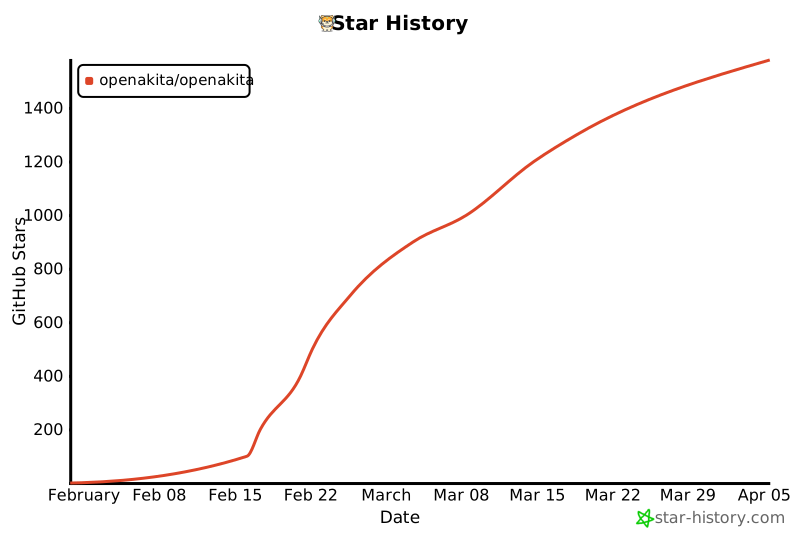
OpenAkita — Open-Source Multi-Agent AI Assistant That Gets Things Done
Release history Release notifications | RSS feed


Download files
Download the file for your platform. If you're not sure which to choose, learn more about installing packages.
Source Distributions
Built Distribution
Filter files by name, interpreter, ABI, and platform.
If you're not sure about the file name format, learn more about wheel file names.
Copy a direct link to the current filters
File details
Details for the file openakita-1.27.1-py3-none-any.whl.
File metadata
- Download URL: openakita-1.27.1-py3-none-any.whl
- Upload date:
- Size: 5.0 MB
- Tags: Python 3
- Uploaded using Trusted Publishing? No
- Uploaded via: twine/6.2.0 CPython/3.11.15
File hashes
| Algorithm | Hash digest | |
|---|---|---|
| SHA256 |
caa52e07743d86b0a6b57ce29937275273cb0923e1c5c269c6cc0cbd76388387
|
|
| MD5 |
6aac64bca22d6d4a32c19ce57d509c9d
|
|
| BLAKE2b-256 |
7e936e12cab550c766f78741d6492364fb9b4e7ecf594e67b6783987cdab554c
|







