
A python library to download, analyse or plot articles, institutions, and other entities from the OpenAlex API

Project description
OpenAlex Analysis
A python library to download, analyse or plot articles, institutions, and other entities from the OpenAlex API
Install with:
pip install openalex-analysis
Documentation: https://romain894.github.io/openalex-analysis
Licence: GPL V3
If you want to export the plots, you need to install kaleido:
pip install kaleido
Examples
Examples in the documentation: https://romain894.github.io/openalex-analysis/html/examples.html
Get a dataset
You can use the library simply to download and work with datasets from OpenAlex. The library can download these datasets and cache them on the computer automatically.
These datasets can then be used in python outside the library, as they are pandas DataFrame objects.
It is possible to save the datasets as a CSV file with the pandas function my_dataset.to_csv("my_dataset.csv").
Bellow, a few examples:
Get works from a list of DOIs
In this example, we will get works in OpenAlex from a list of DOIs.
from openalex_analysis.data import WorksData

# list of DOIs to get, you can mix formats:
article_dois = [
    "https://doi.org/10.1016/j.cosust.2025.101526",
    "10.1038/461472a",
    "https://doi.org/10.1126/SCIENCE.1259855",
]
wdata = WorksData(entities_from_id_list = article_dois)

my_dataset = wdata.entities_df

# you get a pandas DataFrame, you can print it with panda's methods:
my_dataset.head()
Get works from a topic
In this example, we will get the works having the topic "Natural Language Processing".
By default, the library setting limits to 10k entities the number of works, and OpenAlex rank them by their number of citations.
from openalex_analysis.data import WorksData

topic_id = 'T10028' # Natural Language Processing

wdata = WorksData(topic_id)

my_dataset = wdata.entities_df
Other simple examples
You can use the same syntax to get the works of any entity (institution, author, concept...):
from openalex_analysis.data import WorksData

# Get the works of the institution "Stockholm Resilience Centre"
wdata = WorksData("I138595864")
This also works to get other type of entities:
from openalex_analysis.data import AuthorsData

# Get the authors of the institution "Stockholm Resilience Centre"
adata = AuthorsData("I138595864")
from openalex_analysis.data import InstitutionsData

# Get the institutions having as topic "Natural Language Processing"
idata = InstitutionsData("T10028")
Get the works about two topics
from openalex_analysis.data import WorksData

topic_1_id = 'T10119' # Sustainability Transitions and Resilience in Social-Ecological Systems
topic_2_id = 'T13377' # Anticipating Critical Transitions in Ecosystems

extra_filters = {
    'topics':{'id':[topic_1_id, topic_2_id]},
}

wdata = WorksData(extra_filters = extra_filters)

my_dataset = wdata.entities_df
Get the works about sustainability from the Stockholm Resilience Centre published in 2020
from openalex_analysis.analysis import WorksAnalysis

concept_sustainability = 'C66204764'
institution_src_id = "I138595864"
extra_filters = {
    'publication_year':2020,
    'authorships':{'institutions':{'id':institution_src_id}},
}

wplt = WorksAnalysis(concept_sustainability,
                     extra_filters = extra_filters)

my_dataset = wplt.entities_df
More filters
This library uses the same syntax as PyAlex.
You can use all the filters available in the OpenAlex documentation, for example, for works you can find the list here.
Institutions collaborations plot
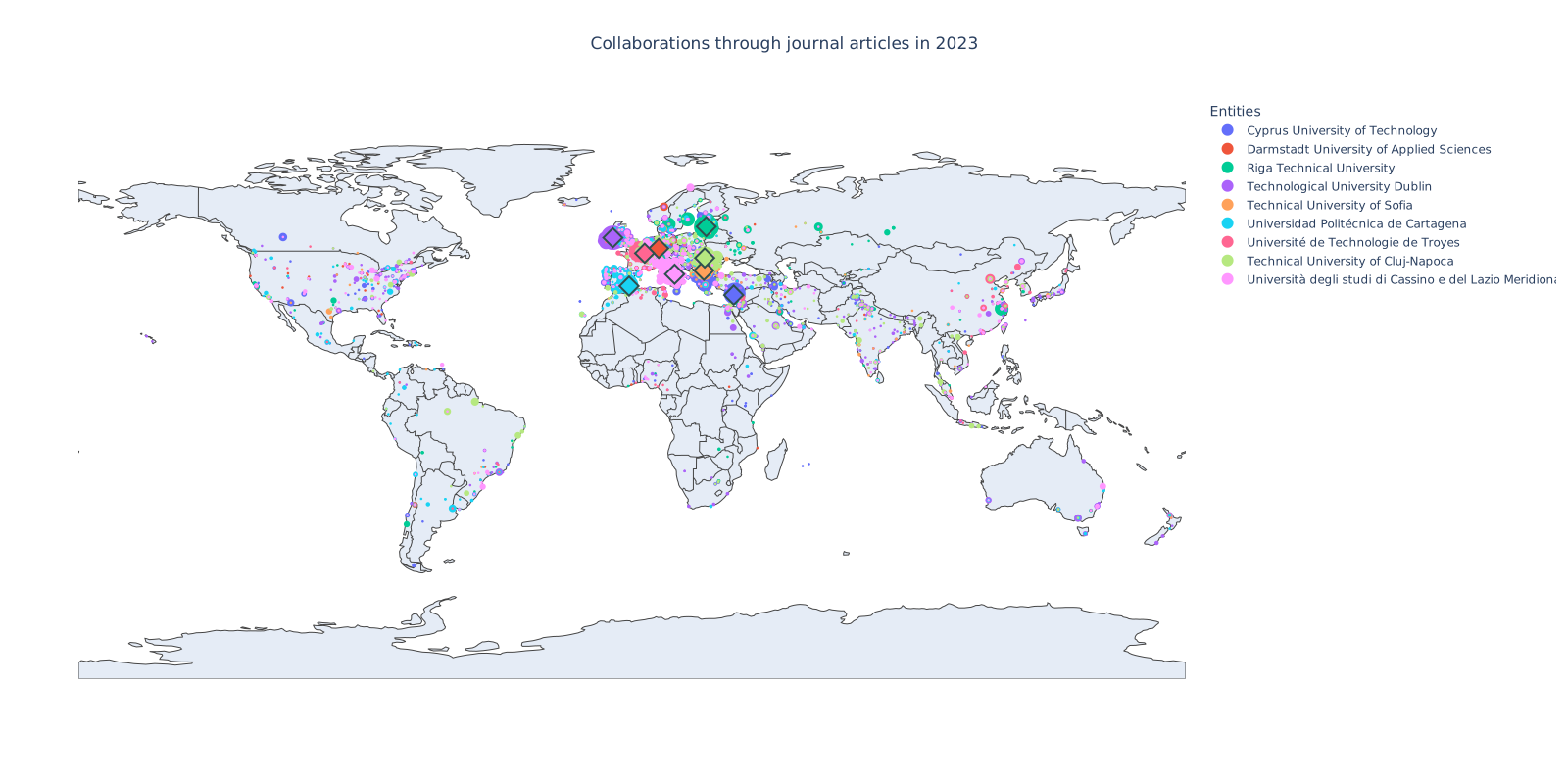
In this example, we will plot the collaborations (co-authorship universities) that a list of universities had.
This plot shows each university that collaborated with a university of the EUt+ (European University of Technology).
from openalex_analysis.plot import InstitutionsPlot

year = "2023"

entities_from = [
                     "I163151358",  # Cyprus University of Technology
                     "I107257983",  # Darmstadt University of Applied Sciences
                     "I201787326",  # Riga Technical University
                     "I4210144925", # Technological University Dublin
                     "I31151848",   # Technical University of Sofia
                     "I3123212020", # Universidad Politécnica de Cartagena
                     "I140494188",  # University of Technology of Troyes
                     "I158333966",  # Technical University of Cluj-Napoca
                     "I186995768",  # University of Cassino and Southern Lazio
                     ]

iplt = InstitutionsPlot()

# generate the DataFrame
iplt.get_collaborations_with_institutions(entities_from = entities_from,
                                          year = year,
                                         )

# generate the plot
fig = iplt.get_figure_collaborations_with_institutions()

fig.write_image("plot_collaborations_eut+_2023.svg")
# fig.write_image("plot_collaborations_eut+_2023.png", scale=2)
# fig.write_html("plot_collaborations_eut+_2023.html")

fig.show()
Configure the library
By default, the library will run out of the box. Nevertheless, some optional configurations can be done to improve the performance and to fit best the use case.
Setting up the email address allows you to use the polite pool from OpenAlex which is faster than the default one.
from openalex_analysis.plot import config, InstitutionsPlot

config.email = "email@example.com"

InstitutionsPlot()
The documentation or this notebook setup_and_settings.ipynb contains more setup examples.
Available settings
email(str) - Your Email for the OpenAlex API. Allows you to use the polite pool (see OpenAlex documentation). The default value is None (not using the polite pool).api_key(str) - Your OpenAlex API key, if you have one. The default value is None.openalex_url(str) - OpenAlex API URL or your self-hosted API URL. The default value is "https://api.openalex.org".http_retry_times(int) - maximum number of retries when querying the OpenAlex API in HTTP. The default value is 3.disable_tqdm_loading_bar(bool) - To disable the tqdm loading bar. The default is False.n_max_entities(int) - Maximum number of entities to download (the default value is to download maximum 10 000 entities). If set to None, no limitation will be applied.project_data_folder_path(str) - Path to the folder containing the data downloaded from the OpenAlex API (these data are stored in compressed parquet files and used as a cache). The default path is "~/openalex-analysis/data".parquet_compression(str) - Type of compression for the parquet files used as cache (see the Pandas documentation). The default value is "brotli".max_storage_percent(int) - When the disk capacity reaches this percentage, cached parquet files will be deleted. The default value is 95.max_storage_files(int) - When the cache folder reaches this number of files, cached parquet files will be deleted. The default value is 10000.max_storage_size(int) - When the cache folder reached this size (in bytes), cached parquet files will be deleted. The default value is 5e9 (5 GB).min_storage_files(int) - Before deleting files, we check if we exceed the minimum number of files and folder size. If one of those minimum if exceeded, we allow the program to delete cached parquet files. This is to avoid the setting max_storage_percent to delete every cached file when the disk is almost full. The default value is 1000.min_storage_size(int) - Before deleting files, we check if we exceed the minimum number of files and folder size. If one of those minimum if exceeded, we allow the program to delete cached parquet files. This is to avoid the setting max_storage_percent to delete every cached file when the disk is almost full. The default value is 5e8 (500 MB).cache_max_age(int) - Maximum age of the cache in days. The default value is 365.log_level(str) - The log detail level for openalex-analysis (library specific). The log_level must be 'DEBUG', 'INFO', 'WARNING', 'ERROR' or 'CRITICAL'. The default value 'WARNING'.
Use a configuration file
You can use a configuration file to load your settings. If you save it in
~/openalex-analysis/openalex-analysis-conf.toml, it will be automatically loaded each time you import the library.
If you want to use another path for you configuration file, you can load it after importing the library as follows:
from openalex_analysis.analysis import load_config_from_file, WorksAnalysis

load_config_from_file("my-openalex-analysis-conf.toml")
In the configuration file, you can define the available settings with the following format:
log_level = "DEBUG"
n_max_entities = 200
Tests
In the directory tests/ run:
pytest tests.py
Build the documentation
In the directory sphinx-doc/ run:
make html
Other resources
- Web app based on the library is available here (this project is not currently maintained but an update is planned in the coming months).
- OpenAlex documentation
- Explore OpenAlex online
- PyAlex (Python library for OpenAlex)
Romain Thomas 2025
Project details
Release history Release notifications | RSS feed


Download files
Download the file for your platform. If you're not sure which to choose, learn more about installing packages.
Source Distribution
Built Distribution
Filter files by name, interpreter, ABI, and platform.
If you're not sure about the file name format, learn more about wheel file names.
Copy a direct link to the current filters
File details
Details for the file openalex_analysis-0.15.2.tar.gz.
File metadata
- Download URL: openalex_analysis-0.15.2.tar.gz
- Upload date:
- Size: 42.5 kB
- Tags: Source
- Uploaded using Trusted Publishing? No
- Uploaded via: twine/6.1.0 CPython/3.12.3
File hashes
| Algorithm | Hash digest | |
|---|---|---|
| SHA256 |
0af76d9b49ad5a05906e1011b06e781826d68d4066131ac362fc945e8637be76
|
|
| MD5 |
55b6233a4feed095daafd2498e7978ae
|
|
| BLAKE2b-256 |
7952dfe38d82128cfdb9f7f8d970fa831fa13af8418da0597afb7a8b222752ba
|
File details
Details for the file openalex_analysis-0.15.2-py3-none-any.whl.
File metadata
- Download URL: openalex_analysis-0.15.2-py3-none-any.whl
- Upload date:
- Size: 38.5 kB
- Tags: Python 3
- Uploaded using Trusted Publishing? No
- Uploaded via: twine/6.1.0 CPython/3.12.3
File hashes
| Algorithm | Hash digest | |
|---|---|---|
| SHA256 |
12d30c760212c7b21323a72a70200411bebea26b6b82fae24cf10c6e80550f0e
|
|
| MD5 |
a5fd7d2075324b8ccf7f331f0b7d22e0
|
|
| BLAKE2b-256 |
d9971cb033c5b9f8b4578c834adbceaf347a8f98b057abba1298356a6ef34bb0
|






