
OpenAPI MCP Server

Overview
- This project will install
MCP - Model Context Protocol Server, that provides configured REST API's as context to LLM's. - Using this we can enable LLMs to interact with RestAPI's and perform REST API call's using LLM prompts.
- Currently we support HTTP API Call's
GET/PUT/POST/PATCH.
Installation
- Install package
pip install openapi_mcp_server
- Create .env in a folder with minimum values for
OPENAPI_SPEC_PATH&API_BASE_URL. Sample file available here - Test
openapi_mcp_serverserver usinguv run openapi_mcp_serverfrom the above folder.
Claud Desktop
- Configuration details for Claud Desktop
{
  "mcpServers": {
    "openapi_mcp_server":{
      "command": "uv",
      "args": ["run","openapi_mcp_server"]
      "env": {
          "DEBUG":"1",
          "API_BASE_URL":"https://petstore.swagger.io/v2",
          "OPENAPI_SPEC_PATH":"https://petstore.swagger.io/v2/swagger.json",
          "API_HEADERS":"Accept:application/json",
          "API_WHITE_LIST":"addPet,updatePet,findPetsByStatus"
      }
    }
  }
}
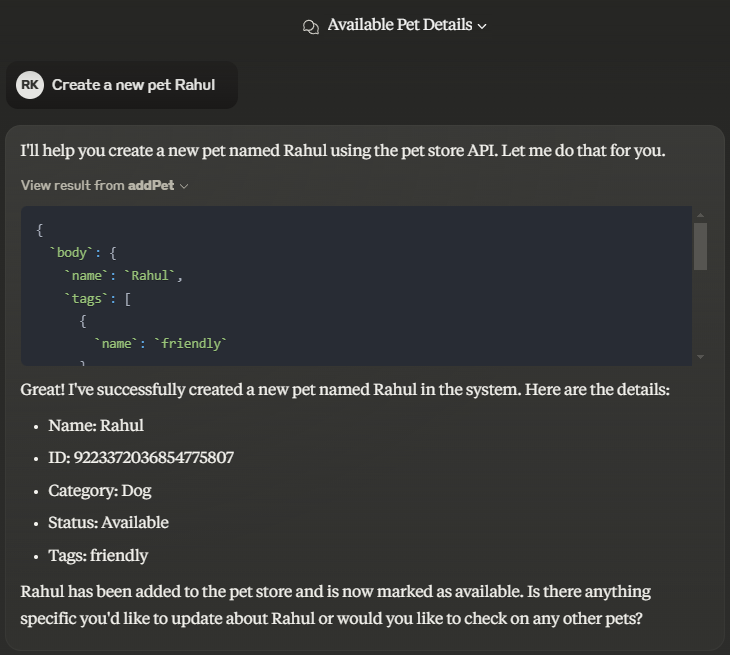
Configuration
- List of available environment variables
DEBUG: Enable debug logging (optional default is False)OPENAPI_SPEC_PATH: Path to the OpenAPI document. (required)API_BASE_URL: Base URL for the API requests. (required)API_HEADERS: Headers to include in the API requests (optional)API_WHITE_LIST: White Listed operationId in list format ["operationId1", "operationId2"] (optional)API_BLACK_LIST: Black Listed operationId in list format ["operationId3", "operationId4"] (optional)HTTP_PROXY: HTTP Proxy details (optional)HTTPS_PROXY: HTTPS Proxy details (optional)NO_PROXY: No Proxy details (optional)
Contributing
Contributions are welcome.
Please feel free to submit a Pull Request.
License
This project is licensed under the terms of the MIT license.
Github Stars
Appendix
UV
mkdir -m777 openapi_mcp_server
cd openapi_mcp_server
uv init
uv add mcp[cli] pydantic python-dotenv requests
uv add --dev twine setuptools
uv sync
uv run openapi_mcp_server
uv build
pip install --force-reinstall --no-deps .\dist\openapi_mcp_server-*fileversion*.whl
export TWINE_USERNAME="rahgadda"
export TWINE_USERNAME="<<API Key>>"
uv run twine upload --verbose dist/*
Reference
1 maintainer

Metadata
1 maintainer
Release files for openapi-mcp-server 0.2.1
For a detailed explanation of source distributions (sdists) and built distributions (wheels), please see the package formats documentation.
Source distribution (sdist)
| File | Size | Uploaded | Provenance | |
|---|---|---|---|---|
| openapi_mcp_server-0.2.1.tar.gz | 12.0 kB | Without provenance | Details |
Built distribution (wheel)
| File | Interpreter | ABI | Platform | Reset |
|---|---|---|---|---|
| openapi_mcp_server-0.2.1-py3-none-any.whl | Python 3 | none | any | Details |
Total release size: 24.0 kB
Release files / openapi_mcp_server-0.2.1.tar.gz
| Download URL | openapi_mcp_server-0.2.1.tar.gz |
|---|---|
| Size | 12.0 kB |
| Tags | Source |
|
SHA-256 checksum How to use checksums |
d9c57e004ea4688e86378f6752f0d4d5e2483b5a183b5d95c3fe7ce5b4e0b196
|
|
BLAKE2b-256 checksum How to use checksums |
8257d058a1ce9dfb05f95a979f4af124aed23f02e20d7338dd90d8f0d375f722
|
| Upload date | |
|
Uploaded using Trusted Publishing? What is trusted publishing? |
No |
| Uploaded via |
twine/6.1.0 CPython/3.11.5
|
Release files / openapi_mcp_server-0.2.1-py3-none-any.whl
| Download URL | openapi_mcp_server-0.2.1-py3-none-any.whl |
|---|---|
| Size | 12.0 kB |
| Tags | Python 3 |
|
SHA-256 checksum How to use checksums |
fcd0db2c67a2f05583bbb1051328bab549c98ecaca51b2fae8394f72290345ae
|
|
BLAKE2b-256 checksum How to use checksums |
198b5023244612d0dd44b5ec31279e698c19206940880b7a516d1616ea1ec19d
|
| Upload date | |
|
Uploaded using Trusted Publishing? What is trusted publishing? |
No |
| Uploaded via |
twine/6.1.0 CPython/3.11.5
|
Security for openapi-mcp-server 0.2.1
Provenance
Provenance describes where a file came from. On PyPI, provenance is shared via attestations, which provide a verifiable record of the build or publishing details. View details, limitations and caveats.
No provenance found
None of the files in this release were uploaded with provenance metadata.
A note on package security
PyPI is a repository for distributing packages, not a service for auditing them. While third-party security researchers and our staff do their best to detect and remove malicious packages, PyPI cannot guarantee the quality, security or suitability of any given package.














