
OpenBB MCP Server
This extension enables LLM agents to interact with OpenBB Platform's REST API endpoints through the MCP protocol.
With tool discovery enabled, the server hides the full tool catalog behind a few discovery tools, so agents search for and call only the tools they need. This keeps the initial tool list small — preventing token bloat — while still giving agents access to the full platform on demand.
Discovery is stateless: every client sees the same tool list, and hidden tools are called through call_tool or directly by name, so multiple agents can share one server.
Installation & Usage
pip install openbb-mcp-server
The server exposes the routes of the installed OpenBB extensions, so install the data extensions too, either all of them (pip install openbb) or the ones you need (pip install openbb-equity openbb-yfinance).
Install the cli extra (pip install "openbb-mcp-server[cli]") for the openbb-cli dispatcher tools.
Start the OpenBB MCP server with default settings:
openbb-mcp
Or use the uvx command:
uvx --from openbb-mcp-server --with openbb openbb-mcp
Command Line Options
Enter openbb-mcp --help to see the docstring from the command line.
--help
    Show this help message and exit.

--app <app_path>
    The path to the FastAPI app instance. This can be in the format
    'module.path:app_instance' or a file path 'path/to/app.py'.
    If not provided, the server will run with the default built-in app.

--name <name>
    The name of the FastAPI app instance or factory function in the app file.
    Defaults to 'app'.

--factory
    If set, the app is treated as a factory function that will be called
    to create the FastAPI app instance.

--spec <path>
    Path to an `openbb-cli` generated `.spec` file. Serves a proxy app whose
    routes forward to the spec's `base_url`. Mutually exclusive with --app.

--config-file <path>
    Path to a TOML config file, the highest-priority layer of the
    `openbb.toml` cascade. Also read from $OPENBB_MCP_CONFIG,
    $OPENBB_API_CONFIG, or $OPENBB_CONFIG.

--host <host>
    The host to bind the server to. Defaults to '127.0.0.1'.
    This is a uvicorn argument.

--port <port>
    The port to bind the server to. Defaults to 8001.
    This is a uvicorn argument.

--transport <transport>
    The transport mechanism to use for the MCP server.
    Defaults to 'streamable-http'.

--allowed-categories <categories>
    A comma-separated list of tool categories to serve. Tools in other
    categories are not listed, searchable, or callable.
    If not provided, all categories are served.

--default-categories <categories>
    A comma-separated list of tool categories to list when tool discovery is off.
    Tools in other categories are not served. Defaults to 'all'.

--tool-discovery
    If set, the tools are hidden behind available_categories, available_tools, search_tools, and call_tool.

--system-prompt <path>
    Path to a TXT file with the system prompt.

--server-prompts <path>
    Path to a JSON file with a list of server prompts.
Other arguments
Every other --key value is routed by name:
- An
MCPSettingsfield sets that setting, e.g.--enable-cli-tools falseor--server-auth '["user", "pass"]'. --httpx-<option>sets an option of the httpx client that calls the API, e.g.--httpx-verify false.- Anything else is passed to uvicorn, e.g.
--log-level debugor--ssl-keyfile key.pem.
Configuration
The server can be configured through multiple methods, with settings applied in the following order of precedence:
- Command Line Arguments: Highest priority, overriding all other methods.
[mcp]table ofopenbb.toml: Defaults for any command line argument, read from the layeredopenbb.tomlcascade (see openbb.toml). They are applied like command line arguments, so they override environment variables.- Environment Variables: Each setting can be controlled by an
OPENBB_MCP_*environment variable, which will override the configuration file. - Configuration File: A JSON file at
~/.openbb_platform/mcp_settings.jsonprovides the base configuration. If the configuration file does not exist, one will be populated with the defaults.
Note: For some data providers you need to set your API key in the
~/.openbb_platform/user_settings.jsonfile.
Authentication
The MCP server supports client-side and server-side authentication to secure your endpoints.
Server-Side Authentication
Server-side authentication requires incoming HTTP requests to provide credentials. This is configured using the server_auth setting, which accepts a (username, password) pair.
When server_auth is set, clients must include an Authorization header with a Bearer token. The token is the Base64 encoding of username:password, and requests without it receive 401 Unauthorized.
Example: Environment Variable
OPENBB_MCP_SERVER_AUTH='["myuser", "mypass"]'
Example: mcp_settings.json
{
  "server_auth": ["myuser", "mypass"]
}
Client-Side Authentication
Client-side authentication configures the MCP server to send credentials, as HTTPX auth, on its requests to the wrapped API.
Example: Environment Variable
OPENBB_MCP_CLIENT_AUTH='["client_user", "client_pass"]'
Example: mcp_settings.json
{
  "client_auth": ["client_user", "client_pass"]
}
Programmatic Authentication
The auth parameter of create_mcp_server accepts any FastMCP AuthProvider, a (username, password) pair (the same scheme as server_auth), or None. Anything else raises TypeError.
from fastapi import FastAPI
from fastmcp.server.auth.providers.jwt import JWTVerifier
from openbb_mcp_server.app.app import create_mcp_server
from openbb_mcp_server.models.settings import MCPSettings

auth = JWTVerifier(
    jwks_uri="https://auth.example.com/.well-known/jwks.json",
    issuer="https://auth.example.com",
    audience="openbb-mcp",
)
mcp_server = create_mcp_server(MCPSettings(), FastAPI(), auth=auth)
Advanced Configuration: Lists and Dictionaries
For settings that accept a list or a dictionary, you have two flexible formats for defining them in both command-line arguments and environment variables.
1. Comma-Separated Strings
This is a simple and readable way to define lists and simple dictionaries.
- Lists: Provide a string of comma-separated values.
- Example:
equity,news,crypto
- Example:
- Dictionaries: Provide a string of comma-separated
key:valuepairs.- Example:
host:0.0.0.0,port:9000
- Example:
2. JSON-Encoded Strings
For more complex data structures, or to ensure precise type handling (e.g., for numbers and booleans), you can use a JSON-encoded string.
- Lists: A standard JSON array.
- Example:
'["equity", "news", "crypto"]'
- Example:
- Dictionaries: A standard JSON object.
- Example:
'{"host": "0.0.0.0", "port": 9000}'
- Example:
Important Note on Quoting: When passing JSON-encoded strings on the command line, it is highly recommended to wrap the entire string in single quotes ('). This prevents your shell from interpreting the double quotes (") inside the JSON string, which can lead to parsing errors.
Practical Examples
Here’s how you can apply these formats in practice:
Command-Line Arguments:
# List with comma-separated values
openbb-mcp --default-categories equity,news

# List with a JSON-encoded string (note the single quotes)
openbb-mcp --default-categories '["equity", "news"]'

# Dictionary with comma-separated key:value pairs
openbb-mcp --uvicorn-config "host:0.0.0.0,port:9000"

# Dictionary with a JSON-encoded string (note the single quotes)
openbb-mcp --uvicorn-config '{"host": "0.0.0.0", "port": 9000, "env_file": "./path_to/.env"}'
Environment Variables (in a .env file):
# List with comma-separated values
OPENBB_MCP_DEFAULT_TOOL_CATEGORIES="equity,news"

# List with a JSON-encoded string
OPENBB_MCP_DEFAULT_TOOL_CATEGORIES='["equity", "news"]'

# Dictionary with comma-separated key:value pairs
OPENBB_MCP_UVICORN_CONFIG="host:0.0.0.0,port:9000"

# Dictionary with a JSON-encoded string
OPENBB_MCP_UVICORN_CONFIG='{"host": "0.0.0.0", "port": 9000, "env_file": "./path_to/.env"}'
openbb.toml
The launcher reads the same layered TOML cascade as openbb-core, each layer overriding the one before:
the [tool.openbb] table of the nearest pyproject.toml (so [tool.openbb.mcp] there), then ~/.openbb_platform/openbb.toml, then the nearest openbb.toml walking up from the working directory, then the file passed with --config-file (or $OPENBB_MCP_CONFIG, $OPENBB_API_CONFIG, $OPENBB_CONFIG). .openbb.toml works in place of openbb.toml.
[mcp]
host = "0.0.0.0"
port = 8005
default-categories = "equity,economy"
tool-discovery = true

[mcp.auth]
hooks = ["my_pkg.auth:bearer_token_check"]

[mcp.middleware]
hooks = ["my_pkg.middleware:request_logger"]

[env]
OPENBB_MCP_NAME = "Research MCP"
[mcp]sets defaults for the command line arguments.[mcp.auth]and[mcp.middleware]listmodule:attrentry points ofasync def hook(request, call_next)functions. They wrap the HTTP and SSE transports, notstdio; auth hooks run before middleware hooks.[env]sets environment variables before the server starts, without replacing variables already set in the shell. Values support$VAR/${VAR}substitution.[mcp.spec]serves anopenbb-cligenerated.specfile as a proxy to its upstream server instead of the installed extensions, the same as--spec.[mcp.spec.NAME]subtables mount several specs, each with its own headers and hooks.
The configure_mcp_server skill covers every table and the spec proxy mode in detail.
Settings Reference
All settings in the MCPSettings model can be configured via the mcp_settings.json file or as environment variables.
| Setting | Environment Variable | Type | Default | Description |
|---|---|---|---|---|
api_prefix |
OPENBB_MCP_API_PREFIX |
string | None |
Overrides the API prefix from SystemService. |
name |
OPENBB_MCP_NAME |
string | "OpenBB MCP" |
Server name. |
description |
OPENBB_MCP_DESCRIPTION |
string | Server description. | |
version |
OPENBB_MCP_VERSION |
string | None |
Server version. |
instructions |
OPENBB_MCP_INSTRUCTIONS |
string | None |
Server instructions sent during the MCP initialize handshake. Auto-populated from system prompt if not set. |
default_tool_categories |
OPENBB_MCP_DEFAULT_TOOL_CATEGORIES |
list[string] | ["all"] |
With tool discovery off, the categories served; other tools are not listed or callable, even through run_pipeline, unless a route sets enable: true. Ignored with tool discovery on. |
allowed_tool_categories |
OPENBB_MCP_ALLOWED_TOOL_CATEGORIES |
list[string] | None |
The only categories served, with or without tool discovery; other routes are never registered. None or ["all"] serves every category. |
enable_tool_discovery |
OPENBB_MCP_ENABLE_TOOL_DISCOVERY |
boolean | False |
Hide the tools behind available_categories, available_tools, search_tools, and call_tool. |
list_page_size |
OPENBB_MCP_LIST_PAGE_SIZE |
integer | None |
Max items per page in MCP list responses. None disables pagination. |
describe_responses |
OPENBB_MCP_DESCRIBE_RESPONSES |
boolean | False |
Include response types in tool descriptions. |
system_prompt_file |
OPENBB_MCP_SYSTEM_PROMPT_FILE |
string | None |
Path to a text file for the system prompt. |
server_prompts_file |
OPENBB_MCP_SERVER_PROMPTS_FILE |
string | None |
Path to a JSON file with a list of server prompt definitions. |
default_skills_dir |
OPENBB_MCP_DEFAULT_SKILLS_DIR |
string | (bundled skills dir) | Directory of bundled skills, one sub-directory per skill with a SKILL.md. Set to null or an empty string to disable. |
skills_reload |
OPENBB_MCP_SKILLS_RELOAD |
boolean | False |
Reload skill files on every read (useful during development). |
skills_providers |
OPENBB_MCP_SKILLS_PROVIDERS |
list[string] | None |
Vendor skill provider short-names to load (e.g. ["claude", "cursor"]). |
on_duplicate |
OPENBB_MCP_ON_DUPLICATE |
string | None |
Behavior when a tool, resource, or prompt is registered twice (warn, error, replace, ignore). |
mask_error_details |
OPENBB_MCP_MASK_ERROR_DETAILS |
boolean | None |
Mask error details from user functions. |
enable_cli_tools |
OPENBB_MCP_ENABLE_CLI_TOOLS |
boolean | True |
Register the openbb-cli dispatcher tools when openbb-cli is installed. |
module_exclusion_map |
OPENBB_MCP_MODULE_EXCLUSION_MAP |
dict[str, str] | None |
Route path segments mapped to Python modules; routes under a segment are hidden while its module is imported. None uses {"coverage": "openbb_core"}, and {} hides nothing. |
uvicorn_config |
OPENBB_MCP_UVICORN_CONFIG |
dict | {"host": "127.0.0.1", "port": "8001"} |
Configuration for the Uvicorn server. |
httpx_client_kwargs |
OPENBB_MCP_HTTPX_CLIENT_KWARGS |
dict | {} |
Configuration for the async httpx client. |
client_auth |
OPENBB_MCP_CLIENT_AUTH |
tuple[string, string] | None |
(username, password) sent as HTTPX auth on requests to the wrapped API. |
server_auth |
OPENBB_MCP_SERVER_AUTH |
tuple[string, string] | None |
(username, password) required as Authorization: Bearer <base64(username:password)> on HTTP requests. |
Note: Runtime argument keys, in general, "-" and "_" are interchangeable. Nested uvicorn arguments should use
_.
Tool Categories
The server organizes OpenBB tools into categories based on the included API Routers (paths). Categories depend on the installed extensions, but will be the first path in the API after the given prefix.
For example:
equity- Stock data, fundamentals, price history, estimatescrypto- Cryptocurrency data and analysiseconomy- Economic indicators, GDP, employment datanews- Financial news from various sourcesfixedincome- Bond data, rates, government securitiesderivatives- Options and futures dataetf- ETF information and holdingscurrency- Foreign exchange datacommodity- Commodity prices and dataindex- Market indices dataregulators- SEC, CFTC regulatory data
Each category contains subcategories that group related functionality (e.g., equity_price, equity_fundamental, etc.).
Tool names come from the route path after the API prefix, skipping {placeholder} segments: /equity/price/historical is equity_price_historical, /economy/cpi is economy_cpi, and a single-segment /hello is hello_hello.
When one path serves several methods, the non-GET tools get a _<method> suffix (demo_items and demo_items_post). A route's mcp_config.name replaces the generated name.
Root Tools
These tools are always listed, next to the OpenBB tools or, with discovery, in their place.
-
available_categories: List all tool categories with subcategory names and tool counts.
-
available_tools: List tools in a specific category (and optional subcategory).
category: Category of tools to list.subcategory: Optional subcategory. Usegeneralfor tools directly under the category.- Returns each tool's name with a one-sentence description.
-
search_tools: Find tools with a natural-language query.
query: What the tool should do.- Returns the full definitions of the best matches, including their input schemas.
-
call_tool: Run any tool by name.
name: Tool name.arguments: Dictionary of the tool's arguments.
-
list_prompts: List all available prompts with their arguments.
-
get_prompt: Render a prompt.
name: Name of the prompt.arguments: Optional dictionary of argument values.
-
list_resources / read_resource: List resources and read one by
uri, including theskill://guides. -
install_skill: Write a skill (
SKILL.mdplus supporting files) into the bundled or a vendor skills directory.skill_name: Lowercase letters, digits, underscores, and hyphens.files: Relative file paths inside the skill directory mapped to their content; paths that leave the directory are refused.target:bundled(default) or a loaded vendor provider name.- Any connected client can call it, and it writes to the server's disk, so leave the skills directories read-only for the server process, or serve behind
server_auth, when clients are untrusted.
-
run_pipeline: Run tools in sequence on the server, feeding earlier steps'
resultsinto later steps' arguments.steps: List of{"id", "tool", "arguments", "inputs"}, whereinputsmaps an argument name to an earlier step'sid.outputs: Optional list of step ids to return. Defaults to the last step.
available_categories, available_tools, search_tools, and call_tool exist only with tool discovery.
openbb-cli Dispatcher Tools
When openbb-cli is installed (pip install "openbb-mcp-server[cli]") and enable_cli_tools is on, four more tools run commands through the CLI's dispatcher, in process or against a remote openbb-api server:
- openbb_dispatch: Run one command (
command,params). - openbb_batch_dispatch: Run a list of commands concurrently (
requests). - openbb_list_commands: List every command with a one-line description.
- openbb_describe_command: Describe one command's parameters and output schema (
command, optionalprovider).
Each takes an optional server_url, falling back to OPENBB_SERVER_URL, then to the in-process obb.
Data-Processing Tools and Pipelines
Installed data-processing extensions (openbb-technical, openbb-quantitative, openbb-econometrics) are exposed like any other category. Their commands take the rows to analyze as a data argument, so pass them through run_pipeline instead of sending a price history through the conversation.
The rows travel between steps on the server, and only the selected outputs come back:
{
    "steps": [
        {
            "id": "prices",
            "tool": "equity_price_historical",
            "arguments": {"symbol": "AAPL", "provider": "yfinance", "start_date": "2025-01-01"}
        },
        {"id": "rsi", "tool": "technical_rsi", "arguments": {"length": 14}, "inputs": {"data": "prices"}},
        {"id": "macd", "tool": "technical_macd", "inputs": {"data": "prices"}}
    ],
    "outputs": ["rsi", "macd"]
}
A step's input is the earlier step's results, a chart artifact's rows, a wrapped result, or its whole output when it has neither.
Pipelines are validated before any step runs, and a failing step is reported by its id. Use allowed_tool_categories (or, with tool discovery off, default_tool_categories) to leave the data-processing categories out. run_pipeline calls only tools the server serves: tools hidden by discovery, but not tools outside those categories.
Parameter Choices
Tool input schemas state every parameter's valid values, taken from the provider choices and widget x-widget_config options declared on the command:
- A parameter with one fixed set of values gets an
enum, which clients validate before the call. - When providers accept different values, the
enumholds all of them and the description lists them by provider. - Multi-valued (comma-separated) parameters, and choices only some of a parameter's providers declare, are listed in the description (
Valid values for provider oecd (comma-separate several): ...). - A parameter whose values come from an options endpoint names the tool that lists them, with the arguments to pass (
Get the valid values from the `derivatives_options_strikes` tool with symbol=<the symbol you pass here>.). Options endpoints left out of the API schema have no tool to point to.
Charts
A Plotly figure in a tool result, returned directly or as an OBBject's chart (chart: true), is replaced by an OpenBB Workspace artifact that Copilot renders natively.
Line, bar, scatter, pie, and donut figures become a chart artifact whose content rows and chart_params (chartType, xKey, yKey, or angleKey and calloutLabelKey) redraw the figure. Other figures become a table artifact of their data. Tool output schemas declare the artifact in place of the Plotly figure.
{
    "type": "chart",
    "name": "SPY Price Nearest OTM Strikes",
    "description": "Output of the cboe_options_term_structure tool.",
    "uuid": "5b0e1c52-6f3e-4a51-9d6f-0f1b6a2f4c11",
    "content": [{"x": "2026-10-16", "Calls": 4.51}, {"x": "2026-11-20", "Calls": 7.12}],
    "chart_params": {"chartType": "line", "xKey": "x", "yKey": ["Calls"]}
}
Tool Discovery
When enable_tool_discovery is enabled, the OpenBB tools are left out of the tool list and reached through these tools instead:
- Browse —
available_categoriesreturns the category tree with tool counts. - Inspect —
available_toolslists every tool in a category with a one-sentence description. - Search —
search_toolsfinds tools by a natural-language query and returns their full definitions, including the input schema. - Call —
call_toolruns any tool by name with its arguments. A hidden tool can also be called directly by name.
Discovery holds no per-session state, so it behaves the same for every client and transport — including stateless MCP clients — and is safe for multi-user deployments.
For scenarios where you want discovery available, enable it with --tool-discovery. Otherwise the server runs with a fixed toolset and you can control the available tools via allowed_tool_categories and default_tool_categories.
System Prompt
A system prompt file can be added on initialization, or defined in the configuration file, or as an environment variable.
It should be a valid, relative or absolute, path to a .txt file.
The system prompt is made available as a resource, resource://system_prompt, and as the system_prompt prompt listed by list_prompts.
Clients will not automatically use the system prompt, instruct them to use it as part of their onboarding and orientation.
Skills
The server ships with a set of bundled skill guides — Markdown documents that teach an agent how to perform complex multi-step tasks with the OpenBB Platform.
Skills are exposed as MCP resources and are discoverable via list_resources().
Each skill is available at a URI of the form skill://<name>/SKILL.md.
Bundled Skills
| Skill | URI | Description |
|---|---|---|
develop_extension |
skill://develop_extension/SKILL.md |
Step-by-step guide for building an OpenBB Platform extension. |
build_workspace_app |
skill://build_workspace_app/SKILL.md |
Guide for building and running OpenBB Workspace applications. |
configure_mcp_server |
skill://configure_mcp_server/SKILL.md |
Reference for configuring and customising the OpenBB MCP Server. |
work_with_server |
skill://work_with_server/SKILL.md |
Practical guide for working with the OpenBB MCP Server as an agent. |
use_openbb_cli |
skill://use_openbb_cli/SKILL.md |
Guide to the openbb command line, .spec files, and spec-driven proxy mode. |
When any skills are loaded and no system_prompt_file is configured, the server automatically adds a brief default system prompt that nudges the agent to discover available skills.
Skill Settings
| Setting | Description |
|---|---|
default_skills_dir |
Path to the bundled skills directory. Set to null or an empty string to disable loading the built-in skills. |
skills_reload |
Set to true to reload skill files from disk on every read — useful when authoring or iterating on skill content. |
skills_providers |
A list of vendor skill provider short-names. Supported values: claude, cursor, vscode, copilot, codex, gemini, goose, opencode. |
Example — disable bundled skills:
{
  "default_skills_dir": null
}
Example — load vendor skill providers:
{
  "skills_providers": ["claude", "cursor"]
}
Example — enable skill reload during development:
OPENBB_MCP_SKILLS_RELOAD=true
Server Prompts
A server prompts file can be added on initialization, or defined in the configuration file, or as an environment variable.
It should be a valid, relative or absolute, path to a .json file with a list of prompt definitions.
Each entry in the JSON file is a dictionary with the following properties:
name: Name of the prompt.description: A brief description of the prompt.content: The content for rendering the prompt.arguments: Optional list of arguments.name: Name of the argument.type: Simple Python type as a string - i.e, "int".default: Supplying a default value makes the parameter Optional; arguments without one are required.description: Description of the parameter. Supply need-to-know details for the LLM.
tags: List of tags to apply to the prompt.
Prompts here should provide the LLM a clear path for executing a workflow combining multiple tools or steps, for example:
[
    {
      "name": "equity_analysis",
      "description": "Perform a comprehensive equity analysis using multiple data sources and metrics",
      "content": "Conduct a comprehensive analysis of {symbol} for {analysis_period}. Follow this workflow:\n1. First, get basic stock quote and recent price performance using equity_price_performance.\n2. Retrieve fundamental data including financial statements, ratios, and key metrics using [equity_fundamental_ratios, equity_fundamental_metrics, equity_fundamental_balance].\n3. Gather recent news and analyst estimates for the company using [news_company, equity_estimates_price_target].\n4. Compare valuation metrics with industry peers using equity_compare_peers.\n5. Summarize findings with investment recommendation.\n\nFocus areas: {focus_areas}\nRisk tolerance: {risk_tolerance}",
      "arguments": [
        {
          "name": "symbol",
          "type": "str",
          "description": "Stock ticker symbol to analyze (e.g., AAPL, TSLA)"
        },
        {
          "name": "analysis_period",
          "type": "str",
          "default": "last 12 months",
          "description": "Time period for the analysis"
        },
        {
          "name": "focus_areas",
          "type": "str",
          "default": "growth, profitability, valuation",
          "description": "Specific areas to focus on in the analysis"
        },
        {
          "name": "risk_tolerance",
          "type": "str",
          "default": "moderate",
          "description": "Risk tolerance level: conservative, moderate, or aggressive"
        }
      ],
      "tags": ["equity", "analysis", "comprehensive"]
    }
]
An invalid prompt definition, or prompt argument, will be logged to the console as an error. The item will be ignored, and will not raise an error.
Inline Prompts
Prompts can be added to an endpoint through the openapi_extra dictionary.
Adding prompts here will help the LLM use the endpoint for specific purposes, with less reasoning overhead.
Direct it to get_prompt, or to make note that helpful prompts may be included in the tool's metadata.
The block below assumes app is an instance of FastAPI
@app.get(
    "/economy/gdp",
    openapi_extra={
        "mcp_config": {
            "prompts": [
                {
                    "name": "gdp_summary_prompt",
                    "description": "Generate a brief summary of GDP for a country.",
                    "content": "Provide a concise summary of the GDP for {country} over the last {years} years.",
                    "arguments": [
                        {
                            "name": "years",
                            "type": "int",
                            "default": 5,
                            "description": "Number of years to summarize.",
                        }
                    ],
                    "tags": ["economy", "gdp", "summary"],
                },
                {
                    "name": "gdp_comparison_prompt",
                    "description": "Compare the GDP of two countries.",
                    "content": "Compare the GDP growth of {country1} and {country2}.",
                    "arguments": [
                        {
                            "name": "country1",
                            "type": "str",
                            "description": "First country for comparison.",
                        },
                        {
                            "name": "country2",
                            "type": "str",
                            "description": "Second country for comparison.",
                        },
                    ],
                    "tags": ["economy", "gdp", "comparison"],
                },
            ]
        }
    },
)
def get_gdp_data(country: str, period: Literal["annual", "quarterly"] = "annual"):
    """Get GDP data for a specific country."""
    return {"country": country, "period": period}
Along with being added to list_prompts, prompts will be included with the tool's metadata, returned by list_tools.
Each {placeholder} in content becomes an argument: a prompt argument of the same name, else the endpoint parameter, else a required string.
Arguments without a default are required. Prompts name the route's tool, including a name set with mcp_config.name.
The tool description for economy_gdp then ends with:
**Associated Prompts:**
- **gdp_summary_prompt**: Generate a brief summary of GDP for a country.
  - Arguments: `country`, `years`
- **gdp_comparison_prompt**: Compare the GDP of two countries.
  - Arguments: `country1`, `country2`
Use a prompt with the get_prompt tool. MCP passes prompt arguments as strings, so quote every value:
{
  "name": "gdp_summary_prompt",
  "arguments": {
    "years": "10",
    "country": "Japan"
  }
}
Which outputs:
{
  "messages": [
    {
      "role": "user",
      "content": "Use the tool, economy_gdp, to perform the following task.\n\nProvide a concise summary of the GDP for Japan over the last 10 years."
    }
  ]
}
Inline MCP Configuration
In addition to defining prompts, the openapi_extra.mcp_config dictionary allows for more granular control over how your FastAPI routes are exposed as MCP tools.
By using the MCPConfigModel, you can validate your configuration and access several powerful properties to customize tool behavior.
It can be imported with:
from openbb_mcp_server.models.mcp_config import MCPConfigModel
Including this configuration in the openapi_extra slot will override any automatically generated value.
You only need to enter the values that you wish to customize.
Below are the properties you can define within mcp_config:
The configuration is read from openapi_extra["mcp_config"], or from openapi_extra["x-mcp"] when mcp_config is absent.
-
expose(Optional[bool]): Set toFalseto completely hide a route from the MCP server. This is useful for internal or deprecated endpoints that should not be available as tools. -
mcp_type(Optional[MCPType]): Classify the route as a specific MCP type. Valid options are"tool","resource", or"resource_template". -
methods(Optional[list[HTTPMethod]]): The HTTP methods of the route to serve; the route's other methods are left out. If omitted, all of the route's methods are served. Valid methods include"GET","POST","PUT","PATCH","DELETE","HEAD","OPTIONS", and*(for all). When a path serves several methods, the non-GET tools get a_<method>suffix. -
exclude_args(Optional[list[str]]): Argument names left out of the tool's input schema, for parameters that are handled internally or are not relevant to the end-user. The route's default applies, so every excluded argument needs one. -
name(Optional[str]): The tool name, replacing the one built from the path. -
tags(Optional[list[str]]): Tags added to the tool next to its category. -
enable(Optional[bool]): With tool discovery off, serve (True) or hide (False) the tool regardless ofdefault_tool_categories. -
describe_responses(Optional[bool]): Keep (True) or cut (False) the response documentation in the tool description, overriding thedescribe_responsessetting. -
mime_type(Optional[str]): The MIME type of a route served as a resource. -
prompts(Optional[list[dict[str, str]]]): List of prompts specific to the endpoint. Keys for a prompt are:name: Name of the prompt.description: A brief description of the prompt.content: The content for rendering the prompt. Endpoint parameters are inferred by placeholders.arguments: Optional list of arguments. Items can be exclusive to the prompt, and not referenced in the endpoint.name: Name of the argument.type: Simple Python type as a string - i.e, "int".default: Supplying a default value makes the parameter Optional; arguments without one are required.description: Description of the parameter. Supply need-to-know details for the LLM.
tags: List of tags to apply to the prompt.
MCPConfigModel Validation
Values will be validated by the model before including in the server. Invalid configurations will be logged to the console as an error, and the inline definition will be ignored.
ERROR    Invalid MCP config found in route, 'GET /equity/price'. Skipping tool customization because of validation error ->
          1 validation error for MCPConfigModel
          mcp_type
            Input should be 'tool', 'resource' or 'resource_template' [type=enum, input_value='some_setting', input_type=str]
              For further information visit https://errors.pydantic.dev/2.11/v/enum
Example
Here is an example demonstrating how to use these properties to fine-tune a tool’s behavior:
@app.get(
    "/some/route",
    openapi_extra={
        "mcp_config": {
            "expose": True,
            "mcp_type": "tool",
            "methods": ["GET"],
            "exclude_args": ["internal_param"],
            "prompts": [
                {
                    "name": "some_route_prompt",
                    "description": "Summarize the route's output for a value.",
                    "content": "Summarize the output of some_route for {param1}.",
                }
            ],
        }
    },
)
def some_route(param1: str, internal_param: str = "default"):
    """An example route with advanced MCP configuration."""
    return {"param1": param1}
In this example, the /some/route endpoint is explicitly exposed as a tool for the GET method only, and the internal_param argument is hidden from the tool’s interface.
Client Examples
Start the server with the appropriate transport and configuration for the client, the default transport is streamable-http, served at http://127.0.0.1:8001/mcp.
# Start with default settings
openbb-mcp

# Use an alternative transport
openbb-mcp --transport sse

# Start with specific categories and custom host/port
openbb-mcp --default-categories equity,news --host 0.0.0.0 --port 8080

# Start with allowed categories restriction
openbb-mcp --allowed-categories equity,crypto,news

# Hide the tools behind search_tools and call_tool
openbb-mcp --tool-discovery
Claude Desktop
To connect the OpenBB MCP server with Claude Desktop, you need to configure it as a custom tool server. Here are the steps:
-
Locate the settings or configuration file for Claude Desktop where you can define custom MCP servers.
-
Add the following entry to your
mcpServersconfiguration. This will configure Claude Desktop to launch the OpenBB MCP server automatically usingstdiofor communication.{ "mcpServers": { "openbb-mcp": { "command": "uvx", "args": [ "--from", "openbb-mcp-server", "--with", "openbb", "openbb-mcp", "--transport", "stdio" ] } } }
-
Ensure that
uvx, is installed and available in your system's PATH. If not, follow the installation instructions. -
Restart Claude Desktop to apply the changes. You should now see "openbb-mcp" as an available tool source.
Cursor
To use OpenBB tools within Cursor, you first need to run the MCP server and then tell Cursor how to connect to it.
Step 1: Run the OpenBB MCP Server
Open your terminal and start the server. You can use the default settings or customize it.
For a default setup, run:
openbb-mcp
The server will start on http://127.0.0.1:8001.
Step 2: Configure Cursor
Add the following configuration to the mcpServers object in your mcp.json file. If the mcpServers object doesn't exist, you can add it.
{
  "mcpServers": {
    "openbb-mcp": {
      "url": "http://localhost:8001/mcp"
    }
  }
}
VS Code
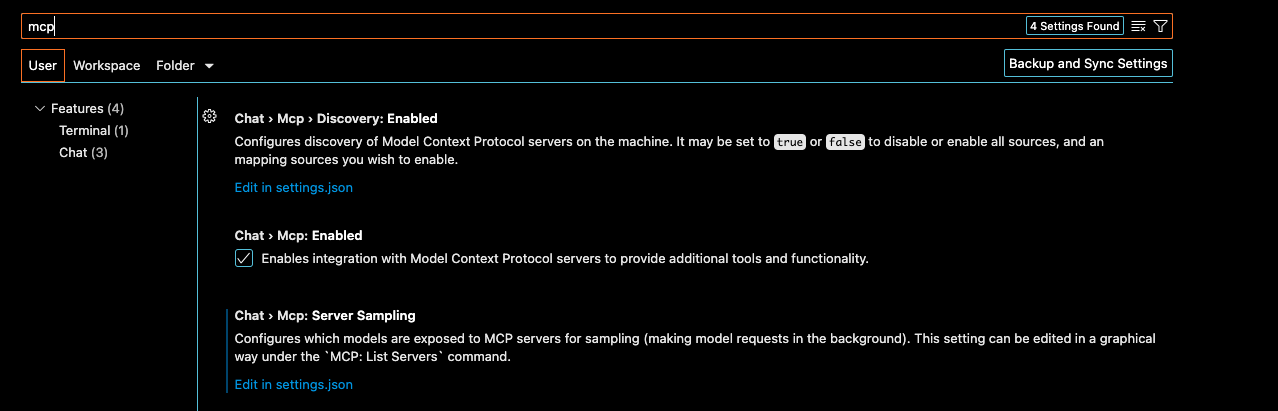
Step 1: Enable MCP in VS Code Settings
Enter shift + command + p and open "Preferences: Open User Settings"
Search for "mcp", and the item should show up under "Chat". Check the box to enable MCP server integrations.
Step 2: Run the OpenBB MCP Server
Open your terminal and start the server. You can use the default settings or customize it.
For a default setup, run:
openbb-mcp
The server will start on http://127.0.0.1:8001.
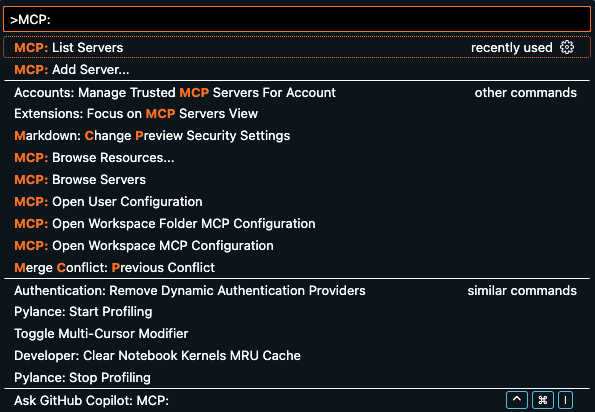
Step 3: Add Server as HTTP
Enter shift + command + p and select "MCP: Add Server".
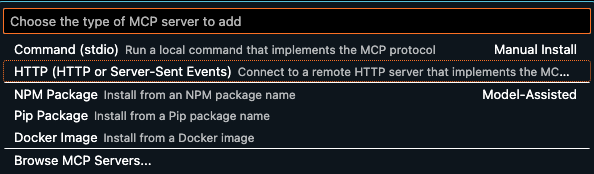
Press enter and then select HTTP.
Copy the URL from the console of the running server, and enter it
INFO Starting MCP server 'OpenBB MCP' with transport 'streamable-http' on http://127.0.0.1:8001/mcp
Give it a name, and add it either as global or to a workspace. The end result will create a mcp.json VS Code configuration file for the chosen domain.
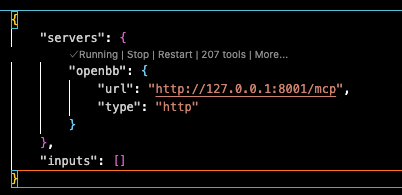
The tools can now be added as context to the chat.
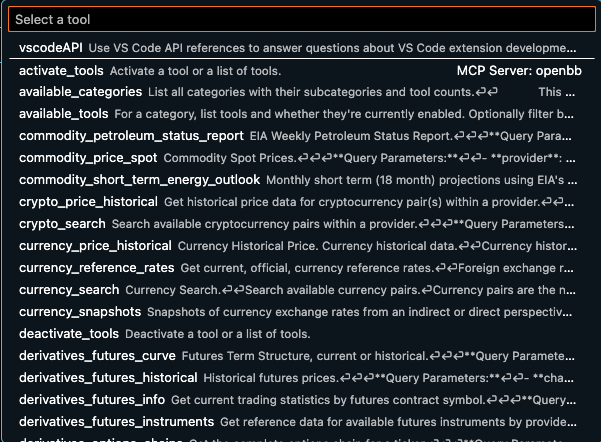
Note: When adding to the Cline extension, set --transport sse when starting the server.
3 maintainers


Release files for openbb-mcp-server 2.0.1
For a detailed explanation of source distributions (sdists) and built distributions (wheels), please see the package formats documentation.
Source distribution (sdist)
| File | Size | Uploaded | |
|---|---|---|---|
| openbb_mcp_server-2.0.1.tar.gz | 104.8 kB | Details |
Built distribution (wheel)
| File | Interpreter | ABI | Platform | Reset |
|---|---|---|---|---|
| openbb_mcp_server-2.0.1-py3-none-any.whl | Python 3 | none | any | Details |
Total release size: 212.5 kB
Release files / openbb_mcp_server-2.0.1.tar.gz
| Download URL | openbb_mcp_server-2.0.1.tar.gz |
|---|---|
| Size | 104.8 kB |
| Tags | Source |
|
SHA-256 checksum How to use checksums |
6efca7cdf0a4ae205fb8eb8e2c35baf4558299e1d9a3ba5874d57f82ceae6a4e
|
|
BLAKE2b-256 checksum How to use checksums |
e0f3dbf15ecfa3784cd1d05e5d2829d19fc4042db6838966e1c4574996a2a566
|
| Upload date | |
|
Uploaded using Trusted Publishing? What is trusted publishing? |
Yes |
| Uploaded via |
twine/7.0.0 CPython/3.13.14
|
Provenance
Provenance describes where a file came from. On PyPI, provenance is shared via attestations, which provide a verifiable record of the build or publishing details. View details, limitations and caveats.


PyPI Publish Attestation
PyPI verified that this artifact, at this checksum, originated from the publisher listed below.
Signed by GitHub Actions, verified by PyPI on Sep 28, 2026.
Transparency logRelease files / openbb_mcp_server-2.0.1-py3-none-any.whl
| Download URL | openbb_mcp_server-2.0.1-py3-none-any.whl |
|---|---|
| Size | 107.7 kB |
| Tags | Python 3 |
|
SHA-256 checksum How to use checksums |
35f4816b263e95cfc63fa467543f279c0e1a047b714c434faf2bffaf68d5d989
|
|
BLAKE2b-256 checksum How to use checksums |
3cd7750577e1f8a39596fb22191f3f165ac514c2782ee67885ace0edfc628ca3
|
| Upload date | |
|
Uploaded using Trusted Publishing? What is trusted publishing? |
Yes |
| Uploaded via |
twine/7.0.0 CPython/3.13.14
|
Provenance
Provenance describes where a file came from. On PyPI, provenance is shared via attestations, which provide a verifiable record of the build or publishing details. View details, limitations and caveats.
PyPI Publish Attestation
PyPI verified that this artifact, at this checksum, originated from the publisher listed below.
Signed by GitHub Actions, verified by PyPI on Sep 28, 2026.
Transparency log













