
OpenBB Platform API
Launcher and widgets builder for the OpenBB Workspace custom backend. Wraps any FastAPI application with the metadata, exception handling, and widgets.json generation that OpenBB Workspace expects — so a regular FastAPI app becomes a Workspace data source with no glue code.
Full documentation: docs.openbb.co/odp/python/extensions/interface/openbb-api
Install
pip install openbb-platform-api
Python ≥ 3.10. Already included when you install openbb.
Launch OpenBB Platform
To start the OpenBB Platform API, open a terminal, activate the environment where it is installed, and then enter:
openbb-api

# Launch your own FastAPI app
openbb-api --app /path/to/your_app.py

# Factory function?
openbb-api --app some_file.py:create_app --factory

# Launch as a proxy from an openbb-cli .spec file
openbb-api --spec /path/to/cli.spec
widgets.json is auto-generated from your routes' types, response models, and docstrings. Plotly returns become chart widgets, BaseModel returns become tables, scalars become metrics — no manual wiring.
Spec-driven proxy mode
Generate a spec file with openbb-cli against any OpenBB Platform deployment, then launch a Workspace-compatible backend that proxies every command to that upstream:
# Generate the spec once
openbb --generate-spec --server https://api.example.com -o cli.spec

# Launch the proxy
openbb-api --spec cli.spec
Each command in the spec becomes a FastAPI route at its url_path; the launcher forwards every request to the spec's base_url (preserving query, body, and non-hop-by-hop headers). widgets.json is generated from the spec's parameter and response-schema metadata via the same builder used for in-process apps.
Useful for shipping a thin frontend container that talks to a managed backend in another cluster, without bundling openbb-core or any provider extensions. --spec is mutually exclusive with --app.
[spec] config — credentials and base-URL override
A [spec] table in openbb.toml carries the path plus the bits the file alone can't provide — base_url overrides for staging/prod, and headers injected on every upstream request.
Header values support the same $VAR substitution as [env], so credentials live in environment variables (or [env] entries that read from them) and the TOML just maps them onto upstream header names:
[env]
OPENBB_UPSTREAM_TOKEN = "$GITHUB_TOKEN"   # or any orchestrator-injected secret

[spec]
path     = "/etc/openbb/cli.spec"
base_url = "https://prod.example.com"     # optional; overrides spec's recorded value

[spec.headers]
Authorization = "Bearer $OPENBB_UPSTREAM_TOKEN"
X-Tenant      = "production"
Config-supplied headers OVERRIDE matching incoming-request headers — [spec.headers] is the credential-injection point, so a misbehaving client can't leak its own auth value upstream by sending the same header name.
Custom HTTP middleware ([middleware])
Attach Starlette-style HTTP middleware functions from a config-supplied entrypoint — useful for auth, request logging, tracing, IP allow-listing, response transformation. Each entry is a "module:async_callable" reference resolved through the standard import system:
[middleware]
hooks = [
    "my_pkg.middleware:auth_middleware",
    "my_pkg.middleware:request_logger",
]
# my_pkg/middleware.py
from fastapi.responses import JSONResponse

async def auth_middleware(request, call_next):
    if request.headers.get("X-API-Key") != "expected":
        return JSONResponse({"error": "unauthorized"}, status_code=401)
    return await call_next(request)

async def request_logger(request, call_next):
    response = await call_next(request)
    print(f"{request.method} {request.url.path} → {response.status_code}")
    return response
List order is outermost-to-innermost: the first entry sees the request first on the way in and the response last on the way out. Misconfigured references (missing module, wrong attribute, sync function, wrong arity) raise loudly at startup so deployments fail fast instead of silently passing requests through unauthenticated.
Single-file launch
Everything in this README — app source (--app or --spec), env injection, host/port, SSL, agents, middleware, credentials — can be set in one openbb.toml and launched without any other CLI flags:
openbb-api --app some_file.py:main --factory
Keyword Arguments
The behavior of the script can be configured with the use of arguments and keyword arguments.
Launcher specific arguments:
--app                           Absolute path to the Python file with the target FastAPI instance. Default is the installed OpenBB Platform API.
--name                          Name of the FastAPI instance in the app file. Default is 'app'.
--factory                       Flag to indicate if the app name is a factory function. Default is 'false'.
--editable                      Flag to make widgets.json an editable file that can be modified during runtime. Default is 'false'.
--build                         If the file already exists, changes prompt action to overwrite/append/ignore. Only valid when --editable true.
--no-build                      Do not build the widgets.json file. Use this flag to load an existing widgets.json file without checking for updates.
--exclude                       JSON encoded list of API paths to exclude from widgets.json. Disable entire routes with '*' - e.g. '["/api/v1/*"]'.
--no-filter                     Do not filter out widgets in widget_settings.json file.
--widgets-json                  Absolute/relative path to use as the widgets.json file. Default is ~/envs/{env}/assets/widgets.json, when --editable is 'true'.
--apps-json                     Absolute/relative path to use as the apps.json file. Default is ~/OpenBBUserData/workspace_apps.json.
--agents-json                   Absolute/relative path to use as the agents.json file. Including this will add the /agents endpoint to the API.
All other arguments will be passed to uvicorn. Here are the most common ones:
--host TEXT                     Host IP address or hostname.
                                  [default: 127.0.0.1]
--port INTEGER                  Port number.
                                  [default: 6900]
--ssl_keyfile TEXT              SSL key file.
--ssl_certfile TEXT             SSL certificate file.
--ssl_keyfile_password TEXT     SSL keyfile password.
--ssl_version INTEGER           SSL version to use.
                                  (see stdlib ssl module's)
                                  [default: 17]
--ssl_cert_reqs INTEGER         Whether client certificate is required.
                                  (see stdlib ssl module's)
                                  [default: 0]
--ssl_ca_certs TEXT             CA certificates file.
--ssl_ciphers TEXT              Ciphers to use.
                                  (see stdlib ssl module's)
                                  [default: TLSv1]
Run uvicorn --help to get the full list of arguments.
Note Replace, '-', with, '_' in the command line arguments of uvicorn (as per uvicorn.run)
API Over HTTPS
To run the API over the HTTPS protocol, you must first create a self-signed certificate and the associated key. After activating the environment, you can generate the files by entering this to the command line:
openssl req -x509 -days 3650 -out localhost.crt -keyout localhost.key   -newkey rsa:4096 -nodes -sha256   -subj '/CN=localhost' -extensions EXT -config <( \
   printf "[dn]\nCN=localhost\n[req]\ndistinguished_name = dn\n[EXT]\nsubjectAltName=DNS:localhost\nkeyUsage=digitalSignature\nextendedKeyUsage=serverAuth")
Two files will be created, in the current working directory, that are passed as keyword arguments to the openbb-api entry point.
openbb-api --ssl_keyfile localhost.key --ssl_certfile localhost.crt
Note Adjust the command to include the full path to the file if the current working directory is not where they are located.
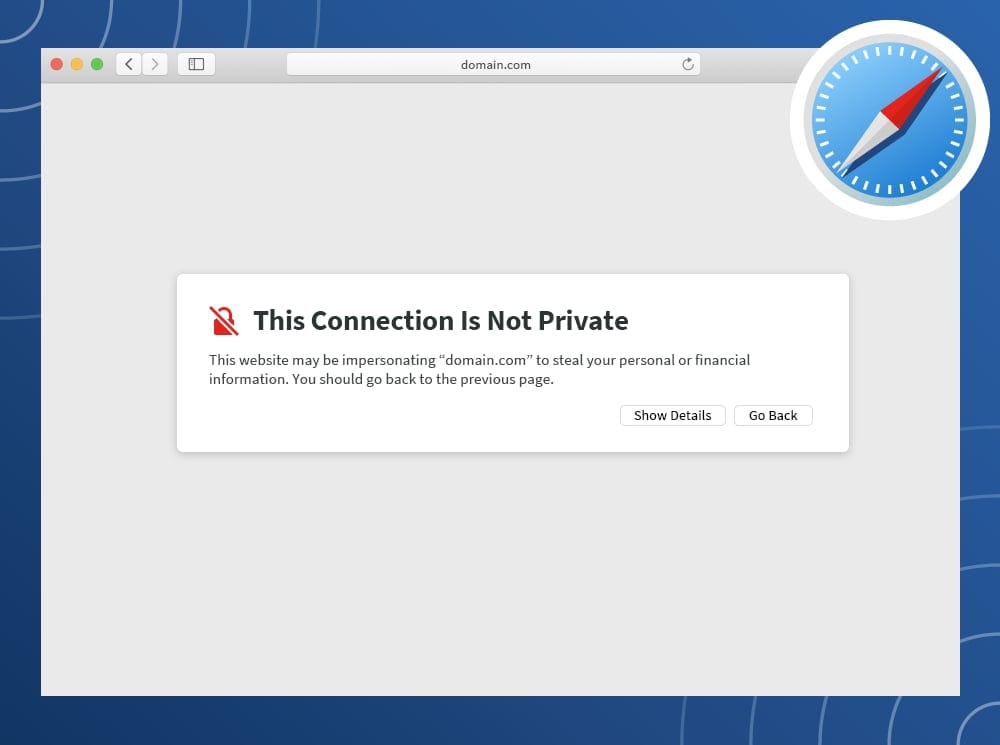
The certificate - localhost.crt - will need to be added to system's trust store. The process for this will depend on the operating system and the user account privilege.
A quick solution is to visit the server's URL, show the details of the warning, and choose to continue anyways.
Contact the system administrator if you are using a work device and require additional permissions to complete the configuration.
Example Application
Examples below will assume this code block is at the start of the file.
from fastapi import FastAPI
from openbb_platform_api.response_models import (
    Data,
    MetricResponseModel,
    OmniWidgetResponseModel,
    PdfResponseModel,
)

app = FastAPI()

# Markdown — return a string
@app.get("/hello")
async def hello() -> str:
    """Tooltip from the docstring."""
    return "Hello, OpenBB!"

# Table — return a list of records or a typed Data subclass
@app.get("/rows")
async def rows() -> list[dict]:
    return [{"symbol": "AAPL", "price": 150.0}]

# Metric — single label/value/delta
@app.get("/score")
async def score() -> MetricResponseModel:
    return MetricResponseModel(label="Score", value=100, delta="1%")

# Chart — return a Plotly figure JSON
@app.get("/chart", openapi_extra={"widget_config": {"type": "chart"}})
async def chart() -> dict:
    from plotly.graph_objs import Bar, Figure
    return Figure(data=[Bar(x=["A"], y=[1])]).to_plotly_json()
Annotated Data models drive auto-generated table column definitions:
from datetime import date
from openbb_platform_api.response_models import Data
from pydantic import Field

class MyRow(Data):
    when: date = Field(title="Date", description="Trading date")
    pct:  float = Field(
        title="Change",
        json_schema_extra={"x-widget_config": {"formatterFn": "percent", "renderFn": "greenRed"}},
    )

@app.get("/data")
async def data() -> list[MyRow]:
    return [MyRow(when=date.today(), pct=0.0125)]
PDF Widget
To create a PDF widget, import the custom response model below and define it as a return type.
The model handles conversion of the document, from a bytes object, to a base64 encoded string.
from openbb_platform_api.response_models import PdfResponseModel

@app.get("/open_pdf")
async def open_pdf(
    url: Annotated[
        str,
        Query(
            description="URL, or local path, to the PDF document.",
            title="URL or Path",
        ),
    ],
    filename: Annotated[
        Optional[str],
        Query(
            description="Filename to associate with the PDF internally.",
            title="Fiilename",
        ),
    ] = "",
    user_agent: Annotated[
        Optional[str],
        Query(description="A specific User-Agent string for the request.", title="User-Agent"),
    ] = None,
) -> PdfResponseModel:
    """Open a PDF document from a URL, or local file path."""
    # pylint: disable=import-outside-toplevel
    from pathlib import Path  # noqa
    from openbb_core.provider.utils.errors import OpenBBError
    from openbb_core.provider.utils.helpers import get_requests_session

    if "://" not in url:
        file_path = Path(url)
        if not file_path.is_file():
            raise OpenBBError(f"The file - {url} - does not exist.")
        with open(file_path, "rb") as file:
            pdf = file.read()
    else:
        session = get_requests_session(headers={"User-Agent": user_agent})
        response = session.get(url)
        if response.status_code != 200:
            raise OpenBBError(
                f"Failed to open PDF from URL -> Code: {response.status_code} -> {response.reason}"
            )

        pdf = response.content

    return PdfResponseModel(
        filename = filename,
        content = pdf,
    )
Custom Plotly Chart
To define a chart widget, update the widget "type" and return the content from the Figure.to_plotly_json() method.
@app.get(
    "/hello_chart",
    openapi_extra={"widget_config": {"type": "chart"}},
)
async def hello_chart() -> dict:
    """Widget description created by docstring."""
    from plotly.graph_objs import Bar, Layout, Figure

    fig = Figure(
        data=[Bar(x=["A", "B", "C"], y=[1, 2, 3])],
        layout=Layout(title="Hello Chart!"),
    )

    return fig.to_plotly_json()
Form Submit Widget
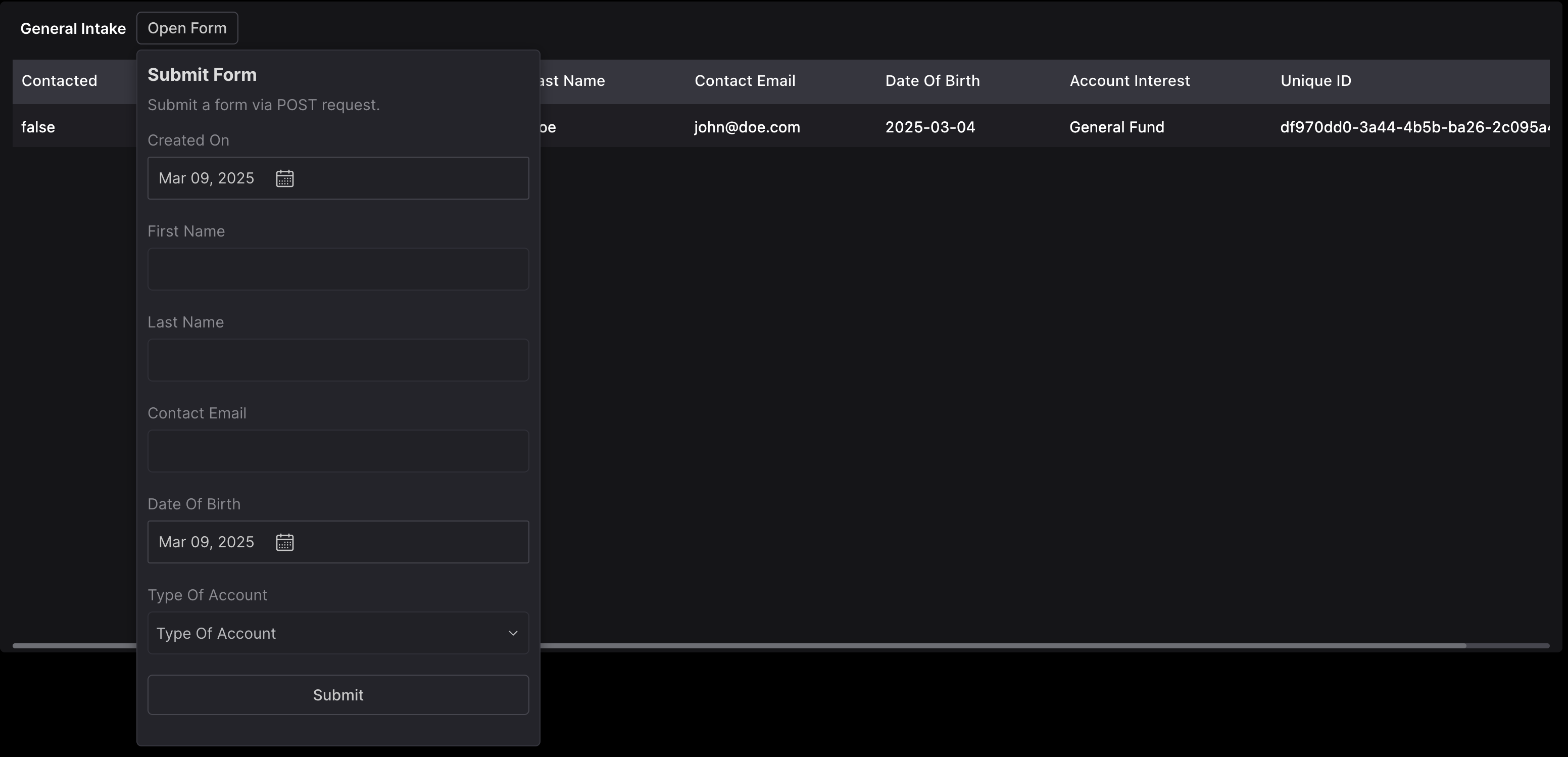
When submitted, Workspace makes a POST request to the endpoint.
If the POST function returns a 200 status code, the widget associated with the GET function is refreshed.
The results of the GET function does not have to correspond with the parameters and results of the POST function.
For example, the response to submitting a form can be a Markdown widget with a custom message.
The entry in widgets.json will be automatically created if the conditions below are met:
- GET request defines in top-level
widget_config:{"form_endpoint": /path_to/form_post_endpoint}
- POST method takes 1 positional argument, a sub-class of Pydantic BaseModel.
- Create a model, like annotated table fields, defining all inputs to the form.
Example
The code below creates a widget with a form as the input, and an output table of all submitted forms, as processed through the IntakeForm model.
import uuid
from datetime import date as dateType
from typing import Literal, Union

# from fastapi import FastAPI
from openbb_platform_api.response_models import Data
from pydantic import BaseModel, ConfigDict, Field

# app = FastAPI()

AccountTypes = Literal["General Fund", "Separately Managed", "Private Equity", "Family Office"]

class GeneralIntake(BaseModel):
    """Submit a form via POST request."""

    date_created: dateType = Field(
        title="Created On", default_factory=dateType.today
    )
    first_name: str = Field(title="First Name")
    last_name: str = Field(title="Last Name")
    email: str = Field(title="Contact Email")
    dob: dateType = Field(
        title="Date Of Birth",
    )
    account_types: Union[AccountTypes, list[AccountTypes]] = Field(
        title="Type Of Account",
        json_schema_extra={
            "x-widget_config": {"multiSelect": True},
        },
    )
    submit: bool = Field(
        default=True,
        title="Submit",
        json_schema_extra={
            "x-widget_config": {
                "type": "button",
            },
        }
    )


class IntakeForm(Data):
    """Submission Records."""

    model_config = ConfigDict(extra="ignore")

    contacted: bool = Field(
        title="Contacted",
        default=False,
    )
    date_created: dateType = Field(
        title="Created On",
    )
    first_name: str = Field(title="First Name")
    last_name: str = Field(title="Last Name")
    email: str = Field(title="Contact Email")
    dob: dateType = Field(
        title="Date Of Birth",
    )
    account_types: Union[AccountTypes, list[AccountTypes]] = Field(
        title="Account Interest",
    )
    unique_id: uuid.UUID = Field(
        title="Unique ID",
        default_factory=uuid.uuid4,
    )


INTAKE_FORMS: list[IntakeForm] = []


@app.post("/general_intake_submit")
async def general_intake_post(data: GeneralIntake) -> bool:
    global INTAKE_FORMS
    try:
        INTAKE_FORMS.append(IntakeForm(**data.model_dump()))
        return True
    except Exception as e:
        raise e from e


@app.get(
    "/general_intake",
    openapi_extra= {
        "widget_config": {
            "form_endpoint": "/general_intake_submit",
        },
    },
)
async def general_intake() -> list[IntakeForm]:
    return INTAKE_FORMS
Omni Widget Example
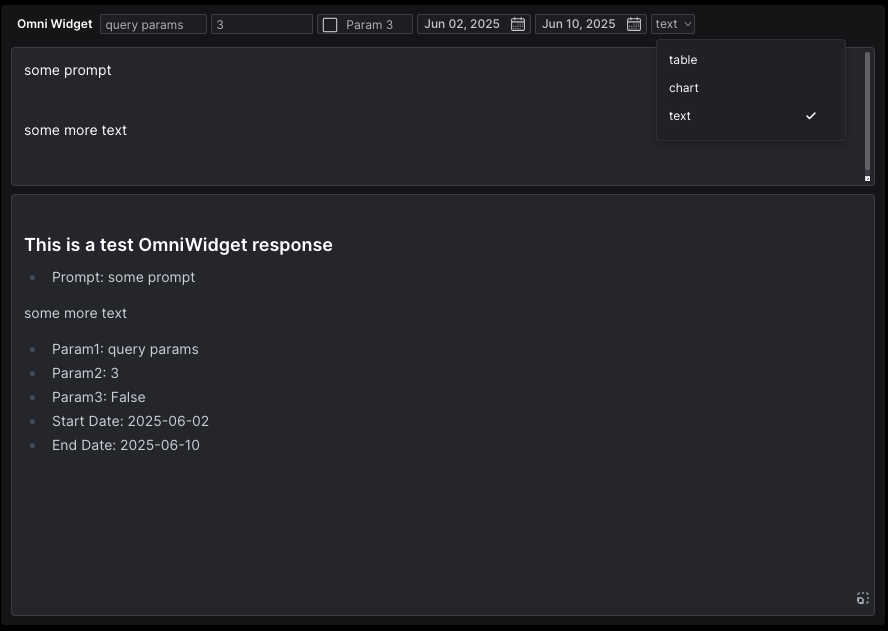
An Omni Widget is a POST request where all parameters are sent to the request body, along with the text input box (keyed as "prompt").
The returned type can be a list of records (table), a Plotly Figure, or formatted Markdwon. The model will attempt to assign the correct return type dynamically.
Set the response model as OmniWidgetResponseModel, then return {"content": your_content} from the endpoint.
from typing import Literal, Optional
from openbb_platform_api.query_models import OmniWidgetInput
from openbb_platform_api.response_models import OmniWidgetResponseModel
from pydantic import Field

class TestOmniWidgetQueryModel(OmniWidgetInput):
    """Test query model for OmniWidget."""
    param1: str = Field(description="A string parameter for testing")
    param2: int = Field(description="An integer parameter for testing")
    param3: bool = Field(default=False, description="A boolean parameter for testing")
    start_date: str = Field(description="The start date for testing")
    end_date: str = Field(description="The end date for testing")
    parse_as: Optional[Literal["table", "chart", "text"]] = Field(
        default=None,
        description="The format to parse the response as, either 'table', 'chart', or 'text'."
        + " If not defined, the model will try to infer the type based on the content.",
    )

@app.post("/omni_widget", response_model=OmniWidgetResponseModel)
async def create_omni_widget(item: TestOmniWidgetQueryModel):
    """This is a test endpoint for generating an OmniWidget in OpenBB Workspace."""
    # Here you would process the incoming request and return a response
    some_test_data = [
        {"prompt": item.prompt,
        "param1": item.param1,
        "param2": item.param2,
        "param3": item.param3,
        "start_date": item.start_date,
        "end_date": item.end_date,
    }]

    if item.parse_as == "chart":
        some_test_data = {
            "data": [{"type": "bar", "x": ["A", "B", "C"], "y": [1, 2, 3]}],
            "layout": {"template": "plotly_dark", "title": {"text": "Hello Chart!"}}
        }
    elif item.parse_as == "text":
        some_test_data = f"""
### This is a test OmniWidget response

- Prompt: {item.prompt}
- Param1: {item.param1}
- Param2: {item.param2}
- Param3: {item.param3}
- Start Date: {item.start_date}
- End Date: {item.end_date}
"""
    return {"content": some_test_data}
Widget Config
Any value from the widgets.json structure can be passed into the @app decorator by including an openapi_extra dictionary with the key, "widget_config".
Configurations for widgets.json supplied here will override any of the automatically generated content. If the key does not exist, it will be created.
When inserting/updating an entry in a Params or ColumnsDefs array, the matching identifier is "paramName" and "field", respectively.
@app.get(
    "/hello_data",
    openapi_extra={
        "widget_config": {
            "data": {
                "table": {
                    "columnsDefs": [
                        {
                            "field": "column_1",
                            "headerName": "My Column",
                            "headerTooltip": "This hovertext wins!",
                        }
                    ]
                }
            }
        }
    },
)
async def hello_data() -> list[MyData]:
    """Widget description created by docstring."""
    # Do something with the parameters and return the result of work.
    return [MyData(column_1=datetime.date.today(), column_2="Hello!")]
Location of widgets.json
When --editable is not flagged, the file remains in memory until the server is stopped. It is regenerated every run.
The file can be served at any time by visiting the URL (host address will vary):
http://127.0.0.1:6900/widgets.json
When launched as openbb-api --editable, a file will be stored to disk. By default, that location is:
/Path/to/environments/envs/obb/assets/widgets.json
The file can be manually edited and served without the build process by passing --editable --no-build to the API launch script.
openbb-api --editable --no-build
If you would like to construct this file manually, create the file and define the path as an argument.
openbb-api --widgets-json /Users/some_user/path/to/widgets.json
Location of workspace_apps.json
By default, the location is:
~/OpenBBUserData/workspace_apps.json
This can be changed by adding the path as an argument.
openbb-api --apps-json /Users/some_user/path/to/workspace_apps.json
The browser will warn about the untrusted cert — accept once, or add localhost.crt to the OS trust store.
License
Apache-2.0. © OpenBB.
3 maintainers


Metadata
3 maintainers
Release files for openbb-platform-api 2.0.0
For a detailed explanation of source distributions (sdists) and built distributions (wheels), please see the package formats documentation.
Source distribution (sdist)
| File | Size | Uploaded | |
|---|---|---|---|
| openbb_platform_api-2.0.0.tar.gz | 73.2 kB | Details |
Built distribution (wheel)
| File | Interpreter | ABI | Platform | Reset |
|---|---|---|---|---|
| openbb_platform_api-2.0.0-py3-none-any.whl | Python 3 | none | any | Details |
Total release size: 160.3 kB
Release files / openbb_platform_api-2.0.0.tar.gz
| Download URL | openbb_platform_api-2.0.0.tar.gz |
|---|---|
| Size | 73.2 kB |
| Tags | Source |
|
SHA-256 checksum How to use checksums |
03225df7e43f2e7786c3befbe7790f8ffe0dc1da9c100249f09c948085eb7003
|
|
BLAKE2b-256 checksum How to use checksums |
25fa33e0abff04ab2df5b92cb3fb0c7f13fd5d89f37dfe8487949db40d4c0fcb
|
| Upload date | |
|
Uploaded using Trusted Publishing? What is trusted publishing? |
Yes |
| Uploaded via |
twine/7.0.0 CPython/3.13.14
|
Provenance
Provenance describes where a file came from. On PyPI, provenance is shared via attestations, which provide a verifiable record of the build or publishing details. View details, limitations and caveats.


PyPI Publish Attestation
PyPI verified that this artifact, at this checksum, originated from the publisher listed below.
Signed by GitHub Actions, verified by PyPI on Sep 26, 2026.
Transparency logRelease files / openbb_platform_api-2.0.0-py3-none-any.whl
| Download URL | openbb_platform_api-2.0.0-py3-none-any.whl |
|---|---|
| Size | 87.1 kB |
| Tags | Python 3 |
|
SHA-256 checksum How to use checksums |
d67bdf0af2234f4cee60baed65f08202a7390c5e884b060abc314f7355510795
|
|
BLAKE2b-256 checksum How to use checksums |
4e064eeb74fc2568a22719ce45948c0a5203e4cabf8054651ad52c98f216c97e
|
| Upload date | |
|
Uploaded using Trusted Publishing? What is trusted publishing? |
Yes |
| Uploaded via |
twine/7.0.0 CPython/3.13.14
|
Provenance
Provenance describes where a file came from. On PyPI, provenance is shared via attestations, which provide a verifiable record of the build or publishing details. View details, limitations and caveats.
PyPI Publish Attestation
PyPI verified that this artifact, at this checksum, originated from the publisher listed below.
Signed by GitHub Actions, verified by PyPI on Sep 26, 2026.
Transparency log













