
vmmanager
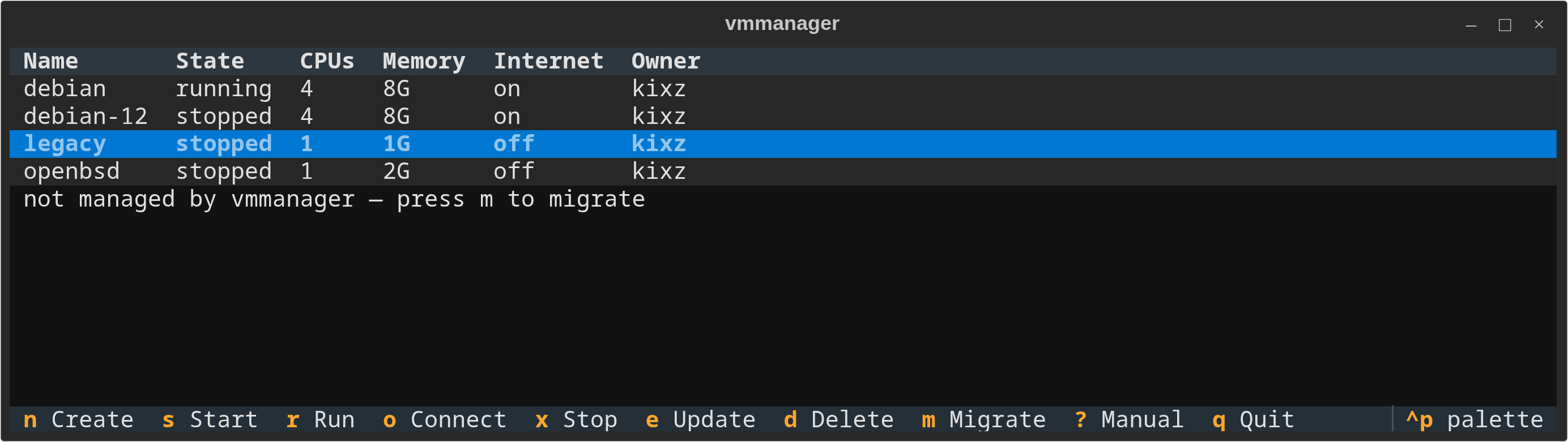
A terminal UI for OpenBSD's vmm/vmd virtual machines. Think VirtualBox, but in a terminal and built on vmctl and vm.conf: create, start, run, connect, stop, update, delete and migrate VMs, with networking set up for you.
Requirements
- OpenBSD (tested on 8.0, amd64) with virtualization enabled in the BIOS
- Python 3.11+
vmdrunning (rcctl enable vmd && rcctl start vmd) and the VM BIOS firmware (fw_update); vmmanager offers to do both on first rundoasfor creating, changing, deleting and migrating VMs (permit persist :wheelin/etc/doas.confsaves you a password prompt per step)
Installation
Quick install (recommended)
$ pkg_add py3-pipx
$ pipx install openbsd-vmmanager
Or with pip:
$ pip install openbsd-vmmanager
Then run:
$ vmmanager
From source
$ git clone https://github.com/OpenBSDGuy/vmmanager
$ cd vmmanager
$ python3 -m venv venv && . venv/bin/activate
$ pip install -e .
$ vmmanager
First run
vmmanager checks the host before showing your VMs and offers a fix for anything missing: vmd not running, missing VM firmware, or a VM whose configuration is broken (for example because its folder was deleted by hand). It also offers to install the man pages system-wide.
The first time you create a VM with Internet on, vmmanager sets up NAT for VMs once: it writes /etc/vmmanager/pf.conf (loaded as a pf anchor from a marked block it adds to /etc/pf.conf), turns on IP forwarding, and starts unwind if no DNS resolver is running. Every change that needs root is explained first and asks before it runs through doas.
Usage
| Key | Action |
|---|---|
| n | Create a VM: name, memory, CPUs, disk size, install ISO, Internet on/off |
| s | Start the VM in the background |
| r | Run: start the VM and attach its serial console |
| o | Connect to the console of a running VM |
| x | Stop the VM (graceful first, then offers a force stop) |
| e | Update memory, CPUs, ISO and Internet of a stopped VM |
| d | Delete a stopped VM; asks separately before removing its disk |
| m | Migrate a VM you wrote by hand in /etc/vm.conf into vmmanager |
| ? | Show the manual page |
| q | Quit |
| ~. | Leave a VM console and return to vmmanager |
In the ISO browser, . shows or hides dot files and folders.
Notes
- Each VM gets its own folder,
~/vmmanager/<name>/, holding its disk and a smallvmmanager.toml. Itsvm.confblock lives in/etc/vmmanager/<user>/<name>.conf, which/etc/vm.confincludes through one added line. - vmmanager never rewrites your hand-written
/etc/vm.conf. VMs defined there are listed but locked until you migrate them; migration moves the disks, comments out the old block and can be undone by hand (seevmmanager(8), MIGRATING). - Every VM vmmanager creates is owned by you (
ownerinvm.conf), so vmd itself stops other users from starting, stopping or opening the console of your VMs. They can still see them. - Starting, stopping and the console need no root. Writing configuration does, and every write is checked with
vmd -nand rolled back if it fails. - Networking is either on (NAT through the host) or off (no network interface at all, an air-gapped VM).
- Deleting a VM keeps its folder unless you agree to remove it.
Manual
vmmanager(8) covers keys, files, privileges, networking, migration, security and how to uninstall, and vmmanager.toml(5) the per-VM file. Read them with man vmmanager once installed system-wide (vmmanager --install-man), or without installing with vmmanager --man.
License
GPL-3.0
1 maintainer

Metadata
1 maintainer
Release files for openbsd-vmmanager 0.1.1
For a detailed explanation of source distributions (sdists) and built distributions (wheels), please see the package formats documentation.
Source distribution (sdist)
| File | Size | Uploaded | Provenance | Actions |
|---|---|---|---|---|
| openbsd_vmmanager-0.1.1.tar.gz | 73.4 kB | Without provenance | Details for openbsd_vmmanager-0.1.1.tar.gz |
Built distribution (wheel)
| File | Interpreter | ABI | Platform | Actions Reset |
|---|---|---|---|---|
| openbsd_vmmanager-0.1.1-py3-none-any.whl | Python 3 | none | any | Details for openbsd_vmmanager-0.1.1-py3-none-any.whl |
Total release size: 132.1 kB
Release files / openbsd_vmmanager-0.1.1.tar.gz
| Download URL | openbsd_vmmanager-0.1.1.tar.gz |
|---|---|
| Size | 73.4 kB |
| Tags | Source |
|
SHA-256 checksum How to use checksums |
b8764d48e84563b2b66b19cf8ef47d011bfe77a60b1a1f1747bdecf1d6b2d7d3
|
|
BLAKE2b-256 checksum How to use checksums |
5ad7bed5e39c4f535d0c25e0d4a7ebe70d412fb835c50a167b3480ca8d97727c
|
| Upload date | |
|
Uploaded using Trusted Publishing? What is trusted publishing? |
No |
| Uploaded via |
twine/7.0.0 CPython/3.14.9
|
Release files / openbsd_vmmanager-0.1.1-py3-none-any.whl
| Download URL | openbsd_vmmanager-0.1.1-py3-none-any.whl |
|---|---|
| Size | 58.7 kB |
| Tags | Python 3 |
|
SHA-256 checksum How to use checksums |
c21f7245fd8bfadf9a509b123b78906b32cb36b9d547bace0e172a788e699f4f
|
|
BLAKE2b-256 checksum How to use checksums |
85c213f222763b3b48e3f7d1c0d1bce35816af8953050c3bb9204545576fee84
|
| Upload date | |
|
Uploaded using Trusted Publishing? What is trusted publishing? |
No |
| Uploaded via |
twine/7.0.0 CPython/3.14.9
|
Security for openbsd-vmmanager 0.1.1
Provenance
Provenance describes where a file came from. On PyPI, provenance is shared via attestations, which provide a verifiable record of the build or publishing details. View details, limitations and caveats.
No provenance found
None of the files in this release were uploaded with provenance metadata.
A note on package security
PyPI is a repository for distributing packages, not a service for auditing them. While third-party security researchers and our staff do their best to detect and remove malicious packages, PyPI cannot guarantee the quality, security or suitability of any given package.
To learn more about protecting yourself from malicious actors, visit our package security documentation.














