
OpenCAMLib



Introduction
OpenCAMLib (ocl) is a library for creating 3D toolpaths for CNC-machines such as mills and lathes. It is written in C++ and has bindings for Python, Node.js and the browser. At the moment it supports the following algorithms:
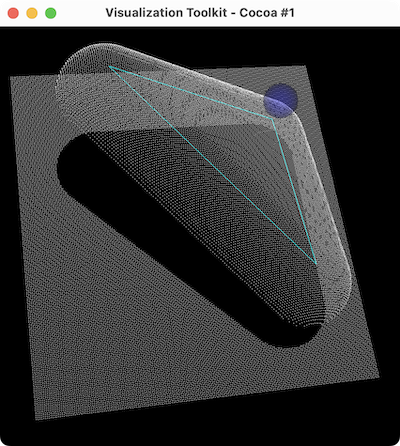
Drop-cutter
The drop cutter algorithm drops a cutter, positioned at a predefined (x,y) location, until it touches the 3D model.
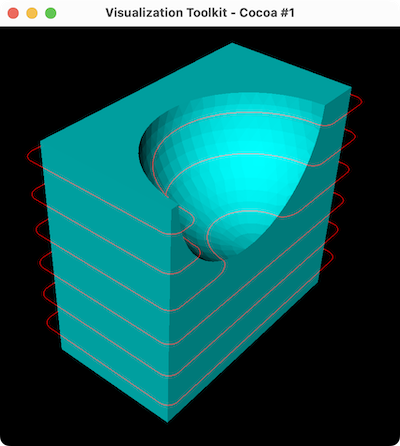
Push-cutter
The Push-cutter is used to create a Waterline toolpath that follows the shape of the model at a constant z-height in the xy-plane.
Cutters
The algorithms listed above can be used with following cutters:
CylCutter (flat end mill / cylindrical)
BallCutter (ball end mill / spherical)
BullCutter (radius end mill / toroidal)
ConeCutter (tapered end mill / conical)
CompositeCutter (combinations of the above / compound)
From August 2018 OpenCAMLib is released under LGPL license.
Pre-compiled Libraries
OpenCAMLib provides pre-compiled C++, Node.js and Python libraries for the following platforms and architectures:
Windows |
ia32 / x64 |
macOS |
x86_64 / arm64 |
Linux |
x86_64 / aarch64 |
The Python library is called opencamlib and is hosted on PyPi (pypi.org), precompiled libraries are available for Python v3.7 up to v3.11.
The Node.js + emscripten library is called @opencamlib/opencamlib and is hosted on npm (npmjs.org), precompiled libraries are available for Node-API v3 and up.
The C++ library is called libocl and is hosted on our Github Releases page.
Python
The Python library (hosted on PyPi) can be installed like this:
pip install opencamlibOn some platforms, pip is called pip3, you might have to run:
pip3 install opencamlibNote that pip / pip3 is will install packages for to the system installation of Python, if you want to install a package in a custom Python installation that is not in your $PATH (for example, the Python which comes with Blender), you can install packages like so:
/path/to/your/custom/python -m pip install opencamlibIf you don’t know where Python is, but you have access to it’s interpreter (FreeCAD and Blender both have a Python console), you can simply enter this command in there to install OpenCAMLib:
import sys; import subprocess; subprocess.check_call([sys.executable, '-m', 'pip', 'install', 'opencamlib'])JavaScript
The JavaScript library (hosted on npm) works in Node.js and the browser (by leveraging emscripten / WASM) can be installed like this:
npm install --save @opencamlib/opencamlibOr, using yarn:
yarn add @opencamlib/opencamlibNote that it is not 100% feature complete and lacking some functionality still.
C++
Pre-compiled C++ libraries are available on the Github Releases page (https://github.com/aewallin/opencamlib/releases). This project also installs a OpenCAMLibConfig.cmake, which, if your project uses CMake, allows you to use find_package(OpenCAMLib REQUIRED).
You can see an example of that in use over here: examples/cpp/test/CMakeLists.txt
Building from Source
Having trouble with a pre-compiled library? Please report it to us. If there are no pre-compiled libraries for your platform or architecture, or want to customize or package opencamlib, this is for you.
OpenCAMLib uses functionality from a library called Boost. For the Python library it uses an extra library called Boost.Python.
Only the Python bindings need Boost to be compiled (with Boost.Python). All other libraries DO NOT need Boost to be compiled, in those cases, a headers only version will suffice. So, if you are not compiling the Python libraries, simply download Boost, extract it into a folder, and tell CMake where to look for it.
Make sure to download Boost from the boost.org downloads page, if you download it from github, you have to make sure to install the git submodules and build the headers.
We provide a install.sh script that helps with installation of dependencies and building OpenCAMLib libraries, you might want to take a look at it first. You can run ./install.sh --help to look at the available options, or inspect it’s source code to find out more.
Dependencies
To compile OpenCAMLib, you need:
C++ compiler (It should at least support C++ 14)
Git (This is used for cloning the repository, and the emscripten SDK)
CMake (At least version 3.15)
Boost (When compiling the Python library, you have to compile Boost.Python for your Python version after installation)
At this time of writing, here are the packages to install:
Ubuntu Dependencies
sudo apt install -y git cmake curl build-essential libboost-devmacOS Dependencies
brew install git cmake curl boost python@3.11 boost-python3Windows Dependencies
Install
Visual Studio Build Tools (https://visualstudio.microsoft.com/visual-cpp-build-tools/)
CMake (https://git-scm.com/download/win)
By downloading the installers from the internet, or by using your package manager.
Building for C++
The C++ library is the easiest to build, it only depends on Boost’s headers. Make sure you have a compiler, git, cmake and Boost installed (or simply download and extract it somewhere).
git clone https://github.com/aewallin/opencamlib
cd opencamlib
mkdir build
cd build
cmake .. -D CXX_LIB="ON"
make . # try make -j4 for a faster build if you have a multi-core machine
make install .
When boost is not in a standard location, you can add the -D BOOST_ROOT=/path/to/boost option to the cmake command.
Building for Emscripten
To compile the emscripten library, first download, install and activate it using the following commands:
git clone https://github.com/emscripten-core/emsdk.git
cd emsdk
./emsdk install latest
./emsdk activate latest
Now you can compile OpenCAMLib like this (make sure to replace the path/to/ sections):
source path/to/emsdk/emsdk_env.sh
git clone https://github.com/aewallin/opencamlib
cd opencamlib
mkdir build
cd build
emcmake cmake \
  -D CMAKE_BUILD_TYPE="Release" \
  -D BUILD_EMSCRIPTEN_LIB="ON" \
  -D USE_OPENMP="OFF" \
  -D CMAKE_INSTALL_PREFIX="/path/to/opencamlib/src/npmpackage/build" \
  -D BOOST_ROOT="/path/to/boost" \
  ..
emmake make # try emmake make -j4 for a faster build if you have a multi-core machine
Note that USE_OPENMP has been turned off, OpenMP is not supported with Emscripten at the moment
Building for Node.js
To compile the Node.js library, install the dependencies in src/nodejslib:
cd src/nodejslib
npm install
Next, use cmake-js to compile the library:
git clone https://github.com/aewallin/opencamlib
cd opencamlib
mkdir build
cd build
../src/nodejslib/node_modules/.bin/cmake-js \
  build \
  --directory ".." \
  --out "." \
  --parallel 4 \
  --CD BUILD_NODEJS_LIB="ON" \
  --CD USE_OPENMP="ON" \
  --CD CMAKE_INSTALL_PREFIX="/path/to/opencamlib/build/Release/$(node --print 'process.platform')-nodejs-$(node --print 'process.arch')" \
  --CD BOOST_ROOT="/path/to/boost" \
  --config "Release"
Building for Python
The Python library can be compiled similarly to the C++ example above, however, this time Boost.Python has to be compiled first. Most systems have Boost.Python available as a download, but only for a specific Python version only (usually the latest Python version). These might work if you are using Python from the same package provider, but, unfortunately, this is not a very reliable method, so compiling them yourself is usually the best option.
First, download and extract Boost:
curl "https://boostorg.jfrog.io/artifactory/main/release/1.80.0/source/boost_1_80_0.tar.gz" --output "boost_1_80_0.tar.gz" --location
tar -zxf boost_1_80_0.tar.gz -C /tmp/boost
cd /tmp/boost/boost_1_80_0
Now we can compile it:
echo "using python ;" > ./user-config.jam
./bootstrap.sh
./b2 \
  -a \
  threading="multi" \
  -j4 \
  variant="release" \
  link="static" \
  address-model="64" \
  architecture="x86" \
  --layout="system" \
  --with-python \
  --user-config="./user-config.jam" \
  cxxflags="-fPIC" \
  stage
Note that you can customize the user-config.jam file to point it to your Python installation (see: https://www.boost.org/doc/libs/1_78_0/libs/python/doc/html/building/configuring_boost_build.html). You should also specify the correct architecture and address-model. On windows, make sure to use windows style paths, e.g. C:\\path\\to\\Python
Usage
Please take a look at the examples/ folder on how to use OpenCAMLib. For each language there is an example named test which calls all of the algorithms.
There is also some API documentation over here: https://opencamlib.readthedocs.io
Common Problems
Compiling OpenCAMLib is unfortunately not very easy and there are many things that can go wrong. Here is a list of common problems and solutions.
Could NOT find Boost (missing: Boost_INCLUDE_DIR)
This happens a lot, here are some of the reasons why this happens:
You don’t have Boost installed.
If you forgot to install boost, go ahead and download Boost from from their website: https://www.boost.org/users/download/ and extract it somewhere. Now, when compiling the C++ or node.js module, add the
-D BOOST_ROOT=/path/to/extracted/boost flag to the cmake .. command, or the.
--boost-prefix /path/to/extracted/boost flag to the ./install.sh command
You installed Boost from Github.
The boost that is hosted on Github does not have the headers yet! To compile those, you should run the following commands:
./bootstrap.sh
./b2 headers
Your CMake version has a FindBoost module which is unaware of your Boost’s version.
The CMake module that looks for Boost, is usually not aware of the existence of the latest Boost versions. You can help it by providing the version number of your Boost with the -D Boost_ADDITIONAL_VERSIONS="1.80.0" flag. Make sure to change 1.80.0 with your version of Boost.
It can also be helpfull to enable Boost_DEBUG in the CMake configuration.
Cross Compiling
To compile OpenCAMLib for other architectures, we recommend the following strategies. Always make sure to compile Boost for the correct architecture as well!
macOS
Cross compiling on macOS is possible by setting the CMake CMAKE_OSX_ARCHITECTURES flag. When using the install.sh script, you can use the --macos-architecture flag to accomplish the same thing. Make sure to take a look at the other --*-architecture flags when cross compiling.
Windows
Cross compiling on Windows is possible by using the “Visual Studio” generator (default) and by setting the CMake CMAKE_GENERATOR_PLATFORM flag. When using the install.sh script, you can use the --cmake-generator-platform flag to accomplish the same thing. Make sure to take a look at the other --*-architecture flags when cross compiling.
Linux
To ensure that compiled libraries work on older linux versions, it has to be compiled with an older Glibc version. The easiest way to accomplish this is by using Docker, there are images available especially for this purpose. When using the install.sh script, you can use the --docker-image flag which will make the command run in a container with the given image name.
C++ docker image
When cross compiling the C++ library, make sure to use an old Glibc, this is included in the dockcross docker images. For a list of supported architectures, take a look at:
https://github.com/dockcross/dockcross#summary-cross-compilers
Node.js docker image
Cross compilers for node.js are available here:
Python docker image
Cross compilers for python are here:
https://github.com/pypa/manylinux#manylinux2014-centos-7-based
Links
repository https://github.com/aewallin/opencamlib
PPAs - https://launchpad.net/~iacobs/+archive/ubuntu/cnc/ - https://launchpad.net/~neomilium/+archive/ubuntu/cam - https://launchpad.net/~freecad-community/+archive/ubuntu/ppa - (updated 2012) https://launchpad.net/~anders-e-e-wallin/+archive/ubuntu/cam
mailing-list http://groups.google.com/group/opencamlib
IRC-channel #cam on irc.freenode.net
coding standard (?) http://www.possibility.com/Cpp/CppCodingStandard.html
Organization of Files
(generate this with ‘tree -dL 2’):
├── docs                        documentation (not much here yet!)
├── examples                    c++, emscripten, nodejs and python examples
├── scripts                     CI scripts for installing and building ocl
├── src
│   ├── algo                    algorithms under development
│   ├── common                  common algorithms and data-structures
│   ├── cutters                 cutter-classes
│   ├── cxxlib                  c++ library cmake config
│   ├── deb                     debian package cmake config
│   ├── dropcutter              drop-cutter algorithms and operations
│   ├── emscriptenlib           bindings for emscripten library
│   ├── geo                     primitive geometry classes (point, triangle, stlsurf, etc.)
│   ├── nodejslib               Node.js library bindings and cmake config
│   ├── npmpackage              combined Node.js and emscripten wrappers, for publishing to npm
│   ├── pythonlib               python library bindings and cmake config
└── stl                         STL files for testing
1 maintainer

Metadata
1 maintainer
Release files for opencamlib 2023.1.11
For a detailed explanation of source distributions (sdists) and built distributions (wheels), please see the package formats documentation.
Built distributions (wheels)
Total release size: 14.9 MB
Release files / opencamlib-2023.1.11-cp311-cp311-win_amd64.whl
| Download URL | opencamlib-2023.1.11-cp311-cp311-win_amd64.whl |
|---|---|
| Size | 272.5 kB |
| Tags | CPython 3.11 Windows x86-64 |
|
SHA-256 checksum How to use checksums |
40afdde34669101194419324424649efaec72570f232a8eecefd3ea8f76dd58a
|
|
BLAKE2b-256 checksum How to use checksums |
6e06248c617a8302fefb770aae1afe4ff3b7bbdc4558db95d1acffd9ad4cba4c
|
| Upload date | |
|
Uploaded using Trusted Publishing? What is trusted publishing? |
No |
| Uploaded via |
twine/4.0.1 CPython/3.11.1
|
Release files / opencamlib-2023.1.11-cp311-cp311-win32.whl
| Download URL | opencamlib-2023.1.11-cp311-cp311-win32.whl |
|---|---|
| Size | 251.9 kB |
| Tags | CPython 3.11 Windows x86-32 |
|
SHA-256 checksum How to use checksums |
e46decd0cf053e91d631e154098b37ef9536412269e08cdd8195f7ba0e028f07
|
|
BLAKE2b-256 checksum How to use checksums |
0d8df5bf113222b6fa885d7b4aba164724316e4ad48bc3d1cfa62071d73e1278
|
| Upload date | |
|
Uploaded using Trusted Publishing? What is trusted publishing? |
No |
| Uploaded via |
twine/4.0.1 CPython/3.11.1
|
Release files / opencamlib-2023.1.11-cp311-cp311-manylinux_2_17_x86_64.manylinux2014_x86_64.whl
| Download URL | opencamlib-2023.1.11-cp311-cp311-manylinux_2_17_x86_64.manylinux2014_x86_64.whl |
|---|---|
| Size | 627.4 kB |
| Tags | CPython 3.11 Linux glibc 2.17+ x86-64 |
|
SHA-256 checksum How to use checksums |
c345d2093dcded00fe0e22e8d6c1d0afe080ddc6a78d35dbeb7a0b9e3b78f057
|
|
BLAKE2b-256 checksum How to use checksums |
298c6f7eca8b3dfedc52d5e127ff76ddc145172b2a0d78a7a7be2d94553541e5
|
| Upload date | |
|
Uploaded using Trusted Publishing? What is trusted publishing? |
No |
| Uploaded via |
twine/4.0.1 CPython/3.11.1
|
Release files / opencamlib-2023.1.11-cp311-cp311-manylinux_2_17_aarch64.manylinux2014_aarch64.whl
| Download URL | opencamlib-2023.1.11-cp311-cp311-manylinux_2_17_aarch64.manylinux2014_aarch64.whl |
|---|---|
| Size | 593.9 kB |
| Tags | CPython 3.11 Linux glibc 2.17+ ARM64 |
|
SHA-256 checksum How to use checksums |
660fb61791aed5416037be98031598c04510ab10ec7599a81ab3a42edf7d85fa
|
|
BLAKE2b-256 checksum How to use checksums |
c061561552fcfcf46b50a5466f70cdc60053cb602a1fd5256c8dc01e14544d9f
|
| Upload date | |
|
Uploaded using Trusted Publishing? What is trusted publishing? |
No |
| Uploaded via |
twine/4.0.1 CPython/3.11.1
|
Release files / opencamlib-2023.1.11-cp311-cp311-macosx_11_0_arm64.whl
| Download URL | opencamlib-2023.1.11-cp311-cp311-macosx_11_0_arm64.whl |
|---|---|
| Size | 660.5 kB |
| Tags | CPython 3.11 macOS 11.0+ ARM64 |
|
SHA-256 checksum How to use checksums |
fffb83120c15aec47b9557271fda667aa1398fae0d876f2baecc0eeff3506644
|
|
BLAKE2b-256 checksum How to use checksums |
ef11eba8458ee3dc1782a0285e8537fa57cbd0fa76eebd319fb988f8262eb43c
|
| Upload date | |
|
Uploaded using Trusted Publishing? What is trusted publishing? |
No |
| Uploaded via |
twine/4.0.1 CPython/3.11.1
|
Release files / opencamlib-2023.1.11-cp311-cp311-macosx_10_9_x86_64.whl
| Download URL | opencamlib-2023.1.11-cp311-cp311-macosx_10_9_x86_64.whl |
|---|---|
| Size | 703.8 kB |
| Tags | CPython 3.11 macOS 10.9+ x86-64 |
|
SHA-256 checksum How to use checksums |
c244afa1b0b4eaaa7b7a0bd41ff5fc2516db35ba96f0597b7288cc5ca37a7c33
|
|
BLAKE2b-256 checksum How to use checksums |
4c8c02e469e18a40ef88c9fdba0b2d50b458762064cc18e5336cb06ffd61eb28
|
| Upload date | |
|
Uploaded using Trusted Publishing? What is trusted publishing? |
No |
| Uploaded via |
twine/4.0.1 CPython/3.11.1
|
Release files / opencamlib-2023.1.11-cp310-cp310-win_amd64.whl
| Download URL | opencamlib-2023.1.11-cp310-cp310-win_amd64.whl |
|---|---|
| Size | 272.5 kB |
| Tags | CPython 3.10 Windows x86-64 |
|
SHA-256 checksum How to use checksums |
326eb863b71825fa1e3005dfb57b789a4a5a6bf4a1735c54deeb58aa9e08e698
|
|
BLAKE2b-256 checksum How to use checksums |
e0c1b687baabf1ada73f12310cccdb7e9d33c5d192d963e0a8cb6a5bbb3d5de2
|
| Upload date | |
|
Uploaded using Trusted Publishing? What is trusted publishing? |
No |
| Uploaded via |
twine/4.0.1 CPython/3.11.1
|
Release files / opencamlib-2023.1.11-cp310-cp310-win32.whl
| Download URL | opencamlib-2023.1.11-cp310-cp310-win32.whl |
|---|---|
| Size | 251.9 kB |
| Tags | CPython 3.10 Windows x86-32 |
|
SHA-256 checksum How to use checksums |
fa6fcbf7a1c07ee6ac120768f84e007bd8fddd39a35f01450734cb6fad779c59
|
|
BLAKE2b-256 checksum How to use checksums |
7a7e89ba09e3e676ff2df3b84d29a573e9230d859528f4d4a9dd0659e0e824f3
|
| Upload date | |
|
Uploaded using Trusted Publishing? What is trusted publishing? |
No |
| Uploaded via |
twine/4.0.1 CPython/3.11.1
|
Release files / opencamlib-2023.1.11-cp310-cp310-manylinux_2_17_x86_64.manylinux2014_x86_64.whl
| Download URL | opencamlib-2023.1.11-cp310-cp310-manylinux_2_17_x86_64.manylinux2014_x86_64.whl |
|---|---|
| Size | 627.7 kB |
| Tags | CPython 3.10 Linux glibc 2.17+ x86-64 |
|
SHA-256 checksum How to use checksums |
d3e170bb30bed6e12d1be66b7a18a1a36c086b5137d900ff18108af2010d5688
|
|
BLAKE2b-256 checksum How to use checksums |
b5ae93db58d608466a755e40aa3653acb832debef2577e1e893ab38c00cb9568
|
| Upload date | |
|
Uploaded using Trusted Publishing? What is trusted publishing? |
No |
| Uploaded via |
twine/4.0.1 CPython/3.11.1
|
Release files / opencamlib-2023.1.11-cp310-cp310-manylinux_2_17_aarch64.manylinux2014_aarch64.whl
| Download URL | opencamlib-2023.1.11-cp310-cp310-manylinux_2_17_aarch64.manylinux2014_aarch64.whl |
|---|---|
| Size | 594.3 kB |
| Tags | CPython 3.10 Linux glibc 2.17+ ARM64 |
|
SHA-256 checksum How to use checksums |
8ee51c59eeb86b4f7547379b01c49baae4f74651af786089f237a7d5a865cd1f
|
|
BLAKE2b-256 checksum How to use checksums |
0a35c894fcf7c98daf78dfd791c1408ae714e7d9bd3475eeb66765b3c5b3a09f
|
| Upload date | |
|
Uploaded using Trusted Publishing? What is trusted publishing? |
No |
| Uploaded via |
twine/4.0.1 CPython/3.11.1
|
Release files / opencamlib-2023.1.11-cp310-cp310-macosx_11_0_arm64.whl
| Download URL | opencamlib-2023.1.11-cp310-cp310-macosx_11_0_arm64.whl |
|---|---|
| Size | 660.5 kB |
| Tags | CPython 3.10 macOS 11.0+ ARM64 |
|
SHA-256 checksum How to use checksums |
5349ef313fa2ac0bfbb7da859547ec19eddeb9b4865595b8ddb2f7601cfc6ce0
|
|
BLAKE2b-256 checksum How to use checksums |
351bc8462030f67b84fcdc831719fad1ac87940219213bc6685e4ffa51ef134f
|
| Upload date | |
|
Uploaded using Trusted Publishing? What is trusted publishing? |
No |
| Uploaded via |
twine/4.0.1 CPython/3.11.1
|
Release files / opencamlib-2023.1.11-cp310-cp310-macosx_10_9_x86_64.whl
| Download URL | opencamlib-2023.1.11-cp310-cp310-macosx_10_9_x86_64.whl |
|---|---|
| Size | 703.8 kB |
| Tags | CPython 3.10 macOS 10.9+ x86-64 |
|
SHA-256 checksum How to use checksums |
ea9ccb4d4816dc52ac9fb4339bc020ccbee373938a87044b08fae8e19d7767c3
|
|
BLAKE2b-256 checksum How to use checksums |
170d70abfc704a8168eb59b46c063fb70dc5dbe5e799175a455fb2739a455f04
|
| Upload date | |
|
Uploaded using Trusted Publishing? What is trusted publishing? |
No |
| Uploaded via |
twine/4.0.1 CPython/3.11.1
|
Release files / opencamlib-2023.1.11-cp39-cp39-win_amd64.whl
| Download URL | opencamlib-2023.1.11-cp39-cp39-win_amd64.whl |
|---|---|
| Size | 272.6 kB |
| Tags | CPython 3.9 Windows x86-64 |
|
SHA-256 checksum How to use checksums |
88807ae81bb09f19759cd94f27229fd679f6a761f845107b00feffeff77ea845
|
|
BLAKE2b-256 checksum How to use checksums |
f648735bf2ee8aaa191c1d59720503458efbb27921961467129204ca7cfbefa9
|
| Upload date | |
|
Uploaded using Trusted Publishing? What is trusted publishing? |
No |
| Uploaded via |
twine/4.0.1 CPython/3.11.1
|
Release files / opencamlib-2023.1.11-cp39-cp39-win32.whl
| Download URL | opencamlib-2023.1.11-cp39-cp39-win32.whl |
|---|---|
| Size | 252.0 kB |
| Tags | CPython 3.9 Windows x86-32 |
|
SHA-256 checksum How to use checksums |
af765fc4d16820bddea471ad1292e4d9d9946de70b506df9e386b714521078c9
|
|
BLAKE2b-256 checksum How to use checksums |
e99740176af3e2a88e425e34eedb77edc05b31b4bcd2e9eecbe37ca28f868a5f
|
| Upload date | |
|
Uploaded using Trusted Publishing? What is trusted publishing? |
No |
| Uploaded via |
twine/4.0.1 CPython/3.11.1
|
Release files / opencamlib-2023.1.11-cp39-cp39-manylinux_2_17_x86_64.manylinux2014_x86_64.whl
| Download URL | opencamlib-2023.1.11-cp39-cp39-manylinux_2_17_x86_64.manylinux2014_x86_64.whl |
|---|---|
| Size | 627.9 kB |
| Tags | CPython 3.9 Linux glibc 2.17+ x86-64 |
|
SHA-256 checksum How to use checksums |
bf3ebe2580f816fb4cc96b809088a8c2b933a1fb178e80644590b624c92b13d5
|
|
BLAKE2b-256 checksum How to use checksums |
4e37335ffeff987a2583f7866e5f717385375605a12e63923a68f9f433b5d3fa
|
| Upload date | |
|
Uploaded using Trusted Publishing? What is trusted publishing? |
No |
| Uploaded via |
twine/4.0.1 CPython/3.11.1
|
Release files / opencamlib-2023.1.11-cp39-cp39-manylinux_2_17_aarch64.manylinux2014_aarch64.whl
| Download URL | opencamlib-2023.1.11-cp39-cp39-manylinux_2_17_aarch64.manylinux2014_aarch64.whl |
|---|---|
| Size | 594.4 kB |
| Tags | CPython 3.9 Linux glibc 2.17+ ARM64 |
|
SHA-256 checksum How to use checksums |
84fd66b1f5b2c6eb943df8cc9a9ddfbcc3de04a74c1c6858d4439fdf54d69ff7
|
|
BLAKE2b-256 checksum How to use checksums |
29e0a485c0da89ca6e7ce17376273f7acd75db31857bcde408368bcef334a1a4
|
| Upload date | |
|
Uploaded using Trusted Publishing? What is trusted publishing? |
No |
| Uploaded via |
twine/4.0.1 CPython/3.11.1
|
Release files / opencamlib-2023.1.11-cp39-cp39-macosx_11_0_arm64.whl
| Download URL | opencamlib-2023.1.11-cp39-cp39-macosx_11_0_arm64.whl |
|---|---|
| Size | 660.5 kB |
| Tags | CPython 3.9 macOS 11.0+ ARM64 |
|
SHA-256 checksum How to use checksums |
1bd9c6b0001365657460b404c840a3566c378dc95937280357e950d2e14059ca
|
|
BLAKE2b-256 checksum How to use checksums |
884ab054e427c6f6c64e6213b9ca2364fe10761c79c167c97be04d201e6d9abe
|
| Upload date | |
|
Uploaded using Trusted Publishing? What is trusted publishing? |
No |
| Uploaded via |
twine/4.0.1 CPython/3.11.1
|
Release files / opencamlib-2023.1.11-cp39-cp39-macosx_10_9_x86_64.whl
| Download URL | opencamlib-2023.1.11-cp39-cp39-macosx_10_9_x86_64.whl |
|---|---|
| Size | 703.9 kB |
| Tags | CPython 3.9 macOS 10.9+ x86-64 |
|
SHA-256 checksum How to use checksums |
8d1581fcfb3bd3fbff9bb2a0ac4802418f2b445f366aa7b79cf50e5266db5bad
|
|
BLAKE2b-256 checksum How to use checksums |
4361f611f238bb5d6ce231d8e8f3b436bde6e0c5b9503f5834ed6c1890059797
|
| Upload date | |
|
Uploaded using Trusted Publishing? What is trusted publishing? |
No |
| Uploaded via |
twine/4.0.1 CPython/3.11.1
|
Release files / opencamlib-2023.1.11-cp38-cp38-win_amd64.whl
| Download URL | opencamlib-2023.1.11-cp38-cp38-win_amd64.whl |
|---|---|
| Size | 272.6 kB |
| Tags | CPython 3.8 Windows x86-64 |
|
SHA-256 checksum How to use checksums |
3b3d2673ee1fad720eb0caef422adf72f6c53e76e754ad717c767ddf2a272ab2
|
|
BLAKE2b-256 checksum How to use checksums |
ceb8ebdab67de722ffda565c9fa2650995791f9467dd0e947f489f5a7d698bea
|
| Upload date | |
|
Uploaded using Trusted Publishing? What is trusted publishing? |
No |
| Uploaded via |
twine/4.0.1 CPython/3.11.1
|
Release files / opencamlib-2023.1.11-cp38-cp38-win32.whl
| Download URL | opencamlib-2023.1.11-cp38-cp38-win32.whl |
|---|---|
| Size | 251.7 kB |
| Tags | CPython 3.8 Windows x86-32 |
|
SHA-256 checksum How to use checksums |
693e00a8175255435d90524853238cf43dd6e3b755b48ac0877ffc61114bc9f8
|
|
BLAKE2b-256 checksum How to use checksums |
69092f9eae7930a32b9ed5df76d6ddbc053fe9ea7cfc2eab6bbfcea8641172b9
|
| Upload date | |
|
Uploaded using Trusted Publishing? What is trusted publishing? |
No |
| Uploaded via |
twine/4.0.1 CPython/3.11.1
|
Release files / opencamlib-2023.1.11-cp38-cp38-manylinux_2_17_x86_64.manylinux2014_x86_64.whl
| Download URL | opencamlib-2023.1.11-cp38-cp38-manylinux_2_17_x86_64.manylinux2014_x86_64.whl |
|---|---|
| Size | 628.2 kB |
| Tags | CPython 3.8 Linux glibc 2.17+ x86-64 |
|
SHA-256 checksum How to use checksums |
a993f159ed57422d6491d537e87e4374aa1e7124cd3ef455b903596a8dddf081
|
|
BLAKE2b-256 checksum How to use checksums |
f09b8bf22f15e43c3e0501fcd3ea5aac4e5d72635eeb4e82c900c63364043c51
|
| Upload date | |
|
Uploaded using Trusted Publishing? What is trusted publishing? |
No |
| Uploaded via |
twine/4.0.1 CPython/3.11.1
|
Release files / opencamlib-2023.1.11-cp38-cp38-manylinux_2_17_aarch64.manylinux2014_aarch64.whl
| Download URL | opencamlib-2023.1.11-cp38-cp38-manylinux_2_17_aarch64.manylinux2014_aarch64.whl |
|---|---|
| Size | 594.5 kB |
| Tags | CPython 3.8 Linux glibc 2.17+ ARM64 |
|
SHA-256 checksum How to use checksums |
329dbf99c5e1feda73cf2765c6db32d9d88490a97dd9b7c79dd04f6f6f525a98
|
|
BLAKE2b-256 checksum How to use checksums |
65c7bf40666c97653cfb4e8c302358f0b0e6752c2950a9a8b25803903faf1482
|
| Upload date | |
|
Uploaded using Trusted Publishing? What is trusted publishing? |
No |
| Uploaded via |
twine/4.0.1 CPython/3.11.1
|
Release files / opencamlib-2023.1.11-cp38-cp38-macosx_11_0_arm64.whl
| Download URL | opencamlib-2023.1.11-cp38-cp38-macosx_11_0_arm64.whl |
|---|---|
| Size | 660.6 kB |
| Tags | CPython 3.8 macOS 11.0+ ARM64 |
|
SHA-256 checksum How to use checksums |
bc58335a5e5829bf8ae78f34e411394ced7af20802055095f073b3d3d95d4df5
|
|
BLAKE2b-256 checksum How to use checksums |
51c37482a8de900ed9633585d8aae53236a57a48ba57c06e8ef304f8e450df71
|
| Upload date | |
|
Uploaded using Trusted Publishing? What is trusted publishing? |
No |
| Uploaded via |
twine/4.0.1 CPython/3.11.1
|
Release files / opencamlib-2023.1.11-cp38-cp38-macosx_10_9_x86_64.whl
| Download URL | opencamlib-2023.1.11-cp38-cp38-macosx_10_9_x86_64.whl |
|---|---|
| Size | 703.9 kB |
| Tags | CPython 3.8 macOS 10.9+ x86-64 |
|
SHA-256 checksum How to use checksums |
7f0660c859b476cb76269c77f4c425e002cd5dd1d25cce6d61cdb5be48286cb5
|
|
BLAKE2b-256 checksum How to use checksums |
b56cc9df4a380fadd084664c179ae694cd5a646ffaa7c7450fac3a17c3bc35c9
|
| Upload date | |
|
Uploaded using Trusted Publishing? What is trusted publishing? |
No |
| Uploaded via |
twine/4.0.1 CPython/3.11.1
|
Release files / opencamlib-2023.1.11-cp37-cp37m-win_amd64.whl
| Download URL | opencamlib-2023.1.11-cp37-cp37m-win_amd64.whl |
|---|---|
| Size | 269.7 kB |
| Tags | CPython 3.7 CPython 3.7 pymalloc Windows x86-64 |
|
SHA-256 checksum How to use checksums |
17d81300895c7b56fe1920c341b258e2db4891c08074e4c9699f4035ae9f418f
|
|
BLAKE2b-256 checksum How to use checksums |
255b21a9f8be86eb26ba9b4414bf014822f8754720035ba3c1169acb5bac3430
|
| Upload date | |
|
Uploaded using Trusted Publishing? What is trusted publishing? |
No |
| Uploaded via |
twine/4.0.1 CPython/3.11.1
|
Release files / opencamlib-2023.1.11-cp37-cp37m-win32.whl
| Download URL | opencamlib-2023.1.11-cp37-cp37m-win32.whl |
|---|---|
| Size | 251.1 kB |
| Tags | CPython 3.7 CPython 3.7 pymalloc Windows x86-32 |
|
SHA-256 checksum How to use checksums |
c65d1b121e8d6062d7a1f510866452768c6405cd8be0eb12fed3e3b9bec27393
|
|
BLAKE2b-256 checksum How to use checksums |
4b06209ac9ae029cc3ad882273d91449e0ca25803314abe145a3dff066d28b19
|
| Upload date | |
|
Uploaded using Trusted Publishing? What is trusted publishing? |
No |
| Uploaded via |
twine/4.0.1 CPython/3.11.1
|
Release files / opencamlib-2023.1.11-cp37-cp37m-manylinux_2_17_x86_64.manylinux2014_x86_64.whl
| Download URL | opencamlib-2023.1.11-cp37-cp37m-manylinux_2_17_x86_64.manylinux2014_x86_64.whl |
|---|---|
| Size | 620.3 kB |
| Tags | CPython 3.7 CPython 3.7 pymalloc Linux glibc 2.17+ x86-64 |
|
SHA-256 checksum How to use checksums |
82689389b97b46086d150dd52f19d165517f028209b3b933b147f9a2676617d6
|
|
BLAKE2b-256 checksum How to use checksums |
a0139111aff1b41fd50ac6695fc37434b9e3598b526e5ade5da314279e995c50
|
| Upload date | |
|
Uploaded using Trusted Publishing? What is trusted publishing? |
No |
| Uploaded via |
twine/4.0.1 CPython/3.11.1
|
Release files / opencamlib-2023.1.11-cp37-cp37m-manylinux_2_17_aarch64.manylinux2014_aarch64.whl
| Download URL | opencamlib-2023.1.11-cp37-cp37m-manylinux_2_17_aarch64.manylinux2014_aarch64.whl |
|---|---|
| Size | 583.4 kB |
| Tags | CPython 3.7 CPython 3.7 pymalloc Linux glibc 2.17+ ARM64 |
|
SHA-256 checksum How to use checksums |
d94420a6b86b4bb12c3401036813650ae7caefa0bb5b571c53613038fa782cf7
|
|
BLAKE2b-256 checksum How to use checksums |
e69bdf3a6f6792e73a3d8609a2f93610ca90d2b119ede2aae3ae596a8bd8ea4c
|
| Upload date | |
|
Uploaded using Trusted Publishing? What is trusted publishing? |
No |
| Uploaded via |
twine/4.0.1 CPython/3.11.1
|
Release files / opencamlib-2023.1.11-cp37-cp37m-macosx_10_9_x86_64.whl
| Download URL | opencamlib-2023.1.11-cp37-cp37m-macosx_10_9_x86_64.whl |
|---|---|
| Size | 691.8 kB |
| Tags | CPython 3.7 CPython 3.7 pymalloc macOS 10.9+ x86-64 |
|
SHA-256 checksum How to use checksums |
f5ae422f08e798286fbc88f5b3ade6e1ff537b021325a968fdccd9ec7efbc5e4
|
|
BLAKE2b-256 checksum How to use checksums |
dd727222d2e95944caae7c037cdc0d927ceb076312d2a07854e5e41944406f76
|
| Upload date | |
|
Uploaded using Trusted Publishing? What is trusted publishing? |
No |
| Uploaded via |
twine/4.0.1 CPython/3.11.1
|
Security for opencamlib 2023.1.11
Provenance
Provenance describes where a file came from. On PyPI, provenance is shared via attestations, which provide a verifiable record of the build or publishing details. View details, limitations and caveats.
No provenance found
None of the files in this release were uploaded with provenance metadata.
A note on package security
PyPI is a repository for distributing packages, not a service for auditing them. While third-party security researchers and our staff do their best to detect and remove malicious packages, PyPI cannot guarantee the quality, security or suitability of any given package.
To learn more about protecting yourself from malicious actors, visit our package security documentation.














