




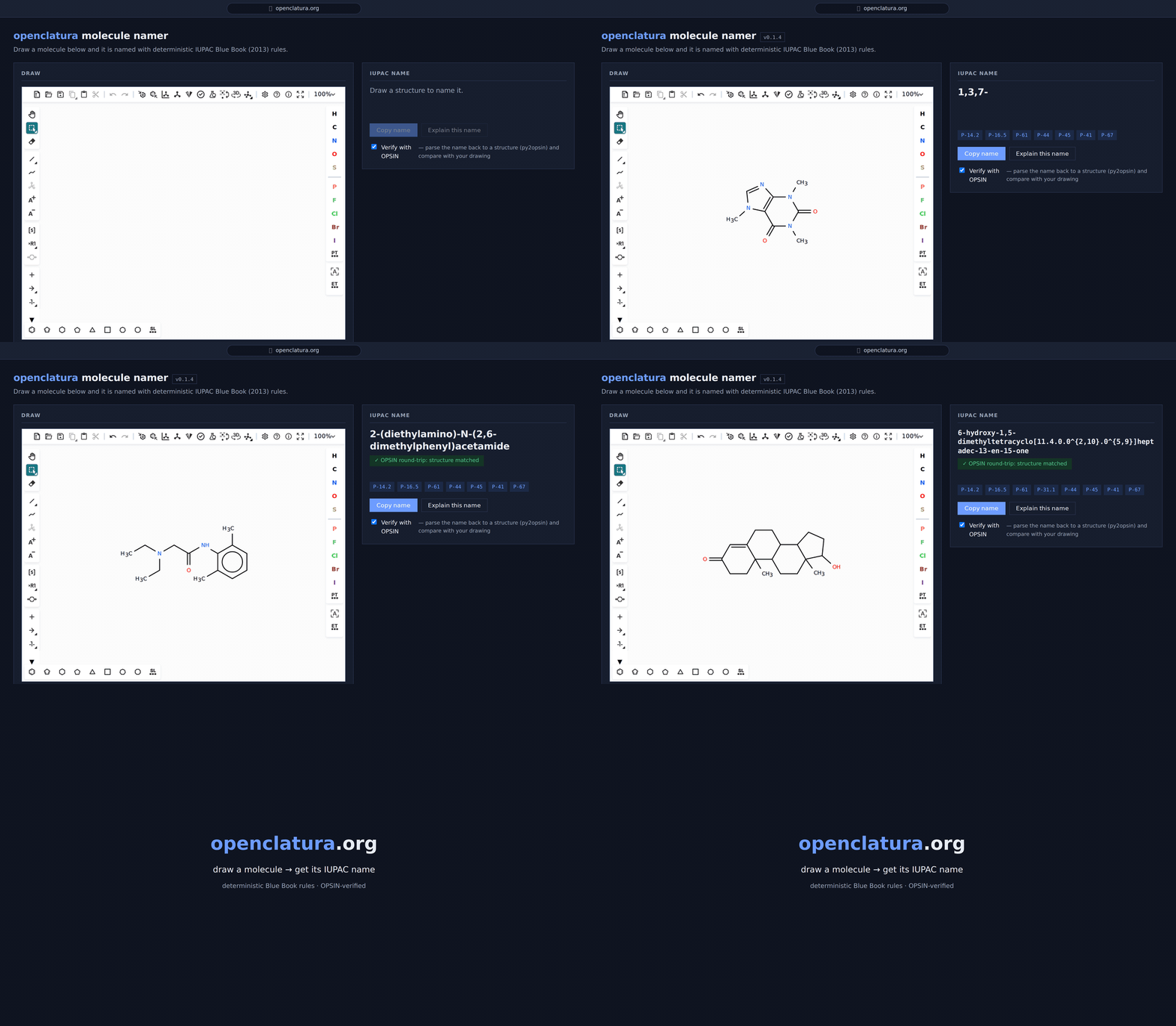
openclatura names molecules the way the IUPAC Blue Book (2013) says to. It
walks the RDKit molecular graph, perceives functional groups and ring systems,
picks the principal parent, numbers it, and assembles the substitutive name.
There is no model and no lookup table: the same structure always yields the same name, and every choice along the way is recorded in a decision trace, so the why of a name is recoverable and not just the what.
What that buys you
- Auditable. Each name carries the Blue Book rules it hit (
P-44,P-61, …) and a step-by-step trace of parse → perception → parent → numbering → assembly. - Broad. Chains and rings from 1 to 1000 skeletal atoms (P-14.2.1), plus fused, spiro and bridged systems, and the Blue Book's retained names.
- Verifiable. Optional round-trip through OPSIN: parse the generated name back to a structure and compare.
- Explainable.
describe()renders the trace as prose — useful for teaching material and for building (SMILES, name, description) datasets.
Coverage
Round-trip accuracy against public datasets (details and rerun instructions in
evaluations/):
| dataset | QM9 | PubChem | ZINC22 |
|---|---|---|---|
| coverage | 100 % | 99.3 % | 97.4 % |
The package is in beta. Naming is solid across common organic chemistry; exotic corners of the Blue Book — and stereodescriptor edge cases — are still being filled in. Bug reports are very welcome.
Install
pip install openclatura
Optional extras:
| extra | adds |
|---|---|
[opsin] |
py2opsin for OPSIN-based round-trip verification |
[datasets] |
datasets + tqdm for PubChem/QM9-style evaluations |
[web] |
FastAPI + uvicorn for the HTTP service |
[dev] |
pytest, ruff, pre-commit, hypothesis, py2opsin |
pip install "openclatura[opsin,datasets]"
The default install does not include OPSIN verification. Install the
[opsin] extra and make sure Java 8+ is available if you want round-trip
verification through OPSIN:
pip install "openclatura[opsin]"
java -version
If py2opsin is installed but Java is missing or inaccessible, OPSIN
verification is skipped gracefully. The name generation still succeeds and the
verification status is reported as skipped_no_java.
Quick start
from openclatura import name_smiles

name_smiles("CCO")          # 'ethanol'
name_smiles("c1ccccc1")     # 'benzene'
name_smiles("CC(=O)O")      # 'acetic acid'
Typed result with rules hit + OPSIN round-trip
For everything richer than the bare string, use openclatura.name:
from openclatura import name

result = name("CC(=O)Nc1ccccc1", include_trace=True, verify_opsin=True)

result.name           # 'N-phenylacetamide'
result.smiles         # 'CC(=O)Nc1ccccc1'
result.ok             # True
result.rules_hit      # ('P-44', 'P-45', 'P-41', 'P-61', 'P-67', ...)
result.rule_hints     # ('Parent hydride / parent structure: Blue Book P-44 ...',)
result.opsin_check.status   # 'matched' | 'mismatched' | 'skipped_no_java' | ...
result.verified       # True when opsin_check is matched
verify_opsin defaults to False. When set to True, verification is
best-effort and does not raise if OPSIN support is unavailable:
- no
py2opsininstalled:result.opsin_check.status == "skipped_no_opsin" py2opsininstalled but Java unavailable:status == "skipped_no_java"- OPSIN parses and round-trips:
status == "matched"or"mismatched"
Errors do not raise — they are captured on result.error, which makes
the batch API safe to point at noisy datasets:
from openclatura import name_many

results = name_many(
    ["CCO", "c1ccccc1", "definitely-not-a-smiles"],
    processes="auto",       # or an integer, or 1 for in-process
    verify_opsin=False,
)
[r.name for r in results if r.ok]
Naming an existing RDKit molecule
If you already hold an rdkit.Chem.rdchem.Mol — from an SD file, a reaction,
or an earlier step in a pipeline — skip the SMILES round-trip:
from rdkit import Chem
from openclatura import name_rdkit_mol, name_mol, name_many

for mol in Chem.SDMolSupplier("compounds.sdf"):
    if mol is not None:
        print(name_rdkit_mol(mol))          # -> 'benzoic acid'

name_mol(mol)                                # typed NamingResult, as `name`
name_many([mol, "CCO"])                      # batches take either form
The input molecule is never modified, explicit hydrogens (as SD files usually
carry them) are handled, and name_rdkit_mol_with_trace / analyze_rdkit_mol
mirror their SMILES counterparts.
For the full decision trace (one TraceStep per phase: parse, perception,
parent selection, numbering, assembly, …):
from openclatura import analyze_smiles

analysis = analyze_smiles("CC(=O)Nc1ccccc1")
for step in analysis.decisions:
    print(step.phase, step.decision, step.reason)
CLI
openclatura name "CC(=O)Nc1ccccc1"            # → N-phenylacetamide
openclatura name "CC(=O)Nc1ccccc1" --json     # JSON with trace + rules
openclatura batch smiles.txt --output names.jsonl --processes auto
The CLI verifies with OPSIN by default when possible. This is different from the
Python API, where verify_opsin=False by default. Disable CLI verification with
--no-verify:
openclatura name "CC(=O)Nc1ccccc1" --no-verify
If OPSIN support is unavailable, the command still prints the generated name and reports the verification status:
N-phenylacetamide
  opsin: skipped_no_java
Other possible skipped statuses include skipped_no_opsin when py2opsin is
not installed. Install openclatura[opsin] and Java 8+ for full CLI
verification.
Explaining a name
Two renderers turn the same decision trace into prose. Both are deterministic — same input, same output, no LLM in the loop.
describe — rule-by-rule
A multi-paragraph account of how the name was built, keyed to the Blue Book rules that fired:
from openclatura import describe

d = describe("CC(=O)Nc1ccccc1")
print(d)            # multi-paragraph prose
d.rules_hit         # ('P-44', 'P-45', 'P-41', 'P-61', 'P-67')
d.components[0]     # DescribedComponent(phase='parse', text='RDKit parsed ...')
describe_human — how a chemist would say it
The same information, phrased the way a person would explain the structure at a whiteboard, with every position tied back to an atom index in the SMILES:
from openclatura import describe_human

d = describe_human("CN1C=NC2=C1C(=O)N(C(=O)N2C)C")   # caffeine
print(d.text)
Input SMILES: CN1C=NC2=C1C(=O)N(C(=O)N2C)C
Processed SMILES: Cn1cnc2c1c(=O)n(C)c(=O)n2C
Atom ids in that SMILES: C{0}n{1}1c{2}n{3}c{4}2c{5}1c{6}(=O{7})n{8}(C{13})c{9}(=O{10})n{11}2C{12}

The molecule is named 1,3,7-trimethylpurine-2,6-dione.

The molecule is built around the retained purine parent, 9-membered bicyclic [4.3.0] heteroskeleton.
Within that parent framework, there is nitrogen at positions 1 (atom id 8), 3 (atom id 11), 7 (atom id 1), and 9 (atom id 3).
The principal characteristic feature is oxo groups at positions 2 (atom id 9) and 6 (atom id 6).
Attached to this framework are methyl groups at positions 1 (atom id 8), 3 (atom id 11), and 7 (atom id 1).
Development
git clone https://github.com/lamalab-org/openclatura
cd openclatura
pip install -e ".[dev]"

# run the unit + round-trip tests
pytest

# run only fast tests
pytest -m "not slow and not dataset and not golden"

# strict RDKit-version regression suite (also runs in the rdkit-compat CI job)
pytest -m golden

# lint and format
ruff check --fix src/openclatura
ruff format src/openclatura
Java is required for the OPSIN-based round-trip checks (see py2opsin).
HTTP service (Docker)
The [web] extra ships a FastAPI app with name, batch, describe
and healthz endpoints. The bundled Dockerfile includes a headless JRE
so verify_opsin=True works out of the box.
# build + run
docker build -t openclatura:local .
docker run --rm -p 8000:8000 openclatura:local

# or via compose
docker compose -f docker/compose.yaml up --build
Call the API:
curl -X POST localhost:8000/name -H 'content-type: application/json' \
     -d '{"smiles":"CC(=O)Nc1ccccc1","include_trace":true,"verify_opsin":true}'

curl -X POST localhost:8000/batch -H 'content-type: application/json' \
     -d '{"smiles":["CCO","c1ccccc1","CC(=O)O"],"processes":1}'

curl -X POST localhost:8000/describe -H 'content-type: application/json' \
     -d '{"smiles":"CC(=O)Nc1ccccc1"}'
OpenAPI docs are served at http://localhost:8000/docs.
Changelog
See CHANGELOG.md for release notes.
License
MIT. See LICENSE.
How to cite
If you use Openclatura in your research, please cite the Openclatura preprint:
@article{openclatura2026,
  author  = {Mirza, Adrian and Jablonka, Kevin Maik and Fedorov, Rostislav},
  title   = {Openclatura--An Open-Source Nomenclature Framework for Rule-Based Molecule Naming},
  journal = {ChemRxiv},
  year    = {2026},
  month   = jul,
  day     = {15},
  doi     = {10.26434/chemrxiv.15006114/v2},
  url     = {https://doi.org/10.26434/chemrxiv.15006114/v2},
  note    = {Preprint}
}
If you are using OPSIN for verification, please cite the original OPSIN publication:
@article{lowe2011opsin,
  author  = {Lowe, Daniel M. and Corbett, Peter T. and Murray-Rust, Peter and Glen, Robert C.},
  title   = {Chemical Name to Structure: {OPSIN}, an Open Source Solution},
  journal = {Journal of Chemical Information and Modeling},
  year    = {2011},
  volume  = {51},
  number  = {3},
  pages   = {739--753},
  doi     = {10.1021/ci100384d},
  url     = {https://doi.org/10.1021/ci100384d}
}
1 maintainer

Download files
Download the file for your platform. If you're not sure which to choose, learn more about installing packages.
Source Distribution
Built Distribution
Filter files by name, interpreter, ABI, and platform.
If you're not sure about the file name format, learn more about wheel file names.
Copy a direct link to the current filters
File details
Details for the file openclatura-0.3.1.tar.gz.
File metadata
- Download URL: openclatura-0.3.1.tar.gz
- Upload date:
- Size: 738.2 kB
- Tags: Source
- Uploaded using Trusted Publishing? No
- Uploaded via:
twine/7.0.0 CPython/3.13.12
File hashes
| Algorithm | Hash digest | |
|---|---|---|
| SHA256 |
6226e31cfbf935f7eae4b4589b40f043a3d8e87cac9f7e9997592b72c78abf4c
|
|
| MD5 |
732f95c86392ec8357ce323d6dc520f3
|
|
| BLAKE2b-256 |
c02fdd87c352d2491467714ff683ae110d1306e87baca00864d250df015e87d3
|
File details
Details for the file openclatura-0.3.1-py3-none-any.whl.
File metadata
- Download URL: openclatura-0.3.1-py3-none-any.whl
- Upload date:
- Size: 382.0 kB
- Tags: Python 3
- Uploaded using Trusted Publishing? No
- Uploaded via:
twine/7.0.0 CPython/3.13.12
File hashes
| Algorithm | Hash digest | |
|---|---|---|
| SHA256 |
6b9cde78e8cf9a06c89a298414fb9f2e6b04fdf3e3ba07b4b5c7f680c1242da6
|
|
| MD5 |
1d79e714bf53f971ce691bdc6a914fc3
|
|
| BLAKE2b-256 |
444761cb264e8e287db0f14e41e0e5d41ba4978dbeafa75af2757c75f600c710
|














