
A Python AI coding assistant — local-first, OpenAI-compatible
Verified details
These details have been verified by PyPIProject links
GitHub Statistics
Maintainers

Project description
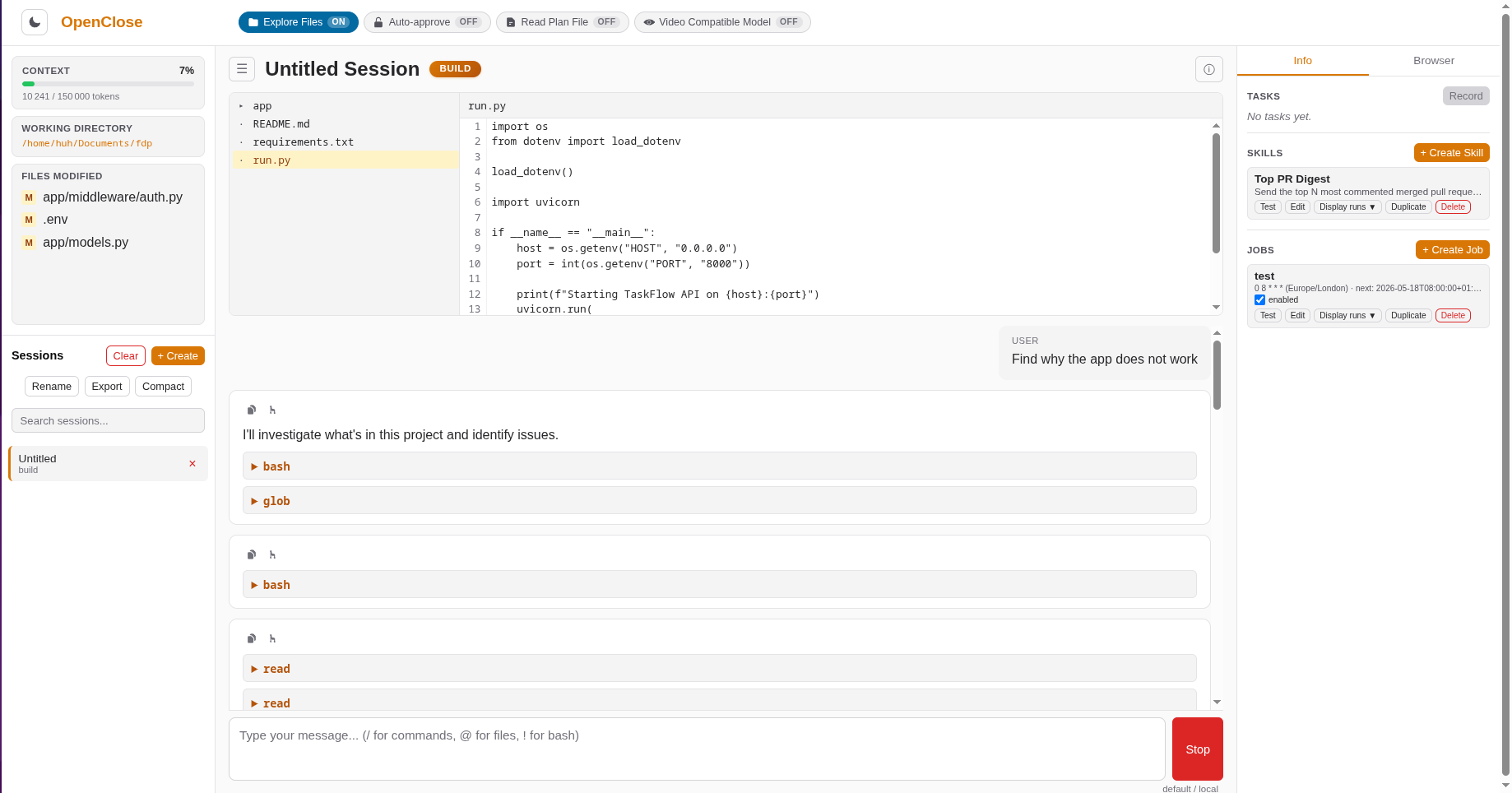
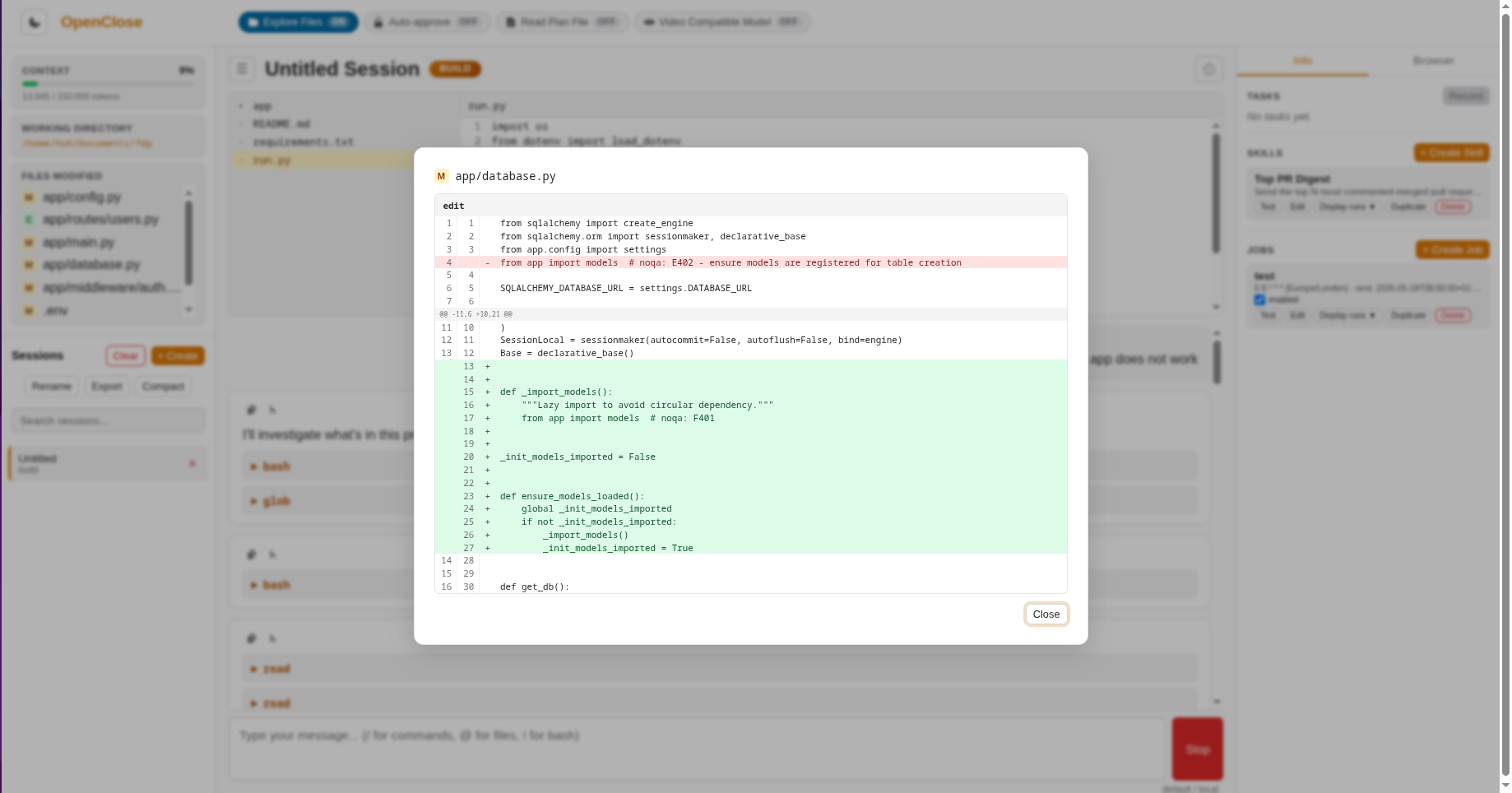
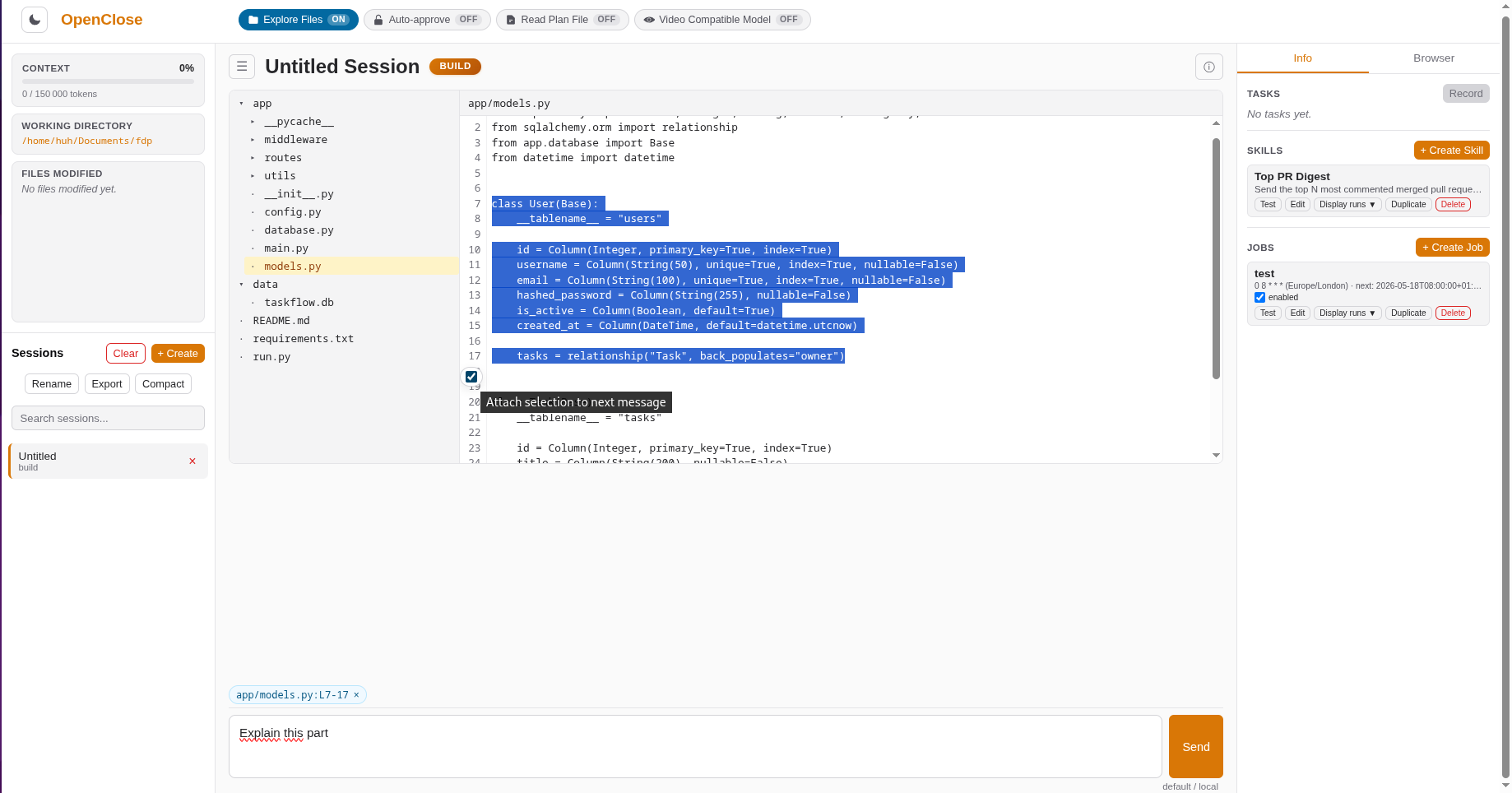
| General view | Diff viewer | Select code from files |
|---|---|---|
 |
 |
 |
https://github.com/user-attachments/assets/60053746-0f52-44c9-b1d1-e0a5514baa61
OpenClose
A local-first Python AI coding assistant and automation platform that works with any OpenAI-compatible API.
OpenClose runs entirely on your machine. Connect it to vLLM, llama.cpp, Ollama, or OpenAI — all conversations and data stay in a local SQLite database. The web UI streams responses in real time via SSE, a headless CLI mode lets you script it into workflows, and a record → distill → schedule → notify pipeline turns ad-hoc chat sessions and recorded browser workflows into unattended jobs.
Features
- Local-first — SQLite storage, no cloud, no remote auth, no telemetry
- Provider-agnostic — works with any OpenAI-compatible endpoint (vLLM, llama.cpp, Ollama, OpenAI)
- Web UI — FastAPI + Jinja2 three-column layout with sessions, chat, and a sidebar for Tasks / Skills / Jobs; per-message Copy (text + tool call + result) and Fork from here (new session with truncated history and reconstructed Files Modified panel) actions on every assistant message
- Real-time streaming — Server-Sent Events for live token-by-token output
- Two built-in agents —
build(full tool access) andplan(read-only analysis), plus a sub-agent:delegate(read-only investigation with configurable budget) - Custom agents — define your own in
config.tomlwith custom prompts, semantic traits, and tool restrictions - 14 built-in tools — file ops (read, write, edit, multiedit), search (glob, grep), shell (bash), web (webfetch), planning (plan with
phase="draft"review by sub-agent andphase="final"user review, ask_user), delegation (delegate), browser (browser_automation_dom, browser_automation_vision), messaging (deliver_message) - Skills — distill a chat session into a reusable, parameterised procedure stored as editable markdown (see Skills)
- Jobs — schedule skill chains with cron or one-shot timing and optional Telegram/Discord notifications (see Jobs)
- Browser recorder → Tasks — capture a manual browser session over CDP, let a VLM annotate it, and save a structured task that can seed a skill (see Recorder & Tasks)
- Two-layer browser automation — fast accessibility-tree DOM tool with a screenshot + visual-grounding fallback (see Browser Automation)
- Messaging — send Telegram/Discord messages via the
deliver_messagetool; the same channel aliases drive job notifications (see Messaging) - Permission system — per-tool allow/deny/ask rules with last-match-wins semantics
- Auto-formatting — ruff, black, gofmt, rustfmt, prettier, shfmt, clang-format
- Context management — automatic compaction when approaching the context window limit
- CLI mode —
openclose run -p "..."for non-interactive scripting with optional JSON output
Installation
Requires Python 3.12+.
From PyPI
pip install openclose
With uv (recommended)
uv pip install openclose
From source
git clone https://github.com/leflakk/openclose.git
cd openclose
uv sync
Quickstart
Where openclose stores files
OpenClose follows each OS's conventional directories. Wherever this README says "your openclose config directory" or shows ~/.config/openclose/..., substitute the row below:
| Platform | Config dir | Data dir | Cache dir |
|---|---|---|---|
| Linux | ~/.config/openclose |
~/.local/share/openclose |
~/.cache/openclose |
| macOS | ~/Library/Application Support/openclose |
~/Library/Application Support/openclose |
~/Library/Caches/openclose |
| Windows | %APPDATA%\openclose |
%LOCALAPPDATA%\openclose |
%LOCALAPPDATA%\openclose |
1. Configure a provider
Create config.toml in your openclose config directory (e.g. ~/.config/openclose/config.toml on Linux, ~/Library/Application Support/openclose/config.toml on macOS, %APPDATA%\openclose\config.toml on Windows):
[[providers]]
name = "default"
kind = "openai_compatible"
base_url = "http://localhost:8000/v1"
Multiple providers are supported. Declare as many [[providers]] blocks as you want and switch between them at runtime from the UI with the /model command:
default_provider = "local"

[[providers]]
name = "local"
kind = "openai_compatible"
base_url = "http://localhost:8000/v1"
default_model = "qwen2.5-coder:7b"

[[providers]]
name = "openrouter"
kind = "openai_compatible"
base_url = "https://openrouter.ai/api/v1"
api_key_env = "OPENROUTER_API_KEY"
default_model = "anthropic/claude-3.5-sonnet"
models = ["anthropic/claude-3.5-sonnet", "google/gemini-2.0-flash-001"]
API-key resolution order (first non-empty wins): per-provider api_key_env → per-provider inline api_key → OPENCLOSE_API_KEY env → OPENAI_API_KEY env.
2. Start the web UI
openclose serve
Opens your browser to http://127.0.0.1:9876. Use --host, --port, --no-browser, or --project-dir to customize.
3. Or run headless
openclose run -p "Explain the main function in src/main.py"
openclose run -p "Add error handling to the parser" --agent build
openclose run -p "Analyze the test coverage gaps" --agent plan --json
4. List sessions
openclose sessions
Configuration
Configuration is loaded in priority order (highest wins):
- Environment variables (
OPENCLOSE_*) - Project config (
.openclose/config.tomlin your project directory) - User config (
config.tomlin your openclose config directory) - Defaults
Example config.toml:
# Provider — any OpenAI-compatible endpoint. Declare multiple [[providers]]
# blocks to switch between them at runtime via the /model command.
default_provider = "default"

[[providers]]
name = "default"
kind = "openai_compatible"
base_url = "http://localhost:8000/v1"
api_key = ""
api_key_env = ""        # name of env var holding the key (preferred over inline)
default_model = ""
# models = ["model-a", "model-b"]    # offered in the /model picker

# Session defaults
default_agent = "build"
max_context_tokens = 128000
compaction_threshold = 0.9

# Override built-in agent settings (build / plan / delegate are built-in;
# you can also add fully self-contained custom agents)
[[agents]]
name = "build"
model = "your-model-name"
temperature = 0.7
max_steps = 200

[[agents]]
name = "plan"
temperature = 0.7

# Custom agent (must be fully self-contained — no inheritance)
[[agents]]
name = "reviewer"
description = "Code reviewer"
model = "your-model-name"
temperature = 0.3
traits = ["readonly"]
allowed_tools = ["read", "grep", "glob"]
system_prompt = "You are a code reviewer. Focus on bugs, security, and clarity."

# Sampling temperatures for tool-internal one-shot LLM calls
# (skill builder/runner, recorder annotators, browser planners, cron NL),
# the `delegate` sub-agent, and the `plan` reviewer sub-agent (phase="draft").
# These bypass AgentLoop and are configured separately from agents.
[temperatures]
skills_runner            = 0.1
skills_builder           = 0.1
browser_vision_grounding = 0.0
browser_vision_planner   = 0.0
browser_dom_planner      = 0.0
recorder_merger          = 0.1
recorder_task_builder    = 0.1
recorder_chunk_annotator = 0.2
cron_nl                  = 0.0
delegate                 = 0.0
plan_reviewer            = 0.0

# Permission rules (last match wins)
[[permissions]]
tool = "*"
action = "ask"

[[permissions]]
tool = "read"
action = "allow"

[[permissions]]
tool = "bash"
path = "/tmp/*"
action = "deny"
See docs/guide-agents-customization.md for the full agent customization guide, including the [temperatures] reference and template variables ($project_dir, $tool_names, …) for system prompts.
Environment variables
| Variable | Type | Default | Description |
|---|---|---|---|
OPENCLOSE_API_KEY |
string | "" |
API key for the provider (takes priority over OPENAI_API_KEY) |
OPENCLOSE_DEBUG |
bool | false |
Enable general debug logging |
OPENCLOSE_DEBUG_LLM |
bool | false |
Dump every LLM request to <config_dir>/<project_name>/llm_debug.jsonl |
OPENCLOSE_BASH_TIMEOUT_MS |
int | 30000 |
Default timeout for bash tool commands (ms) |
OPENCLOSE_DISABLE_FORMATTERS |
bool | false |
Disable auto-formatting after file writes |
OPENCLOSE_DISABLE_FILE_WATCHER |
bool | false |
Disable the file-system watcher |
Boolean flags accept 1/true/yes to enable, 0/false/no to disable.
OPENCLOSE_DEBUG_LLM
Set OPENCLOSE_DEBUG_LLM=1 to record every request sent to the LLM. Each call appends a JSON line to <config_dir>/<project_name>/llm_debug.jsonl (see openclose config directory) with:
timestamp— UTC ISO-8601step— agent loop iteration numbersource— which code path made the callmodel,temperature— model parametersmessages— the full message array sent to the APItools— tool schemas included in the request
OPENCLOSE_DEBUG_LLM=1 openclose serve
# or
OPENCLOSE_DEBUG_LLM=1 openclose run -p "..."
Inspect the output with any JSONL tool:
# adjust the path to your platform — see "Where openclose stores files"
cat ~/.config/openclose/<project_name>/llm_debug.jsonl | python -m json.tool --no-ensure-ascii
Agents
| Agent | Mode | Description | Tool restrictions |
|---|---|---|---|
build |
primary | Full tool access for code writing and execution | Denied: plan |
plan |
primary | Read-only analysis agent with the plan tool (may run bash for verification only — tests/lint/typecheck — never for file mutation) |
Denied: write, edit, multiedit, browser_automation, deliver_message |
delegate |
subagent | Read-only sub-agent spawned by the delegate tool |
Allowed: read, glob, grep, bash, webfetch |
Built-in agents have their traits, allowed_tools, and denied_tools locked. You can still override model, temperature, max_steps, description, and system_prompt for any of them.
Plan workflow
The plan agent has exclusive access to the plan tool, which now has two phases controlled by the required phase parameter:
phase="draft"— spawns a read-only reviewer sub-agent (mirroring thedelegatesub-agent's machinery: filtered read-only tool registry,<report>...</report>extraction, zero-tool-call rejection, hard tool-call cap of 30) that re-reads relevant code, criticizes the plan against actual files, and returns a structured<report>with **Verdict / Issues / Concrete edits / Verified / Caveats` sections. The proposer agent reads the feedback and iterates the plan content before re-calling.phase="final"— pauses the agent loop and presents the polished plan to the user. A review dialog pops up with four options:- Execute — saves the plan to
<config_dir>/<project_name>/plan.md, switches the session to thebuildagent, and injects the plan into the system prompt - Accept & Clear — same as Execute, but starts a fresh build session (clears conversation history while preserving the plan in context)
- Reject — discards the plan
- Send Feedback — returns your feedback to the agent, which revises the plan and presents it again
- Execute — saves the plan to
The reviewer sub-agent's sampling temperature is configured via [temperatures] plan_reviewer (default 0.0 — deterministic critiques). The plan agent should always call phase="draft" first and revise the plan based on the reviewer's Concrete edits before calling phase="final"; skipping straight to final is reserved for trivial plans.
Use /read_plan_file or the sidebar "Read Plan File" toggle to load/unload an existing plan from any agent's context.
The build agent also has access to the delegate tool, which launches read-only delegate sub-agents to carry out focused investigations without filling the main context with verbose search results. The parent supplies 1–3 independent missions in mission_1, mission_2, mission_3 (each a precise question, trace, or angle) and a shared budget (default = 30 tool calls, extended = 50 tool calls — both produce a structured <report>…</report> reply per mission). One delegate call spawns one sub-agent per provided slot and runs them concurrently in their own contexts (read, glob, grep, bash, webfetch); the tool returns a single combined output with === Mission i/N === headers. To explore several angles, fill multiple mission_N slots in a single call rather than issuing multiple delegate calls in the same message.
Custom agents must be fully self-contained (no inheritance) and support:
- Semantic traits — e.g.
["readonly"]adjusts the system prompt automatically - Tool filtering —
allowed_toolsanddenied_toolscontrol what the LLM can call - Custom system prompts with
$variablesubstitution ($project_dir,$date,$agent_name,$agent_description,$tool_names)
Skills
A skill is a distilled, re-runnable procedure derived from a chat session. You run the task once interactively (manually, or by asking the agent to do it), then hit "Save as skill" in the sidebar — an LLM builder reads the full conversation and emits an editable form separating three kinds of values:
- Constants — hardcoded into the procedure (an email address, a target URL, a fixed prompt)
- Runtime parameters — values that change per run, exposed as typed inputs with defaults and referenced in the procedure as
$param_name - Live observations — data the skill must gather fresh each run (today's headlines, latest PR list, current price)
Saved skills live under <config_dir>/<project>/skills/<slug>.md as markdown with YAML frontmatter — human-editable, greppable, portable. Each skill lists its required_tools (with a sensitive: true flag for tools that write, run shell, browse the web, or send messages) and a markdown body with sections Goal, Required tools, Procedure, Pitfalls, Verification.
Run a skill manually (sidebar → Skills → Run) or schedule it as part of a Job (see below). A manual run writes:
skills/<slug>/<iso-ts>-<run_id>.jsonl— one JSON event per lineskills/<slug>/<iso-ts>-<run_id>.out.md— the final assistant text
Skill runs execute in a fresh AgentLoop with allowed_tools set to exactly the skill's required_tools, permissions pre-granted for those tools, and a strict "no ask-user" trigger. If a skill needs input the user can't pre-configure, it fails cleanly rather than blocking.
See docs/guide-skills.md for the full skill format, parameter rules, and troubleshooting.
Jobs
A job is an ordered chain of one or more skills with a fire time and an optional notification. Jobs support:
- Recurring — a 5-field cron expression in the job's
timezone - One-shot — an ISO timestamp; runs once and then marks itself
executed. Past-due one-shots are disarmed on startup rather than run late
The job scheduler runs inside openclose serve (not in openclose run), ticks every 20 seconds, and re-reads job configs from disk on each tick — "edit a job → the scheduler picks it up" with no reload. A per-job asyncio.Lock prevents overlapping runs; missed cron fires are skipped (strict forward scheduling — no catch-up storms).
Other knobs:
skill_parameters— per-job overrides for the default parameter values of each referenced skillon_failure—stopaborts the remaining skills;continuepresses on and reports apartialstatus- Notification — pick a
channelalias from yourdeliver_messageconfig;notify_onisfailure,always, orverification_fail;include_outputattaches each skill's output preview
Job artifacts land under <config_dir>/<project>/jobs/<id>/<iso-ts>-<run_id>/:
summary.json        # top-level run status, per-skill status, durations
<skill>.jsonl       # per-skill event log
<skill>.out.md      # per-skill final text
Write cron expressions directly, or type a phrase like "every weekday at 9am" and hit the translate button — POST /api/jobs/cron/parse asks the provider to convert it and validates the result against croniter before saving.
See docs/guide-jobs.md for timing details, failure modes, and run-artifact layout.
Recorder & Tasks
The recorder captures a manual browser session over CDP and turns it into a structured task definition — the starting point for a skill.
Prerequisite: a Chromium (or Chrome) instance listening on CDP at localhost:9222:
chromium --remote-debugging-port=9222 --user-data-dir=/tmp/cdp-profile
Workflow:
- In the sidebar Recorder panel, click Record. OpenClose attaches to the browser via CDP, starts a screencast, and opens an event log that captures navigation, clicks, typing, and paste events.
- Perform the task in the browser manually.
- Click Stop. The screencast is encoded to MP4 and the events are flushed to JSONL.
- Give the recording a name and description, then click Save. This kicks off a two-pass pipeline:
- Annotator — a vision-language model watches the video + events and writes a numbered literal procedure. For recordings longer than ~12 seconds the video is chunked and annotated in parallel, then merged.
- Task builder — a text-only LLM second pass reads the raw procedure + the authoritative events log and produces a structured task definition that distinguishes
Task constants(baked in),Task runtime observations(gathered live each run),Task example observations(the values seen during recording),Task preconditions,Task workflow, andTask success criteria.
- The task is saved as markdown with YAML frontmatter at
<config_dir>/<project>/recordings/<slug>.md. The raw artifacts (mp4, events.json, procedure.md, task_builder_raw.md, per-chunk files) stay underrecordings/artifacts/<recording_id>/for inspection and debugging.
Tasks are read-only reference material; to actually execute the workflow on a schedule, open a new session, ask the agent to perform the task (it has access to the browser tools), then "Save as skill" to distill a parameterised skill from that conversation.
See docs/guide-recorder.md for CDP setup, chunking tunables, and how to hand a recorded task off to the skill builder.
Browser Automation
Two tools, one lock — only one browser automation call (of either kind) runs at a time:
browser_automation_dom— fast, text-only navigation using the Chrome accessibility tree. Fails cleanly with a structuredfailure_reason(element_not_in_tree,element_ambiguous, etc.) when the tree can't answer the request.browser_automation_vision— a 3-layer sub-agent (planner + visual grounding model + Playwright executor) that navigates by screenshot. Invoked when the DOM tool escalates, or started directly when the session's Vision Mode toggle is on.
Both tools use the same Chromium instance over CDP at localhost:9222 (same as the recorder). The vision tool additionally expects a visual-grounding model at localhost:5002/v1 (OpenAI-compatible endpoint serving a model that returns element coordinates) — vision/rich mode is activated automatically when [browser_vision_grounding] is present in your config.toml; absent that section, browser_automation runs in DOM-only mode. Main-agent intents: visit_url (open a URL), web_search (Bing search), act_on_page (hand a task to the planner sub-agent). Planner actions (inside act_on_page) include history_back, left_click, type, scroll, key, wait, and terminate — the planner cannot navigate to a new URL or search itself; if it needs one, it terminates so the main agent can re-issue visit_url/web_search. Post-action waits adapt to the action type — full-navigation actions wait for load+networkidle, possibly-nav actions wait a short networkidle window, local actions settle briefly.
Limits per tool invocation: max 5 steps, 5-minute timeout. Viewport is 1440×900.
See docs/guide-browser-automation.md for CDP setup, grounding-model requirements, action reference, and failure modes.
Web UI
The web UI has a three-column layout: sessions sidebar, chat panel, and an info sidebar that also hosts the Recorder, Tasks, Skills, and Jobs panels.
Slash commands
| Command | Description |
|---|---|
/new |
Start a new session |
/sessions |
Switch to another session |
/rename |
Rename this session |
/agents |
Switch agent (build / plan / custom) |
/compact |
Compress context window |
/undo |
Remove last message pair |
/export |
Export session transcript |
/copy |
Copy last response to clipboard |
/auto_approve |
Toggle auto-approve for all tool calls |
/read_plan_file |
Toggle plan file in/out of model context |
/video_compatible |
Toggle the Video Compatible Model flag (gates the Record button) |
/help |
Show available commands |
The chat input also accepts @ to autocomplete file paths and !<command> to run a one-off bash command in the project directory.
Sessions can be forked to continue a conversation with a different agent. The info sidebar also includes toggle buttons:
- Read Plan File — load/unload the current plan file into the agent's context
- Auto-approve — auto-approve every tool call in this session (dev/automation shortcut)
- Video Compatible Model — assert that your main LLM accepts video input; required to enable the Record button (which sends recorded videos to the model for annotation). Independent of
browser_automation's vision/grounding mode, which is now activated automatically when[browser_vision_grounding]is present in your config (see Browser Automation)
Below the toggles, four panels surface automation state:
- Recorder — Record / Stop / Cancel the browser CDP capture; once stopped, give the recording a name + description and the annotator turns it into a task
- Tasks — the markdown files produced by the recorder; clickable to view, duplicate, or delete
- Skills — reusable, parameterised procedures (see Skills)
- Jobs — scheduled skill chains (see Jobs); each job shows enable/disable, "Run now", and its recent run history
Messaging (deliver_message tool)
The deliver_message tool lets the agent push text to Telegram and Discord bots. Long messages are split automatically (Telegram cap: 4096 chars, Discord cap: 2000 chars); code fences are preserved across chunks.
Copy .env.example to .env in your openclose config directory and fill in the values (real environment variables always win over the file):
# Bot tokens
OPENCLOSE_TELEGRAM_BOT_TOKEN=123456:ABC-XYZ
OPENCLOSE_DISCORD_BOT_TOKEN=MTIz...

# Channel aliases: OPENCLOSE_CHANNEL_<ALIAS>=<platform>:<target_id>
OPENCLOSE_CHANNEL_OPS=telegram:-1001234567890
OPENCLOSE_CHANNEL_ME=telegram:123456789
OPENCLOSE_CHANNEL_TEAMCHAT=discord:987654321098765432

# Optional: outbound allowlist — the tool refuses to POST to any
# Telegram chat_id not in this comma-separated set.
OPENCLOSE_TELEGRAM_ALLOWED_USERS=123456789,-1001234567890
Aliases are case-insensitive. The agent selects one or more aliases per call (up to 10). The plan (read-only) agent is denied this tool; only build and custom agents can send messages.
The same channel aliases are also what Jobs pick from for their post-run notifications — define a channel once and you can both address it from chat and target it from a cron-scheduled job.
Architecture
See ARCHITECTURE.md for the full package structure, design decisions, and data flow diagrams.
Contributing
git clone https://github.com/leflakk/openclose.git
cd openclose
uv sync
uv run pytest tests/
Code quality requirements:
- Linting —
uv run ruff check src/ tests/ - Type checking —
uv run mypy --strict src/ tests/ - Tests —
uv run pytest tests/ --cov=openclose --cov-fail-under=79
CI runs all three checks on every push and pull request via GitHub Actions.
License
Project details
Verified details
These details have been verified by PyPIProject links
GitHub Statistics
Maintainers
Release history Release notifications | RSS feed


Download files
Download the file for your platform. If you're not sure which to choose, learn more about installing packages.
Source Distribution
Built Distribution
Filter files by name, interpreter, ABI, and platform.
If you're not sure about the file name format, learn more about wheel file names.
Copy a direct link to the current filters
File details
Details for the file openclose-1.0.1.tar.gz.
File metadata
- Download URL: openclose-1.0.1.tar.gz
- Upload date:
- Size: 464.8 kB
- Tags: Source
- Uploaded using Trusted Publishing? Yes
- Uploaded via: twine/6.1.0 CPython/3.13.12
File hashes
| Algorithm | Hash digest | |
|---|---|---|
| SHA256 |
9fba3edca93c7e097ede4976f8433e3d0b7b9e1d0a44fca60fc1cee3e42fd682
|
|
| MD5 |
3a5807e17bfc5454d3d2894871d3ac1c
|
|
| BLAKE2b-256 |
61ce11e92b52184134171365e78fdf0022b52f6df9f8d996926c2a90736477d5
|
Provenance
The following attestation bundles were made for openclose-1.0.1.tar.gz:
Publisher:
publish.yml on leflakk/openclose
-
Statement:
-
Statement type:
https://in-toto.io/Statement/v1 -
Predicate type:
https://docs.pypi.org/attestations/publish/v1 -
Subject name:
openclose-1.0.1.tar.gz -
Subject digest:
9fba3edca93c7e097ede4976f8433e3d0b7b9e1d0a44fca60fc1cee3e42fd682 - Sigstore transparency entry: 1564096695
- Sigstore integration time:
-
Permalink:
leflakk/openclose@399b2b4f31443e390126eb0869f411c4096ea14e -
Branch / Tag:
refs/tags/v1.0.1 - Owner: https://github.com/leflakk
-
Access:
public
-
Token Issuer:
https://token.actions.githubusercontent.com -
Runner Environment:
github-hosted -
Publication workflow:
publish.yml@399b2b4f31443e390126eb0869f411c4096ea14e -
Trigger Event:
release
-
Statement type:
File details
Details for the file openclose-1.0.1-py3-none-any.whl.
File metadata
- Download URL: openclose-1.0.1-py3-none-any.whl
- Upload date:
- Size: 291.8 kB
- Tags: Python 3
- Uploaded using Trusted Publishing? Yes
- Uploaded via: twine/6.1.0 CPython/3.13.12
File hashes
| Algorithm | Hash digest | |
|---|---|---|
| SHA256 |
72d00f13e560edc9efadcf354de3b5527c14df2a0d2aa7b659f5e4b813443ec3
|
|
| MD5 |
75ac035e404fb5f1aeb59b82b33f54cc
|
|
| BLAKE2b-256 |
bc0d4923966f9bffcacbb116b2f92ccb245fb7905740cb9576ea5f94c5df162c
|
Provenance
The following attestation bundles were made for openclose-1.0.1-py3-none-any.whl:
Publisher:
publish.yml on leflakk/openclose
-
Statement:
-
Statement type:
https://in-toto.io/Statement/v1 -
Predicate type:
https://docs.pypi.org/attestations/publish/v1 -
Subject name:
openclose-1.0.1-py3-none-any.whl -
Subject digest:
72d00f13e560edc9efadcf354de3b5527c14df2a0d2aa7b659f5e4b813443ec3 - Sigstore transparency entry: 1564096710
- Sigstore integration time:
-
Permalink:
leflakk/openclose@399b2b4f31443e390126eb0869f411c4096ea14e -
Branch / Tag:
refs/tags/v1.0.1 - Owner: https://github.com/leflakk
-
Access:
public
-
Token Issuer:
https://token.actions.githubusercontent.com -
Runner Environment:
github-hosted -
Publication workflow:
publish.yml@399b2b4f31443e390126eb0869f411c4096ea14e -
Trigger Event:
release
-
Statement type:






