
opencode-swap
Multi-account switcher for OpenCode.
OpenCode has no built-in way to keep several accounts for one provider around and flip
between them. opencode-swap is a small standalone CLI that does exactly
that: it keeps a securely-stored copy of each account's OpenCode auth state
and swaps the one OpenCode currently considers "active."
opencode-swap use openai personal && opencode
Core workflow stays standalone: no background process or proxy runs while OpenCode is. An optional terminal UI plugin adds account status and commands without taking ownership of credentials or swaps.

Status
Early. Core behavior is covered by automated tests and has been exercised
against a real OpenCode installation. See
docs/roadmap.md
for what's done and what's left.
⚠️ OpenAI is the only provider tested end to end with real accounts. Other provider implementations were derived from OpenCode source and synthetic tests. Maintainer does not have accounts for those services, so testers are wanted for every non-OpenAI provider.
🧪 Testers wanted. If you use any non-OpenAI provider, please open an issue with the provider, auth method, OpenCode version, and sanitized failure details. Never include credentials.
docs/provider-research-prompt.mdhas a copy-paste OpenCode prompt that gathers safe source evidence for one provider.
🤖 This project is built largely with agentic AI coding tools, under human review. Read the code before trusting it with your credentials.
Looking for load balancing?
opencode-swap activates one account at a time. If you instead want requests
spread across several accounts at runtime, that's a different problem, and
opencode-balancer is the
project for it.
docs/security.md
covers the storage trade-offs each approach makes.
Install
Two pieces ship from this repo: the CLI, which does all the work, and an optional OpenCode TUI plugin that surfaces it inside the TUI. Install the CLI first — the plugin shells out to it.
1. CLI (required)
uv tool install opencode-swap     # or: pipx install opencode-swap
opencode-swap --help
uvx opencode-swap --help works too, without installing anything permanently.
2. OpenCode TUI plugin (optional)
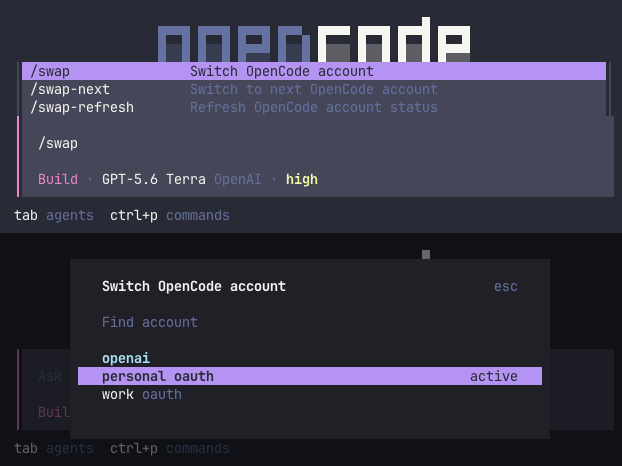
Adds the active account and its usage to the session prompt, plus /swap,
/swap-next, and /swap-refresh in the command palette:
opencode plugin @leinardi/opencode-swap --global
Restart OpenCode afterwards. The plugin invokes opencode-swap from your
PATH, so it needs the CLI from step 1 already installed. See
OpenCode TUI integration for what it renders and
when it stays hidden.
From source
git clone https://github.com/leinardi/opencode-swap.git
cd opencode-swap
uv sync
uv run opencode-swap --help
uv tool install . from the checkout also works if you want opencode-swap
and ocs on your PATH from a local checkout.
Quickstart
# 1. Log into OpenCode normally with your first account.
opencode auth login

# 2. Import whichever account is currently active into opencode-swap.
opencode-swap add openai personal

# 3. Log into a second account.
opencode auth login   # choose/authenticate a different ChatGPT account
opencode-swap add openai work

# 4. See what's saved.
opencode-swap list
#   personal   ...abcd   -
# * work       ...ef01   -

# 5. Switch whenever you like.
opencode-swap use openai personal
opencode
Names are yours to choose (lowercase letters/digits/-/_/.). Re-running
add with the provider and name of an already-imported account refreshes its stored
tokens in place; it won't create a duplicate.
Commands
| Command | Description |
|---|---|
opencode-swap add <provider> <name> |
Import the provider's currently-active account under <name>. |
opencode-swap list [provider] [--usage] |
List every saved account, or filter by provider; --usage adds a live quota line where supported (OpenAI ChatGPT OAuth, Z.AI zai-coding-plan; network, opt-in). |
opencode-swap current [provider] |
Show active managed accounts for every provider, or one provider. |
opencode-swap status [provider] [--json] [--usage] |
Show integration status; --json emits versioned secret-safe data; --usage as for list. |
opencode-swap use <provider> <name> [-y] |
Activate one saved provider account. |
opencode-swap switch <provider> [-y] |
Switch to next saved account for provider. |
opencode-swap refresh <provider> [name] |
Ensure a saved account's OAuth token is valid, refreshing over the network if expired (no-op if already valid); every saved account for the provider if name is omitted. Never refreshes whichever account is currently active in OpenCode — that account's own next request handles its refresh. |
opencode-swap remove <provider> <name> [-y] |
Delete a saved provider account. |
opencode-swap rename <provider> <old> <new> |
Rename a saved provider account. |
opencode-swap export <path> |
Export all saved accounts to a new password-encrypted .ocs archive. |
opencode-swap import <path> |
Import accounts from an encrypted archive; prompts to skip or overwrite existing names. |
opencode-swap restore [--pristine] [-y] |
Recover auth.json from the most recent pre-switch backup, or from the very first snapshot ever taken (--pristine). |
opencode-swap doctor |
Diagnose paths, schema compatibility, secret backend, and backup state. |
use, switch, remove, and restore ask for confirmation unless you pass -y/--yes
(and refuse to prompt at all on a non-interactive terminal, so pass -y in
scripts). use also warns if it detects a running opencode process, since
switching while OpenCode might be mid-token-refresh is the one real race
condition this tool can't fully close (see
docs/security.md).
No command ever prints an access token, refresh token, or API key. Account ids are shown truncated to their last four characters.
OpenCode TUI integration
Install it with step 2 of Install.
integrations/opencode-tui-plugin
uses OpenCode's supported TUI-plugin API to render active account and
active-only usage at right side of session prompt metadata:
Plan · GPT-5.6 Sol OpenAI · medium work · 17%
It only appears after session has sent a request through provider managed by
opencode-swap; it stays hidden for unrelated providers. /swap opens a
safe account picker, /swap-next rotates current provider, and /swap-refresh
refreshes visible status. See the
plugin README
for install and concurrency limits.
Core CLI does not require Bun. TUI plugin development and root make verify
require Bun 1.3.14; make check remains Python-only and offline.
Moving accounts to another computer
# Source computer
opencode-swap export ~/opencode-accounts.ocs

# Transfer the archive, then on the destination computer
opencode-swap import ~/opencode-accounts.ocs
opencode-swap use openai personal
export asks for a password twice; import asks for it once. Password input
requires an interactive terminal and is never placed in command arguments or
printed. The archive is AES-256 encrypted and created with 0600 permissions.
Delete the transfer archive after a successful import. See
docs/architecture.md
for how import handles naming conflicts and validates accounts before writing
anything.
How it works
The short version: OpenCode keeps all of its provider credentials in a
single JSON file, ~/.local/share/opencode/auth.json, and re-reads it fresh
on every request; no restart is required to pick up a change. The entire unit
of "which account is active" is one top-level provider key in that file.
opencode-swap keeps a copy of each account's record in private storage, and
use <provider> <name> atomically replaces that one key.
The interesting part is what happens between switches: OpenCode rotates
the access and refresh token in place whenever it refreshes, so a naively
cached copy would go stale. opencode-swap captures that rotation back into
its own storage every time you switch away from an account, before
overwriting it with another. Providers using static API keys do not rotate
credentials, but use the same atomic switching path.
Provider support
| Provider/auth class | Status |
|---|---|
| OpenAI API key and ChatGPT OAuth | ✅ Supported; only end-to-end tested provider |
Any provider using OpenCode's canonical {"type":"api","key":"..."} record |
⚠️ Supported generically; testers wanted |
| GitHub Copilot OAuth | ⚠️ Supported from OpenCode source analysis; testers wanted |
| Poe API/OAuth | ⚠️ Supported from pinned plugin source analysis; testers wanted |
| xAI API/OAuth | ⚠️ API supported; OAuth requires access JWT with stable iss/sub; testers wanted |
Z.AI GLM Coding Plan (zai-coding-plan) |
⚠️ Supported through generic API handling; --usage reads the GLM Coding Plan quota; testers wanted |
| GitLab and Snowflake API/PAT | ⚠️ Supported through generic API handling; testers wanted |
| GitLab and Snowflake OAuth | ❌ Not supported: OpenCode does not persist a provably stable per-user identity |
| Well-known URL auth and unknown OAuth plugins | ❌ Not supported |
Same account name may exist under different providers. openai:work and
anthropic:work are separate accounts. Provider IDs must match keys in
OpenCode's auth.json exactly.
Full details, including the exact OpenCode internals this was reverse
engineered from and the switch algorithm's failure-recovery guarantees, are
in docs/opencode-auth.md
and docs/architecture.md.
Security
Credentials are stored via:
- macOS: the system Keychain, through the pinned
/usr/bin/securityCLI. - Linux: atomic
chmod 0600files under a0700directory, obfuscated (base64) but not encrypted. This matches OpenCode's filesystem trust boundary without interactive Secret Service unlock prompts. The optional TUI status widget polls account usage, so every secret read must be non-interactive and complete in bounded time. Linux Secret Service cannot guarantee this: an unlocked keyring may prompt again, while a locked or unhealthy D-Bus service can block the CLI indefinitely. - macOS fallback: the same private-file backend when Keychain is unavailable.
No custom cryptographic protocol. Portable exports use standard WinZip AES-256
implemented by pyzipper; plaintext credentials never touch a temporary file.
No plaintext database. Full threat model in
docs/security.md.
See SECURITY.md
to report a vulnerability.
Scope
In scope: standalone CLI, Linux + macOS, OpenCode provider accounts with known safe identity semantics, secure multi-account storage, transactional switching with rollback, backup/recovery, an architecture that doesn't need a rewrite to add provider-specific behavior without changing safe I/O machinery.
Out of scope: load balancing / round-robin, runtime request interception, a local proxy, Windows, unsupported/ambiguous OAuth providers, reimplementing or modifying OpenCode, cloud sync. The core CLI stays standalone and owns credentials and swaps; the optional TUI plugin is a read-only companion that shells out to it rather than a separate GUI.
Documentation
docs/architecture.md: module map, data flow, the switch algorithm, transaction/rollback design.docs/opencode-auth.md: how OpenCode stores provider credentials and refreshes OpenAI credentials.docs/provider-support.md: provider matrix, source evidence, live-testing status, and deferred OAuth cases.docs/provider-research-prompt.md: safe copy-paste prompt for provider-research issues.docs/security.md: threat model, storage mechanism comparison, what's explicitly out of scope.docs/testing.md: testing strategy and how to run the suite.docs/roadmap.md: what v1 ships and the known gaps.docs/releasing.md: how to cut a CLI (PyPI) or TUI plugin (npm) release.AGENTS.md: project guide for AI coding agents working in this repo.CONTRIBUTING.md: how to set up, test, and submit changes.SECURITY.md: how to report a vulnerability.
Development
make python-sync
make python-test          # No network/keychain access required
make doctor
Run make help for all development targets. Direct uv commands remain
available when Make is not installed.
See docs/testing.md
for what the suite covers and how it keeps real macOS Keychain data and your
real auth.json out of the loop,
CONTRIBUTING.md
for the PR workflow, and
AGENTS.md
for conventions to follow when changing code here.
License
MIT
1 maintainer

Download files
Download the file for your platform. If you're not sure which to choose, learn more about installing packages.
Source Distribution
Built Distribution
Filter files by name, interpreter, ABI, and platform.
If you're not sure about the file name format, learn more about wheel file names.
Copy a direct link to the current filters
File details
Details for the file opencode_swap-0.4.1.tar.gz.
File metadata
- Download URL: opencode_swap-0.4.1.tar.gz
- Upload date:
- Size: 139.5 kB
- Tags: Source
- Uploaded using Trusted Publishing? Yes
- Uploaded via:
twine/7.0.0 CPython/3.13.14
File hashes
| Algorithm | Hash digest | |
|---|---|---|
| SHA256 |
6313bc4121e8e3ff985c2e7c6bc702788bf0a1e071dcd7234d0d7dd979358c95
|
|
| MD5 |
4a33710fb99e1f22617e8d164955a80f
|
|
| BLAKE2b-256 |
f0ac9441b2f976d6889803926fc010aaa9e6fd6a5394a2365f8d8e301662ee2d
|
Provenance
The following attestation bundles were made for opencode_swap-0.4.1.tar.gz:
Publisher:
publish-pypi.yml on leinardi/opencode-swap
-
Statement:
-
Statement type:
https://in-toto.io/Statement/v1 -
Predicate type:
https://docs.pypi.org/attestations/publish/v1 -
Subject name:
opencode_swap-0.4.1.tar.gz -
Subject digest:
6313bc4121e8e3ff985c2e7c6bc702788bf0a1e071dcd7234d0d7dd979358c95 - Sigstore transparency entry: 2619274243
- Sigstore integration time:
-
Permalink:
leinardi/opencode-swap@c02827a9124f7816008d462f0dbdf08a234c44ca -
Branch / Tag:
refs/tags/v0.4.1 - Owner: https://github.com/leinardi
-
Access:
public
-
Token Issuer:
https://token.actions.githubusercontent.com -
Runner Environment:
github-hosted -
Publication workflow:
publish-pypi.yml@c02827a9124f7816008d462f0dbdf08a234c44ca -
Trigger Event:
workflow_dispatch
-
Statement type:
File details
Details for the file opencode_swap-0.4.1-py3-none-any.whl.
File metadata
- Download URL: opencode_swap-0.4.1-py3-none-any.whl
- Upload date:
- Size: 77.4 kB
- Tags: Python 3
- Uploaded using Trusted Publishing? Yes
- Uploaded via:
twine/7.0.0 CPython/3.13.14
File hashes
| Algorithm | Hash digest | |
|---|---|---|
| SHA256 |
11ac9a96fbaa718c45c070531807e044ee0035ff9ec24b8899233b26f587fe3c
|
|
| MD5 |
75418953de9cf23dc78d3f01e58e553c
|
|
| BLAKE2b-256 |
2e899c09a8542c4c2c61663c14333a7c308d7d11cd0443bc4964551e60c4db6b
|
Provenance
The following attestation bundles were made for opencode_swap-0.4.1-py3-none-any.whl:
Publisher:
publish-pypi.yml on leinardi/opencode-swap
-
Statement:
-
Statement type:
https://in-toto.io/Statement/v1 -
Predicate type:
https://docs.pypi.org/attestations/publish/v1 -
Subject name:
opencode_swap-0.4.1-py3-none-any.whl -
Subject digest:
11ac9a96fbaa718c45c070531807e044ee0035ff9ec24b8899233b26f587fe3c - Sigstore transparency entry: 2619274549
- Sigstore integration time:
-
Permalink:
leinardi/opencode-swap@c02827a9124f7816008d462f0dbdf08a234c44ca -
Branch / Tag:
refs/tags/v0.4.1 - Owner: https://github.com/leinardi
-
Access:
public
-
Token Issuer:
https://token.actions.githubusercontent.com -
Runner Environment:
github-hosted -
Publication workflow:
publish-pypi.yml@c02827a9124f7816008d462f0dbdf08a234c44ca -
Trigger Event:
workflow_dispatch
-
Statement type:














