
A comprehensive toolkit for large model evaluation

Project description



👋 join us on Discord and WeChat
🧭 Welcome
to OpenCompass!
Just like a compass guides us on our journey, OpenCompass will guide you through the complex landscape of evaluating large language models. With its powerful algorithms and intuitive interface, OpenCompass makes it easy to assess the quality and effectiveness of your NLP models.
🔥 Attention
We launch the OpenCompass Collaboration project, welcome to support diverse evaluation benchmarks into OpenCompass! Clike Issue for more information. Let's work together to build a more powerful OpenCompass toolkit!
🚀 What's New 
- [2023.09.26] We update the leaderboard with Qwen, one of the best-performing open-source models currently available, welcome to our homepage for more details. 🔥🔥🔥.
- [2023.09.20] We update the leaderboard with InternLM-20B, welcome to our homepage for more details. 🔥🔥🔥.
- [2023.09.19] We update the leaderboard with WeMix-LLaMA2-70B/Phi-1.5-1.3B, welcome to our homepage for more details.
- [2023.09.18] We have released long context evaluation guidance.
- [2023.09.08] We update the leaderboard with Baichuan-2/Tigerbot-2/Vicuna-v1.5, welcome to our homepage for more details.
- [2023.09.06] Baichuan2 team adpots OpenCompass to evaluate their models systematically. We deeply appreciate the community's dedication to transparency and reproducibility in LLM evaluation.
- [2023.09.02] We have supported the evaluation of Qwen-VL in OpenCompass.
- [2023.08.25] TigerBot team adpots OpenCompass to evaluate their models systematically. We deeply appreciate the community's dedication to transparency and reproducibility in LLM evaluation.
- [2023.08.21] Lagent has been released, which is a lightweight framework for building LLM-based agents. We are working with Lagent team to support the evaluation of general tool-use capability, stay tuned!
✨ Introduction
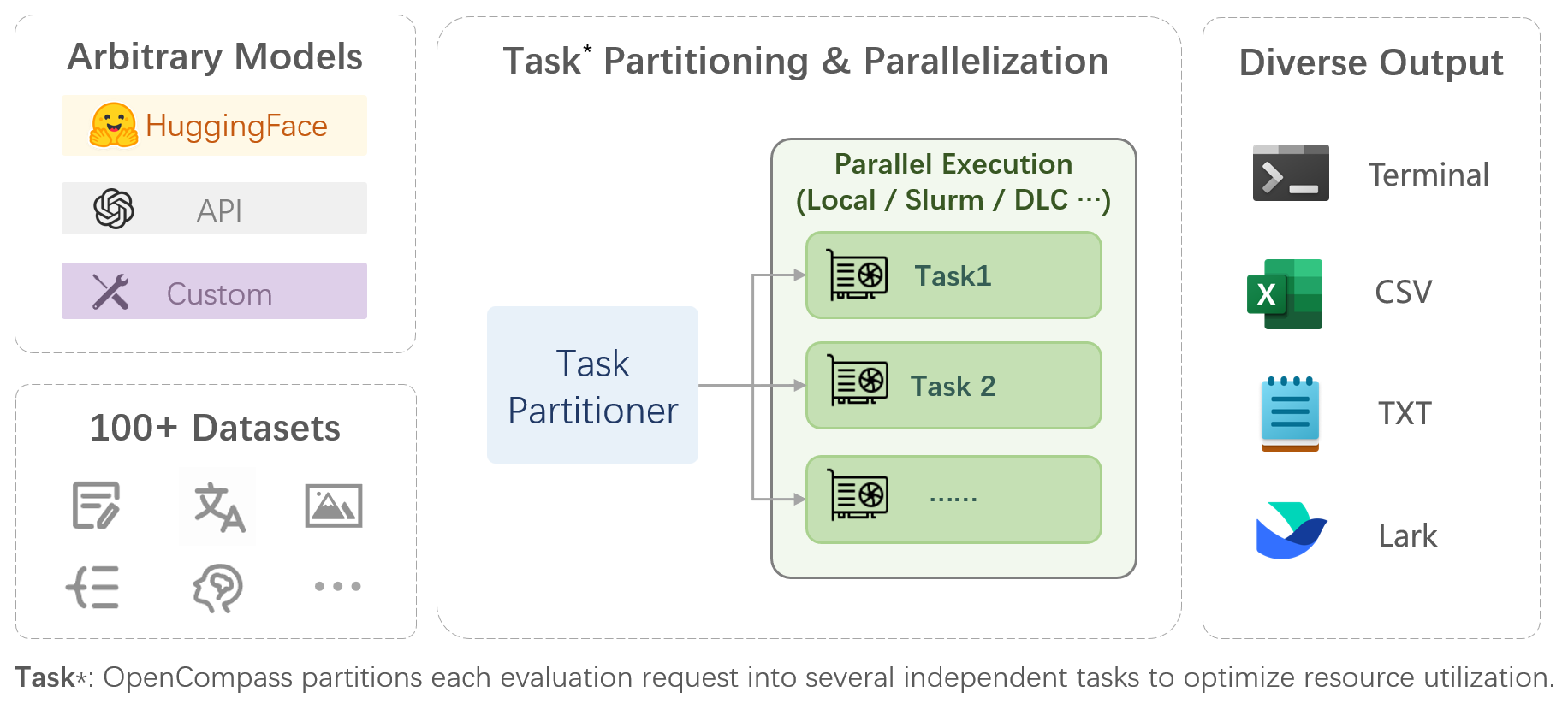
OpenCompass is a one-stop platform for large model evaluation, aiming to provide a fair, open, and reproducible benchmark for large model evaluation. Its main features includes:
-
Comprehensive support for models and datasets: Pre-support for 20+ HuggingFace and API models, a model evaluation scheme of 70+ datasets with about 400,000 questions, comprehensively evaluating the capabilities of the models in five dimensions.
-
Efficient distributed evaluation: One line command to implement task division and distributed evaluation, completing the full evaluation of billion-scale models in just a few hours.
-
Diversified evaluation paradigms: Support for zero-shot, few-shot, and chain-of-thought evaluations, combined with standard or dialogue type prompt templates, to easily stimulate the maximum performance of various models.
-
Modular design with high extensibility: Want to add new models or datasets, customize an advanced task division strategy, or even support a new cluster management system? Everything about OpenCompass can be easily expanded!
-
Experiment management and reporting mechanism: Use config files to fully record each experiment, support real-time reporting of results.
📊 Leaderboard
We provide OpenCompass Leaderbaord for community to rank all public models and API models. If you would like to join the evaluation, please provide the model repository URL or a standard API interface to the email address opencompass@pjlab.org.cn.
🛠️ Installation
Below are the steps for quick installation and datasets preparation.
conda create --name opencompass python=3.10 pytorch torchvision pytorch-cuda -c nvidia -c pytorch -y
conda activate opencompass
git clone https://github.com/open-compass/opencompass opencompass
cd opencompass
pip install -e .
# Download dataset to data/ folder
wget https://github.com/open-compass/opencompass/releases/download/0.1.1/OpenCompassData.zip
unzip OpenCompassData.zip
Some third-party features, like Humaneval and Llama, may require additional steps to work properly, for detailed steps please refer to the Installation Guide.
🏗️ ️Evaluation
After ensuring that OpenCompass is installed correctly according to the above steps and the datasets are prepared, you can evaluate the performance of the LLaMA-7b model on the MMLU and C-Eval datasets using the following command:
python run.py --models hf_llama_7b --datasets mmlu_ppl ceval_ppl
OpenCompass has predefined configurations for many models and datasets. You can list all available model and dataset configurations using the tools.
# List all configurations
python tools/list_configs.py
# List all configurations related to llama and mmlu
python tools/list_configs.py llama mmlu
You can also evaluate other HuggingFace models via command line. Taking LLaMA-7b as an example:
python run.py --datasets ceval_ppl mmlu_ppl \
--hf-path huggyllama/llama-7b \  # HuggingFace model path
--model-kwargs device_map='auto' \  # Arguments for model construction
--tokenizer-kwargs padding_side='left' truncation='left' use_fast=False \  # Arguments for tokenizer construction
--max-out-len 100 \  # Maximum number of tokens generated
--max-seq-len 2048 \  # Maximum sequence length the model can accept
--batch-size 8 \  # Batch size
--no-batch-padding \  # Don't enable batch padding, infer through for loop to avoid performance loss
--num-gpus 1  # Number of minimum required GPUs
Note
To run the command above, you will need to remove the comments starting from#first.
Through the command line or configuration files, OpenCompass also supports evaluating APIs or custom models, as well as more diversified evaluation strategies. Please read the Quick Start to learn how to run an evaluation task.
📖 Dataset Support
| Language | Knowledge | Reasoning | Examination |
Word Definition
Idiom Learning
Semantic Similarity
Coreference Resolution
Translation
Multi-language Question Answering
Multi-language Summary
|
Knowledge Question Answering
|
Textual Entailment
Commonsense Reasoning
Mathematical Reasoning
Theorem Application
Comprehensive Reasoning
|
Junior High, High School, University, Professional Examinations
Medical Examinations
|
| Understanding | Long Context | Safety | Code |
Reading Comprehension
Content Summary
Content Analysis
|
Long Context Understanding
|
Safety
Robustness
|
Code
|
📖 Model Support
| Open-source Models | API Models |
|
|
🔜 Roadmap
- Subjective Evaluation
- Release CompassAreana
- Subjective evaluation dataset.
- Long-context
- Long-context evaluation with extensive datasets.
- Long-context leaderboard.
- Coding
- Coding evaluation leaderdboard.
- Non-python language evaluation service.
- Agent
- Support various agenet framework.
- Evaluation of tool use of the LLMs.
- Robustness
- Support various attack method
👷♂️ Contributing
We appreciate all contributions to improve OpenCompass. Please refer to the contributing guideline for the best practice.
🤝 Acknowledgements
Some code in this project is cited and modified from OpenICL.
Some datasets and prompt implementations are modified from chain-of-thought-hub and instruct-eval.
🖊️ Citation
@misc{2023opencompass,
    title={OpenCompass: A Universal Evaluation Platform for Foundation Models},
    author={OpenCompass Contributors},
    howpublished = {\url{https://github.com/open-compass/opencompass}},
    year={2023}
}
Release history Release notifications | RSS feed


Download files
Download the file for your platform. If you're not sure which to choose, learn more about installing packages.
Source Distribution
Built Distribution
Filter files by name, interpreter, ABI, and platform.
If you're not sure about the file name format, learn more about wheel file names.
Copy a direct link to the current filters
File details
Details for the file opencompass-0.1.7.tar.gz.
File metadata
- Download URL: opencompass-0.1.7.tar.gz
- Upload date:
- Size: 163.6 kB
- Tags: Source
- Uploaded using Trusted Publishing? No
- Uploaded via: twine/4.0.2 CPython/3.7.17
File hashes
| Algorithm | Hash digest | |
|---|---|---|
| SHA256 |
20246805b1618fc606ca722ee6f7fc57f4ac9eb2841adebdbd360dab27be2f07
|
|
| MD5 |
ea8374c944f8039c9f3bcdcf5ec16edb
|
|
| BLAKE2b-256 |
8bb7e6c4b8eaa29a4e890cea2b5f8b8d3c97d9dac2cbc7689d436f58e02dc423
|
File details
Details for the file opencompass-0.1.7-py3-none-any.whl.
File metadata
- Download URL: opencompass-0.1.7-py3-none-any.whl
- Upload date:
- Size: 279.4 kB
- Tags: Python 3
- Uploaded using Trusted Publishing? No
- Uploaded via: twine/4.0.2 CPython/3.7.17
File hashes
| Algorithm | Hash digest | |
|---|---|---|
| SHA256 |
862fe74e5949dd883622f63e5e068e542668060db0d52d5d6ce144b7d5cfd54c
|
|
| MD5 |
a2dd38cc6d6c51494bda596d0a0e3f87
|
|
| BLAKE2b-256 |
0344817cd1abb663f5c806cc2a687116caa7d63ff61235d63cf8ffb45d57cc86
|






