
opencv_wrap
A collection of decorators for opencv and helper functions for multiple opencv tasks.
Working with opencv can be quite a hussel, a lot of boiler code, nested functions for specific use cases, this package is designed to make it easier to work with opencv, while focusing on the main task in hand. best for prototyping and quick testing. second part is speed and performance, this package is designed to be fast and efficient.
Built with ☕ by [@rishi23root](https://github.com/rishi23root/)




Installation
pip install opencv-wrapVery basic example of reading camera feed and displaying it. with just 5 lines of code. 😎
from opencv_wrap import cv2Decorator

@cv2Decorator.TotalTimeTaken(show=True)
@cv2Decorator.AccessCamOrVideo(show=True)
@cv2Decorator.CalculateFps(draw=True)
def all_actions(**kwargs):
    return kwargs

all_actions()
Advance example of face detection and smart viewer. with just 23 lines of code. 😊
from opencv_wrap import cv2Decorator
import cv2
from opencv_wrap.detectors import Face
from opencv_wrap.utils.helper import show_all_frames, clipImage

@cv2Decorator.DetectInEachFrame(detector=Face(verbose=True),name="face")
@cv2Decorator.TotalTimeTaken(show=True)
@cv2Decorator.AccessCamOrVideo(show=False,videoPath="./opencv_wrap/testMedia/test.mp4")  # path to video
@cv2Decorator.CalculateFps(draw=False)
@cv2Decorator.MirrorFrame()
@cv2Decorator.ConvertCOLOR(converter=cv2.COLOR_RGB2BGR, frameName="bgr_frame")
def all_actions(**kwargs):
    mainFrameCopy = kwargs["frame"].copy()
    processed = kwargs["face"].detect(kwargs["bgr_frame"])
    face_coordinate = kwargs["face"].getDetectionBox(
        processed, kwargs["frame"], draw=True
    )
    kwargs["face"].getLandmarks(processed, kwargs["frame"], draw=True)
    kwargs["detected"] = [clipImage(mainFrameCopy, i) for i in face_coordinate]
    show_all_frames(kwargs, keysToShow=["frame", "detected"])
    return kwargs

all_actions()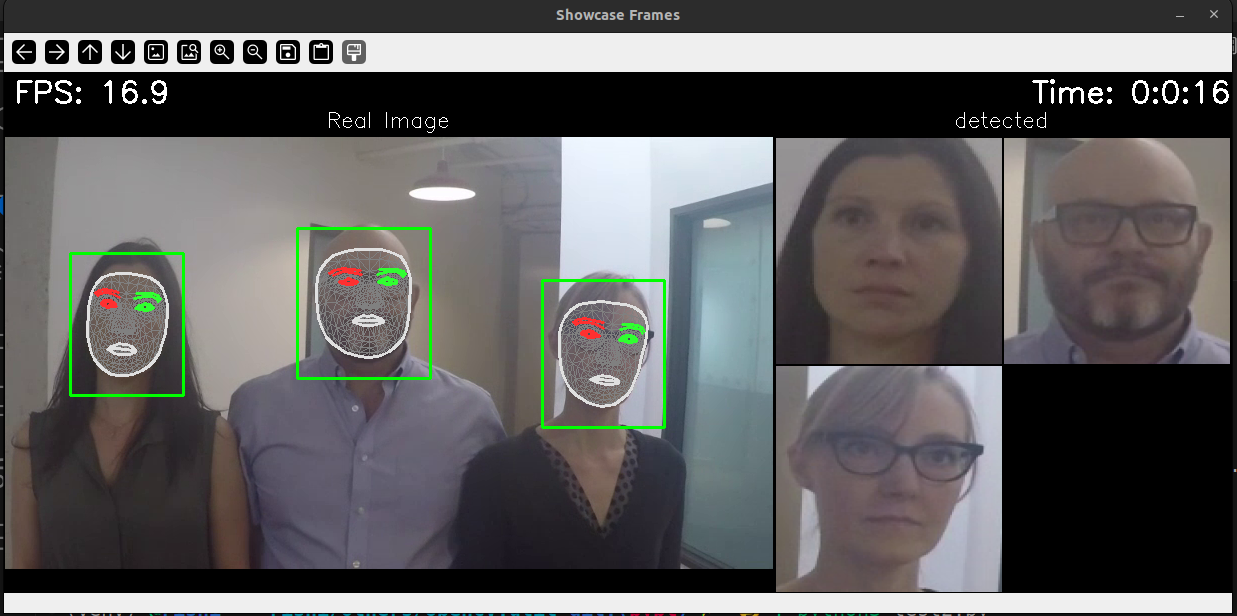
image
Features with decorators
from opencv_wrap import cv2Decorator

@cv2Decorator.TotalTimeTaken(show=True)
...
TotalTimeTaken
CalculateFps
MirrorFrame
ConvertCOLOR
AccessCamOrVideo
DetectInEachFrame
Utils to help you with opencv tasks
from opencv_wrap.utils import DetectorClass
from opencv_wrap.utils.helper import detectionBox
Detector Parent
DetectorClass is a base class for all the detectors. provide some basic functions like Singleton and isVerbose.
Helper functions
saveFrames
detectionBox
detectionBox
resizeImage
clipImage
added_title
combine_images
Detection Classes
from opencv_wrap.detectors import Face , Hand, PoseFace detection
Hand detection
Pose detection
eye detection (yet to be added)
you can reconstruct the detector classes as per your need. 😊
like extend the class and add more functions to it. like action of certain detections.
example, blur everything but face. can be useful when you want to hide the background and just fucus on the object, here Face.
import cv2
from opencv_wrap import cv2Decorator
from opencv_wrap.detectors import Face

class FaceExtented(Face):
    def blurEverytingButFace(self, frame, face_coordinate):
        # make a copy of the frame
        frameCopy = frame.copy()
        frame = cv2.blur(frame, (50,50))
        for (x, y, w, h) in face_coordinate:
            frame[y : y + h, x : x + w] = frameCopy[y : y + h, x : x + w]
        return frame

@cv2Decorator.DetectInEachFrame(detector=FaceExtented(verbose=True),name="face")
@cv2Decorator.AccessCamOrVideo(show=True,videoPath="./opencv_wrap/testMedia/test.mp4")
@cv2Decorator.ConvertCOLOR(converter=cv2.COLOR_RGB2BGR, frameName="bgr_frame")
def all_actions(\*\*kwargs):
    processed = kwargs["face"].detect(kwargs["bgr_frame"])
    face_coordinate = kwargs["face"].getDetectionBox(
    processed, kwargs["frame"], draw=False,padding_ratio=0.4)
    kwargs["frame"] = kwargs["face"].blurEverytingButFace(kwargs["frame"], face_coordinate)
    return kwargs

all_actions()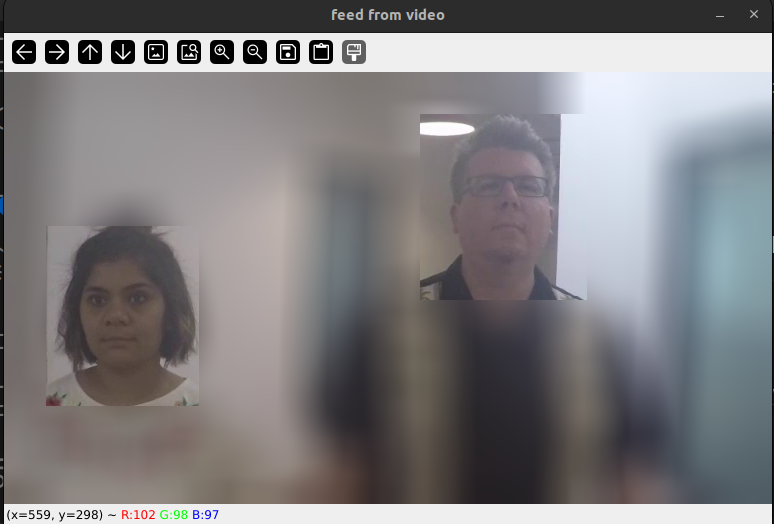
image
OPEN FOR CONTRIBUTIONS 🤝
Steps to start contributing
Star the repo 🌟
Fork the repo 👨💻
Clone the repo 📂
Create a new issue 🔖
Make changes 📜
Push the changes 🚀
Create a pull request 🌐
More Usage Examples
Example 1 : Reading a single frame from the directory
@cv2Decorator.DetectInEachFrame(
    detector=cv2.CascadeClassifier(cv2.data.haarcascades+"haarcascade_frontalface_default.xml"),
    name='face')
@cv2Decorator.MirrorFrame()
@cv2Decorator.ConvertCOLOR(converter=cv2.COLOR_BGR2GRAY)
def all_actions(**kwargs):
    frame = kwargs['frame']
    # detect face from trainerd data and detectMultiScale use to deteat every size of face
    face_coordinate = kwargs['face'].detectMultiScale(kwargs['greyScale'],1.3,5)
    detectionBox(detectedArr=face_coordinate, frame=frame)
    return kwargs

frame = cv2.imread('./opencv_wrap/testMedia/test.jpg')

kwargs = all_actions(frame=frame)
cv2.imshow('frame',kwargs['frame'])
key = cv2.waitKey(0)
Example 2 : Reading cam and detecting Hand in each frame
@cv2Decorator.DetectInEachFrame(
    detector=Hand(verbose=True),
    name="hand",
)
@cv2Decorator.TotalTimeTaken(show=True)
@cv2Decorator.AccessCamOrVideo(show=False, fps=12)
@cv2Decorator.CalculateFps(draw=True)
@cv2Decorator.ConvertCOLOR(converter=cv2.COLOR_RGB2BGR, frameName="bgr_frame")
def all_actions(**kwargs):
    mainFrameCopy = kwargs["frame"].copy()
    processed = kwargs["hand"].detect(kwargs["bgr_frame"])
    face_coordinate = kwargs["hand"].getDetectionBox(
        processed, kwargs["frame"], draw=True
    )
    kwargs["hand"].getLandmarks(processed, kwargs["frame"],draw=True)
    # print(len(face_coordinate))
    kwargs["detected"] = [clipImage(mainFrameCopy, i) for i in face_coordinate]
    show_all_frames(kwargs, keysToShow=["frame", "detected"])
    return kwargs


kwargs = all_actions()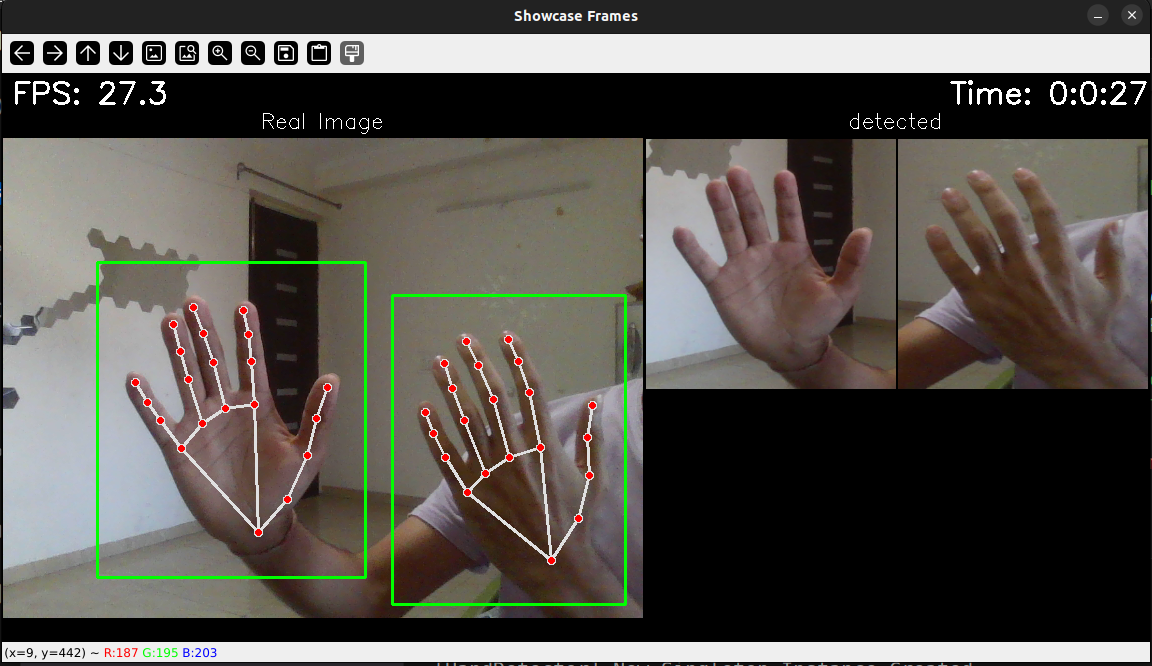
image
Example 3 : Reading video and detecting Pose in each frame
@cv2Decorator.DetectInEachFrame(
    detector=Pose(verbose=True),
    name="pose",
)
@cv2Decorator.TotalTimeTaken(show=True)
@cv2Decorator.AccessCamOrVideo(show=False, videoPath="./opencv_wrap/testMedia/test.mp4", fps=12)
@cv2Decorator.CalculateFps(draw=True)
@cv2Decorator.MirrorFrame()
@cv2Decorator.ConvertCOLOR(converter=cv2.COLOR_BGR2GRAY)
@cv2Decorator.ConvertCOLOR(converter=cv2.COLOR_RGB2BGR, frameName="bgr_frame")
def all_actions(**kwargs):
    mainFrameCopy = kwargs["frame"].copy()
    processed = kwargs["pose"].detect(kwargs["bgr_frame"])
    face_coordinate = kwargs["pose"].getDetectionBox(
        processed, kwargs["frame"], draw=True
    )
    kwargs["pose"].getLandmarks(processed, kwargs["frame"],draw=True)

    kwargs["detected"] = [clipImage(mainFrameCopy, i) for i in face_coordinate]
    show_all_frames(kwargs, keysToShow=["frame", "detected"])
    return kwargs


all_actions()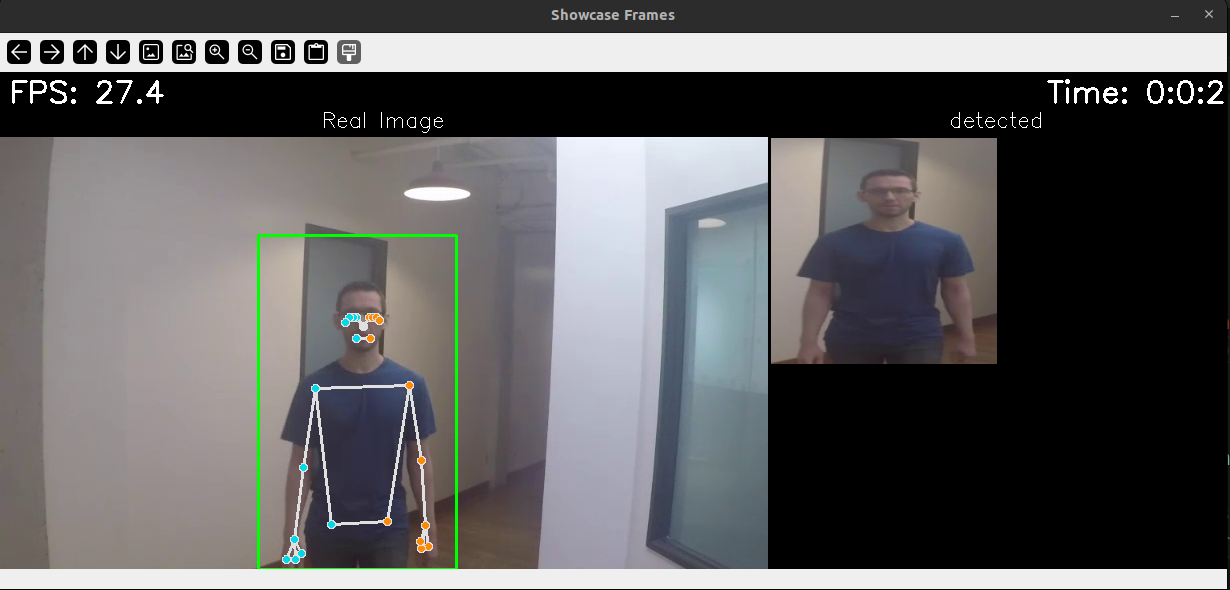
image
Example 4 : Reading video and saving each frame in a folder
from opencv_wrap import cv2Decorator
from opencv_wrap.utils.helper import saveFrame

@cv2Decorator.AccessCamOrVideo(show=True, videoPath="./opencv_wrap/testMedia/test.mp4", )
def all_actions(**kwargs):
    saveFrame(kwargs['frame'],kwargs['frame_count'],destination='./output')
    return kwargs

all_actions()
image
Example 5 : Reading video and show converted frame in smart view
@cv2Decorator.TotalTimeTaken(show=True)
@cv2Decorator.AccessCamOrVideo(show=False, videoPath="./opencv_wrap/testMedia/test.mp4", fps=12)
@cv2Decorator.CalculateFps(draw=True)
@cv2Decorator.MirrorFrame()
@cv2Decorator.ConvertCOLOR(converter=cv2.COLOR_BGR2GRAY)
def all_actions(**kwargs):
    show_all_frames(kwargs,keysToShow=['frame','greyScale','mirror_frame'])
    return kwargs

all_actions()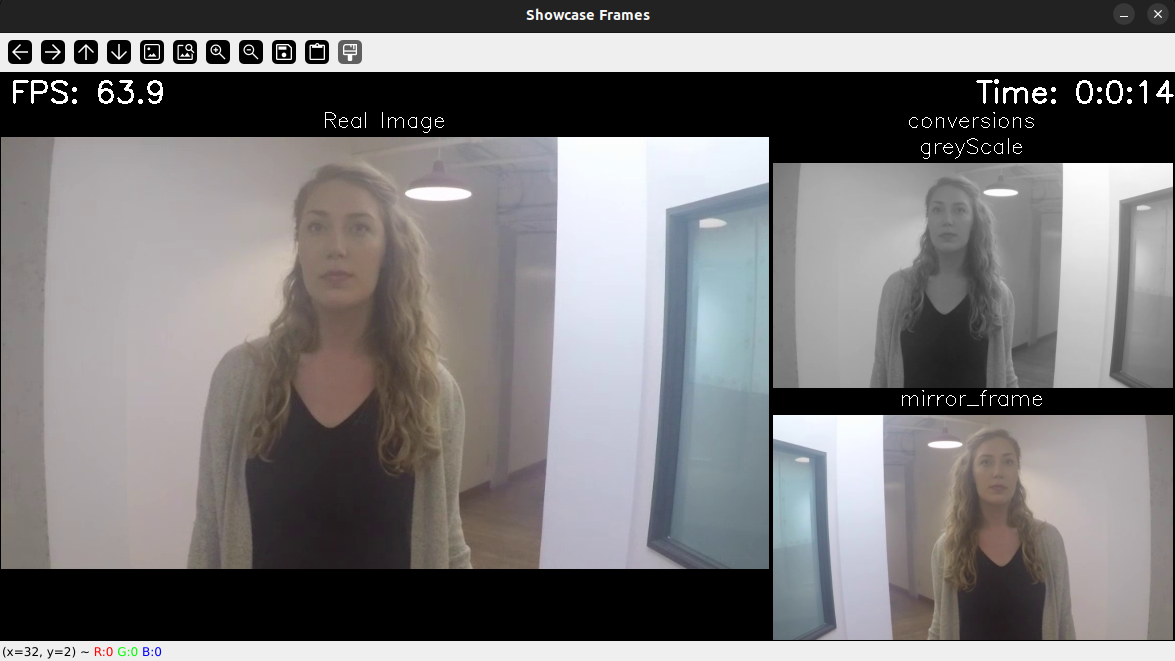
Future Updates
☐ Face recognition
☐ Eye detection
☐ Object detection
☐ Image classification
☐ segmentation (decorator)
☐ making whole program faster by atleast 10x using cython
1 maintainer

Download files
Download the file for your platform. If you're not sure which to choose, learn more about installing packages.
Source Distribution
File details
Details for the file opencv_wrap-0.1.2.tar.gz.
File metadata
- Download URL: opencv_wrap-0.1.2.tar.gz
- Upload date:
- Size: 18.1 kB
- Tags: Source
- Uploaded using Trusted Publishing? No
- Uploaded via:
twine/5.0.0 CPython/3.10.12
File hashes
| Algorithm | Hash digest | |
|---|---|---|
| SHA256 |
59c4bad4ad1dc5d33f6120ec8191fd945ba3c1b040fb4edc5b842c59766b4821
|
|
| MD5 |
4cea431e46217533474acc51ccbaf4a6
|
|
| BLAKE2b-256 |
db0b11c465b6a6d5f15acebc879743408c2a34305133f2fd34f0fd4f34eb1aab
|







