
opencypher-compliance
Measure graph database compliance against the openCypher 9 specification.
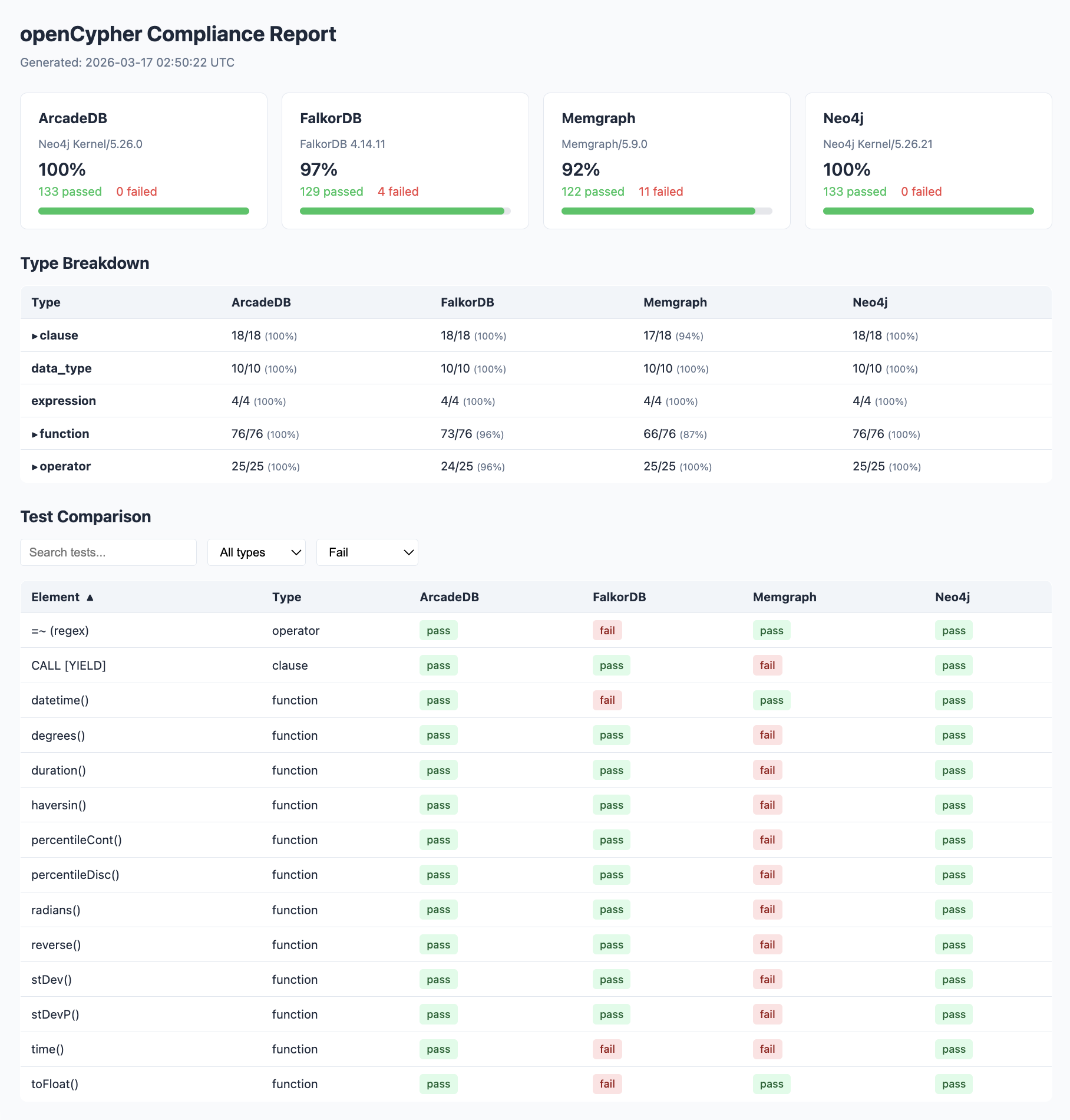
Table of Contents
Installation
Install the core package with the adapter extra for your database:
pip install "opencypher-compliance[bolt]"         # Neo4j, Memgraph, ArcadeDB
pip install "opencypher-compliance[falkordb]"     # FalkorDB
pip install "opencypher-compliance[all]"          # All adapters
Note: The quotes around the package name are required in zsh (the default shell on macOS). Bash does not require them, but they work in both.
From source:
git clone https://github.com/<org>/opencypher-compliance.git
cd opencypher-compliance
pip install -e ".[all]"
The adapter extras install the required third-party driver for each database (e.g. bolt installs the neo4j driver, falkordb installs the falkordb driver). The core package includes the adapter code but not the drivers — you'll get a ModuleNotFoundError at runtime if the driver isn't installed.
Quickstart
# 1) Start from the sample config (edit values as needed)
cp sample.config.yaml config.yaml

# 2) Test a single database
opencypher-compliance run -a bolt --host localhost --port 7687 -u neo4j -p test

# 3) Test multiple databases from one config file
opencypher-compliance run -c config.yaml

# 4) Run and open an HTML comparison report in one step
opencypher-compliance run -c config.yaml -r
Configuration
Docker setup
This project will include ready‑to‑use Docker commands / docker-compose snippets for common databases (Neo4j, Memgraph, FalkorDB, ArcadeDB).
Examples:
- ArcadeDB: Container with Bolt plugin and default db setup on port
7001
docker run --rm \
  -p 2480:2480 -p 2424:2424 -p 7001:7687 \
  -e "JAVA_OPTS=-Darcadedb.server.rootPassword=playwithdata -Darcadedb.server.defaultDatabases=myDB[root] -Darcadedb.server.plugins=Bolt:com.arcadedb.bolt.BoltProtocolPlugin" \
  arcadedata/arcadedb:latest
- FalkorDB: Redis‑compatible container with the FalkorDB module load on port
7002, also runs default browser UI on port 7011
docker run -p 7001:6379 -p 7011:3000 -it --rm falkordb/falkordb:latest
- Memgraph: Memgraph platform image with Bolt exposed on port
7003
docker run -d \
  --name memgraph-mage \
  --network memgraph-net \
  -p 7003:7687 \
  -p 7444:7444 \
  memgraph/memgraph-mage:latest
- Neo4j: Single instance container with Bolt exposed on
7004
docker run \
  --name neo4j-docker \
  -p 7474:7474 -p 7473:7473 -p 7004:7687 \
  -e NEO4J_AUTH=neo4j/abcd1234 \
  -e NEO4J_ACCEPT_LICENSE_AGREEMENT=yes \
  neo4j:5
These examples will live in a dedicated docker/ directory and be referenced here once finalized. For now, use your own Docker setup to expose the correct host/port for each database and point config.yaml at those values.
Config file (config.yaml)
Config files use a databases list — even for a single database:
databases:
  - name: "ArcadeDB"
    adapter: "bolt"
    host: "localhost"
    port: 7001
    auth: { username: "root", password: "playwithdata" }

  - name: "FalkorDB"
    adapter: "falkordb"
    host: "localhost"
    port: 7002

  - name: "Memgraph"
    adapter: "bolt"
    host: "localhost"
    port: 7003

  - name: "Neo4j"
    adapter: "bolt"
    host: "localhost"
    port: 7004
    auth:
      username: "neo4j"
      password: "password"
    options:
      database_name: "neo4j"
    query_timeout: 10
    pre_run: "MATCH (n) DETACH DELETE n"
    post_run: "MATCH (n) DETACH DELETE n"
Each entry supports: adapter (required), name, host, port, auth, options, query_timeout, pre_run, post_run.
All databases are tested sequentially. Each run is independent — if one database is unreachable, the others still run.
Environment variables
export CYPHER_COMPLIANCE_ADAPTER="bolt"
export CYPHER_COMPLIANCE_HOST="localhost"
export CYPHER_COMPLIANCE_PORT="7687"
export CYPHER_COMPLIANCE_USERNAME="neo4j"
export CYPHER_COMPLIANCE_PASSWORD="secret"
Precedence: CLI flags > environment variables > config.yaml
Usage
Run compliance tests
# Single database with config file
opencypher-compliance run -c config.yaml

# Single database with inline flags (no config file needed)
opencypher-compliance run -a bolt --host localhost --port 7687 -u neo4j -p password

# Multiple databases from one config
opencypher-compliance run -c config.yaml

# Run and open an HTML report in the browser
opencypher-compliance run -c config.yaml -r

# Filter by type
opencypher-compliance run -c config.yaml --types function --format json

# Verbose output
opencypher-compliance run -c config.yaml --verbose

# Pipe JSON to jq (single database only)
opencypher-compliance run -c config.yaml --quiet | jq '.results[] | select(.result=="fail")'

# Stop on first failure
opencypher-compliance run -c config.yaml --fail-fast
List tests
opencypher-compliance list
opencypher-compliance list --types operator
Validate catalog
opencypher-compliance validate
opencypher-compliance validate --catalog-dir ./my-custom-catalog/
Generate HTML report
After running tests, generate a self-contained HTML report that compares results side by side:
# Run all databases, then generate report
opencypher-compliance run -c config.yaml
opencypher-compliance report

# Custom input/output paths, don't auto-open
opencypher-compliance report -i ./my-results -o ./reports --no-open

# Custom filename
opencypher-compliance report --filename neo4j-vs-falkordb.html
The report is a single HTML file with no external dependencies. It includes:
- Dashboard cards — per-database pass rate, version info, and bar charts
- Type breakdown table — pass counts by element type across databases, with expandable failure details
- Comparison table — every test element as a row, every database as a column, with pass/fail/error badges
- Filters — text search, type dropdown, and status dropdown
- Sorting — click column headers to sort
- Error details — hover over failed badges to see the error message
Python API
from opencypher_compliance import run_compliance

results = run_compliance(
    config={"database": {"adapter": "bolt", "host": "localhost", "port": 7687,
                         "auth": {"username": "neo4j", "password": "test"}}},
)
print(f"Pass rate: {results['metadata']['pass_rate']}")
Adapters
| Adapter | Database(s) | Install extra | Protocol |
|---|---|---|---|
bolt |
Neo4j, Memgraph, ArcadeDB | [bolt] |
Bolt |
falkordb |
FalkorDB | [falkordb] |
Redis |
Each adapter is a thin wrapper (~20 lines) around the database's official Python package.
Output Format
JSON
{
  "metadata": {
    "database": "Neo4j Community 5.x",
    "adapter": "bolt",
    "total_tests": 133,
    "passed": 129,
    "failed": 4,
    "pass_rate": "96.99%"
  },
  "summary_by_type": {
    "clause": {"total": 18, "passed": 17, "failed": 1}
  },
  "results": [
    {"element": "MATCH", "type": "clause", "result": "pass", "duration_ms": 12}
  ]
}
CSV
element,type,result,error,duration_ms
MATCH,clause,pass,,12
MANDATORY MATCH,clause,fail,"SyntaxError: MANDATORY is not supported",3
Development
# Install in dev mode
pip install -e ".[dev]"

# Run tests
pytest -v

# Run specific test file
pytest tests/test_comparator.py -v
Test catalog
The built-in catalog contains ~133 tests covering:
- 18 clauses (MATCH, CREATE, DELETE, MERGE, etc.)
- 25 operators (math, comparison, boolean, string, list)
- 76 functions (scalar, aggregate, list, math, string, temporal)
- 4 expressions (CASE, list comprehension, map projection)
- 10 data types (Boolean, Integer, Float, String, List, Map, etc.)
Custom catalogs
Place YAML files in a directory and use --catalog-dir:
opencypher-compliance run -c config.yaml --catalog-dir ./my-catalog/
Each YAML file should follow the test definition schema:
tests:
  - name: "My Test"
    type: "clause"
    query: "RETURN 1 AS x"
    expected_columns: ["x"]
    expected_rows: [[1]]
License
This project is open source and available under the MIT License. See the LICENSE file at the repository root for full terms.
1 maintainer

Release files for opencypher-compliance 1.0.1
For a detailed explanation of source distributions (sdists) and built distributions (wheels), please see the package formats documentation.
Source distribution (sdist)
| File | Size | Uploaded | |
|---|---|---|---|
| opencypher_compliance-1.0.1.tar.gz | 39.2 kB | Details |
Built distribution (wheel)
| File | Interpreter | ABI | Platform | Reset |
|---|---|---|---|---|
| opencypher_compliance-1.0.1-py3-none-any.whl | Python 3 | none | any | Details |
Total release size: 73.4 kB
Release files / opencypher_compliance-1.0.1.tar.gz
| Download URL | opencypher_compliance-1.0.1.tar.gz |
|---|---|
| Size | 39.2 kB |
| Tags | Source |
|
SHA-256 checksum How to use checksums |
e7ab4806c54798e56a7fbb7ee2802a63669a50de47635308f4f7052427997751
|
|
BLAKE2b-256 checksum How to use checksums |
6957655c4d4bd386c10a34fec361289919663d1aaa3aba3aef249f3003d56cc0
|
| Upload date | |
|
Uploaded using Trusted Publishing? What is trusted publishing? |
No |
| Uploaded via |
twine/6.2.0 CPython/3.13.12
|
Release files / opencypher_compliance-1.0.1-py3-none-any.whl
| Download URL | opencypher_compliance-1.0.1-py3-none-any.whl |
|---|---|
| Size | 34.2 kB |
| Tags | Python 3 |
|
SHA-256 checksum How to use checksums |
d5c9ac4e1785d1d0a93eed30d1740e74654600ac53e69edfd0d0693f8baff1e9
|
|
BLAKE2b-256 checksum How to use checksums |
fad750ec4c130fcaaa4815d171632c167c26b46d5f4b31fe6537a2b6d6e64e74
|
| Upload date | |
|
Uploaded using Trusted Publishing? What is trusted publishing? |
No |
| Uploaded via |
twine/6.2.0 CPython/3.13.12
|














