


A lightweight iOS device framework: native screen mirroring, touch and keyboard input, and a control tree with coordinates — UI automation without installing WDA.
Adapted for iOS 27 only, use with caution. Whether other versions work depends on the protocol; nothing else has been verified.
Accessibility coverage varies by app. Apps that draw their UI without exposing it through the accessibility tree cannot be read.
Disclaimer. This is an independent, third-party project. It is not affiliated with, endorsed by, or sponsored by Apple Inc.
Contents
Demo
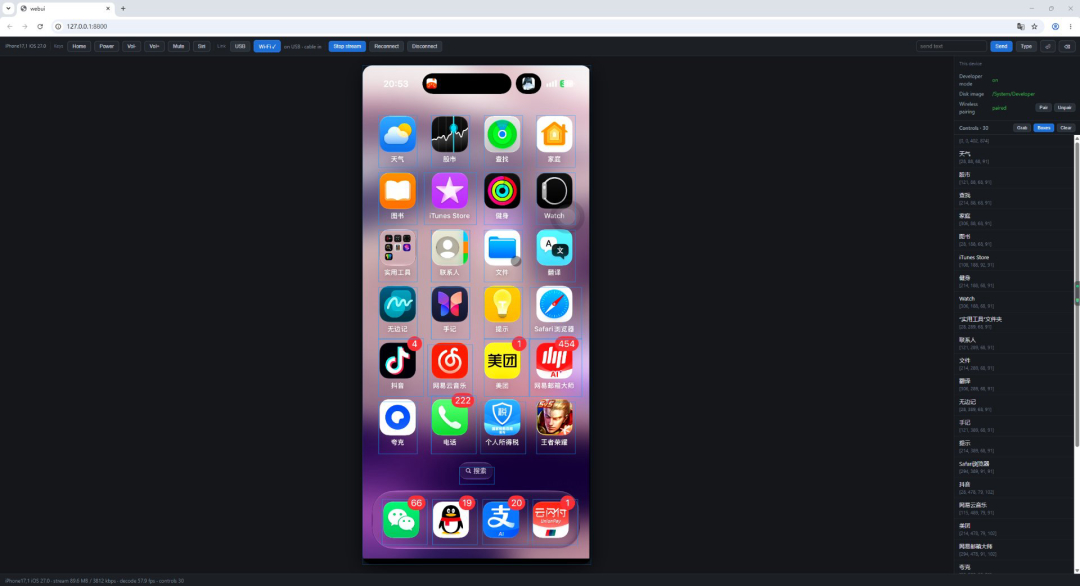
A single-page browser UI that ties these together: live screen, touch, control-tree coordinates, hardware keys, text input, USB↔Wi-Fi hot switching. The example lives in the GitHub repository only and is not part of any PyPI distribution:
git clone https://github.com/oops-workplace/opendevice
cd opendevice
python examples/webui/run.py -d <udid> --port 8800
Then open http://127.0.0.1:8800/. USB mode needs no installation and runs the
opendevice copy inside the repository; Wi-Fi mode (--tunnel network) requires
opendevice[wifi] and Python 3.13+.
Two prerequisites are required: developer mode on and a personalized image mounted. Without either, the screen, touch and control tree are unavailable. Both can be done from the command line:
opendevice devmode enable    # turn on developer mode (the device reboots, then it is confirmed)
opendevice mounter mount     # mount the personalized image (normally done automatically on connect)
opendevice devmode status and opendevice mounter status show the current state.
webui is not an opendevice command — it is that example's own entry point
(run.py), so its flags are its own (--port / --bind / --tunnel /
--dump-h265 …). Run it with --help.
Install
pip install opendevice              # wired mode (USB, zero third-party dependencies)
pip install "opendevice[wifi]"      # plus wireless mode (Wi-Fi, bonjour + RemotePairing)
Requirements:
- Wired mode (USB): Python 3.9+, only iTunes on the host side.
- Wireless mode (Wi-Fi): Python 3.13+, plus the dependencies in
opendevice[wifi]. - Both modes have identical capabilities; wireless only swaps the link. Screen mirroring and touch injection require iOS 27 (the only version-gated piece); everything else (lockdown / AFC / install / apps / diagnostics / logs / screenshot / developer mode) works on older systems per the protocol.
Commands
Use opendevice once installed; python -m opendevice is equivalent without an
install. opendevice --help shows the grouped quick reference,
opendevice <command> --help shows every flag for that command.
27 commands, by domain (the quick reference at the end of --help matches this):
| Domain | Commands |
|---|---|
| Device | devices deviceinfo |
| UI | uitree click swipe key type hid sendtext paste |
| Apps and files | applist install uninstall launch kill ps afc screenshot |
| Screen | stream |
| Wireless | pairing unpairing wifi |
| System | devmode power syslog mounter paths |
Global options
| Option | Meaning |
|---|---|
-d/--device |
target device: full UDID or a unique prefix |
--link auto|usb|wifi |
link: auto (default) / usb / wifi |
--force |
take over even when another process holds the device (streaming / syslog) |
--mux HOST:PORT |
usbmux address, 127.0.0.1:27015 on Windows by default |
-v/--verbose, --log, --log-file |
-v for INFO, -vv for every packet; --log writes to a log file |
-d is accepted before or after the command. When omitted and exactly one device is
connected it is used; with several it errors out and lists the candidates. It means
the same thing on both links.
--link auto prefers USB: it only falls back to Wi-Fi when no -d is given and no
device is found. usb / wifi are hard requirements — an unavailable link errors
out instead of silently switching.
Device
opendevice devices                  # list devices (the Note column shows who holds each)
opendevice devices --json --fast    # JSON; --fast asks only usbmux, not the product type / OS
opendevice deviceinfo               # basic device info (the common keys)
opendevice deviceinfo --all         # every lockdown key (--json for JSON)
opendevice deviceinfo --screen      # main screen resolution (pixels / points / refresh rate / orientation)
UI
Control tree and input:
opendevice uitree --limit 20        # control tree of the current screen (with point coordinates, ready for click)
opendevice uitree --filter search   # only elements whose text contains this, ancestors kept
opendevice uitree --json            # raw fields of every control
opendevice uitree --tap search      # find -> tap center -> re-fetch and compare
opendevice uitree --home            # press Home first, then fetch

opendevice click 200,300            # tap: point coordinates from the tree (normalized internally; 0.5,0.5 works)
opendevice click search             # or a text: locate it and tap its center (--exact / --no-verify)
opendevice swipe 200,600 200,200    # swipe: start -> end (also accepts point coordinates or 0..1)
opendevice key home                 # hardware key: home / power / volumeUp / volumeDown / mute / siri
opendevice type "abc"               # type character by character (ASCII only; use sendtext for other scripts)
opendevice hid                      # which HID surfaces this device registered (--raw for raw JSON)
opendevice paste --set "text"       # device pasteboard (--get to read back; --name picks the pasteboard)
opendevice sendtext "some text"     # pasteboard + Cmd+V (--no-paste / --no-approve)
Touch and keyboard share one authentication with the media stream: when no stream is open, the command opens one first and then sends.
Screen
opendevice stream --seconds 10 --out screen.h265 # capture 10 seconds
Captures the H.265 Annex-B the device sends and writes it as-is (mpv / VLC play it
directly), with no remuxing. Without --out only statistics are printed; with it the
bytes go to that path (relative to the current directory; the absolute path is printed
when done).
tunnel device fde4:7625:93a3::1 <-> host fde4:7625:93a3::2  mtu=16000  RSD port 49814   <- tunnel (stderr)
video negotiated: 1216x2624 @ 60fps (RTP payload type 100)                              <- what the device sends

  duration           10.0 s                     <- results below (stdout)
  RTP packets        2797 / 3.1 MB
  lost / reordered   0 / 0
  filtered out       10 (non-video packets: audio / control)
  access units       564 (key frames 1)         <- access units carried in the Annex-B
  first packet key   yes                        <- no = first frames don't decode, capture a bit longer
  written            <output>/screen.h265 (3.1 MB)

open it in VLC: <output>/screen.h265
Apps and files
opendevice applist                  # your installed apps (--system / --all / --json)
opendevice install MyApp.ipa        # install (auto-staged to /PublicStaging; --developer / --upgrade)
opendevice uninstall com.example.app
opendevice launch com.example.app   # launch (--arg=-x to pass args; --keep-existing to keep the running one)
opendevice ps                       # running app processes (--all / --front / --json)
opendevice kill com.example.app     # stop (bundle id / executable name / pid all work)
opendevice kill 1234 --signal 15    # send SIGTERM by pid (default 9 = SIGKILL)
opendevice screenshot --out s.png   # one static screenshot

opendevice afc ls /                 # device filesystem (DCIM / Books / PhotoData …)
opendevice afc ls / --app com.x     # an app sandbox (house_arrest): Documents / Library / tmp
opendevice afc pull /DCIM/100APPLE/IMG_0001.HEIC ./     # device -> host (directories recurse)
opendevice afc pull /Documents/a.txt ./ --documents     # with --app, only its Documents
opendevice afc push ./a.txt /PublicStaging/a.txt        # host -> device
opendevice afc rm /PublicStaging/a.txt                  # delete a file
opendevice afc rm /DCIM/100APPLE -r                     # delete including contents (directories need -r)
afc's four actions are ls / pull (device to host) / push (host to device) /
rm, mapping one-to-one to the Python API's Afc.listdir / pull / push / remove.
--app goes through house_arrest: only open to developer-signed apps (with
get-task-allow); App Store apps are rejected (InstallationLookupFailed).
--documents additionally requires the app to declare UIFileSharingEnabled.
Wireless
opendevice pairing                  # one-time: establish remote pairing over USB (--force to rebuild)
opendevice unpairing                # the reverse: delete the local record (--all; pick one of many with -d)
opendevice wifi --list              # devices advertising on the LAN
opendevice wifi --seconds 8         # the full Wi-Fi link (0 = tunnel only, no stream)
opendevice wifi --host 192.168.1.5  # specify an address; without it, discover via bonjour
opendevice wifi --identifier UUID   # pick by the bonjour-advertised identifier when several are present
System
opendevice devmode status           # also reveal / enable / accept
opendevice power info               # all diagnostics (--json for JSON)
opendevice power ioreg --class X    # IORegistry (also narrow with --name / --plane)
opendevice power battery            # battery and power
opendevice power restart            # reboot the device
opendevice power shutdown           # shut down
opendevice power sleep              # screen off
opendevice syslog --seconds 10      # system log (--filter to narrow; a long task that holds the device)

opendevice mounter list             # image entries (the mounted one is the personalized DDI)
opendevice mounter images           # cached images and which one works for this device
opendevice mounter status           # whether developer mode is on
opendevice mounter lookup --type Personalized   # signature of this type (--type Developer for the old style)
opendevice mounter nonce            # the device nonce needed for a personalized image
opendevice mounter fetch <build>    # fetch an image into the cache (default source: the opendevice-ddi mirror)
opendevice mounter unmount          # unmount the image (--path for the mount point)
opendevice mounter mount            # mount manually (completed automatically on connect when not mounted)

opendevice paths                    # where the data directory lives (--json for JSON)
Developer images are downloaded automatically: the cache is used when it has one, with no network;
otherwise mounter mount and the mount on connect fetch one first (--url / OPENDEVICE_DDI_URL changes the source, --no-fetch reads the cache only).
stream and syslog are long tasks: they hold the device (cross-process lock), so a
second long task on the same device is blocked (--force takes over). Short commands
like deviceinfo / applist / afc / screenshot run concurrently as usual.
Using it as a library
The top level is DeviceSession — one object per device:
from opendevice.session import DeviceSession

with DeviceSession() as device:                   # no udid: use the single connected device
    device.start_stream(on_access_unit=lambda au, key: None)
    device.tap(0.5, 0.5)                          # normalized coordinates
    device.press_button("home")
    device.send_text("some text")                 # pasteboard + Cmd+V
    for element in device.elements():
        print(element.text, element.center)       # AXElement: text / role / frame / center

    device.install("MyApp.ipa", on_progress=lambda p, s: print(p, s))
    print([app["CFBundleIdentifier"] for app in device.apps()])
    device.launch("com.example.app")
    device.screenshot("shot.png")                 # static image, no stream needed
    device.syslog(seconds=5, on_line=print)
    with device.afc() as files:                   # filesystem
        files.pull("/Documents/db.sqlite", "./db.sqlite")
    device.restart()
To reach the protocol layer directly:
from opendevice import LockdownClient
from opendevice.remote.coredevice import CoreDeviceClient
from opendevice.remote.tunnel import open_rsd

with LockdownClient() as lockdown:                # auto StartSession (incl. TLS)
    print(lockdown.get_value(None, "DeviceName")) # get_value(domain, key); a single arg is the domain
    print(lockdown.all_values()["ProductVersion"])

handle = open_rsd()                                # tunnel + RSD in one call, it owns the close order
print(len(handle.rsd.services), "services")

with CoreDeviceClient(handle.rsd, "com.apple.coredevice.deviceinfo") as core:
    print(core.get_device_info())
handle.close()
The Wi-Fi link just swaps the tunnel; everything above RSD is identical:
from opendevice.remote.tunnel import open_rsd

handle = open_rsd(backend="network")               # equivalent to open_wifi_rsd(), plus a cleanup handle
1 maintainer

Metadata
1 maintainer
Release files for opendevice 0.1.2
For a detailed explanation of source distributions (sdists) and built distributions (wheels), please see the package formats documentation.
Source distribution (sdist)
| File | Size | Uploaded | Provenance | Actions |
|---|---|---|---|---|
| opendevice-0.1.2.tar.gz | 122.3 kB | With provenance | Details for opendevice-0.1.2.tar.gz |
Built distribution (wheel)
| File | Interpreter | ABI | Platform | Actions Reset |
|---|---|---|---|---|
| opendevice-0.1.2-py3-none-any.whl | Python 3 | none | any | Details for opendevice-0.1.2-py3-none-any.whl |
Total release size: 270.9 kB
Release files / opendevice-0.1.2.tar.gz
| Download URL | opendevice-0.1.2.tar.gz |
|---|---|
| Size | 122.3 kB |
| Tags | Source |
|
SHA-256 checksum How to use checksums |
452a812b1fb4f1526f07e5e6781ddf1d887e445d1e90eeca7dce0bc414769d78
|
|
BLAKE2b-256 checksum How to use checksums |
632ccb10bc61db5b4fadcf5282989d289785d05b413e82574b1fa158fda9ad8b
|
| Upload date | |
|
Uploaded using Trusted Publishing? What is trusted publishing? |
Yes |
| Uploaded via |
twine/7.0.0 CPython/3.13.16
|
Provenance
Provenance describes where a file came from. On PyPI, provenance is shared via attestations, which provide a verifiable record of the build or publishing details. View details, limitations and caveats.


PyPI Publish Attestation
PyPI verified that this artifact, at this checksum, originated from the publisher listed below.
Signed by GitHub Actions, verified by PyPI on Oct 24, 2026.
Transparency logRelease files / opendevice-0.1.2-py3-none-any.whl
| Download URL | opendevice-0.1.2-py3-none-any.whl |
|---|---|
| Size | 148.6 kB |
| Tags | Python 3 |
|
SHA-256 checksum How to use checksums |
a2e3cf253db55ad9e02b2184924375ff60ededced53fdb46cc607e2584f45558
|
|
BLAKE2b-256 checksum How to use checksums |
d4e39c4b36cc249b41d0a279a3d74c3c8162815c130b3bd951184166d04599c1
|
| Upload date | |
|
Uploaded using Trusted Publishing? What is trusted publishing? |
Yes |
| Uploaded via |
twine/7.0.0 CPython/3.13.16
|
Provenance
Provenance describes where a file came from. On PyPI, provenance is shared via attestations, which provide a verifiable record of the build or publishing details. View details, limitations and caveats.
PyPI Publish Attestation
PyPI verified that this artifact, at this checksum, originated from the publisher listed below.
Signed by GitHub Actions, verified by PyPI on Oct 24, 2026.
Transparency logSecurity for opendevice 0.1.2
Provenance
Provenance describes where a file came from. On PyPI, provenance is shared via attestations, which provide a verifiable record of the build or publishing details. View details, limitations and caveats.
Full provenance
All 2 files in this release have been uploaded with provenance metadata.
Attestation for opendevice-0.1.2.tar.gz
PyPI Publish Attestation
PyPI verified that this artifact, at this checksum, originated from the publisher listed below.
Signed by GitHub Actions, verified by PyPI on Oct 24, 2026.
Transparency logA note on package security
PyPI is a repository for distributing packages, not a service for auditing them. While third-party security researchers and our staff do their best to detect and remove malicious packages, PyPI cannot guarantee the quality, security or suitability of any given package.
To learn more about protecting yourself from malicious actors, visit our package security documentation.














