
OpenDots

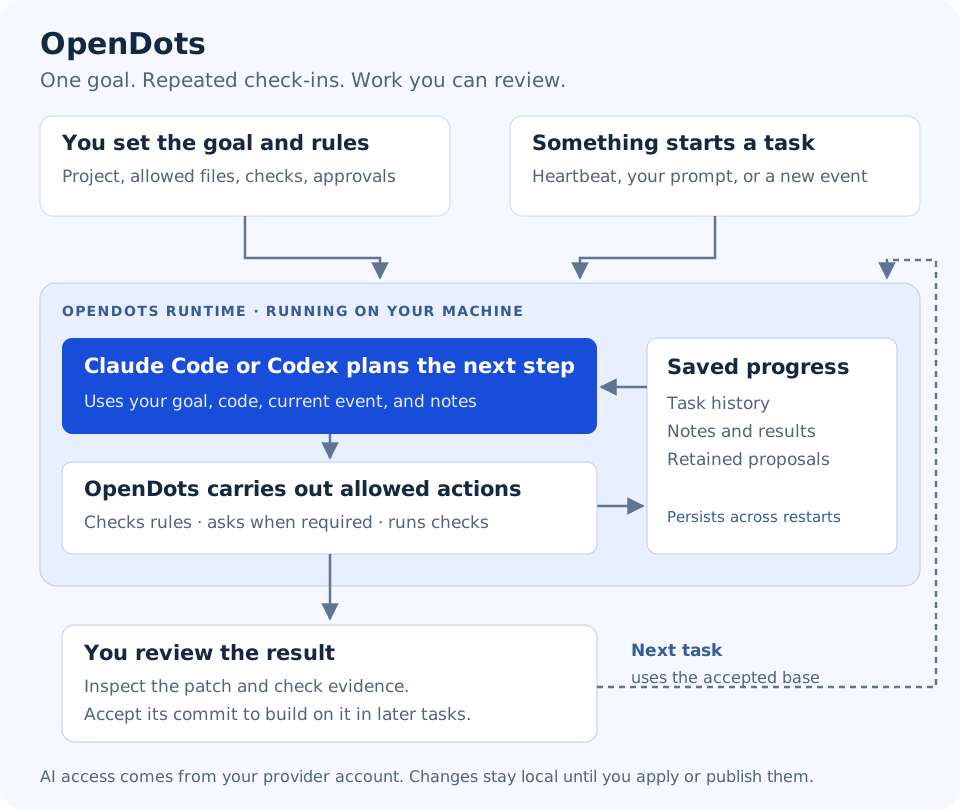
Give an agent your goal. Connect the information it needs. Review the work it proposes.
OpenDots runs on your computer and coordinates CLI agents, cloud models or local Ollama models around a goal you choose. It listens for incoming information, keeps task history and notes, and can check progress on a schedule. You choose the project, allowed changes, checks, and approval rules.
A heartbeat is a scheduled check-in. An event is a message from you or a connected tool. A target is one configured agent with its own goal. The runtime is the process you leave running.
What can it do?
- Pursue your saved goal using Claude Code, Codex, OpenAI, Anthropic, compatible APIs or Ollama.
- React to terminal requests, local HTTP messages, JSONL files, and GitHub activity.
- Assess matching events against each goal, with a visible confidence estimate and reason.
- Revisit progress on a configurable heartbeat schedule.
- Read project files, propose scoped edits, and run checks you configure.
- Ask for approval, retain local patches, and preserve history across restarts.
- Send notifications to local files or configured webhooks, including Slack/Discord formats.
- Manage multiple agents through a terminal or a local web interface.
- Extend providers, tools and polling or persistent event listeners through a shared plugin framework.
This is a local prototype. It does not automatically publish PRs, deploy applications, or pull upstream changes. Model access comes from your provider account. Checks prove only what you configure them to test.
Inspect loaded integrations with opendots plugins, /plugins in the TUI, or Loaded plugins in the web interface. Connection status appears under /listeners. Slack and Discord require a connector plugin or an external bridge; they are not bundled integrations.
What you need
- Linux, Python 3.11+, Git, and Bubblewrap with working namespaces for isolated checks.
- Model access: a signed-in Claude Code/Codex CLI, an API key, or a running Ollama server with a model. See provider setup.
- Your own project directory and a goal you want the agent to pursue.
On Ubuntu/Debian, install prerequisites with sudo apt-get install python3 python3-venv git bubblewrap curl. Check python3 --version is at least 3.11. Docker and a GitHub token are not needed to start.
Install OpenDots
Choose one method.
Option A: one-command installer
curl -fsSL https://raw.githubusercontent.com/Shashankss1205/OpenDots/main/install.sh | bash
Installs the latest PyPI release into a separate Python environment without sudo
and adds the opendots command under ~/.local/bin. If that directory is not on
your PATH, run the PATH instruction printed by the installer and add it to your
shell startup file. Linux (or WSL2), Python 3.11+, python3-venv, Git and
Bubblewrap must already be installed.
To inspect the script before running it:
curl -fsSLo install-opendots.sh https://raw.githubusercontent.com/Shashankss1205/OpenDots/main/install.sh
bash install-opendots.sh
Pin a PyPI version with bash -s -- --version 0.2.0 in place of bash.
--prefix DIR chooses the environment directory, --bin-dir DIR chooses the
command directory, and --ref COMMIT installs a reviewed GitHub revision instead.
Existing installations and command files are not overwritten. The default
environment is ~/.local/share/opendots/runtime (or under XDG_DATA_HOME).
Option B: install with pipx or pip
With pipx installed:
pipx install opendots
pipx ensurepath
Alternatively, install in a Python virtual environment with python -m pip install opendots.
Option C: install the Python package from GitHub
With pipx installed:
pipx install 'git+https://github.com/Shashankss1205/OpenDots.git'
pipx ensurepath
Open a new terminal if pipx asks you to. All methods provide the opendots command.
Start with your project and your goal
1. Create your configuration
First sign in to your chosen CLI (claude auth login, or codex login). From your project's directory, replace the goal text below with your own objective:
opendots init --workspace "$PWD" --goal "Describe what you want this agent to achieve" --backend claude
Use --backend codex if that is your provider. For OpenAI, Anthropic, compatible APIs or Ollama, follow the model setup commands. No sample project, predefined repair, or demo event is created.
The command prints your configuration path. By default it is ~/.config/opendots/config.json (or under XDG_CONFIG_HOME). Open that file to review your saved goal and settings. Normal setup starts with reads and notes allowed, no writable paths, no configured checks, model goal-relevance assessment enabled, and no heartbeat. Before enabling changes, set write_paths, checks, and required_checks for your project.
Want periodic work? Add --heartbeat 1800 to init for a 30-minute check-in. A heartbeat can start work immediately when the runtime starts, and uses your provider's allowance. You can also configure schedules later.
2. Check the setup, then start the runtime
opendots doctor
opendots serve
Continue only when doctor reports top-level "ok": true. It checks configuration, executables, authentication, and isolation; it is not proof of a completed live model task. Leave the serve terminal open.
If you used init --directory DIR, pass the printed path explicitly: opendots --config DIR/config.json doctor and opendots --config DIR/config.json serve. Configuration and runtime data must stay outside your project directory.
3. Open an interface
In another terminal:
opendots
Or open http://127.0.0.1:8765 on the same machine. Both interfaces use the same runtime.
Talk to your agent
Type these commands inside the OpenDots terminal interface, not your shell:
/agents
/use project
Then type a normal message about your goal. It becomes an owner.request event for the selected agent. The agent can investigate, save notes, or explain a blocker. It cannot write until you configure allowed paths and approve the proposed action.
| Command | What it does |
|---|---|
/listeners |
See configured sources, subscriptions, schedules, and relevance settings. |
/notifications |
See notification destinations and delivery status. |
/plugins |
Inspect loaded plugins, versions, and the capabilities each owns. |
/events / /event ID |
Browse received events and inspect payloads, routing reasons, and confidence. |
/send TYPE MESSAGE |
Create a message with your chosen event type. |
/connect |
Learn how to connect an event producer. |
/providers |
Show models, provider profiles and agent assignments. |
/status |
Show the provider, source health, and model usage. |
/activity |
See what is happening. |
/reviews |
Find work waiting for approval. |
/review ID |
Inspect the action for the task number shown. |
/approve ID |
Request approval; type the requested confirmation to permit that exact action. |
/work ID |
Inspect task results and check evidence. |
/proposal ID |
Inspect a completed patch and its acceptance command. |
/pause / /resume |
Stop or resume the selected agent taking new work. |
/help |
Show all commands. |
Accepting a completed proposal makes its commit the base of future tasks; it does not change your original checkout or push code. Pause the agent and finish or cancel active work before acceptance. Editing your saved goal or subscriptions requires restarting the runtime.
/quit or Ctrl+D disconnects the interface. Ctrl+C in the serve terminal stops the runtime. Pausing does not cancel active work or stop incoming messages from queuing.
Connect incoming information
Use /listeners and /events in the terminal, or What is listening? and Received events in the web interface. The web form can preview and send arbitrary JSON payloads.
A source brings messages into OpenDots. A subscription specifies which message types an agent listens to. Setting up one without the other does not create useful work.
| Method | How information arrives |
|---|---|
| Terminal / web form | You submit a message. |
| HTTP | Your tool sends a JSON event to POST /api/events. |
| JSONL | Your tool appends one JSON object per line to a watched inbox. |
| GitHub polling | OpenDots periodically fetches new repository activity. |
| GitHub webhook | A separately configured receiver forwards signed deliveries. |
| Heartbeat | OpenDots emits a scheduled event while running. |
Create events and connect sources explains each setup with producer commands, subscription rules, and how confidence controls execution. New setups assess matching events before actions; uncertain decisions block work for inspection. Confidence is a model estimate, not a calibrated probability.
Native Slack, email, Kafka, Redis, and arbitrary filesystem-watch adapters are not built in. External tools can bridge into HTTP or JSONL. GitHub activity does not automatically refresh the agent's source-code snapshot.
Documentation
-
Notifications: configure alerts, webhooks, retries and delivery history.
-
Plugins: install packages and build providers, tools, polling adapters or persistent listeners.
-
Events and listeners: create messages, connect tools, inspect history and relevance.
-
Provider setup: CLI authentication, API keys, local models and per-agent model profiles.
-
Implementation: configuration, policies, event routing, and storage.
-
Development and operations: checks, packaging, services, backup, and source refresh.
-
Validation: tested behavior and remaining live-provider validation.
-
Roadmap and Contributing.
Show me a demo or a worked sample
Demos are optional and separate from normal setup. For deterministic fixtures:
opendots init --demo --directory "$HOME/.config/opendots-demo"
opendots --config "$HOME/.config/opendots-demo/config.json" serve --port 8766
Open http://127.0.0.1:8766 and explicitly select the five-event demo. It uses no model and makes no changes to a real cluster or upstream repository.
For a fully worked real-provider sample using OpenDots' own source, see the optional goal walkthrough. Its predefined goal and syntax check are illustrative; they are not applied to your project by normal setup.
OpenDots is an independent experiment inspired by OpenAI's Dots idea. MIT licensed; see LICENSE and NOTICE.
1 maintainer

Metadata
1 maintainer
Release files for opendots 0.2.1
For a detailed explanation of source distributions (sdists) and built distributions (wheels), please see the package formats documentation.
Source distribution (sdist)
| File | Size | Uploaded | |
|---|---|---|---|
| opendots-0.2.1.tar.gz | 949.9 kB | Details |
Built distribution (wheel)
| File | Interpreter | ABI | Platform | Reset |
|---|---|---|---|---|
| opendots-0.2.1-py3-none-any.whl | Python 3 | none | any | Details |
Total release size: 1.4 MB
Release files / opendots-0.2.1.tar.gz
| Download URL | opendots-0.2.1.tar.gz |
|---|---|
| Size | 949.9 kB |
| Tags | Source |
|
SHA-256 checksum How to use checksums |
8ed15febfe01d732576a71e086fd99a6c90d43897b22b59396097697095f867a
|
|
BLAKE2b-256 checksum How to use checksums |
ad863d110c443ae3a59a59151a5453f572907cd54f91ea1bc38cb316bb3dd691
|
| Upload date | |
|
Uploaded using Trusted Publishing? What is trusted publishing? |
No |
| Uploaded via |
twine/7.0.0 CPython/3.12.14
|
Release files / opendots-0.2.1-py3-none-any.whl
| Download URL | opendots-0.2.1-py3-none-any.whl |
|---|---|
| Size | 473.1 kB |
| Tags | Python 3 |
|
SHA-256 checksum How to use checksums |
74b793027b2d45021954c2dbc3f4771e211e27316e50a431778469c4fc9ba000
|
|
BLAKE2b-256 checksum How to use checksums |
45b9fa443c1b0a513462d6b3c748cd0da28c07a4851a25bb779ea5bbcfcef2a4
|
| Upload date | |
|
Uploaded using Trusted Publishing? What is trusted publishing? |
No |
| Uploaded via |
twine/7.0.0 CPython/3.12.14
|














