
OpenFLAM




Joint Audio and Text Embeddings via Framewise Language-Audio Modeling (FLAM)
FLAM is a cutting-edge language–audio model that supports both zero-shot sound even detection and large-scale audio retrieval via free-form text.
This code accompanies the following ICML 2025 publication:
@inproceedings{flam2025,
    title={{FLAM}: Frame-Wise Language-Audio Modeling},
    author={Yusong Wu and Christos Tsirigotis and Ke Chen and Cheng-Zhi Anna Huang and Aaron Courville and Oriol Nieto and Prem Seetharaman and Justin Salamon},
    booktitle={Forty-second International Conference on Machine Learning (ICML)},
    year={2025},
    url={https://openreview.net/forum?id=7fQohcFrxG}
}
Architecture
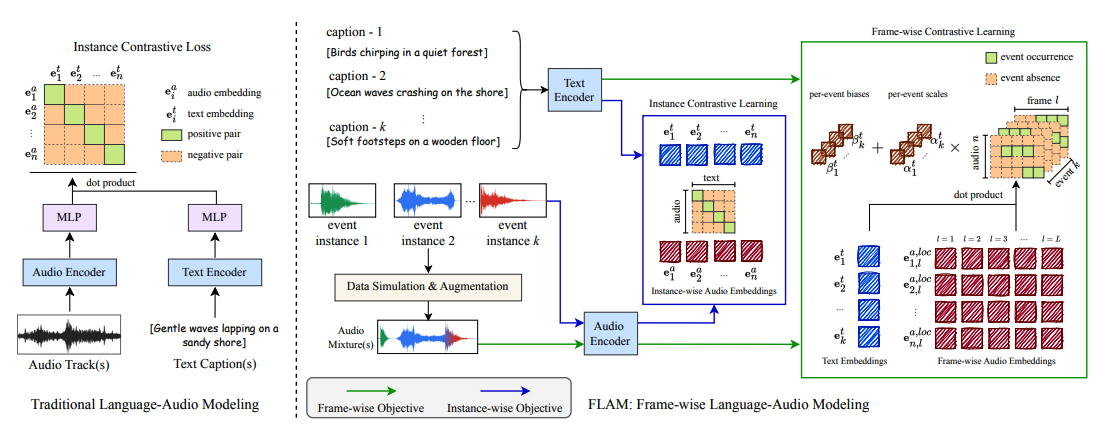
FLAM is based on contrastive language-audio pretraining, known as CLAP, and improve its capability by supporting the frame-wise event localization via learnable text and audio biases and scales.
Quick Start
Install FLAM via PyPi:
pip install openflam
Two examples are provided:
- global_example.py: to obtain audio and text embeddings and do clip-wise similarity.
- local_example.py to do sound event localization and plot the results.
For the API documentation, please refer to hook.py.
Global Example: To obtain clip-wise similarity between audio and text embeddings
Please refer to global_example.py:
import librosa
import torch

import openflam

DEVICE = "cuda" if torch.cuda.is_available() else "cpu"
SR = 48000  # Sampling Rate (FLAM requires 48kHz)

flam = openflam.OpenFLAM(model_name="v1-base", default_ckpt_path="/tmp/openflam").to(
    DEVICE
)

# Sanity Check (Optional)
flam.sanity_check()

# load audio
audio, sr = librosa.load("test/test_data/test_example.wav", sr=SR)
audio = audio[: int(10 * sr)]
audio_samples = torch.tensor(audio).unsqueeze(0).to(DEVICE)  # [B, 480000 = 10 sec]

# Define text
text_samples = [
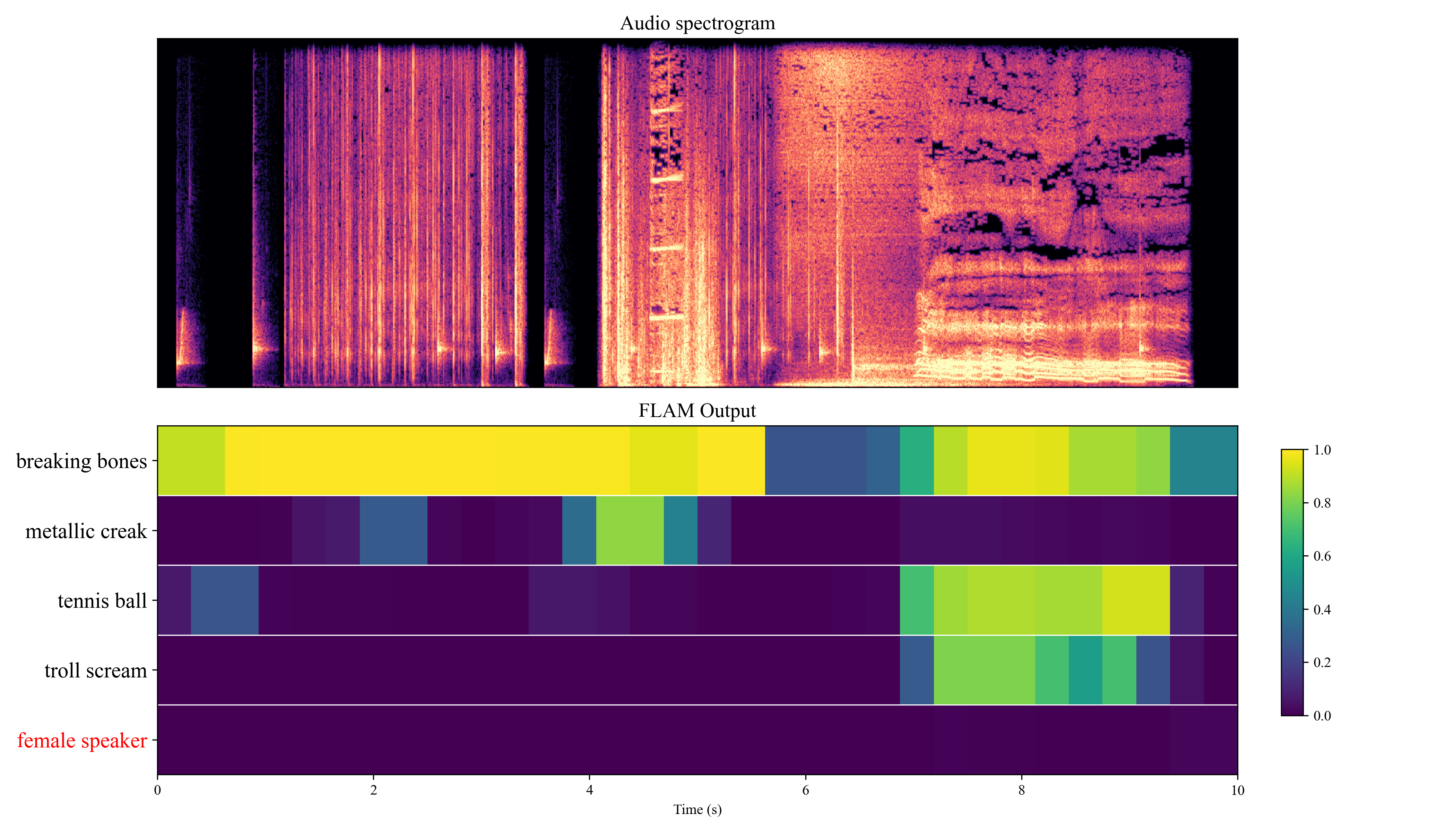
    "breaking bones",
    "metallic creak",
    "tennis ball",
    "troll scream",
    "female speaker",
]

# Get Global Audio Features (10sec = 0.1Hz embeddings)
audio_global_feature = flam.get_global_audio_features(audio_samples)  # [B, 512]

# Get Text Features
text_feature = flam.get_text_features(text_samples)  # [B, 512]

# Calculate similarity (dot product)
global_similarities = (text_feature @ audio_global_feature.T).squeeze(1)

print("\nGlobal Cosine Similarities:")
for text, score in zip(text_samples, global_similarities):
    print(f"{text}: {score.item():.4f}")
Local Example: To perform sound event localization and plot the diagram
Please refer to local_example.py.
The following plot will be generated by running the code below:
from pathlib import Path

import librosa
import numpy as np
import scipy
import torch

import openflam
from openflam.module.plot_utils import plot_sed_heatmap

# Configuration
OUTPUT_DIR = Path("sed_output")  # Directory to save output figures

# Define target sound events
TEXTS = [
    "breaking bones",
    "metallic creak",
    "tennis ball",
    "troll scream",
    "female speaker",
]

# Define negative class (sounds that shouldn't be in the audio)
NEGATIVE_CLASS = [
    "female speaker"
]

SR = 48000
DEVICE = "cuda" if torch.cuda.is_available() else "cpu"

flam = openflam.OpenFLAM(model_name="v1-base", default_ckpt_path="/tmp/openflam")
flam.to(DEVICE)

# Load and prepare audio
audio, sr = librosa.load("test/test_data/test_example.wav", sr=SR)
audio = audio[: int(10 * sr)]

# Convert to tensor and move to device
audio_tensor = torch.tensor(audio).unsqueeze(0).to(DEVICE)

# Run inference
with torch.no_grad():
    # Get local similarity using the wrapper's built-in method
    # This uses the unbiased method (Eq. 9 in the paper)
    act_map_cross = (
        flam.get_local_similarity(
            audio_tensor,
            TEXTS,
            method="unbiased",
            cross_product=True,
        )
        .cpu()
        .numpy()
    )

# Apply median filtering for smoother results
act_map_filter = []
for i in range(act_map_cross.shape[0]):
    act_map_filter.append(scipy.ndimage.median_filter(act_map_cross[i], (1, 3)))
act_map_filter = np.array(act_map_filter)

# Prepare similarity dictionary for plotting
similarity = {f"{TEXTS[i]}": act_map_filter[0][i] for i in range(len(TEXTS))}

# Prepare audio for plotting (resample to 32kHz)
target_sr = 32000
audio_plot = librosa.resample(audio, orig_sr=SR, target_sr=target_sr)

# Create output directory if it doesn't exist
OUTPUT_DIR.mkdir(exist_ok=True)

# Generate and save visualization
output_path = OUTPUT_DIR / "sed_heatmap.png"
plot_sed_heatmap(
    audio_plot,
    target_sr,
    post_similarity=similarity,
    duration=10.0,
    negative_class=NEGATIVE_CLASS,
    figsize=(14, 8),
    save_path=output_path,
)

print(f"Plot saved: {output_path}")
License
Both code and models for OpenFLAM are released under a non-commercial Adobe Research License. Please, review it carefully before using this technology.
Pretrained Models
The pretrained checkpoints can be found here.
OpenFLAM automatically handles the downloading of the checkpoint. Please, refer to the previous section for more details.
Datasets
The original experimental results reported in our paper were obtained by the model trained on internal datasets that are not publicly shareable.
OpenFLAM is trained on all publicly available datasets, including:
- Datasets with coarse (aka, global or weak) labels: AudioSet-ACD (a LLM-based captioning for AudioSet), FreeSound, WavCaps, AudioCaps, Clotho;
- Datasets with fine-grained (aka, local or strong) labels: AudioSet Strong, UrbanSED, DESED, Maestro, and Simulation data from AudioSet-ACD & FreeSound.
We report a comparison of the OpenFLAM performance to the original paper report (the global retrieval metrics --ie, A2T and T2A-- are R@1 / R@5):

Citation
If you use OpenFLAM, please cite our main work:
@inproceedings{flam2025,
    title={{FLAM}: Frame-Wise Language-Audio Modeling},
    author={Yusong Wu and Christos Tsirigotis and Ke Chen and Cheng-Zhi Anna Huang and Aaron Courville and Oriol Nieto and Prem Seetharaman and Justin Salamon},
    booktitle={Forty-second International Conference on Machine Learning (ICML)},
    year={2025},
    url={https://openreview.net/forum?id=7fQohcFrxG}
}
2 maintainers


Metadata
2 maintainers
Release files for openflam 1.0.2
For a detailed explanation of source distributions (sdists) and built distributions (wheels), please see the package formats documentation.
Source distribution (sdist)
| File | Size | Uploaded | |
|---|---|---|---|
| openflam-1.0.2.tar.gz | 37.0 kB | Details |
Built distribution (wheel)
| File | Interpreter | ABI | Platform | Reset |
|---|---|---|---|---|
| openflam-1.0.2-py3-none-any.whl | Python 3 | none | any | Details |
Total release size: 72.8 kB
Release files / openflam-1.0.2.tar.gz
| Download URL | openflam-1.0.2.tar.gz |
|---|---|
| Size | 37.0 kB |
| Tags | Source |
|
SHA-256 checksum How to use checksums |
49751f7faa511dde16572917078bc0c51fbab8ba2ba1eb988d22498a85de0627
|
|
BLAKE2b-256 checksum How to use checksums |
c87f84587b8bf302c36626c82f5061b11d75ec813341643c163b1d7abe8d9daf
|
| Upload date | |
|
Uploaded using Trusted Publishing? What is trusted publishing? |
No |
| Uploaded via |
twine/6.2.0 CPython/3.13.2
|
Release files / openflam-1.0.2-py3-none-any.whl
| Download URL | openflam-1.0.2-py3-none-any.whl |
|---|---|
| Size | 35.9 kB |
| Tags | Python 3 |
|
SHA-256 checksum How to use checksums |
6b40bf72f3bcd0d84c12c5e88021dbb52e97cc591a681ea57bf41ff7c8cf6baa
|
|
BLAKE2b-256 checksum How to use checksums |
92b67fe23c368758f37168c15e1f372f26f5e1db50c183eff07877bc1ecea408
|
| Upload date | |
|
Uploaded using Trusted Publishing? What is trusted publishing? |
No |
| Uploaded via |
twine/6.2.0 CPython/3.13.2
|














