

Overview • Installation • Paper • Examples • Docs • Citation

Overview
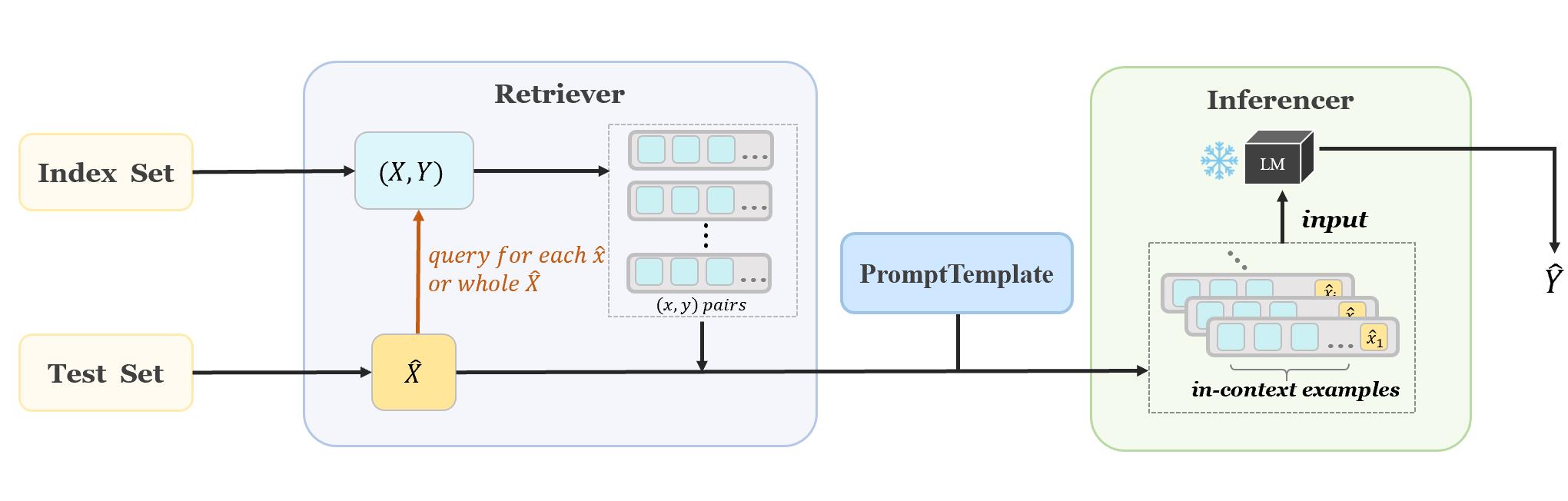
OpenICL provides an easy interface for in-context learning, with many state-of-the-art retrieval and inference methods built in to facilitate systematic comparison of LMs and fast research prototyping. Users can easily incorporate different retrieval and inference methods, as well as different prompt instructions into their workflow.
What's News
- v0.1.8 Support LLaMA and self-consistency
Installation
Note: OpenICL requires Python 3.8+
Using Pip
pip install openicl
Installation for local development:
git clone https://github.com/Shark-NLP/OpenICL
cd OpenICL
pip install -e .
Quick Start
Following example shows you how to perform ICL on sentiment classification dataset. More examples and tutorials can be found at examples
Step 1: Load and prepare data
from datasets import load_dataset
from openicl import DatasetReader

# Loading dataset from huggingface
dataset = load_dataset('gpt3mix/sst2')

# Define a DatasetReader, with specified column names where input and output are stored.
data = DatasetReader(dataset, input_columns=['text'], output_column='label')
Step 2: Define the prompt template (Optional)
from openicl import PromptTemplate
tp_dict = {
    0: "</E>Positive Movie Review: </text>",
    1: "</E>Negative Movie Review: </text>"
}

template = PromptTemplate(tp_dict, {'text': '</text>'}, ice_token='</E>')
The placeholder </E> and </text> will be replaced by in-context examples and testing input, respectively. For more detailed information about PromptTemplate (such as string-type template) , please see tutorial1.
Step 3: Initialize the Retriever
from openicl import TopkRetriever
# Define a retriever using the previous `DataLoader`.
# `ice_num` stands for the number of data in in-context examples.
retriever = TopkRetriever(data, ice_num=8)
Here we use the popular TopK method to build the retriever.
Step 4: Initialize the Inferencer
from openicl import PPLInferencer
inferencer = PPLInferencer(model_name='distilgpt2')
Step 5: Inference and scoring
from openicl import AccEvaluator
# the inferencer requires retriever to collect in-context examples, as well as a template to wrap up these examples.
predictions = inferencer.inference(retriever, ice_template=template)
# compute accuracy for the prediction
score = AccEvaluator().score(predictions=predictions, references=data.references)
print(score)
Docs
(updating...)
Citation
If you find this repository helpful, feel free to cite our paper:
@article{wu2023openicl,
  title={OpenICL: An Open-Source Framework for In-context Learning},
  author={Zhenyu Wu, Yaoxiang Wang, Jiacheng Ye, Jiangtao Feng, Jingjing Xu, Yu Qiao, Zhiyong Wu},
  journal={arXiv preprint arXiv:2303.02913},
  year={2023}
}
1 maintainer

Metadata
1 maintainer
Release files for openicl-nolabel 0.0.2
For a detailed explanation of source distributions (sdists) and built distributions (wheels), please see the package formats documentation.
Source distribution (sdist)
| File | Size | Uploaded | |
|---|---|---|---|
| openicl_nolabel-0.0.2.tar.gz | 26.8 kB | Details |
Built distribution (wheel)
| File | Interpreter | ABI | Platform | Reset |
|---|---|---|---|---|
| openicl_nolabel-0.0.2-py3-none-any.whl | Python 3 | none | any | Details |
Total release size: 69.8 kB
Release files / openicl_nolabel-0.0.2.tar.gz
| Download URL | openicl_nolabel-0.0.2.tar.gz |
|---|---|
| Size | 26.8 kB |
| Tags | Source |
|
SHA-256 checksum How to use checksums |
12a6793c2f2232f3339275d2ad9dc3af882eafb6c8f2c63d3a41f423ee222398
|
|
BLAKE2b-256 checksum How to use checksums |
18f5e7295be82104a5c091a9f07876d45ccef4ebccc4da883207799d825a9898
|
| Upload date | |
|
Uploaded using Trusted Publishing? What is trusted publishing? |
No |
| Uploaded via |
twine/5.1.1 CPython/3.9.18
|
Release files / openicl_nolabel-0.0.2-py3-none-any.whl
| Download URL | openicl_nolabel-0.0.2-py3-none-any.whl |
|---|---|
| Size | 43.1 kB |
| Tags | Python 3 |
|
SHA-256 checksum How to use checksums |
ce9ca36960dfeeb02128e98b0573656097552b4f13e3f9f7d3c0a04e5065cf85
|
|
BLAKE2b-256 checksum How to use checksums |
bd47d772b600653ace882b48dfd878682b8369689ec294134d2bf8ada1e523cc
|
| Upload date | |
|
Uploaded using Trusted Publishing? What is trusted publishing? |
No |
| Uploaded via |
twine/5.1.1 CPython/3.9.18
|














