
openjev
One-pass option scoring with a local Gemma 3 4B: MLX on Apple silicon, or PyTorch on Windows and Linux (CPU or GPU). Design notes: docs/design/one-pass-option-scoring.md; per-task training: docs/design/per-task-finetuning-with-gemma.md.
Given a context and a list of pre-written options, the model prefills the
context once, expands that KV cache across the option batch, and scores every
option in a single padded forward pass. No decoding. The score is the
log-probability of the option tokens given the context; a softmax over the
option scores gives a probability per option, like jevlike-predict.
Train a decision model on your own data
openjev.tod trains small task-oriented decision models: a frozen Gemma backbone plus a
~2M-parameter head that picks one option from a list your code supplies (which tool,
which order, which team), reports a calibrated confidence, and defers to a bigger model
when unsure. Runs on NVIDIA/AMD GPUs (PyTorch) and Apple silicon (MLX). Install with
pip install openjev-sdk.
from openjev.tod import Candidate, DecisionSpec, Episode, Kind, build_dataset

TEAMS = {'billing': 'Billing and refunds', 'shipping': 'Delivery and tracking'}
spec = DecisionSpec('routing', [Kind('team', 'Which team should handle this?',
    lambda state: [Candidate(k, v, payload=k) for k, v in TEAMS.items()], version='1')])
episodes = [Episode(t['id'], (spec.decision(t['id'], 'team', {'message': t['text']}, choice=t['team']),))
            for t in tickets]
build_dataset(spec, episodes).write('runs/routing')
openjev tod train runs/routing --out runs/routing-model # fetches the backbone from parsecai/gemma-3-4b-it on first use
Chat traces, RL in a simulator, and deriving the spec from your tool schemas are covered in the SDK guide and the three cookbooks.
Demo: Doom in the terminal
demo/doom/ runs ViZDoom headless, describes each frame in a line of text, and
lets the server rank the action menu with one /score call (or one System One
choice question). Start make serve, then make doom. Details and keys in
demo/doom/README.md.
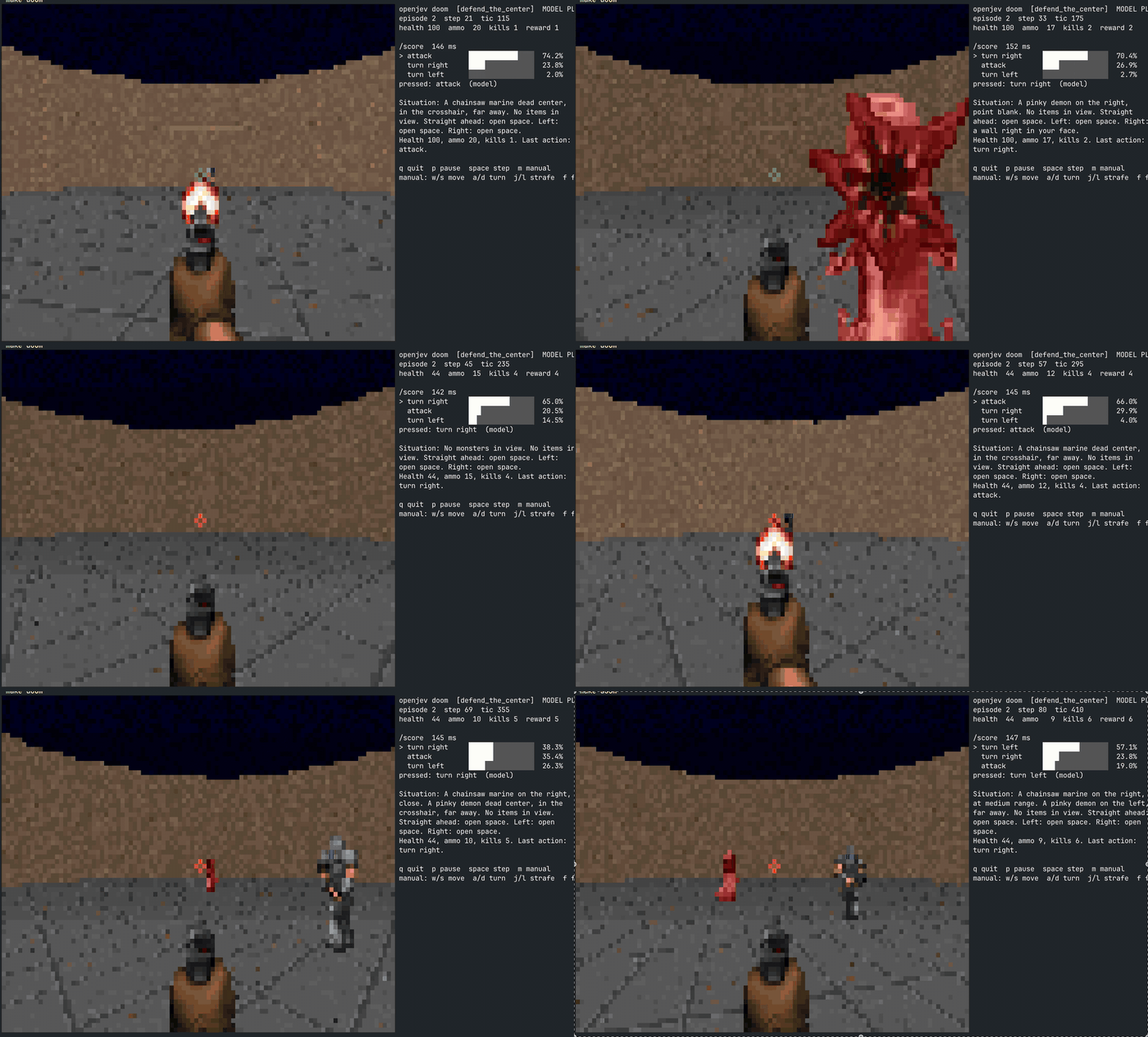
Full-resolution recording: docs/media/doom-recording.mov.
Setup
For use inside a Python application or notebook, install this checkout with
python -m pip install . (Python 3.12+). See the Python package guide
for decision inference, feature extraction, training, and wheel installation.
Windows and Linux
Install Python 3.12+ and uv, then run these commands from the repository in PowerShell or a Linux shell:
uv sync
uv run hf auth login
uv run hf download google/gemma-3-4b-it --local-dir models/gemma-3-4b-it
uv run openjev serve --backend torch --device auto --port 8000
Accept the Gemma license on Hugging Face before downloading. You can also pass
--model google/gemma-3-4b-it to load directly from the Hugging Face cache.
No Make, Xcode, shell activation, or .venv/bin paths are needed here.
--backend auto (the default) selects MLX on Apple silicon and PyTorch elsewhere.
For PyTorch, --device auto selects CUDA when available, then MPS, then CPU.
Use --device cuda or --device cuda:1 to require a specific GPU (fails clearly
if CUDA is unavailable), or --device cpu to force CPU inference.
For NVIDIA acceleration, install the GPU driver and a matching PyTorch build using
the official PyTorch installer.
Run its pip command in this repository's virtual environment (use uv pip install
in place of pip3 install). After a custom PyTorch install, use uv run --no-sync
so uv does not replace your selected build. On supported Linux AMD systems,
PyTorch ROCm builds also use the cuda device name.
uv run --no-sync python -c "import torch; print(torch.__version__, torch.cuda.is_available())"
uv run --no-sync openjev serve --backend torch --device cuda --batch-size 2
uv run --no-sync openjev check --backend torch --device cuda
uv run --no-sync openjev score --backend torch --device cuda --context "The capital of France is" --option " Paris" --option " Berlin"
The base 4B weights need roughly 8 GB just for GPU model weights at 16-bit precision,
plus memory for activations and the option KV caches. Reduce --batch-size and
context length if you run out of GPU memory. CPU runs use float32 and need more RAM.
Use original Hugging Face weights with PyTorch; MLX quantized weights and MLX LoRA
adapters are not supported by this backend.
Scoring, evaluation, benchmarks, correctness checks, both HTTP scoring endpoints,
frozen-feature extraction, head training and evaluation, openjev decision, and
openjev tod (including RL) support PyTorch. Contextual features (--contextual) and the
chess LoRA training workflow still require MLX on Apple silicon. The Doom terminal UI
also has its own platform dependencies; cross-platform support here covers the
scoring CLI and HTTP server.
Apple silicon / existing Make workflow
make setup       # uv sync (arm64 Python 3.12 venv) + download google/gemma-3-4b-it into models/ (gated; needs HF login)
make serve       # start the HTTP server on :8000
make health      # curl /health
make request     # example curl against /score
make systemone   # TypeSafe-style request against /v1/systemone
make check       # verify cached batched scoring against naive re-encoding
make bench       # latency benchmark
make eval DATA=data/synthetic/test.jsonl
make setup also installs the optional torch extra, used only for the jevlike comparison and HF cross-checks.
make on macOS needs the Xcode licence accepted (sudo xcodebuild -license accept) or Homebrew's gmake.
Usage
# Rank options for one context (prints probability, score, raw sum, token count)
.venv/bin/openjev score --context "The capital of France is" \
    --option " Paris" --option " Berlin" --option " Lyon"

# Chat template (context as user turn, options scored as the reply) + PMI normalisation
.venv/bin/openjev score --chat --norm pmi --context "..." --option "..." --option "..."

# Predefined options: one per line in a text file, reused for every context
.venv/bin/openjev score --options-file options.txt --context "..."
.venv/bin/openjev eval contexts.jsonl --fixed-options options.txt   # rows need only {"context": ...}; add "label" for accuracy

# Top-1 / top-3 accuracy on jevlike-style JSONL: {"context": ..., "options": [...], "label": 0}
.venv/bin/openjev eval data.jsonl --norm mean

# Verify the cached batched path against naive re-encoding, and benchmark it
.venv/bin/openjev check
.venv/bin/openjev bench --context-tokens 200 --options 8 --option-tokens 30
Server
Loads the model once. The measured Apple silicon MLX path answers scoring requests in about
90 ms each; PyTorch latency depends on your CPU/GPU. Use uv run openjev serve on any
supported platform, or the Make shortcut below on macOS.
make serve                                     # = .venv/bin/openjev serve --port 8000
curl -s localhost:8000/score -H 'content-type: application/json' -d '{
  "context": "Customer: my order arrived broken. Agent:",
  "options": [" I am sorry, I will send a replacement.", " Please read our returns policy."],
  "norm": "mean", "chat": false, "sep": ""
}'
The response has best, best_index, per-option probability / logprob_sum / n_tokens, and timing.
TypeSafe System One contract
POST /v1/systemone implements the request/response shape documented at
docs.typesafe.ai: a state (string, object or array) plus a map of typed
questions, answered against that state.
make systemone     # sends examples/systemone-quickstart.json; or:
curl -s localhost:8000/v1/systemone -H 'content-type: application/json' -d '{
  "state": "I ordered size 10 shoes but received size 8. Please send the right size.",
  "model": "jev-latest",
  "questions": {
    "department":  {"type": "choice", "instructions": "Which department handles this?",
                    "criteria": {"returns": "Returns and exchanges", "shipping": "Delivery issues", "billing": "Charges and refunds"}},
    "severity":    {"type": "score",  "instructions": "How severe is the problem?",
                    "criteria": ["minor", "moderate: wrong item", "major: safety or financial loss"]},
    "wants_refund":{"type": "noul",   "instructions": "Is the customer asking for a refund to their card?"}
  }
}'
question type |
request criteria |
answer fields |
|---|---|---|
choice |
map of option name to description (string, object, array or null); up to 255 options | choice, probabilities (sum to 1), confidence |
score |
ordered array of level descriptions | score (probability-weighted mean of level index), probabilities keyed "0".."n-1", legend, confidence |
noul |
optional {"true": ..., "false": ...} |
noul = probability of yes |
Response: {"model", "answers": {id: answer}, "usage": {"input_tokens", "output_tokens"}}.
Set OPENJEV_API_KEY before make serve to require Authorization: Bearer <key> on this route.
How it maps onto the scorer: each question is rendered to a plain-text prompt (state, instructions,
options or levels, then Answer: and a newline) and the option names, level numbers, or yes/no
are scored as continuations in one prefix-shared batched pass per question. confidence is 1 minus
the normalised entropy of the distribution; TypeSafe does not publish its formula, so treat it as an
approximation. usage.output_tokens counts the candidate-label tokens that were scored.
Comparison on the docs' quick-start request (examples/systemone-quickstart.json), Gemma 3 4B
zero-shot vs the numbers TypeSafe publishes for Jev:
| answer | Jev (docs) | openjev / Gemma 3 4B |
|---|---|---|
department.choice |
technical, p=0.84, confidence 0.60 | technical, p=1.00, confidence 1.00 |
frustration.score |
1.04 (annoyed but polite) | 2.00 (furious) |
is_urgent.noul |
0.999 | 0.005 |
Same routing decision, but Gemma is over-confident and disagrees on the two judgement calls. Zero-shot probabilities are softmaxed next-token likelihoods, not calibrated judgements. Closing the gap means labelled data and a trained head (below).
Native candidate-decision model
openjev decision trains a shared candidate-scoring head on frozen features and
reloads it for raw state/question/candidate requests. It includes versioned task
validation, feature and artifact fingerprints, held-out evaluation against
continuation scoring, and candidate-order/repeated-request checks.
See the native decision-head guide for data formats and
commands. It runs on MLX or PyTorch (OPENJEV_BACKEND=mlx|torch, OPENJEV_DEVICE=cuda|mps|cpu).
Training a head (per-task, on frozen Gemma features)
make features    # one prefix-shared pass per example, cached to runs/feats/{train,validation,test}.npz
make train       # jevlike's cross-attention head (MLX or PyTorch), listwise cross-entropy -> runs/head.safetensors
make eval-head   # top-1/top-3, ECE, and the shuffled-context control on the test split
openjev features DATA --out F.npzstops Gemma before the LM head, keeps every context token's final hidden state and the masked-mean of each option's tokens (float16). Options are encoded on their own, as in jevlike, so the head has to do the matching.--contextualencodes them as continuations of the context instead: stronger features, but the match leaks into the option vectors and the shuffled-context control below stops meaning anything.openjev train= AdamW 5e-4 (2e-3 diverges on Gemma features, whose norms are ~115), weight decay 1e-4, grad clip 1.0, 8 epochs, batch 64, best validation epoch kept. The checkpoint ishead.safetensorsplushead.json(rank, hidden size, training config).openjev eval-headreports whatjevlike-evalreports: top-1, top-3, 10-bin expected calibration error, and the same metrics with every example paired with another example's context. If the shuffled number does not collapse, the head is reading option priors rather than the state.
Result on the synthetic split (2000 train / 400 validation / 400 test, 2026-09-17): features at 77 ms per example, head training 8 epochs in about 15 s.
| top-1 | top-3 | ECE | |
|---|---|---|---|
| head on frozen Gemma features, test | 0.970 | 1.000 | 0.027 |
| same head, shuffled-context control | 0.258 | 0.698 | 0.724 |
| jevlike tiny byte encoder, test | 0.998 | 1.000 | 0.008 |
Gemma zero-shot, --norm sum, test |
1.000 | 1.000 | n/a |
The control sits at chance (about 4.5 options per row), so the head really matches options to the
state, and its ECE of 0.03 is what a calibrated confidence looks like.
Python:
from openjev import OptionScorer
s = OptionScorer("models/gemma-3-4b-it", batch_size=8)
for r in s.score("The capital of France is", [" Paris", " Berlin"], norm="mean"):
    print(r.option, r.probability, r.logprob_sum, r.n_tokens)
print(s.last_timing)
Normalisation (--norm)
| norm | score | use when |
|---|---|---|
mean (default) |
sum of option-token log-probs divided by token count | options differ in length |
sum |
total log-prob | options are the same length or you want raw likelihood |
pmi |
sum minus the option's unconditional log-prob (BOS-only context) | options differ in base-rate plausibility; costs one extra batched pass |
Measured on M5 Pro, 64 GB (bf16, mlx-lm)
Workload: 202-token context, 8 options, 242 option tokens total.
| path | median latency |
|---|---|
| context cached once, options batched | 0.17 s |
| context re-encoded per option, no cache | 0.68 s |
Model load is about 1 s from a warm disk. First forward pass adds under a second of warm-up.
Validating against jevlike
jevlike is installed into the same venv (uv pip install -e ../../vinnylarouge/jevlike), so both
CLIs read the same JSONL. Generate its synthetic menu set, then score it both ways:
.venv/bin/jevlike-data synthetic --output data/synthetic
.venv/bin/openjev eval data/synthetic/test.jsonl --norm sum --sep $'\nChoice: '
.venv/bin/jevlike-train data/synthetic/train.jsonl --validation data/synthetic/validation.jsonl \
    --output runs/synthetic-tiny.pt --device mps
.venv/bin/jevlike-eval runs/synthetic-tiny.pt data/synthetic/test.jsonl --device mps
Results on the 400-row synthetic test set (2026-09-16):
| scorer | training | top-1 | top-3 | median latency / example |
|---|---|---|---|---|
openjev, Gemma 3 4B zero-shot, --norm sum |
none | 1.000 | 1.000 | 0.086 s |
openjev, --norm mean |
none | 0.988 | 1.000 | 0.086 s |
openjev, --norm pmi |
none | 0.988 | 1.000 | 0.153 s |
| jevlike tiny byte encoder + head | 2000 rows, 8 epochs | 0.998 | 1.000 | well under 10 ms |
The synthetic task is easy for both. The real validation is your own labelled rows: run
openjev eval on them zero-shot and compare against a jevlike-train/jevlike-eval run on the
same split. If Gemma zero-shot is close to the trained head, Route B is enough; if not, train a head
(Route A) with make features && make train && make eval-head.
Layout
openjev/torch_backend.py: PyTorch CPU/GPU inference and shared-prefix KV cache scoring.openjev/scorer.py:OptionScorer(prefill, cache expansion, batched scoring, naive reference).openjev/systemone.py: System One request/answer models, prompt renderers, zero-shot answers.openjev/server.py: FastAPI app,/health,/score,/v1/systemone.openjev/features.py: frozen-Gemma feature extraction and the.npzfeature cache.openjev/compute.py: backend selection (MLX or PyTorch) for features, heads and training.openjev/head.py,openjev/head_torch.py: jevlike's cross-attention head inmlx.nnandtorch.nn; the saved weights load in either.openjev/train.py: head training loop and evaluation (top-k, ECE, shuffled-context control).openjev/cli.py:openjev score | eval | bench | check | serve | features | train | eval-head.demo/doom/: Doom in the terminal, the server picks every action (make doom).models/: downloaded weights (git-ignored).
Development checks
uv sync --extra torch --group test
uv run python -m unittest discover -s tests -v
The offline tests use a tiny randomly initialized Gemma model to compare cached, padded scoring with full re-encoding, including sliding-window attention, multiple batch sizes, normalization, and repeated requests. CI runs them on Windows, Linux, and macOS. Actual GPU availability and throughput must be checked on your hardware.
1 maintainer

Metadata
1 maintainer
Release files for openjev-sdk 0.2.1
For a detailed explanation of source distributions (sdists) and built distributions (wheels), please see the package formats documentation.
Source distribution (sdist)
| File | Size | Uploaded | Provenance | Actions |
|---|---|---|---|---|
| openjev_sdk-0.2.1.tar.gz | 78.3 kB | Without provenance | Details for openjev_sdk-0.2.1.tar.gz |
Built distribution (wheel)
| File | Interpreter | ABI | Platform | Actions Reset |
|---|---|---|---|---|
| openjev_sdk-0.2.1-py3-none-any.whl | Python 3 | none | any | Details for openjev_sdk-0.2.1-py3-none-any.whl |
Total release size: 156.4 kB
Release files / openjev_sdk-0.2.1.tar.gz
| Download URL | openjev_sdk-0.2.1.tar.gz |
|---|---|
| Size | 78.3 kB |
| Tags | Source |
|
SHA-256 checksum How to use checksums |
cf558b904bb9729d01a15031cf6ba029a213941323fd6329ac2f825176883979
|
|
BLAKE2b-256 checksum How to use checksums |
809f8181801072cfec1b2ccdaa9ad0780b6904c4a4b36dc57a20f6e470bb143e
|
| Upload date | |
|
Uploaded using Trusted Publishing? What is trusted publishing? |
No |
| Uploaded via |
twine/7.0.0 CPython/3.12.10
|
Release files / openjev_sdk-0.2.1-py3-none-any.whl
| Download URL | openjev_sdk-0.2.1-py3-none-any.whl |
|---|---|
| Size | 78.1 kB |
| Tags | Python 3 |
|
SHA-256 checksum How to use checksums |
f2ba91275d5614708e6b8ee50d4e198fb8bacafa4ef833cd377d8f0ed38e1201
|
|
BLAKE2b-256 checksum How to use checksums |
8b4fa0b7c9660b67995cd321b293e031b5715fe6e1d7445b36293109902fd047
|
| Upload date | |
|
Uploaded using Trusted Publishing? What is trusted publishing? |
No |
| Uploaded via |
twine/7.0.0 CPython/3.12.10
|
Security for openjev-sdk 0.2.1
Provenance
Provenance describes where a file came from. On PyPI, provenance is shared via attestations, which provide a verifiable record of the build or publishing details. View details, limitations and caveats.
No provenance found
None of the files in this release were uploaded with provenance metadata.
A note on package security
PyPI is a repository for distributing packages, not a service for auditing them. While third-party security researchers and our staff do their best to detect and remove malicious packages, PyPI cannot guarantee the quality, security or suitability of any given package.
To learn more about protecting yourself from malicious actors, visit our package security documentation.














