
OpenLanguageModel (OLM): A clean library based off pytorch to quickly implement LLMs with custom architectures.

Project description
OpenLanguageModel (OLM)
OpenLanguageModel (OLM) is a modular, transparent framework for building, training, and experimenting with transformer‑based language models.
OLM is designed to make sandboxing ideas and prototyping new architectures easy, while still exposing the full complexity required for serious research and large‑scale training. It deliberately avoids black‑box abstractions: every major component is explicit, inspectable, and replaceable.
At the same time, OLM does not force you to work at the lowest level. You can start training quickly, then progressively peel back layers as you explore, modify, or reimplement parts of the system. In other words, OLM allows you to have a customisable level of customisability.
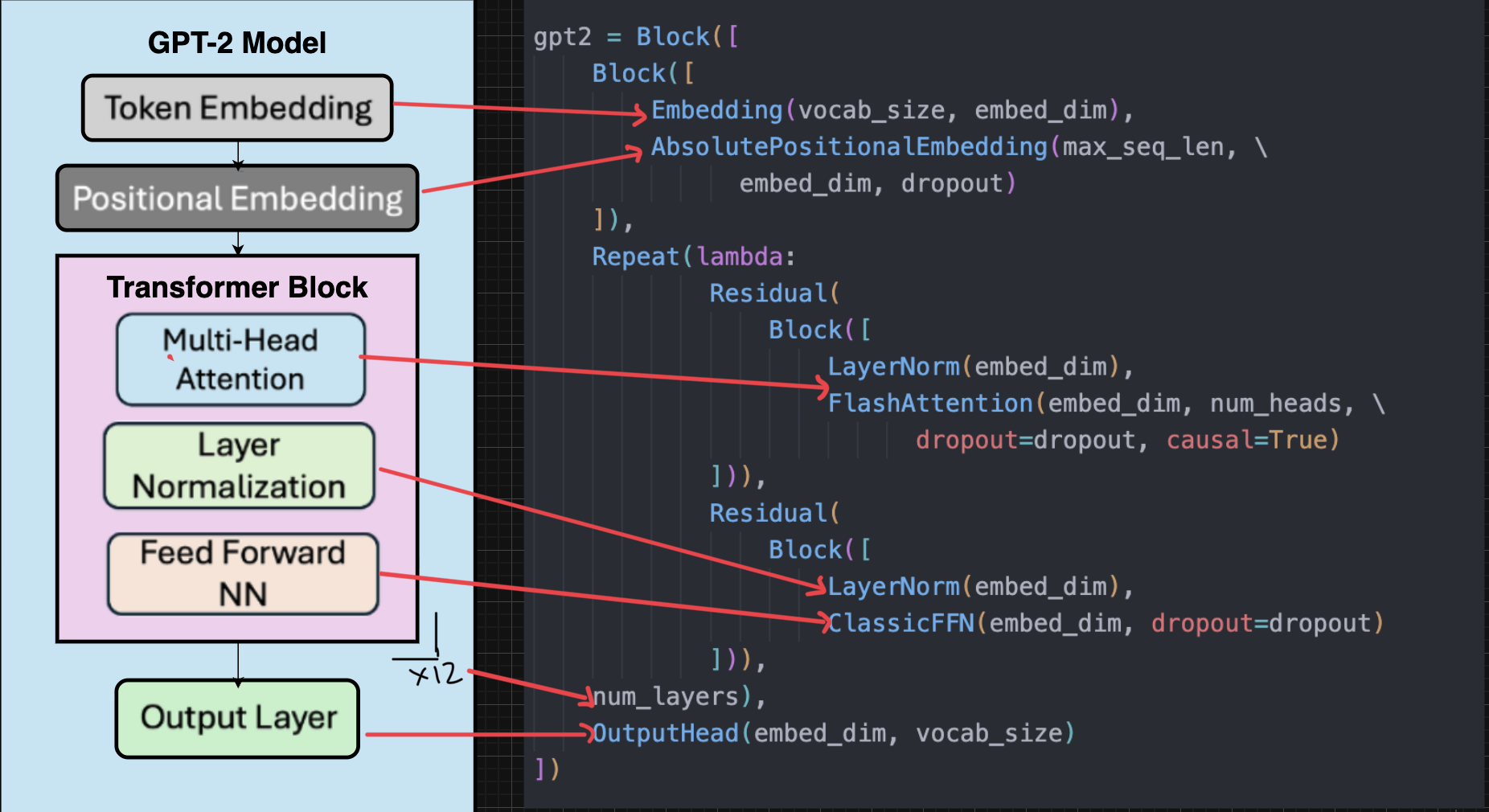
Example: Defining GPT2 using OLM
A simple example of defining the GPT2 structure using the olm library.
Minimal Training Example
A simple example of training a simple language model on the TinyShakespeare dataset locally.
import sys, os, torch, urllib.request; from torch.utils.data import DataLoader; from tempfile import TemporaryDirectory

sys.path.append(os.path.join(os.path.dirname(__file__), '..', 'src'))

from olm.data.datasets import Dataset; from olm.data.tokenization.hf_tokenizer import HFTokenizer; from olm.train.trainer import Trainer; from olm.nn.blocks import LM

with TemporaryDirectory() as tmp:
  urllib.request.urlretrieve("https://raw.githubusercontent.com/karpathy/char-rnn/master/data/tinyshakespeare/input.txt", os.path.join(tmp, "i.txt"))
  tokenizer, device = HFTokenizer("gpt2"), "cuda" if torch.cuda.is_available() else "cpu"
  model = LM(tokenizer.vocab_size, 64, 4, 2, 33)
  optimizer = torch.optim.AdamW(model.parameters(), 3e-4)
  dataset = Dataset(tmp, tokenizer, 32)
  dataloader = DataLoader(dataset, 4)
  trainer = Trainer(model, optimizer, dataloader, device, 32, use_amp=False)
  losses = trainer.train(1, 10, 100)
  print(f"S:{losses[0]:.4f} E:{losses[-1]:.4f} OK:{losses[-1]<losses[0]}")
This setup is intentionally straightforward:
- Models come from
olm.models - Data pipelines come from
olm.data - Training orchestration lives in
olm.train
You can start with this structure and gradually customize any part of it.
Installation
OLM is designed to be used as a regular Python library, with full access to the source.
Requirements
- Python ≥ 3.10
- PyTorch (CPU or CUDA, depending on your setup)
OLM intentionally keeps its dependency surface small and relies heavily on PyTorch under the hood.
Install (Editable, Recommended)
git clone <repo-url>
cd openlanguagemodel
pip install -e .
An editable install is recommended so you can inspect, modify, and extend components easily.
Configuration & Experiment Setup
Models in OLM can be described using simple YAML configuration files.
model:
name: gpt
vocab_size: 50257
n_layers: 12
n_heads: 12
d_model: 768

training:
batch_size: 64
max_steps: 100000
Configurations describe what to run, not how it runs. All execution logic lives in Python and is fully editable. This separation keeps experiments reproducible without turning configuration files into code.
Why OLM?
OLM exists to answer a common tension in ML systems:
- High‑level frameworks are easy to use but hard to extend
- Low‑level code is flexible but slow to iterate
OLM sits in the middle.
You can:
- Get a model training with minimal setup
- Swap architectural components without rewriting everything
- Introduce entirely new structures and wiring patterns
- Drop down to raw PyTorch whenever needed
If you are a beginner, looking to get their feet wet and quickly get started with language models, OLM makes it simple and easy to setup and work with many popular language models and datasets. If you are a more intermediate user looking to dive deep into architeectures or an advanced user looking to conduct research into novel structures then OLM also offers an easy environment to help with those workflows. Check out the docs for understanding specific portions of the library and how it can be leveraged to its maximum capability
Design Philosophy
OLM is built around three core ideas:
- Accessible by default – Training and experimentation should be easy to start
- Transparent by construction – No implicit behavior, no magic helpers
- Structure as a first‑class concept – How blocks are composed matters as much as the blocks themselves
Rather than hiding complexity, OLM organizes it into clear, navigable layers.
Repository Structure
openlanguagemodel/
├── configs/            # YAML experiment configurations
├── docs/               # Design notes and guides
├── examples/           # End‑to‑end training examples
├── src/olm/            # Core library code
│ ├── data/             # Datasets, tokenization, loaders
│ ├── models/           # High‑level model definitions
│ ├── nn/               # Neural building blocks and structure
| | ├── activations/    # Common activation functions
| | ├── attention/      # Attention Models
| | ├── blocks/         # Frequently used transformer blocks
| | ├── embeddings/     # Positional and token embeddings
| | ├── feedforward/    # Feedforward layers
| | ├── moe/            # Mixture of experts
| | ├── norms/          # Normalisation functions
| | ├── structure/      # Helpers for structuring models
│ ├── train/            # Training loop and orchestration
│ └── utils/            # Shared helpers
├── tests/
└── verify_imports.py
PyTorch as the Foundation
OLM is built directly on top of PyTorch.
- All models are standard
torch.nn.Modules - Autograd, optimizers, and AMP come directly from torch
- No custom execution engines or hidden graph layers
This means that you can drop into raw pytorch at any moment, and the code will accept that change readily. Also, the debugging and error handling, as well as managing pipelines behave exactly as expected. Knowledge of pytorch is thus encouraged although not completely necessary. This structure also allows you to have a varying amount of customisability. In a few words,
"OLM extends PyTorch — it does not replace it."
Core Architecture: olm.nn
At the heart of OLM is the olm.nn package. This is where all neural logic lives.
Conceptually, everything in OLM resolves to components defined here.
olm.nn
│
├── attention/      # Multi‑head attention, masking, projections
├── activations/    # GELU, SwiGLU, custom activations
├── norm/           # LayerNorm and variants
├── embeddings/     # Token and positional embeddings
├── structure/      # Residuals, combinators, block wiring
└── misc/           # Small reusable neural utilities
Each component is:
- A plain
torch.nn.Module - Independently testable
- Safe to extend, replace, or rewrite
You can use these building blocks directly, subclass them, or bypass them entirely.
Structural Composition: olm.nn.structure
A distinguishing feature of OLM is its explicit treatment of structure.
Instead of hard‑coding how layers are connected, OLM separates what a block does from how blocks are wired together.
The olm.nn.structure module provides:
- Residual combinators
- Block wrappers
- Explicit composition utilities
This makes it easy to:
- Experiment with alternative residual paths
- Implement pre‑norm, post‑norm, or custom normalization schemes
- Build non‑standard transformer variants
- Reuse the same core layers across multiple architectures
Custom structures are not special cases — they are first‑class citizens. Entirely new wiring patterns can be implemented without modifying existing layers.
Models: olm.models
Models in OLM are intentionally lightweight.
They:
- Assemble components from
olm.nn - Define forward passes clearly
- Contain no training or optimization logic
This separation allows you to:
- Reuse the same architecture across different training setups
- Modify internal blocks without touching the trainer
- Prototype new architectures quickly
Data Pipeline: olm.data
The olm.data module handles everything related to input text and batching, while remaining flexible enough for different research workflows.
It provides:
- Dataset abstractions
- Tokenization hooks
- Iterable and streaming datasets
- Collation utilities for language modeling
Training Setup: olm.train
OLM is designed so that setting up training is simple, even though nothing is hidden.
A typical training setup involves:
model = build_model(cfg)

dataloader = build_dataloader(cfg)

trainer = Trainer(model, dataloader, ...)

trainer.train()
The trainer exists to connect components, not to dictate behavior. If you want to modify the training loop — logging, accumulation, precision, or checkpointing — you can do so directly.
Who OLM Is For
OLM works well for:
- Students learning how transformers are built
- Researchers prototyping new architectures
- Engineers who want control without unnecessary boilerplate


Download files
Download the file for your platform. If you're not sure which to choose, learn more about installing packages.
Source Distribution
Built Distribution
Filter files by name, interpreter, ABI, and platform.
If you're not sure about the file name format, learn more about wheel file names.
Copy a direct link to the current filters
File details
Details for the file openlanguagemodel-1.0.tar.gz.
File metadata
- Download URL: openlanguagemodel-1.0.tar.gz
- Upload date:
- Size: 61.5 kB
- Tags: Source
- Uploaded using Trusted Publishing? No
- Uploaded via: twine/6.2.0 CPython/3.9.13
File hashes
| Algorithm | Hash digest | |
|---|---|---|
| SHA256 |
9bcbb3ee77292f180c603827f7711b5d9aae1ff0cb6ca4bbeadb0442e7552d0a
|
|
| MD5 |
a5051ae678169aeee8ec1776575fd78d
|
|
| BLAKE2b-256 |
edeca027a009e2109784331f665981bff9630adaee135674e5db1b67cf8a63a6
|
File details
Details for the file openlanguagemodel-1.0-py3-none-any.whl.
File metadata
- Download URL: openlanguagemodel-1.0-py3-none-any.whl
- Upload date:
- Size: 98.5 kB
- Tags: Python 3
- Uploaded using Trusted Publishing? No
- Uploaded via: twine/6.2.0 CPython/3.9.13
File hashes
| Algorithm | Hash digest | |
|---|---|---|
| SHA256 |
b9f6f10cf45bd75c14436875004640a4b3772ba64cc084a0e882e35b3dbd3e7c
|
|
| MD5 |
f3208f3e7806750e505456b49d738f90
|
|
| BLAKE2b-256 |
9881b08d9d9166bf3bb64d5049acd3d03f887e81eab3813694646cc64d55a447
|






