
OpenLeads
Describe a customer. Get the people, with every email labeled by how we know it.
OpenLeads searches free public sources for the businesses and people you describe, finds their work emails, and marks each one found, pattern or guessed. Then it works them like Apollo does: lists, ICP scoring, sequences, tasks and a deal pipeline. It runs on your machine, with no API keys and nothing to pay.






Website | Docs | Live benchmark | Changelog
pipx install "openleads[all]"          # or: pip install "openleads[all]", or: npx openleads
openleads "find 30 rust devs in Berlin and email them about our hiring tool"
openleads today                        # replies, emails to approve, tasks due
openleads find "dentists in Austin"    # ten leads, every email labeled
openleads web                          # the app at http://127.0.0.1:8787
Say what you want and OpenLeads shows the plan before anything runs:
$ openleads "email 5 fintech founders about our tool"
Plan
  1. Find      5 fintech founders, deliverable emails only
  2. Write     an email to each about our tool
  3. Queue     them for you to approve in openleads today (nothing sends yet)

Run it? [Y/n]
Emails wait for your yes in Today unless you add --live.
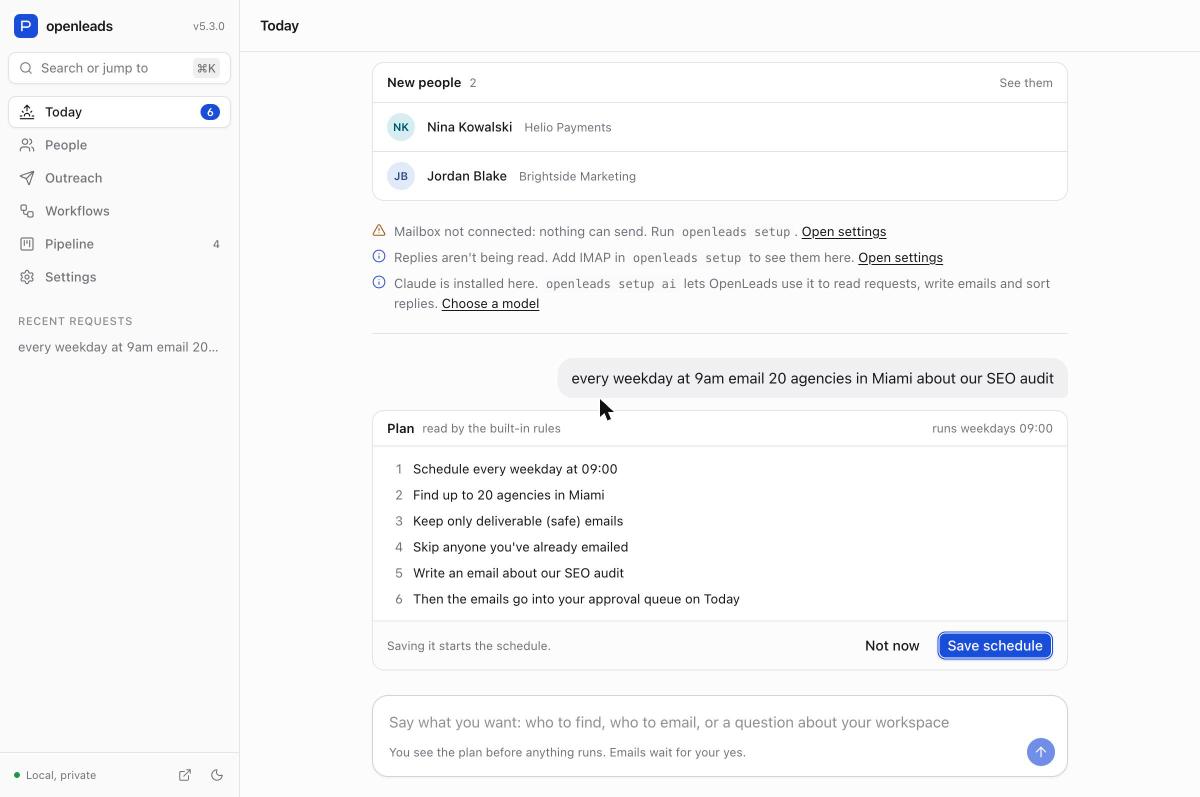
The app (openleads web) on the demo workspace (openleads demo, invented data): the plan comes first, and nothing runs until you say so.
Every email says how we know it
Most free finders call a first.last@ guess "valid". OpenLeads labels each address
with where it came from, then decides separately whether it is safe to send:
| Evidence | Meaning |
|---|---|
| found | Published on the company's site, in a public commit or security.txt, or confirmed by the mail server |
| pattern | Built from an address format already seen at that company |
| guessed | The most common format for that name. Nothing confirms it, and the label says so |
| Tier | What happens |
|---|---|
| safe | Sent by default |
| risky | Held for your review unless you opt in |
| bad | Dropped (no mail server, disposable, or it bounced) |
Seven checks decide the tier, and most of them work without port 25, which home internet providers block: two DNS-over-HTTPS resolvers that must agree on the mail server, SPF and DMARC, disposable/role/free-mail lists, Gravatar, published addresses, learned company patterns, and SMTP with catch-all detection when port 25 is open. How the scoring works.
Measured against live data every night
Unit tests can't tell you whether "dentists in Austin" returns dentists, so a GitHub
Action runs the same real searches against the live sources every night, asks for ten
leads each, and commits what came back to BENCHMARK.md, empty
nights included. Run it yourself with openleads bench.
What you can search
One sentence fans out across the sources that fit it. You never have to pick one,
but -s name pins a source.
| Ask for | Searched | Example |
|---|---|---|
| Local businesses, any city | OpenStreetMap (Overpass and Nominatim) | "accountants in Toronto" |
| Startup founders, companies hiring | Y Combinator, Hacker News | "AI startup founders" |
| Companies by industry | Wikidata, SEC EDGAR | "fintech companies" |
| Developers | GitHub | "rust developers in Berlin" |
| ML builders | Hugging Face | "ML engineers" |
| Researchers | OpenAlex | "machine learning researchers" |
| Everyone at one company | the company's own site | "emails at stripe.com" |
| US healthcare providers | NPI Registry | "pediatricians" |
Companies are turned into named people from their team and about pages. When a search comes back short, OpenLeads says which source failed or ran out of time and what to try next. Need a source we don't have? A source is one Python file.
Work your leads
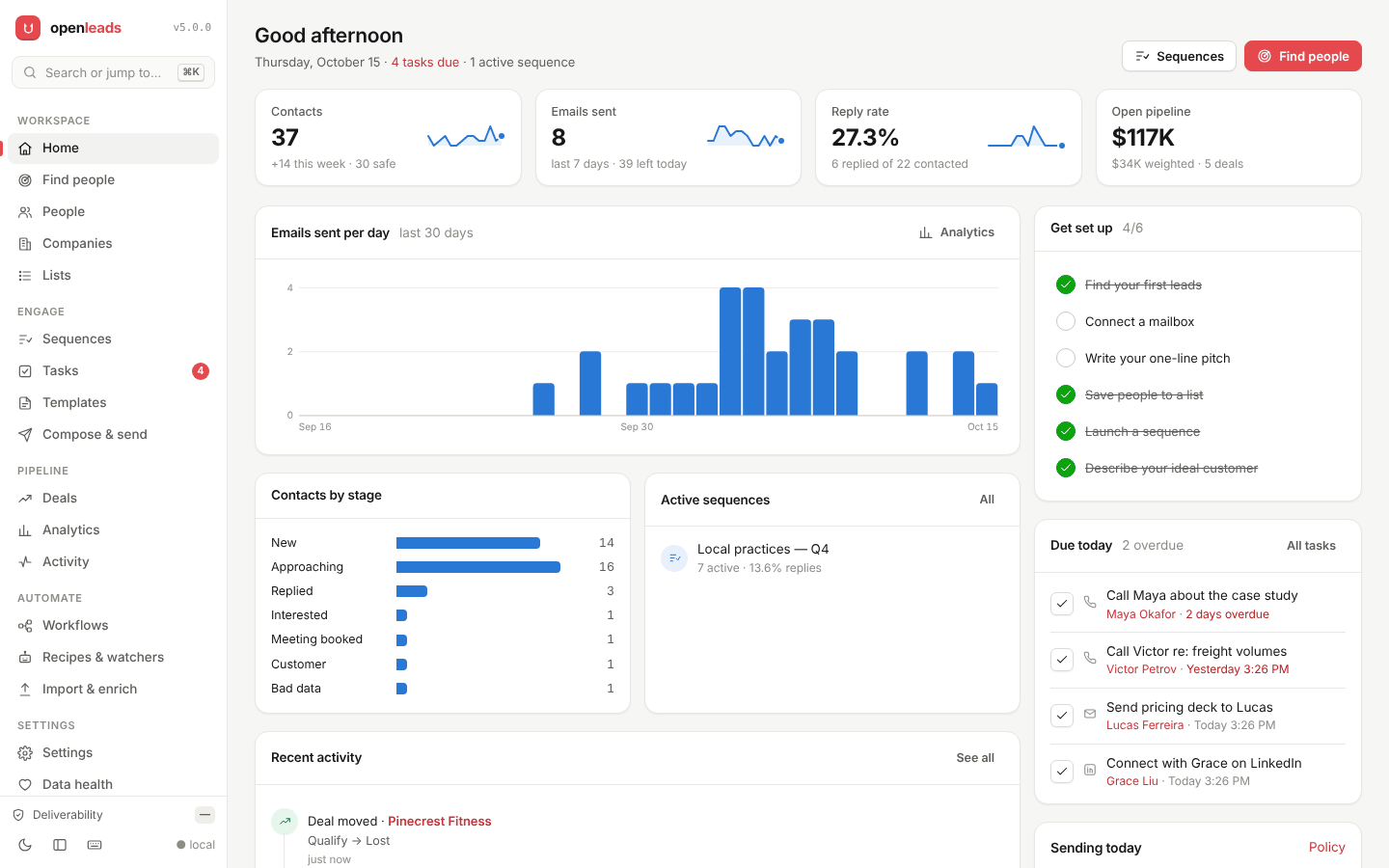
Everything you find lands in a local workspace: the same data in the dashboard, the terminal and your AI assistant.
 |
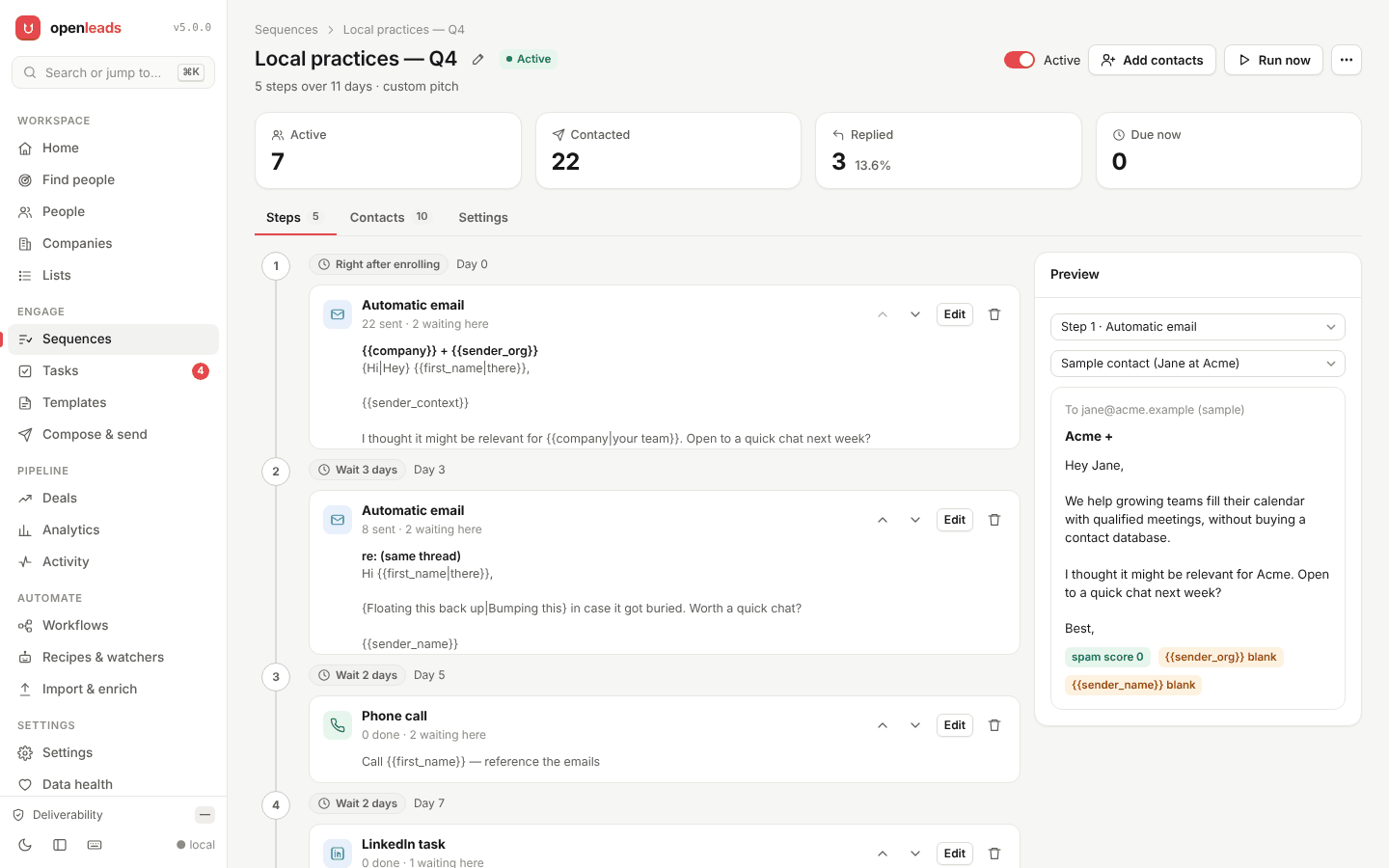 |
| Home. Today first: replies waiting on you, emails to approve, tasks due. Then how outreach is going and the strongest leads you haven't contacted. | Sequences. Email, call, LinkedIn and task steps with A/B variants and same-thread follow-ups. People leave when they reply, bounce or unsubscribe. |
 |
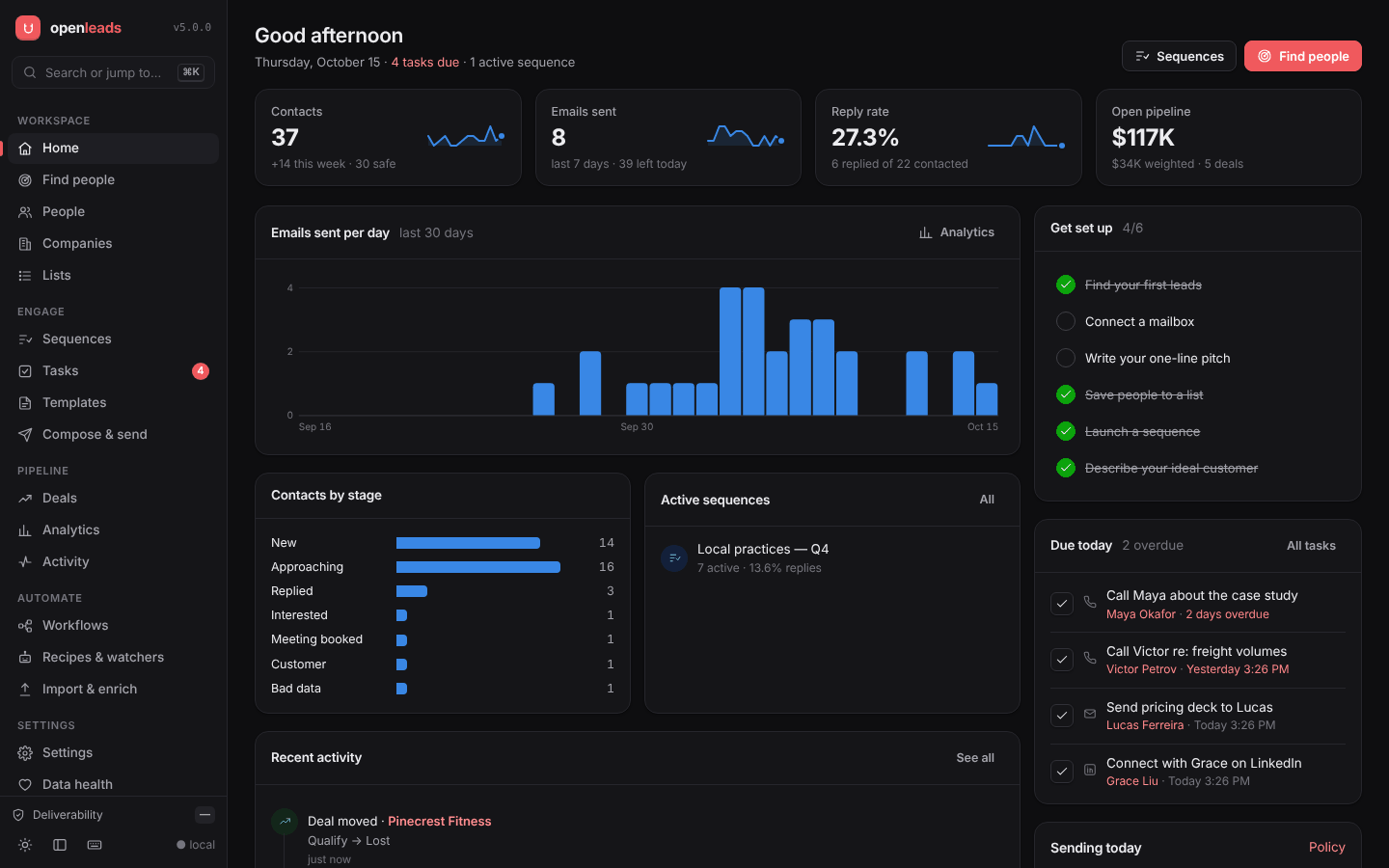 |
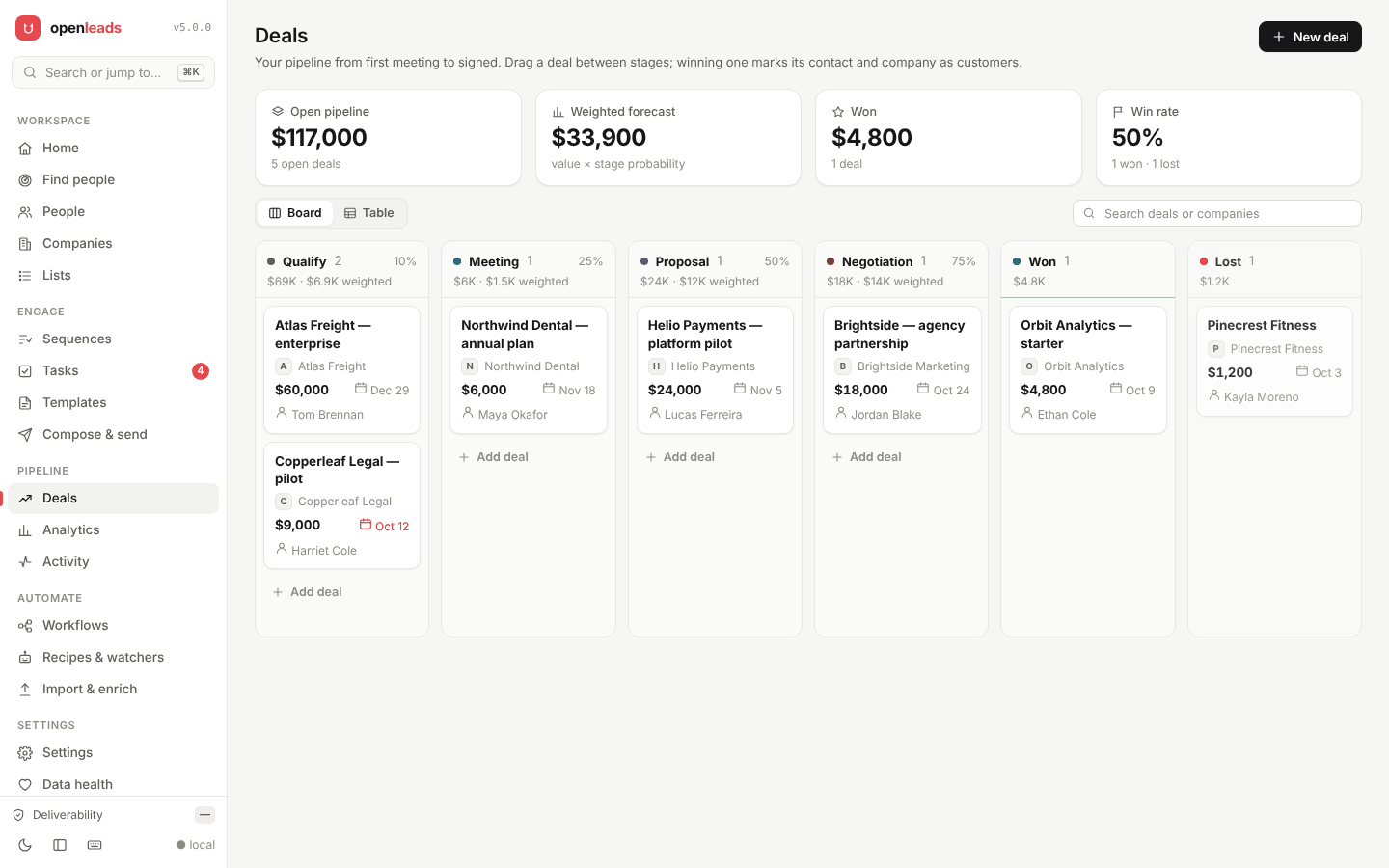
| Deals. A drag-and-drop pipeline with a weighted forecast. Winning a deal makes the contact a customer. | Everything else. People and companies with Apollo-style filters, lists, ICP fit from A to D, a task queue, templates, CSV import, duplicate merge and a ⌘K palette. |
openleads people --fit A --never-contacted                 # best untouched leads
openleads lists add "Q4 dentists" --where dental
openleads seq enroll "Q4 outbound" --list "Q4 dentists"
openleads tasks --bucket today
openleads import apollo-export.csv --list "Imported"
Workspace guide | Sequences guide | Moving from Apollo
Use it from Python
import openleads

leads = openleads.find("gyms in Sydney", count=20)
for lead in leads:
    print(lead.email, lead.evidence, lead.tier)
leads.write("gyms.csv")            # .csv, .json or .jsonl
print(leads.report.summary())      # which sources ran, what failed, why it stopped
Use it from Claude, Cursor or Claude Code
OpenLeads is an MCP server. Your assistant can find and verify leads mid-conversation, and work your lists, tasks and sequences:
claude mcp add openleads -- openleads mcp
{ "mcpServers": { "openleads": { "command": "openleads", "args": ["mcp"] } } }
"Find 10 law firms in London with emails we can actually send to, save them to a list called London law, and give me a call task for each partner."
The assistant can search and edit your workspace and run your morning from
Today. The one tool that sends, approve_draft, only sends a draft
already waiting for your approval.
Use the model you already pay for
Everything works with no model. Connect one and it reads your requests, writes the drafts and sorts your replies:
openleads setup ai
It finds what this computer has: your Claude or ChatGPT subscription (through the
claude or codex CLI), an Anthropic, OpenAI or Gemini key, a free OpenRouter
model, or Ollama. Nothing is spent until you pick one, and the model never decides
on its own that something goes out. Your model
Automate it
Describe a workflow in a sentence and read it back as steps, or wire it on a canvas: triggers (schedule, new leads, a reply), find, verify, filter and split by tier, write email, wait, send, add to a list or sequence, create tasks, and export. Test runs never send; every run shows what each step did. Sends stay inside your daily cap, warm-up ramp and business hours, and stop for anyone who replies. Warm-up sends to seed inboxes, checks inbox placement and holds the ramp when health slips. Sending and warm-up
Running a web agency? Pick a lead in Sites and it builds them a better website: the right template, their name, phone and city, and the words written for them by your Claude subscription. Ask for changes in plain words, preview it, and send the owner the link. Sites
openleads workflow templates                       # 7 ready-made workflows
openleads workflow new dentists --from local-business-outreach   # arrives paused
openleads workflow run dentists      # a test run: finds and writes, never sends
openleads recipe add miami "marketing agencies in Miami" --every "weekdays 9am" --send
openleads watch add new-dentists "dentists in Austin"     # tell me only about new matches
openleads schedule on      # one agent: launchd, cron or Windows Task Scheduler
openleads runs             # what ran, what it found, what failed
Workflows | Writing emails | Timed runs. Exports go to CSV, Google Sheets, Notion, Airtable, HubSpot or any webhook. There is also a GitHub Action:
- uses: Samyrrrrrr990/openleads@v5.2.0
  with: { query: "marketing agencies in Miami", count: 50 }
Install
pipx install "openleads[all]"     # recommended
pip install openleads             # minimal: the standard-library engine and CLI
npx openleads                     # Node: sets up a private Python environment on first run
openleads doctor    # checks your setup: DNS, port 25, mailbox
openleads demo      # the dashboard on an invented workspace
openleads           # chat: type what you want
Python 3.8 or newer on macOS, Linux or Windows. Full walkthrough: quickstart.
Commands
# start
openleads "find 30 rust devs in Berlin and email them"   # see the plan, run it on a yes
openleads today                                        # what needs you
openleads web                                          # the dashboard (--demo: invented data)

# find
openleads find "50 fintech founders, verified only" -o leads.csv
openleads find "accountants in Toronto" --explain     # the plan, each source's status, hints
openleads company stripe.com                           # tech stack, socials, phones, people
openleads enrich my-list.csv                           # your names and companies, emails labeled
openleads verify ada@acme.io

# reach out (a dry run unless you add --live)
openleads write "rust developers in Berlin" --variants 2 --explain   # drafts, scored, with the brief
openleads run "rust developers in Berlin"

# the workspace
openleads people | companies | lists | seq | tasks | deals
openleads import | export | dedupe | stats | backup

# set up and automate
openleads setup                  # mailbox and identity (also: setup doctor, setup config)
openleads workflow | mcp
openleads --help shows the ten everyday commands; openleads help all lists every
command. Older ones (recipe, watch, drip, crm, campaign...) all still work.
How it works
flowchart LR
    Q["'dentists in Austin'"] --> P[Query parser]
    P --> F[Planner<br/>picks the sources]
    F --> S1[OpenStreetMap]
    F --> S2[YC, HN, GitHub, Hugging Face,<br/>OpenAlex, EDGAR, Wikidata, NPI]
    S1 & S2 --> D[People from team pages<br/>+ real-name check]
    D --> E[Email checks<br/>harvest, pattern, MX, SMTP, Gravatar]
    E --> L[Leads with evidence and tier]
    L --> W[Workspace, sequences, exports]
    E <--> DB[(Local SQLite<br/>learned patterns, workspace)]
The engine is Python standard library only. Requests that fail transiently are
retried, a search returns within its time budget with whatever finished, and every
run produces a report of which sources answered, which fell back and why. Your
leads, drafts, mailbox credentials, learned patterns and the whole workspace live in
~/.openleads. There is no hosted backend, no account and no telemetry.
Architecture.
Responsible use
OpenLeads is for legitimate prospecting, recruiting and research. You are responsible for anti-spam law (CAN-SPAM, GDPR, CASL) and each source's terms. It ships the guardrails: dry runs by default, a suppression list, one-click unsubscribe, warmup caps and no tracking pixels. Responsible use.
License
Open source under AGPL-3.0.
Using OpenLeads at a company?
Go ahead. It's free for non-profits, solo founders and small teams, and for any company that runs it internally to find leads and send its own email. You don't need to ask.
Email samyar.shafiee2009@gmail.com if your company wants to keep its changes to OpenLeads private, build it into a closed-source product, or offer it to other people as a hosted service. The AGPL asks you to publish your source in those cases. A commercial license is the other way, and we work out the terms by email. There's no price list. If you host it for others and do publish your source, I'd still like a short note. Details.
Contributing
The most useful contribution is a new source (guide); the next
is a query that openleads bench scores badly, with the fix. See
CONTRIBUTING.md. Thanks to everyone who has sent a pull
request, including @xmejl, @harrisonoconnorhover and @Shalinipks for 5.1.
Thanks
OpenStreetMap contributors,
OpenAlex, yc-oss/api,
Hugging Face, the NPI Registry,
SEC EDGAR, Wikidata, Gravatar, and the US Social Security Administration for its
given-name data. The dashboard and website use
Atkinson Hyperlegible by the Braille
Institute.
1 maintainer

Metadata
1 maintainer
Release files for openleads 5.6.1
For a detailed explanation of source distributions (sdists) and built distributions (wheels), please see the package formats documentation.
Source distribution (sdist)
| File | Size | Uploaded | Provenance | Actions |
|---|---|---|---|---|
| openleads-5.6.1.tar.gz | 1.7 MB | Without provenance | Details for openleads-5.6.1.tar.gz |
Built distribution (wheel)
| File | Interpreter | ABI | Platform | Actions Reset |
|---|---|---|---|---|
| openleads-5.6.1-py3-none-any.whl | Python 3 | none | any | Details for openleads-5.6.1-py3-none-any.whl |
Total release size: 3.3 MB
Release files / openleads-5.6.1.tar.gz
| Download URL | openleads-5.6.1.tar.gz |
|---|---|
| Size | 1.7 MB |
| Tags | Source |
|
SHA-256 checksum How to use checksums |
c986425dfa69f5481080435d81d1b373410f3182c58b4e609abd0699bb1f8d9c
|
|
BLAKE2b-256 checksum How to use checksums |
3bed868d36566270489ba5a7cca859995a03eb60bf6ad84854463ea2512641cc
|
| Upload date | |
|
Uploaded using Trusted Publishing? What is trusted publishing? |
No |
| Uploaded via |
twine/7.0.0 CPython/3.13.16
|
Release files / openleads-5.6.1-py3-none-any.whl
| Download URL | openleads-5.6.1-py3-none-any.whl |
|---|---|
| Size | 1.5 MB |
| Tags | Python 3 |
|
SHA-256 checksum How to use checksums |
6007585e16d471dabb145e19d7dfc58d6c074770b87f5846aced58d1ad2c869a
|
|
BLAKE2b-256 checksum How to use checksums |
28cc85ca47df69e26170929d9b62a5758e1346391820d3afd90730fc07d2e886
|
| Upload date | |
|
Uploaded using Trusted Publishing? What is trusted publishing? |
No |
| Uploaded via |
twine/7.0.0 CPython/3.13.16
|
Security for openleads 5.6.1
Provenance
Provenance describes where a file came from. On PyPI, provenance is shared via attestations, which provide a verifiable record of the build or publishing details. View details, limitations and caveats.
No provenance found
None of the files in this release were uploaded with provenance metadata.
A note on package security
PyPI is a repository for distributing packages, not a service for auditing them. While third-party security researchers and our staff do their best to detect and remove malicious packages, PyPI cannot guarantee the quality, security or suitability of any given package.
To learn more about protecting yourself from malicious actors, visit our package security documentation.














