
OpenTelemetry-native Auto instrumentation library for monitoring LLM Applications and GPUs, facilitating the integration of observability into your GenAI-driven projects
Project description

OpenTelemetry-native
AI Observability, Evaluation and Guardrails Framework
Documentation | Quickstart | Roadmap | Feature Request | Report a Bug







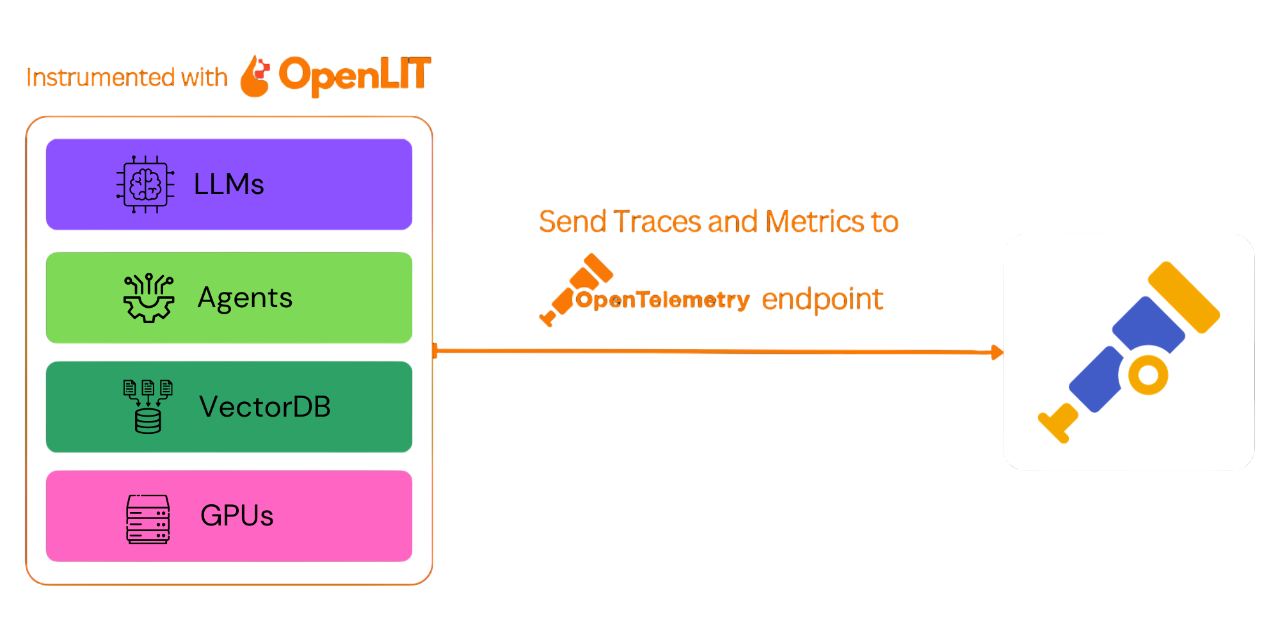
OpenLIT SDK is a monitoring framework built on top of OpenTelemetry that gives your complete Observability for your AI stack, from LLMs to vector databases and GPUs, with just one line of code with tracing and metrics. It also allows you to send the generated traces and metrics to your existing monitoring tools like Grafana, New Relic, and more.
This project proudly follows and maintains the Semantic Conventions with the OpenTelemetry community, consistently updating to align with the latest standards in Observability.
⚡ Features
- 🔎 Auto Instrumentation: Works with 50+ LLM providers, Agents, Vector databases, and GPUs with just one line of code.
- 🔭 OpenTelemetry-Native Observability SDKs: Vendor-neutral SDKs that can send traces and metrics to your existing observability tool like Prometheus and Jaeger.
- 💲 Cost Tracking for Custom and Fine-Tuned Models: Pass custom pricing files for accurate budgeting of custom and fine-tuned models.
- 🚀 Support for OpenLIT Features: Includes support for prompt management and secrets management features available in OpenLIT.
Auto Instrumentation Capabilities
Supported Destinations
- ✅ OpenTelemetry Collector
- ✅ Prometheus + Tempo
- ✅ Prometheus + Jaeger
- ✅ Grafana Cloud
- ✅ New Relic
- ✅ Elastic
- ✅ Middleware.io
- ✅ HyperDX
- ✅ DataDog
- ✅ SigNoz
- ✅ OneUptime
- ✅ Dynatrace
- ✅ OpenObserve
- ✅ Highlight.io
- ✅ SigLens
- ✅ Oodle
💿 Installation
pip install openlit
🚀 Getting Started with LLM Observability
Step 1: Install OpenLIT SDK
Open your command line or terminal and run:
pip install openlit
Step 2: Initialize OpenLIT in your Application
Integrate OpenLIT into your AI applications by adding the following lines to your code.
import openlit

openlit.init()
Configure the telemetry data destination as follows:
| Purpose | Parameter/Environment Variable | For Sending to OpenLIT |
|---|---|---|
| Send data to an HTTP OTLP endpoint | otlp_endpoint or OTEL_EXPORTER_OTLP_ENDPOINT |
"http://127.0.0.1:4318" |
| Authenticate telemetry backends | otlp_headers or OTEL_EXPORTER_OTLP_HEADERS |
Not required by default |
💡 Info: If the
otlp_endpointorOTEL_EXPORTER_OTLP_ENDPOINTis not provided, the OpenLIT SDK will output traces directly to your console, which is recommended during the development phase.
Example
Initialize using Function Arguments
Add the following two lines to your application code:
import openlit

openlit.init(
  otlp_endpoint="YOUR_OTEL_ENDPOINT",
  otlp_headers ="YOUR_OTEL_ENDPOINT_AUTH"
)
Initialize using Environment Variables
Add the following two lines to your application code:
import openlit

openlit.init()
Then, configure the your OTLP endpoint using environment variable:
export OTEL_EXPORTER_OTLP_ENDPOINT = "YOUR_OTEL_ENDPOINT"
export OTEL_EXPORTER_OTLP_HEADERS = "YOUR_OTEL_ENDPOINT_AUTH"
Step 3: Visualize and Optimize!
Now that your LLM observability data is being collected and sent to configured OpenTelemetry destination, the next step is to visualize and analyze this data. This will help you understand your LLM application's performance and behavior and identify where it can be improved.
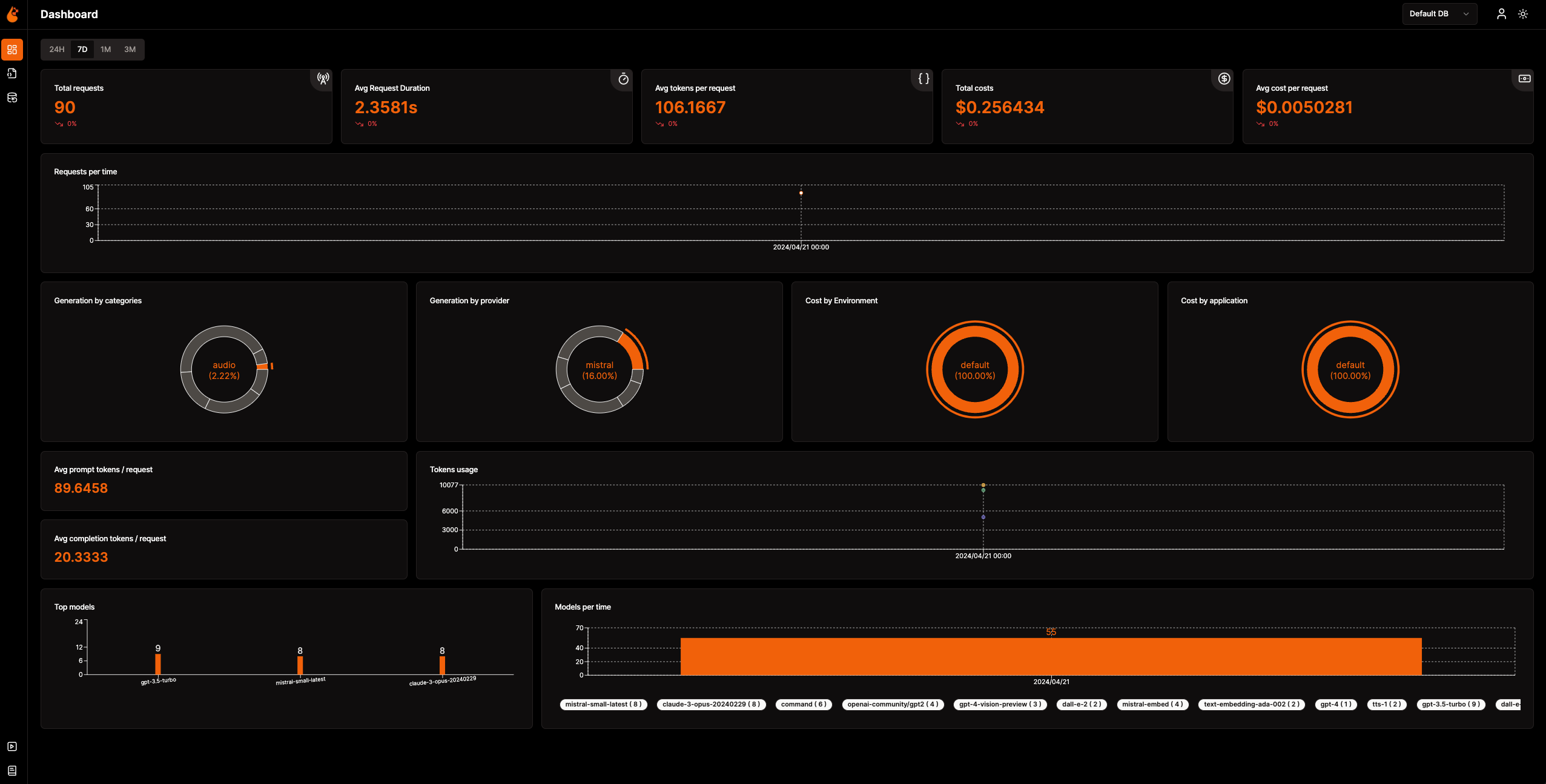
If you want to use OpenLIT's Observability Dashboard to monitor LLM usage—like cost, tokens, and user interactions—please check out our Quickstart Guide.
If you're sending metrics and traces to other observability tools, take a look at our Connections Guide to start using a pre-built dashboard we have created for these tools.
Configuration
Observability - openlit.init()
Below is a detailed overview of the configuration options available, allowing you to adjust OpenLIT's behavior and functionality to align with your specific observability needs:
| Argument | Description | Default Value | Required |
|---|---|---|---|
environment |
The deployment environment of the application. | "default" |
Yes |
application_name |
Identifies the name of your application. | "default" |
Yes |
tracer |
An instance of OpenTelemetry Tracer for tracing operations. | None |
No |
meter |
An OpenTelemetry Metrics instance for capturing metrics. | None |
No |
otlp_endpoint |
Specifies the OTLP endpoint for transmitting telemetry data. | None |
No |
otlp_headers |
Defines headers for the OTLP exporter, useful for backends requiring authentication. | None |
No |
disable_batch |
A flag to disable batch span processing, favoring immediate dispatch. | False |
No |
capture_message_content |
Enables tracing of content for deeper insights. | True |
No |
disabled_instrumentors |
List of instrumentors to disable. | None |
No |
disable_metrics |
If set, disables the collection of metrics. | False |
No |
pricing_json |
URL or file path of the pricing JSON file. | https://github.com/openlit/openlit/blob/main/assets/pricing.json |
No |
collect_gpu_stats |
Flag to enable or disable GPU metrics collection. | False |
No |
custom_metrics_attributes |
Custom key-value attributes applied to every metric recording. Useful for grouping metrics by custom tags (e.g., client ID, team, project). | None |
No |
OpenLIT Prompt Hub - openlit.get_prompt()
Below are the parameters for use with the SDK for OpenLIT Prompt Hub for prompt management:
| Parameter | Description |
|---|---|
url |
Sets the OpenLIT URL. Defaults to the OPENLIT_URL environment variable. |
api_key |
Sets the OpenLIT API Key. Can also be provided via the OPENLIT_API_KEY environment variable. |
name |
Sets the name to fetch a unique prompt. Use this or prompt_id. |
prompt_id |
Sets the ID to fetch a unique prompt. Use this or name. Optional |
version |
Set to True to get the prompt with variable substitution.. Optional |
shouldCompile |
Boolean value that compiles the prompt using the provided variables. Optional |
variables |
Sets the variables for prompt compilation. Optional |
meta_properties |
Sets the meta-properties for storing in the prompt's access history metadata. Optional |
OpenLIT Vault - openlit.get_secrets()
Below are the parameters for use with the SDK for OpenLIT Vault for secret management:
| Parameter | Description |
|---|---|
url |
Sets the Openlit URL. Defaults to the OPENLIT_URL environment variable. |
api_key |
Sets the OpenLIT API Key. Can also be provided via the OPENLIT_API_KEY environment variable. |
key |
Sets the key to fetch a specific secret. Optional |
should_set_env |
Boolean value that sets all the secrets as environment variables for the application. Optional |
tags |
Sets the tags for fetching only the secrets that have the mentioned tags assigned. Optional |
OpenLIT Rule Engine - openlit.evaluate_rule()
Evaluate trace attributes against the OpenLIT Rule Engine to retrieve matching rules and associated entities (contexts, prompts, evaluation configurations).
| Parameter | Description |
|---|---|
url |
Sets the OpenLIT URL. Defaults to the OPENLIT_URL environment variable. |
api_key |
Sets the OpenLIT API Key. Can also be provided via the OPENLIT_API_KEY environment variable. |
entity_type |
Type of entity to match: "context", "prompt", or "evaluation". |
fields |
Dictionary of trace attributes to evaluate against rules. e.g. {"gen_ai.system": "openai", "gen_ai.request.model": "gpt-4"} |
include_entity_data |
If True, include full entity data in the response. Default: False. Optional |
entity_inputs |
Optional dictionary of inputs for entity resolution (e.g. prompt variables, version). |
Example
import openlit

# Evaluate rules to get matching contexts
result = openlit.evaluate_rule(
    entity_type="context",
    fields={
        "gen_ai.system": "openai",
        "gen_ai.request.model": "gpt-4",
        "service.name": "my-app",
    },
    include_entity_data=True,
)

if result:
    print("Matching rules:", result["matchingRuleIds"])
    print("Entities:", result["entities"])
    # Use with evaluations:
    # contexts = result.get("entity_data", {})
🛣️ Roadmap
We are dedicated to continuously improving OpenLIT SDKs. Here's a look at what's been accomplished and what's on the horizon:
| Feature | Status |
|---|---|
| OpenTelmetry auto-instrumentation for LLM Providers like OpenAI, Anthropic | ✅ Completed |
| OpenTelmetry auto-instrumentation for Vector databases like Pinecone, Chroma | ✅ Completed |
| OpenTelmetry auto-instrumentation for LLM Frameworks like LangChain, LlamaIndex | ✅ Completed |
| OpenTelemetry-native auto-instrumentation for NVIDIA GPU Monitoring | ✅ Completed |
| Real-Time Guardrails Implementation | ✅ Completed |
| Programmatic Evaluation for LLM Response | ✅ Completed |
| OpenTelemetry-native AI Agent Observability | ✅ Completed |
🌱 Contributing
Whether it's big or small, we love contributions 💚. Check out our Contribution guide to get started
Unsure where to start? Here are a few ways to get involved:
- Join our Slack or Discord community to discuss ideas, share feedback, and connect with both our team and the wider OpenLIT community.
Your input helps us grow and improve, and we're here to support you every step of the way.
💚 Community & Support
Connect with the OpenLIT community and maintainers for support, discussions, and updates:
- 🌟 If you like it, Leave a star on our GitHub
- 🌍 Join our Slack or Discord community for live interactions and questions.
- 🐞 Report bugs on our GitHub Issues to help us improve OpenLIT.
- 𝕏 Follow us on X for the latest updates and news.
Project details
Release history Release notifications | RSS feed


Download files
Download the file for your platform. If you're not sure which to choose, learn more about installing packages.
Source Distribution
Built Distribution
Filter files by name, interpreter, ABI, and platform.
If you're not sure about the file name format, learn more about wheel file names.
Copy a direct link to the current filters
File details
Details for the file openlit-1.41.0.tar.gz.
File metadata
- Download URL: openlit-1.41.0.tar.gz
- Upload date:
- Size: 416.6 kB
- Tags: Source
- Uploaded using Trusted Publishing? No
- Uploaded via: twine/6.1.0 CPython/3.13.12
File hashes
| Algorithm | Hash digest | |
|---|---|---|
| SHA256 |
5b1813090db74c2b234d0ad23295874f4c92be478f2509a3edae52e531d6573d
|
|
| MD5 |
0a4af289792e2a5b71824b78e37cf4c1
|
|
| BLAKE2b-256 |
e5195c31164ee401dc0b99ca2f794ed2e8019a2bb19913089e7e3bbd0bb2d198
|
File details
Details for the file openlit-1.41.0-py3-none-any.whl.
File metadata
- Download URL: openlit-1.41.0-py3-none-any.whl
- Upload date:
- Size: 583.5 kB
- Tags: Python 3
- Uploaded using Trusted Publishing? No
- Uploaded via: twine/6.1.0 CPython/3.13.12
File hashes
| Algorithm | Hash digest | |
|---|---|---|
| SHA256 |
0308ddc3640367ddacad2f58414b0b306bbe59dfa138f993db876b4edac58cdc
|
|
| MD5 |
370181500f623b1c5f429c7d92d10cc2
|
|
| BLAKE2b-256 |
7436a9b84ca9f5d5cf9f7bb37b6d6fe645466536d604af8dae2ae3d430244a10
|






