
OpenModelica Microgrid Gym









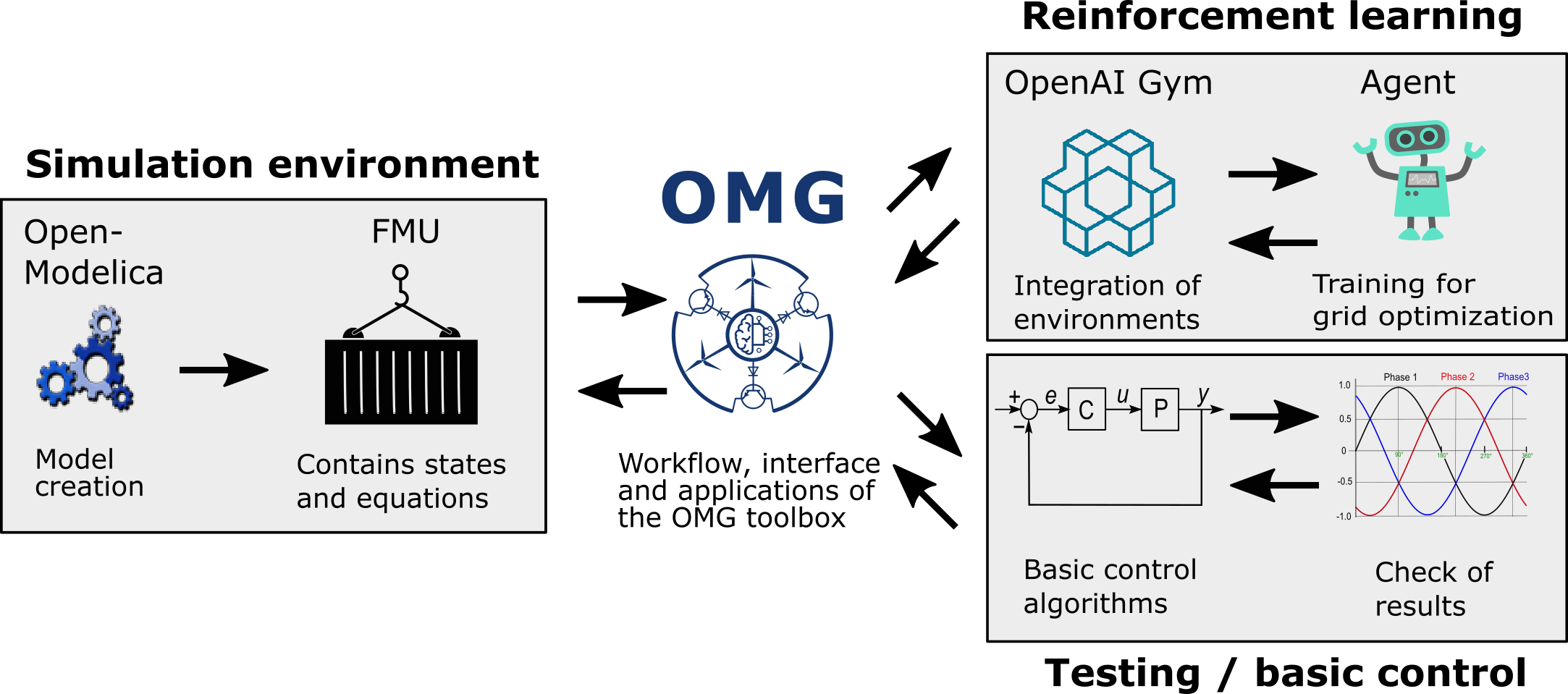
The OpenModelica Microgrid Gym (OMG) package is a software toolbox for the simulation and control optimization of microgrids based on energy conversion by power electronic converters.
The main characteristics of the toolbox are the plug-and-play grid design and simulation in OpenModelica as well as the ready-to-go approach of intuitive reinfrocement learning (RL) approaches through a Python interface.
The OMG toolbox is built upon the OpenAI Gym environment definition framework. Therefore, the toolbox is specifically designed for running reinforcement learning algorithms to train agents controlling power electronic converters in microgrids. Nevertheless, also arbritary classical control approaches can be combined and tested using the OMG interface.
Free software: GNU General Public License v3
Documentation: https://upb-lea.github.io/openmodelica-microgrid-gym
Video Tutorial
Following is a short YouTube video introduction, to get a fist impression how to use OMG.
Installation
Install Python Environment
This is the short installation guide for Windows and Linux. OpenModelica is hardly supported for Mac, they suggest to install in a Linux VM. For this reason, running OMG in a Linux VM is strongly recommended for Mac users!
Since it is not possible to install PyFMI, a package which is necessary for the communication between the python interface and the environment, via pip, we recommend to install this package in advance in a conda environment. As of now, only Windows and Linux are supported officially.
If conda is NOT installed on your PC, install miniconda for python 3.8
Create a new conda environment (e.g. in PyCharm)
Install PyFMI from the conda-forge channel in the terminal:
$ conda install -c conda-forge pyfmi
Install OpenModelica MicrogridGym from PyPI (recommended):
$ pip install openmodelica_microgrid_gym
Installation of OpenModelica
OMG was create by using OMEdit v1.16
In case of installation issues you can resort to their pre-built virtual machine.
Getting started
The environment is initialized and run like any other OpenAI Gym
import gym

if __name__ == '__main__':
    env = gym.make('openmodelica_microgrid_gym:ModelicaEnv-v1',
               max_episode_steps=None,
               net='../net/net.yaml',
               model_path='../omg_grid/grid.network.fmu')

    env.reset()
    for _ in range(1000):
        env.render()
        env.step(env.action_space.sample())  # take a random action
    env.close()
OMG uses the FMI standard for the exchange of the model between OpenModelica and Python.
An example network consisting out of two inverters, three filters and an inductive load.
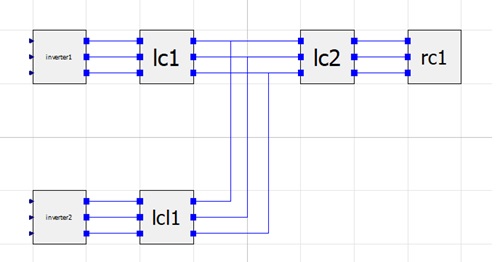
You can either use one of the provided FMUs (Windows and Linux, 64-bit, both included in the grid.network.fmu) or create your own by running:
openmodelica_microgrid_gym\fmu> omc create_fmu.mos
Windows users might need to open the terminal out of OpenModelica by clicking ‘tools’ => ‘OpenModelica Command Prompt’ to make sure that the command ‘omc’ gets recognized.
Running the staticctrl.py starts a simulation with a manually tuned cascaded PIPI controller

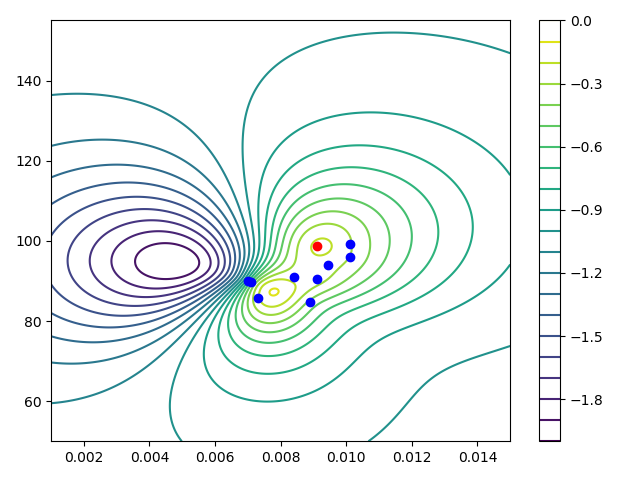
A save Bayesian approach of a reinforcement learning agent is provided under examples/berkamkamp.py.
Using pytest
OMG provides a big range of tests to ensure correct working toolbox after changes are done. On some windows machines, the tests can only be started from the terminal via ‘pytest’.
The standard test OS for the development is Linux. In some cases, we have noticed that the test_modelica.py on windows PCs might throw an error. Since on Linux everything works fine, it seems to be a numerical issue connected with the FMUs.
Citation & white paper
Please find a white paper on the OMG toolbox including an exemplary usage scenario here:
Please use the following BibTeX entry for citing us:
@article{OMG-code2020,
    title = {OMG: A Scalable and Flexible Simulation and Testing Environment Toolbox for Intelligent Microgrid Control},
    author = {Stefan Heid and Daniel Weber and Henrik Bode and Eyke Hüllermeier and Oliver Wallscheid},
    year = {2020},
    doi = {10.21105/joss.02435},
    url = {https://doi.org/10.21105/joss.02435},
    publisher = {The Open Journal},
    volume = {5},
    number = {54},
    pages = {2435},
    journal = {Journal of Open Source Software}
}

@article{OMG-whitepaper2020,
    title={Towards a Scalable and Flexible Simulation and
           Testing Environment Toolbox for Intelligent Microgrid Control},
    author={Henrik Bode and Stefan Heid and Daniel Weber and Eyke Hüllermeier and Oliver Wallscheid},
    year={2020},
    eprint={http://arxiv.org/abs/2005.04869},
    archivePrefix={arXiv},
    primaryClass={eess.SY}
}
Contributing
Please refer to the contribution guide.
Credits
This package was created with Cookiecutter and the audreyr/cookiecutter-pypackage project template.
History
Next
0.4.0 (2021-04-07)
Changes
- ModelicaEnv:
Introduced action clipping
model_params: None values are not passed to the OpenModelica env to allow initialization
model_params: negative time values are introduced for initialization (fix)
Introduced abort reward in env if episode is terminated
Introduced obs_output to define a subset of history given as observation to the agent
Fix
- omg.net.MasterInverter:
default values used to overwrite passed values
Add
Random Process wrapper
ObsTempl test
reset test for initialized env
0.3.0 (2020-12-18)
API
- ModelicaEnv:
Uses Network
__init__: - removed: timestep, model_output, model_input - added: network
Delay buffer
- Network and Components:
Specify class structure using config file corresponding to fmu (see net-folder)
added noise
- SafeoptAgent:
__init__: Performance parameters and calculation
- aux_ctl.Contoller:
__init__: timestep and undersampling changed
added output clipping
Plotmanager
Examples
updated to changed API
Experiments
- model validation:
experiment files
experiment environment managing testbench connection via SSH
Dependencies
Decreased Language Level to Python 3.7
0.2.0 (2020-05-27)
API
- ModelicaEnv:
reward function parameter
vis_cols now also supports Plotting templates
EmptyHistory and descendant: update(), append()
Agent: added properties
StaticControlAgent and descendant: small changes in constructor params, specifically obs_template, added properties
SafeOptAgent: added properties
Runner: plotting can be disabled
Examples
added example for plotting
Performance
6.6× speedup
Dependencies
Increased Language Level to Python 3.8
0.1.3 (2020-05-13)
best parameter set output after termination of SafeOpt agent (#7)
proper action and observation space (#14)
resolved problem related to environment
model_params(#21)
documentation improvements (more examples, installation)
0.1.2 (2020-05-04)
corrected pip install requirements
0.1.1 (2020-04-22)
First release on PyPI.
1 maintainer

Release files for openmodelica-microgrid-gym 0.4.0
For a detailed explanation of source distributions (sdists) and built distributions (wheels), please see the package formats documentation.
Source distribution (sdist)
| File | Size | Uploaded | |
|---|---|---|---|
| openmodelica_microgrid_gym-0.4.0.tar.gz | 1.7 MB | Details |
Built distribution (wheel)
| File | Interpreter | ABI | Platform | Reset |
|---|---|---|---|---|
| openmodelica_microgrid_gym-0.4.0-py2.py3-none-any.whl | Python 2, Python 3 | none | any | Details |
Total release size: 1.8 MB
Release files / openmodelica_microgrid_gym-0.4.0.tar.gz
| Download URL | openmodelica_microgrid_gym-0.4.0.tar.gz |
|---|---|
| Size | 1.7 MB |
| Tags | Source |
|
SHA-256 checksum How to use checksums |
53d4c00893ed2a70443e8e37c24b56d698f07433ca40f2b3ec5ab8f26264cb97
|
|
BLAKE2b-256 checksum How to use checksums |
4f860cdce14188f96920116893f75ca436985cecf831db1824224370fdd52dd7
|
| Upload date | |
|
Uploaded using Trusted Publishing? What is trusted publishing? |
No |
| Uploaded via |
twine/3.4.2 importlib_metadata/4.0.1 pkginfo/1.4.2 requests/2.25.1 requests-toolbelt/0.9.1 tqdm/4.57.0 CPython/3.9.7
|
Release files / openmodelica_microgrid_gym-0.4.0-py2.py3-none-any.whl
| Download URL | openmodelica_microgrid_gym-0.4.0-py2.py3-none-any.whl |
|---|---|
| Size | 65.7 kB |
| Tags | Python 2 Python 3 |
|
SHA-256 checksum How to use checksums |
c46f6594b0f2e39a701b62cfc40d13f1b4c33e58574fa504231b000d2035242d
|
|
BLAKE2b-256 checksum How to use checksums |
6a1ff83093f4b52a79933664867f0fd1471ed44b9f8afec4b9f7642f4c9e64f9
|
| Upload date | |
|
Uploaded using Trusted Publishing? What is trusted publishing? |
No |
| Uploaded via |
twine/3.4.2 importlib_metadata/4.0.1 pkginfo/1.4.2 requests/2.25.1 requests-toolbelt/0.9.1 tqdm/4.57.0 CPython/3.9.7
|














