
This release is a pre-release and may not be stable for production use.

OpenMuse
A local-first personal-agent runtime you can inspect and extend, with exact-action approvals and verifiable audit.
Build on typed tools, isolated workers, and encrypted secrets without giving the planner unchecked access.


Architecture at a glance

The model proposes; the host decides. Every sensitive call pauses for your exact-action approval, and every decision lands in the hash-chained audit log. Full boundary in docs/architecture.md.
Why OpenMuse is different
Use OpenMuse when you want to build a personal agent and inspect the host that decides what it may do. It is a Python runtime with a local browser chat and tested approval and audit boundaries, not a hosted assistant or a multi-agent orchestration suite. Compared with rolling your own, the permission checks and audit path are already here to read, run, and extend:
- Exact-action approval. The host signs each approval token for one tool call and its exact arguments. Tokens expire, can be consumed once, and cannot be minted by the planner.
- Verifiable audit. Decisions land in a redacted, hash-chained local log. Signed checkpoints can be published to an independent store so later verification can detect rewritten history.
- Secrets stay outside planner context. A process-separated service decrypts secrets for the host at execution time. Secret values do not enter action arguments, tool manifests, or the audit log.
- Bounded execution. Typed schemas, budgets, SSRF-resistant fetches, resource-limited workers, and a network-isolated container profile constrain what a proposed action can do.
How OpenMuse compares
Checked against each project's current docs and repositories (September 2026).
| OpenMuse | OpenClaw | CrewAI | Roll your own | |
|---|---|---|---|---|
| What it is | A small local-first personal-agent runtime you can read end to end (Python, alpha) | A full personal-assistant platform: gateway, channels, apps, skill registry | A multi-agent orchestration framework (Python) | Your own stack, your own rules |
| Local-first | ✅ Runs on your machine, localhost-only chat, no hosted service | ✅ State, memory, and credentials live on your hardware; gateway binds to loopback by default | ⚠️ The framework runs locally (local models included); observability and the control plane live in the commercial AMP suite | ✅ If you build it that way |
| Exact-action approvals | ✅ Every sensitive tool call needs a host-signed token bound to that exact action and its arguments: one-time, expiring, and impossible for the planner to mint | ⚠️ Host-command approvals bind exact argv, cwd, and executable, but other tools run under allowlists and single-operator installs default to security=full (no prompting) |
❌ human_input=True asks a human to review a task's final answer, not each tool call |
You build it |
| Verifiable audit log | ✅ Redacted, hash-chained JSONL with signed checkpoints and a verifier you can run | ❌ A metadata-only activity ledger with 30-day retention; the community PR that added a tamper-evident chain was declined | ❌ Tracing via AMP or third-party observability tools; no tamper-evident audit trail | You build it |
| Hackability | ✅ Typed tools, an extension cookbook, and a core small enough to read in an afternoon | ✅ TypeScript plugin SDK plus the ClawHub skill registry | ✅ Large integration ecosystem, YAML/Python crew definitions | ✅ Total, including the security bugs |
Sources: OpenClaw security, exec approvals, audit history, and the declined audit-chain PR #23835; CrewAI README and human input docs.
See the safety boundary in 30 seconds
The demo starts a task, pauses before a write, approves that exact action, runs it, and verifies the resulting audit chain.
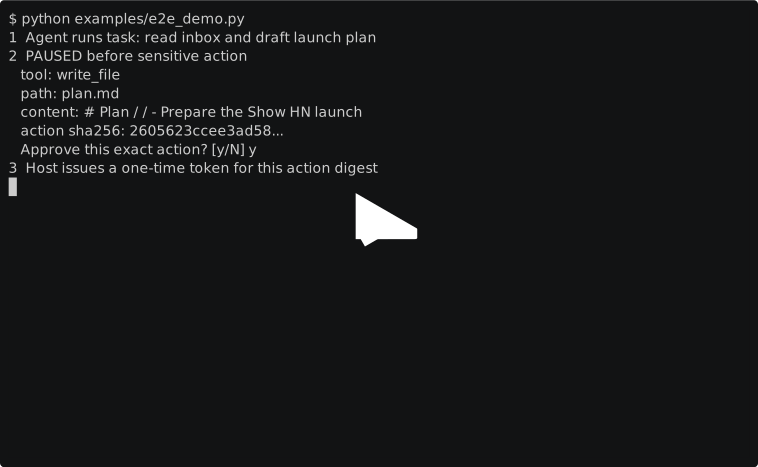
This is a real terminal capture. Its raw, replayable cast is checked into the repository.
Run it locally
Requires Python 3.11+ and Git. Run these commands in a terminal from a clean checkout. The deterministic demo needs no API key or live account. The current runtime requires POSIX file descriptors and audit locking (Linux or macOS). Native Windows is not supported; Windows users need a Linux environment such as WSL. The Windows path remains under verification in issue #30.
git clone https://github.com/tahodev/openmuse.git
cd openmuse
python -m venv .venv
source .venv/bin/activate
python -m pip install -e '.[dev]'
python examples/e2e_demo.py
At Approve this exact action? [y/N], inspect the displayed tool, path and content, then type y to let the demo write its sample plan. It writes only inside .openmuse-demo/ (and replaces that demo folder on each run), not to an external service. Then verify the audit chain:
python examples/verify_audit.py
Expected result:
VERIFIED: 5 records form an intact hash chain
You should also see VERIFIED: approved action == executed action (...). If you answer N, nothing is written and there is no completed action to verify. Change any audited byte and verification fails. More credential-free paths are indexed in examples/.
Chat in your browser
After the install above, start a local web chat in another terminal from the repo root:
openmuse-chat --workspace .
Open http://127.0.0.1:8766 in your own browser. Without an API key it uses an offline demo planner, so you can try read README.md, then write notes/hello.txt: hi to see an approval card. The chat uses the directory passed to --workspace (here the repo root), so use a throwaway checkout for experiments. Stop the server with Ctrl+C. Export OPENAI_API_KEY (or pass --planner openai --model ... --base-url ... for any OpenAI-compatible endpoint) to chat with a real model.
Reads run immediately. Writes go through the same approval boundary as the CLI: the chat pauses, shows a host-rendered card with the exact tool, destination, and arguments, and runs the action once only after you click Approve exact action. Denied actions never run, a decision cannot be replayed, and planner output can never carry its own approval. Every step lands in .openmuse/web-chat-audit.jsonl.
The server binds to localhost only and is a reference app, not a hosted service.
The approval boundary
The planner and everything it reads are untrusted. Only the host can issue an approval, and that approval is bound to one exact action:
flowchart TD
    U([User])
    subgraph untrusted["Untrusted"]
        P["Planner (model)"]
        X["External content: pages, messages, files"]
    end
    subgraph host["Trusted host"]
        POL["Policy"]
        AUTH["Approval service"]
        VAULT["Secret service"]
        EXEC["Tool executor"]
        AUD["Hash-chained audit log"]
    end
    X -.-> P
    P -->|proposes one typed action| POL
    POL -->|sensitive action: ask| U
    U -->|approves this exact action| AUTH
    AUTH -->|one-time, expiring, action-bound token| EXEC
    POL -->|allow| EXEC
    VAULT -->|scoped secret at execution time| EXEC
    EXEC -->|typed result| P
    POL --> AUD
    AUTH --> AUD
    EXEC --> AUD
Channel -> durable Task -> Planner -> typed Action -> Policy/Approval -> Tool -> typed Result
See the architecture, threat model, and product foundation for the full boundary.
Use a real model
OpenAICompatiblePlanner supports OpenAI-compatible chat-completions endpoints. Use a test key and non-sensitive data while OpenMuse is alpha.
import os
from pathlib import Path

from openmuse.core import Agent
from openmuse.policy import Policy
from openmuse.providers import OpenAICompatiblePlanner
from openmuse.tools import ReadFile

agent = Agent([ReadFile(Path.cwd())], Policy(), Path(".openmuse/audit.jsonl"))
planner = OpenAICompatiblePlanner(api_key=os.environ["OPENAI_API_KEY"])
print(agent.run("Read README.md and stop", planner))
The deterministic demo remains the recommended first run because it is free and reproducible.
Project status
OpenMuse is an alpha security-primitives runtime and reproducible demo, not a production personal assistant. “Working” means implemented and covered by the current test suite, not independently audited or safe for unattended sensitive accounts.
| Area | Working now | Remaining production gate |
|---|---|---|
| Safety | Exact-action approvals, persistent single-use decisions, schema validation, SSRF-resistant fetch, redacted hash-chained audit, signed checkpoints | Publish checkpoints to an independent append-only store; complete independent security review |
| Runtime | Budgeted planner loop, durable tasks, timezone-aware atomic cron claims, narrowing subagents, resource-limited process worker, CI-validated locked-down container profile | Validate the chosen container or VM runtime in deployment; provide a production approval UI |
| Data and secrets | Verifiable memory, encrypted vault, OS-keyring master key, process-separated authenticated secret service | Add a hardware-backed master-key provider and deployment-specific key operations |
| Connectors | Credential-free simulations, read-only Gmail and Google Calendar, managed OAuth with revocation | Independently deploy the OAuth callback and add reviewed providers |
| Channels | Local web chat with in-browser exact-action approvals, in-process web adapter, and browser-worker policy envelope | Add authenticated hosted routes and validate isolated browser deployment |
Do not use OpenMuse with sensitive production accounts yet. Deployment guidance and open gates live in the roadmap, container profile, audit anchoring guide, approval service guide, and secret service guide.
The Python distribution is named openmuse-agent. Unlike Digger's deployable OpenMuse assistant, this project focuses on host-enforced approval, bounded execution, and verifiable local audit trails.
Independent project. Not affiliated with or endorsed by Meta. No Meta code, branding, or assets are used.
Contributing
See the extension cookbook, public API policy, scheduling semantics, CONTRIBUTING.md, governance, and code of conduct. Starter work is tracked with good first issue and help wanted labels.
License
MIT.
1 maintainer

Metadata
1 maintainer
Release files for openmuse-agent 0.4.0a0
For a detailed explanation of source distributions (sdists) and built distributions (wheels), please see the package formats documentation.
Source distribution (sdist)
| File | Size | Uploaded | |
|---|---|---|---|
| openmuse_agent-0.4.0a0.tar.gz | 171.7 kB | Details |
Built distribution (wheel)
| File | Interpreter | ABI | Platform | Reset |
|---|---|---|---|---|
| openmuse_agent-0.4.0a0-py3-none-any.whl | Python 3 | none | any | Details |
Total release size: 234.0 kB
Release files / openmuse_agent-0.4.0a0.tar.gz
| Download URL | openmuse_agent-0.4.0a0.tar.gz |
|---|---|
| Size | 171.7 kB |
| Tags | Source |
|
SHA-256 checksum How to use checksums |
e76dee649b62e4feb5a5798e35f03be4d8c2d93b229e308f3aa339c5fe4459d6
|
|
BLAKE2b-256 checksum How to use checksums |
f41082f27e4fd525d314aef59a8d1824097c9ebaaf6d00411ebddcdfe612e817
|
| Upload date | |
|
Uploaded using Trusted Publishing? What is trusted publishing? |
Yes |
| Uploaded via |
twine/7.0.0 CPython/3.13.14
|
Provenance
Provenance describes where a file came from. On PyPI, provenance is shared via attestations, which provide a verifiable record of the build or publishing details. View details, limitations and caveats.


PyPI Publish Attestation
PyPI verified that this artifact, at this checksum, originated from the publisher listed below.
Signed by GitHub Actions, verified by PyPI on Sep 30, 2026.
Transparency logRelease files / openmuse_agent-0.4.0a0-py3-none-any.whl
| Download URL | openmuse_agent-0.4.0a0-py3-none-any.whl |
|---|---|
| Size | 62.3 kB |
| Tags | Python 3 |
|
SHA-256 checksum How to use checksums |
2c6808ea275d4352559d4fa7a6c51191cc7e823f4467cdbf25eed1974be4cbfc
|
|
BLAKE2b-256 checksum How to use checksums |
82283986c0e4b63b8bff2743a7f45831f03875672fb3a26a41fc9983890ccf7d
|
| Upload date | |
|
Uploaded using Trusted Publishing? What is trusted publishing? |
Yes |
| Uploaded via |
twine/7.0.0 CPython/3.13.14
|
Provenance
Provenance describes where a file came from. On PyPI, provenance is shared via attestations, which provide a verifiable record of the build or publishing details. View details, limitations and caveats.
PyPI Publish Attestation
PyPI verified that this artifact, at this checksum, originated from the publisher listed below.
Signed by GitHub Actions, verified by PyPI on Sep 30, 2026.
Transparency log













