
OpenNEM Australian Energy Data


This project has been archived.
The maintainers of this project have marked this project as archived. No new releases are expected.
Project description
OpenNEM Energy Market Data Access
The OpenNEM project aims to make the wealth of public National Electricity Market (NEM) data more accessible to a wider audience.
This toolkit enables downloading, mirroring and accessing energy data from various networks
Project homepage at https://opennem.org.au
Available on Docker at https://hub.docker.com/r/opennem/opennem
Currently supports:
- Australian NEM: https://www.nemweb.com.au/
- West Australia Energy Market: http://data.wa.aemo.com.au/
Requirements
- Python 3.7+ (see
.python-versionwithpyenv) - Docker and
docker-composeif you want to run the local dev stack
Quickstart
With poetry:
$ poetry install
$ source .venv/bin/activate
$ ./init.sh
With pip + venv:
$ pip -m venv .venv
$ pip install -r requirements.txt
$ source .venv/bin/activate
$ ./init.sh
Install
You can install this project with python pip:
$ pip install opennem
Or alternatively with docker:
$ docker pull opennem/opennem
Bundled with sqlite support. Other database drivers are optional and not installed by default. Install a supported database driver:
Postgres:
$ pip install psycopg2
Install Extras
The package contains extra modules that can be installed:
$ poetry install -E postgres
The list of extras are:
postgres- Postgres database driversserver- API server
Usage
List the crawlers
$ scrapy list
Crawl
$ scrapy crawl au.nem.current.dispatch_scada
Development
This project uses the new pyproject.toml project and build specification file. To make use of it use the poetry tool which can be installed on Windows, MacOS and Linux:
https://python-poetry.org/docs/
Installation instructions for Poetry are at:
https://python-poetry.org/docs/#installation
By default poetry will install virtual environments in your home metadata directory. A good alternative is to install the venv locally for each project with the following setting:
$ poetry config virtualenvs.in-project true
This will create the virtual environment within the project folder in a folder called .venv. This folder is ignored by git by default.
Setting up a virtual environment and installing requiements using Poetry:
$ poetry install
To activate the virtual environment either run:
$ poetry shell
Or you can just activate the standard venv
$ source .venv/bin/activate
Settings are read from environment variables. Environment variables can be read from a .env file in the root of the folder. Setup the environment by copying the .env.sample file to .env. The defaults in the sample file map to the settings in docker-compose.yml
There is a docker-compose file that will bring a local database:
$ docker-compose up -d
Bring up the database migrations using alembic:
$ alembic upgrade head
Run scrapy in the root folder for options:
$ scrapy
The opennem cli interface provides other options and settings:
$ opennem -h
Settings for Visual Studio Code are stored in .vscode. Code is kept formatted and linted using pylint, black and isort with settings defined in pyproject.toml
Testing
Tests are in tests/
Run tests with:
$ pytest
Run background test watcher with
$ ptw
Build Release
The script build-release.sh will tag a new release, build the docker image, tag the git version, push to GitHub and push the latest
release to PyPi
Architecture overview
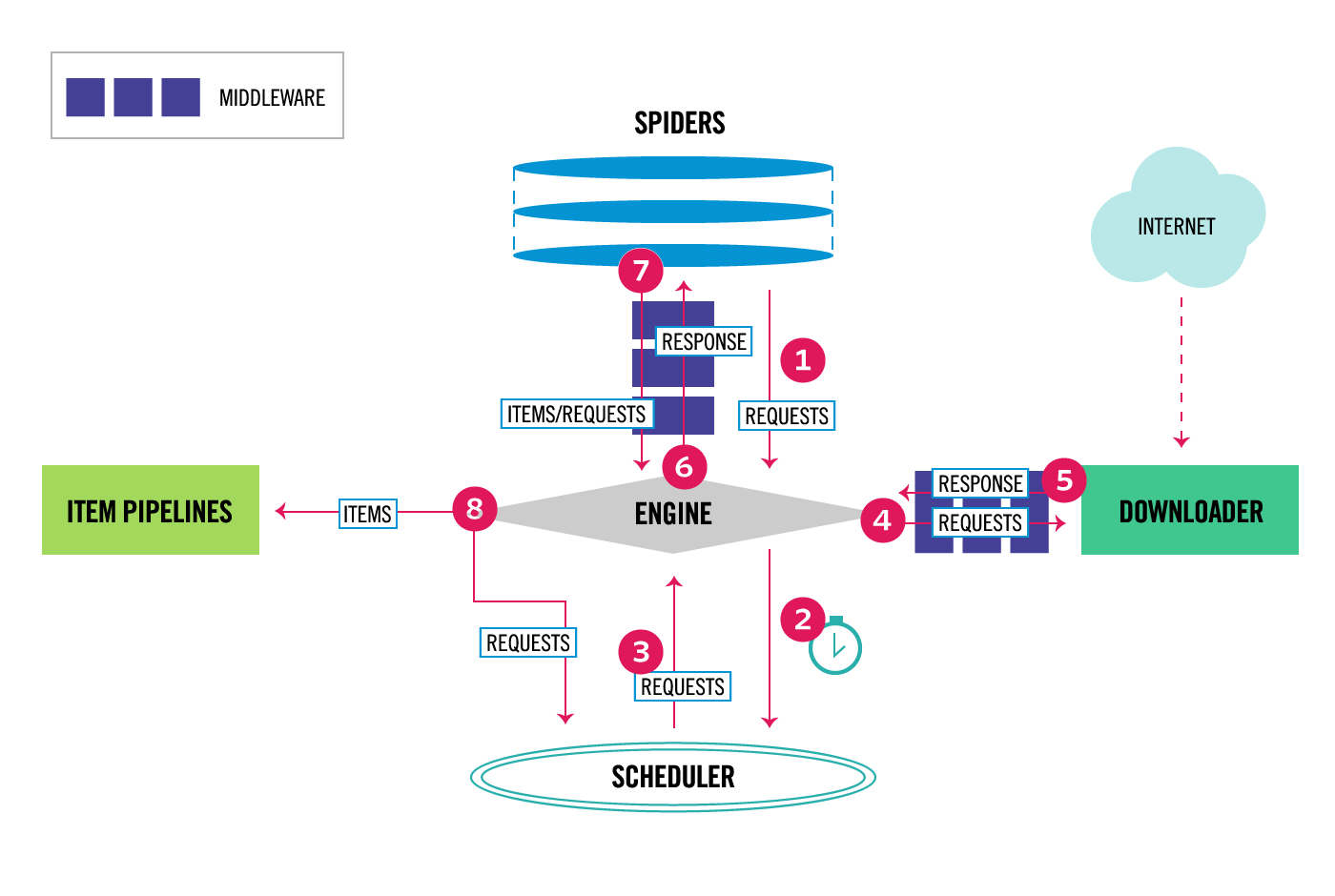
This project uses Scrapy to obtain data from supported energy markets and SQLAlchemy to store data, and Alembic for database migrations. Database storage has been tested with sqlite, postgres and mysql.
Overview of scrapy architecture:
Code Navigation
- Spider definitions in
opennem/spiders - Processing pipelines for crawls in
opennem/pipelines - Database models for supported energy markets are stored in
opennem/db/models
Deploy Crawlers
You can deploy the crawlers to the scrapyd server with:
$ scrapyd-deploy
If you don't have that command and it isn't available install it with:
$ pip install scrapyd-client
Which installs the scrapyd-client tools. Project settings are read from scrapy.cfg
Release history Release notifications | RSS feed


Download files
Download the file for your platform. If you're not sure which to choose, learn more about installing packages.
Source Distribution
Built Distribution
Filter files by name, interpreter, ABI, and platform.
If you're not sure about the file name format, learn more about wheel file names.
Copy a direct link to the current filters
File details
Details for the file opennem-3.6.0b37.tar.gz.
File metadata
- Download URL: opennem-3.6.0b37.tar.gz
- Upload date:
- Size: 1.6 MB
- Tags: Source
- Uploaded using Trusted Publishing? No
- Uploaded via: twine/3.3.0 pkginfo/1.7.0 requests/2.25.1 setuptools/50.3.1 requests-toolbelt/0.9.1 tqdm/4.57.0 CPython/3.8.5
File hashes
| Algorithm | Hash digest | |
|---|---|---|
| SHA256 |
aaf2a31e7f77935bfbac4f4bd9972cd8a756b25f228f8dd4e8f255ba9e70b477
|
|
| MD5 |
d8101ed553c8508d732e89deb8b5c984
|
|
| BLAKE2b-256 |
1c558dc1c3a6baa02f1492a28450db5b49a995a1fd3a3c02900523fd68586b98
|
File details
Details for the file opennem-3.6.0b37-py3-none-any.whl.
File metadata
- Download URL: opennem-3.6.0b37-py3-none-any.whl
- Upload date:
- Size: 1.7 MB
- Tags: Python 3
- Uploaded using Trusted Publishing? No
- Uploaded via: twine/3.3.0 pkginfo/1.7.0 requests/2.25.1 setuptools/50.3.1 requests-toolbelt/0.9.1 tqdm/4.57.0 CPython/3.8.5
File hashes
| Algorithm | Hash digest | |
|---|---|---|
| SHA256 |
1faf9f9ef9eb42f14494fb77bee842dadb7d3e430079c37a4ce6cc59a9ee1a84
|
|
| MD5 |
b7077496f772f61aef2084f9182a7e9b
|
|
| BLAKE2b-256 |
a0b65b78005aaef6a1b2f2ff1e4298168150125d3f1b4af1963ccd49ee87f1fe
|






