
mcp-name: io.github.OpenOSINT/openosint
OpenOSINT
The OSINT toolkit for AI agents: Agent Skill, MCP server and CLI. Passive by default, no API keys needed to start, and every finding cites the tool call that produced it.







A real Claude Code session, nothing mocked: install the plugin and run a passive recon on example.com. Sharper MP4.
Quickstart
Needs uv. No API keys for the default flow.
Claude Code plugin (skills plus a passive MCP server):
/plugin marketplace add OpenOSINT/OpenOSINT
/plugin install openosint@openosint
/openosint:osint example.com
Any agent (Codex, Gemini CLI, Cursor and other Agent Skills clients):
npx skills add OpenOSINT/OpenOSINT
MCP server or pip (other clients):
claude mcp add openosint -- uvx --from openosint openosint-mcp
pip install openosint && openosint exposure example.com
What you can do
Real output, captured 2026-11-04 on v2.37.0 and trimmed. None of these commands needs an API key or an AI provider.
$ openosint exposure example.com
Grade: B  Score: 88/100
Checks:  email OK [passive] · registration OK [passive] · tls OK [touches target] · http_headers OK [touches target]
  [LOW] DMARC has no aggregate report address (dmarc_no_rua)
  [LOW] Strict-Transport-Security header missing (hsts_missing)
  [INFO] Domain registered 31.2 years ago (domain_age)

$ openosint dns example.com
[DNS] NS: elliott.ns.cloudflare.com., hera.ns.cloudflare.com.
[DNS] SPF: v=spf1 -all
[DNS] DMARC: "v=DMARC1;p=reject;sp=reject;adkim=s;aspf=s"
[DNS] DKIM not checked: selector probing is enumeration (needs --allow-active).

$ openosint rdap example.com
[+] Registrar: RESERVED-Internet Assigned Numbers Authority
[+] Registered: 1995-08-14T04:00:00Z
[+] Expires: 2027-08-13T04:00:00Z
[+] Name servers: elliott.ns.cloudflare.com, hera.ns.cloudflare.com

$ openosint ip 8.8.8.8
[+] Hostname: dns.google
[+] Org: AS15169 Google LLC
[+] City: Mountain View

$ openosint gdelt example.com
No geolocated coverage found for 'example.com'. Coverage: the last 15 min (...)
$ openosint gdelt ukraine
[+] White House, District Of Columbia, United States (38.8951, -77.0364) — 1 article(s)
The same commands are what the skill runs for an agent. All of them are in the CLI reference.
Why OpenOSINT
- Real tool executions. Tools are Python code; only their actual output reaches the model.
- Provenance. Every finding is shown with the tool call that produced it. AI summaries are leads to verify, not proof.
- Passive by default, with noise labels. Tools that touch the target or are noisy are not even offered to the agent until you opt in.
- Works with no keys.
exposure,dns,rdap,whois,ip,gdeltanddorksneed no account.
| Prompt-only OSINT skills | SpiderFoot | OpenOSINT | |
|---|---|---|---|
| What runs the lookups | Nothing: the skill is instructions, and the agent improvises | Its own 200+ modules | Python tools shipped with it |
| Breadth | Whatever the agent can reach | Much broader: 200+ modules and a correlation engine, per its README | A focused tool set |
| Built to be driven by an agent | Yes, that is the format | Web UI or CLI, per its README | Agent Skill, Claude Code plugin, MCP server, CLI and web UI |
| Passive/noisy labels, off by default | No | Not claimed here | Yes, per tool |
| License | Varies | MIT | MIT |
SpiderFoot is the better choice when you want a large standalone scanner. OpenOSINT is for agents that need a small set of real, labelled tools.
Tools
Level is the noise label: passive tools are on by default; anything else needs --allow-active. Per-tool docs: openosint.tech/tools.
| Tool | Source | Level | Key needed |
|---|---|---|---|
search_dns |
dnspython (built-in) | passive | No |
search_rdap |
RDAP (IANA bootstrap) | passive | No |
search_whois |
python-whois | passive | No |
search_ip |
ipinfo.io | passive | Optional |
search_ip2location |
IP2Location API (sponsored) | passive | Required |
search_gdelt_geo |
GDELT 15-minute GKG feed | passive | No |
generate_dorks |
built-in | passive | No |
search_paste |
psbdmp.ws | passive | No |
search_github |
GitHub REST API | passive | Optional |
search_breach |
HaveIBeenPwned API | passive | Required |
search_shodan |
Shodan API | passive | Required |
search_censys |
Censys API | passive | Required |
search_virustotal |
VirusTotal API | passive | Required |
search_abuseipdb |
AbuseIPDB v2 API | passive | Required |
search_dorks_live |
Bright Data SERP API¹ | passive | Required |
search_footprint |
Bright Data SERP API¹ | passive | Required |
scrape_url |
Bright Data Web Unlocker¹ | touches target | Required |
search_username |
sherlock | noisy | No |
search_email |
holehe | noisy | No |
search_domain |
sublist3r | noisy | No |
search_phone |
phoneinfoga | unverified | No |
Sherlock, holehe, sublist3r and phoneinfoga are wrapped as local binaries; install them yourself and enable active tools to use them.
Setting up the three Bright Data tools: Using OpenOSINT with Bright Data.
Passive by default
Agents and MCP clients are only offered tools that query third-party data sources or compute locally. Anything that touches the target or sends many requests from your IP is off until you opt in, and is not listed in an MCP client's tools/list at all.
| Level | Meaning |
|---|---|
| passive | Queries third-party sources or computes locally; nothing is sent to the target's own infrastructure (standard DNS goes through your resolver) |
| touches target | The target's infrastructure can see the request |
| noisy | High request volume; expect rate limits, blocks and alerts |
| unverified | Network behavior not yet confirmed by a traffic capture; treated as non-passive |
| inherits | A fan-out tool that only runs what the current mode allows |
Enable active tools with openosint --allow-active …, OPENOSINT_ALLOW_ACTIVE=1, Web UI Settings (loopback only), or openosint-mcp --allow-active. Passive is not private: every service you query sees the query. Per-tool "what it sends" table and the tool-call cap: Safety.
Go deeper
Web UI + globe
openosint web starts a local browser app with streaming chat, tool cards, a news globe and a graph view. Docs.

An agent investigation landing live on the globe; click a point to pivot. Sharper MP4 · Live demo (bring your own key, no signup).
Entity graph
A FollowTheMoney entity graph with statement-level provenance and a human review queue for same_as candidates. Docs.
External exposure report (beta)
openosint exposure example.com grades email authentication, TLS, registration and security headers A to F. Docs.
Installation
pip install openosint, or run without installing: uvx openosint web. Python 3.10+. Install guide.
MCP Server
Works in Claude Desktop, Claude Code, Cursor and any MCP client: uvx --from openosint openosint-mcp. Client configs.
Configuration
Keys go in the web UI Settings, ~/.openosint/config.env or the environment; the app starts with none. All variables · CLI reference · Limitations.
Docker
docker compose up --build, then open http://localhost:8080. Docker notes.
Moved from this README: per-tool details are at openosint.tech/tools; CLI flags (old
#cli-reference) at /docs/cli; limitations (#limitations) at /docs/troubleshooting; integrations (#integrations) at /tools; the graph module (#graph-module-optional) at /docs/entity-graph.
Hosted versions
Built on this engine. The open-source project stays free and MIT-licensed.
- Monitor: scheduled external checks of your domain, with an email when something gets worse. Free for one domain.
- Diligence: due-diligence signals for UK companies and LEI holders, from official registries, each with its source.
- Cloud: hosted REST and MCP API for IP and domain infrastructure intelligence (invite-only).
Sponsors
Featured Integrations

IP2Location.io — powers search_ip2location · Integration guide
Enhanced IP geolocation, ISP, VPN/Proxy/Tor, and datacenter detection

TestMu AI (formerly LambdaTest) is an AI-native testing cloud platform built for modern engineering teams. It covers everything from autonomous test creation and fast execution to testing AI agents, chatbots and voice assistants.
Open: Breach / Compromised-Credential Data · Email / Identity Lookup · Residential Proxies — see SPONSORSHIP.md.
Sponsor on Open Collective · tiers in SPONSORSHIP.md · commercial license and support: COMMERCIAL.md.
Contributing
Issues and pull requests are welcome. See CONTRIBUTING.md (workflow, demo regeneration, conventions) and read DISCLAIMER.md first. Maintainer: Tommaso Bertocchi · @openosint_oss · commercial@openosint.tech. Contributors: @consocio (#6).
License
MIT. See LICENSE. For authorized security research only; see DISCLAIMER.md.
¹ Bright Data links in this README are affiliate/referral links: OpenOSINT earns a commission if you sign up through them, at no extra cost to you.
OpenOSINT v2.38.0 — November 2026
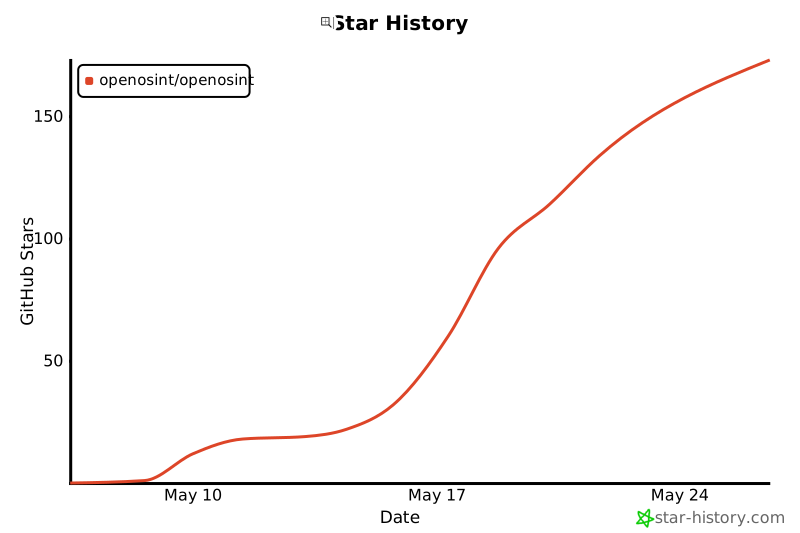
Star History
1 maintainer

Metadata
1 maintainer
Release files for openosint 2.38.0
For a detailed explanation of source distributions (sdists) and built distributions (wheels), please see the package formats documentation.
Source distribution (sdist)
| File | Size | Uploaded | Provenance | Actions |
|---|---|---|---|---|
| openosint-2.38.0.tar.gz | 1.1 MB | With provenance | Details for openosint-2.38.0.tar.gz |
Built distribution (wheel)
| File | Interpreter | ABI | Platform | Actions Reset |
|---|---|---|---|---|
| openosint-2.38.0-py3-none-any.whl | Python 3 | none | any | Details for openosint-2.38.0-py3-none-any.whl |
Total release size: 2.1 MB
Release files / openosint-2.38.0.tar.gz
| Download URL | openosint-2.38.0.tar.gz |
|---|---|
| Size | 1.1 MB |
| Tags | Source |
|
SHA-256 checksum How to use checksums |
12d1b4d8a08ea4a6dd4b02b1dc73f4e227d41c9bfafae6de5e6cd4277e7ec003
|
|
BLAKE2b-256 checksum How to use checksums |
ccb6a645a071e53a3634e815d2d9c7d19233afcd8fcf09a13b34ace44401570e
|
| Upload date | |
|
Uploaded using Trusted Publishing? What is trusted publishing? |
Yes |
| Uploaded via |
twine/7.0.0 CPython/3.13.16
|
Provenance
Provenance describes where a file came from. On PyPI, provenance is shared via attestations, which provide a verifiable record of the build or publishing details. View details, limitations and caveats.


PyPI Publish Attestation
PyPI verified that this artifact, at this checksum, originated from the publisher listed below.
Signed by GitHub Actions, verified by PyPI on Nov 5, 2026.
Transparency logRelease files / openosint-2.38.0-py3-none-any.whl
| Download URL | openosint-2.38.0-py3-none-any.whl |
|---|---|
| Size | 997.6 kB |
| Tags | Python 3 |
|
SHA-256 checksum How to use checksums |
26bcc12ee8a0c108ddd42a7e2a71fe4adf3fbe2e496665e9a4f7d89049461461
|
|
BLAKE2b-256 checksum How to use checksums |
2b63355f9bd3821dd04b619a25c94cd0ff96f6c2152f09eaad3b1ce56b9eb6a8
|
| Upload date | |
|
Uploaded using Trusted Publishing? What is trusted publishing? |
Yes |
| Uploaded via |
twine/7.0.0 CPython/3.13.16
|
Provenance
Provenance describes where a file came from. On PyPI, provenance is shared via attestations, which provide a verifiable record of the build or publishing details. View details, limitations and caveats.
PyPI Publish Attestation
PyPI verified that this artifact, at this checksum, originated from the publisher listed below.
Signed by GitHub Actions, verified by PyPI on Nov 5, 2026.
Transparency logSecurity for openosint 2.38.0
Provenance
Provenance describes where a file came from. On PyPI, provenance is shared via attestations, which provide a verifiable record of the build or publishing details. View details, limitations and caveats.
Full provenance
All 2 files in this release have been uploaded with provenance metadata.
Attestation for openosint-2.38.0.tar.gz
PyPI Publish Attestation
PyPI verified that this artifact, at this checksum, originated from the publisher listed below.
Signed by GitHub Actions, verified by PyPI on Nov 5, 2026.
Transparency logA note on package security
PyPI is a repository for distributing packages, not a service for auditing them. While third-party security researchers and our staff do their best to detect and remove malicious packages, PyPI cannot guarantee the quality, security or suitability of any given package.
To learn more about protecting yourself from malicious actors, visit our package security documentation.














