
openpinescript
📖 Documentation and tutorial · ▶ Zeal Terminal: try it in your browser · npm engine · GitHub
Want to see your script draw on a chart? Zeal Terminal runs this same engine in your browser, in open beta: paste a Pine Script, press apply, and it draws. Nothing to install and no CSV to find.
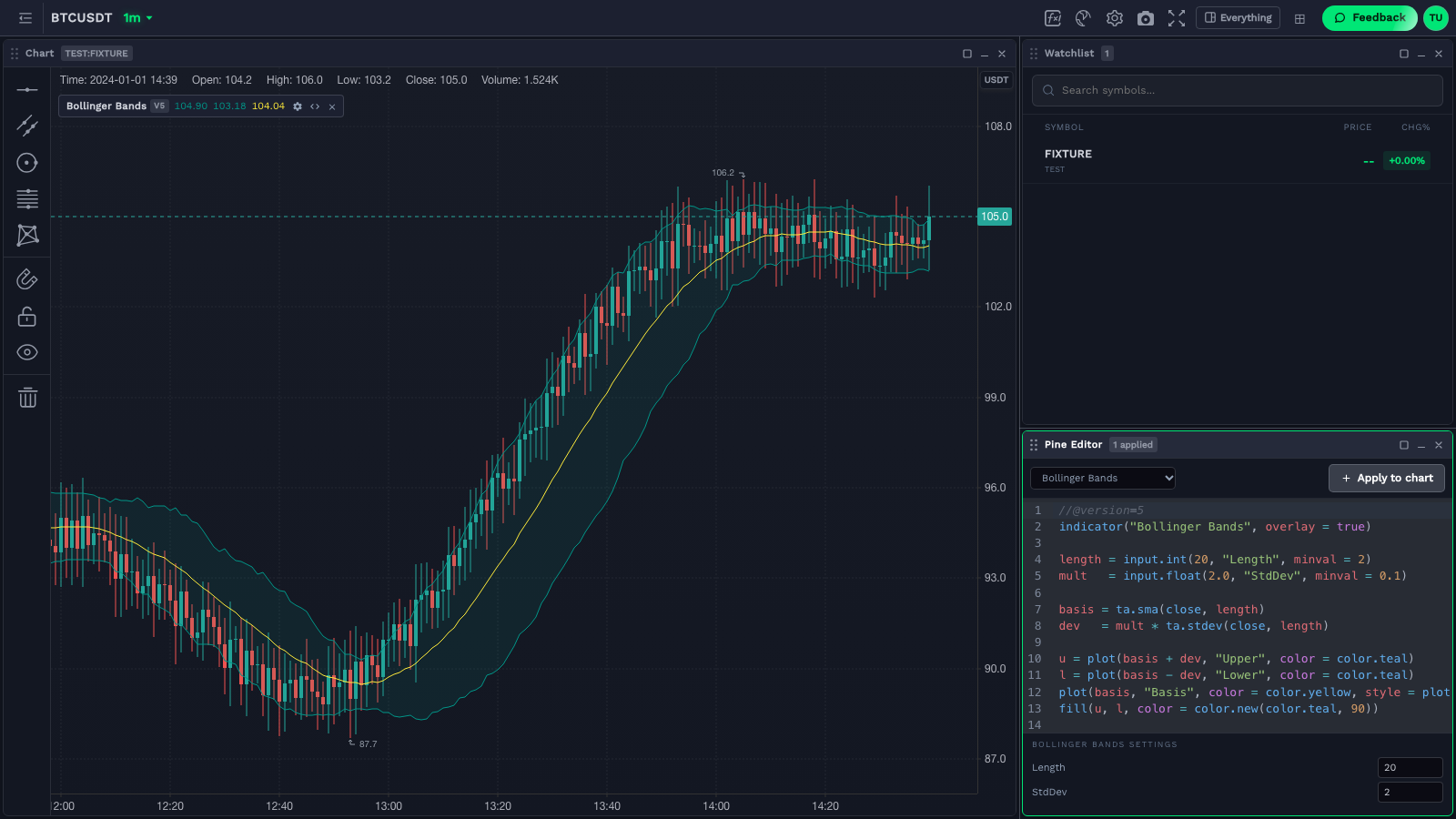
A free, open-source TradingView alternative engine for Python: run TradingView Pine Script (v1 to v6) locally and offline. It compiles your script to JavaScript and runs it on your own OHLCV candles: indicators, plots and strategy backtests, with no TradingView account and no network.
This package is a thin Python wrapper over the openpinescript npm engine. Its version always matches the engine release it bundles (openpinescript 0.1.1 bundles engine 0.1.1; a Python-only fix is released as 0.1.1.postN). Node.js is bundled too (through nodejs-wheel-binaries), so you do not need Node or npm installed.
pip install openpinescript
pip install "openpinescript[pandas]"   # to pass pandas DataFrames
Requires Python 3.9 or newer. Docs for the engine, the Pine features it supports and the full CLI reference: https://be-thomas.github.io/OpenPineScript/
Command line
The openpinescript command passes every argument to the engine CLI and gives the same stdout, stderr and exit code as npx openpinescript.
openpinescript sma_cross.pine --data sample.csv --out-dir results
Compiling: sma_cross.pine...
Pine Script: v5
Running backtest: 150 bars...
✔ Done.
✔ Chart    → results/chart.csv
✔ Trades   → results/trades.csv  (3 trades)
✔ Summary  → results/summary.json

=== sma_cross.pine — Summary ===
Bars processed : 150
Plots recorded : 2

Performance:
  Net Profit         $-279.00 (-0.28%)
  Total Trades       3
  Win Rate           33.3%  (1W / 2L)
  Profit Factor      0.179
  Max Drawdown       0.34%
  Avg Win / Avg Loss $61.00 / $170.00

Script Inputs:
  input_0  "Fast Length"  [integer]  = 9 (default)
  input_1  "Slow Length"  [integer]  = 21 (default)
  Tip: override with --input input_0=<value>
The CSV has one bar per row, oldest first, with columns time,open,high,low,close,volume (ISO 8601 or YYYY-MM-DD times). With no --out-* flag the result is printed to stdout as JSON. See the CLI guide for every flag.
Python
import openpinescript

result = openpinescript.run("sma_cross.pine", "sample.csv", inputs={"input_0": 5, "input_1": 30})
print(result["bars_processed"])   # 150
print(result["performance"])
150
{'net_profit': -1396, 'net_profit_percent': -1.4, 'gross_profit': 0, 'gross_loss': 1396, 'total_closed_trades': 3, 'winning_trades': 0, 'losing_trades': 3, 'win_rate': 0, 'avg_win': 0, 'avg_loss': 465.33, 'profit_factor': 0, 'max_drawdown_percent': 1.4}
run(script, data, *, inputs=None, out_dir=None, extra_args=None, timeout=None) returns the CLI's JSON result as a dict (script, bars_processed, inputs, performance; performance is None for an indicator).
scriptis a path to a.pinefile, or Pine source text.datais a CSV path or a pandas DataFrame withtime,open,high,low,closeand (optionally)volumecolumns; aDatetimeIndexworks in place oftime.inputs={"input_0": 5}overridesinput()calls (--input input_0=5). Booleans are sent as 1 or 0.out_diralso writeschart.csv,trades.csvandsummary.jsonthere and adds a"files"list to the result.extra_argsare more CLI flags, andtimeoutis in seconds.
import pandas as pd, openpinescript

df = pd.read_csv("sample.csv", parse_dates=["time"])
openpinescript.run('//@version=5\nindicator("x")\nplot(close)\n', df)["bars_processed"]   # 150
A failing run raises OpenPineScriptError, with .returncode and .stderr:
try:
    openpinescript.run("broken.pine", "sample.csv")
except openpinescript.OpenPineScriptError as e:
    print(e.returncode)   # 1
    print(e.stderr)
1
Compiling: broken.pine...
Transpilation failed: Pine Script v5: parsing failed with 1 error(s)
  [Line 4:0] The script ends in the middle of a statement at line 3 — was it pasted completely? (missing ')' at '<EOF>')
openpinescript.__version__ is the package version and openpinescript.engine_version() the bundled engine version.
Notes
- The engine, not this wrapper, defines behaviour:
openpinescript --helpprints usage to stdout and exits 0; a missing script or--dataprints usage to stderr and exits 1, exactly likenpx openpinescript. - Set
OPENPINESCRIPT_NODE=/path/to/nodeto use a different Node (20 or newer) than the bundled one.
License
GPL-3.0-or-later, the same as the engine.
1 maintainer

Metadata
1 maintainer
Release files for openpinescript 0.2.1
For a detailed explanation of source distributions (sdists) and built distributions (wheels), please see the package formats documentation.
Source distribution (sdist)
| File | Size | Uploaded | Provenance | Actions |
|---|---|---|---|---|
| openpinescript-0.2.1.tar.gz | 2.4 MB | Without provenance | Details for openpinescript-0.2.1.tar.gz |
Built distribution (wheel)
| File | Interpreter | ABI | Platform | Actions Reset |
|---|---|---|---|---|
| openpinescript-0.2.1-py3-none-any.whl | Python 3 | none | any | Details for openpinescript-0.2.1-py3-none-any.whl |
Total release size: 5.4 MB
Release files / openpinescript-0.2.1.tar.gz
| Download URL | openpinescript-0.2.1.tar.gz |
|---|---|
| Size | 2.4 MB |
| Tags | Source |
|
SHA-256 checksum How to use checksums |
149449bdffa323171fd02af02aa196f4ad4a3ca9923de0ac85441bf390cf13ea
|
|
BLAKE2b-256 checksum How to use checksums |
4f5d7beb419d4e66bb011161bd9f15cc30af28c14d5c0b4f6595b4ba78c0d637
|
| Upload date | |
|
Uploaded using Trusted Publishing? What is trusted publishing? |
No |
| Uploaded via |
twine/7.0.0 CPython/3.14.7
|
Release files / openpinescript-0.2.1-py3-none-any.whl
| Download URL | openpinescript-0.2.1-py3-none-any.whl |
|---|---|
| Size | 2.9 MB |
| Tags | Python 3 |
|
SHA-256 checksum How to use checksums |
17716824721b3b2b26f0012588cf61ac619b473b60a608ef243cd0d05e22c69f
|
|
BLAKE2b-256 checksum How to use checksums |
5e825dc581ef595fc0205a1c2285dca4a381f6dae48ce4a013816517cd830975
|
| Upload date | |
|
Uploaded using Trusted Publishing? What is trusted publishing? |
No |
| Uploaded via |
twine/7.0.0 CPython/3.14.7
|
Security for openpinescript 0.2.1
Provenance
Provenance describes where a file came from. On PyPI, provenance is shared via attestations, which provide a verifiable record of the build or publishing details. View details, limitations and caveats.
No provenance found
None of the files in this release were uploaded with provenance metadata.
A note on package security
PyPI is a repository for distributing packages, not a service for auditing them. While third-party security researchers and our staff do their best to detect and remove malicious packages, PyPI cannot guarantee the quality, security or suitability of any given package.
To learn more about protecting yourself from malicious actors, visit our package security documentation.














