
The OpenPipe Agent Reinforcement Training (ART) library


Project description

Agent Reinforcement Trainer
Train multi-step agents for real-world tasks using GRPO.





🚀 W&B Training: Serverless RL
W&B Training (Serverless RL) is the first publicly available service for flexibly training models with reinforcement learning. It manages your training and inference infrastructure automatically, letting you focus on defining your data, environment and reward function—leading to faster feedback cycles, lower costs, and far less DevOps.
✨ Key Benefits:
- 40% lower cost - Multiplexing on shared production-grade inference cluster
- 28% faster training - Scale to 2000+ concurrent requests across many GPUs
- Zero infra headaches - Fully managed infrastructure that stays healthy
- Instant deployment - Every checkpoint instantly available via W&B Inference
# Before: Hours of GPU setup and infra management
# RuntimeError: CUDA error: out of memory 😢

# After: Serverless RL with instant feedback
from art.serverless.backend import ServerlessBackend

model = art.TrainableModel(
  project="voice-agent",
  name="agent-001",
  base_model="OpenPipe/Qwen3-14B-Instruct"
)

backend = ServerlessBackend(
    api_key="your_wandb_api_key"
)
model.register(backend)
# Edit and iterate in minutes, not hours!
📖 Learn more about W&B Training →
ART Overview
ART is an open-source RL framework that improves agent reliability by allowing LLMs to learn from experience. ART provides an ergonomic harness for integrating GRPO into any python application. For a quick hands-on introduction, run one of the notebooks below. When you're ready to learn more, check out the docs.
📒 Notebooks
| Agent Task | Example Notebook | Description | Comparative Performance |
|---|---|---|---|
| ART•E [Serverless] | 🏋️ Train agent | Qwen3 14B learns to search emails using RULER | 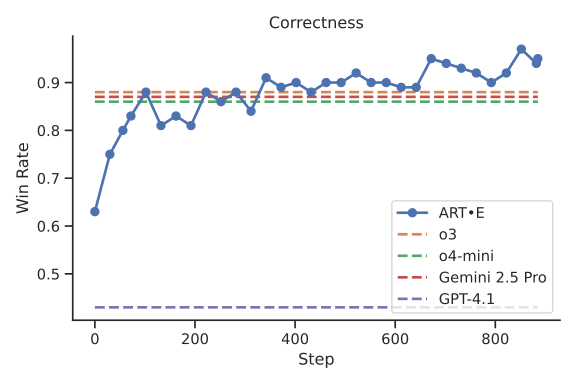 benchmarks benchmarks |
| 2048 [Serverless] | 🏋️ Train agent | Qwen3 14B learns to play 2048 | 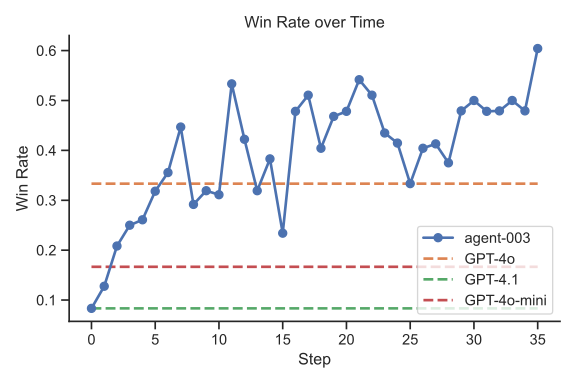 benchmarks benchmarks |
| ART•E LangGraph | 🏋️ Train agent | Qwen 2.5 7B learns to search emails using LangGraph | [Link coming soon] |
| MCP•RL | 🏋️ Train agent | Qwen 2.5 3B masters the NWS MCP server | [Link coming soon] |
| Temporal Clue | 🏋️ Train agent | Qwen 2.5 7B learns to solve Temporal Clue | [Link coming soon] |
| Tic Tac Toe | 🏋️ Train agent | Qwen 2.5 3B learns to play Tic Tac Toe | 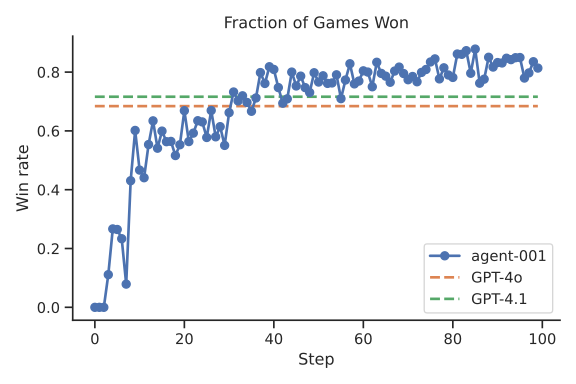 benchmarks benchmarks |
| Codenames | 🏋️ Train agent | Qwen 2.5 3B learns to play Codenames | 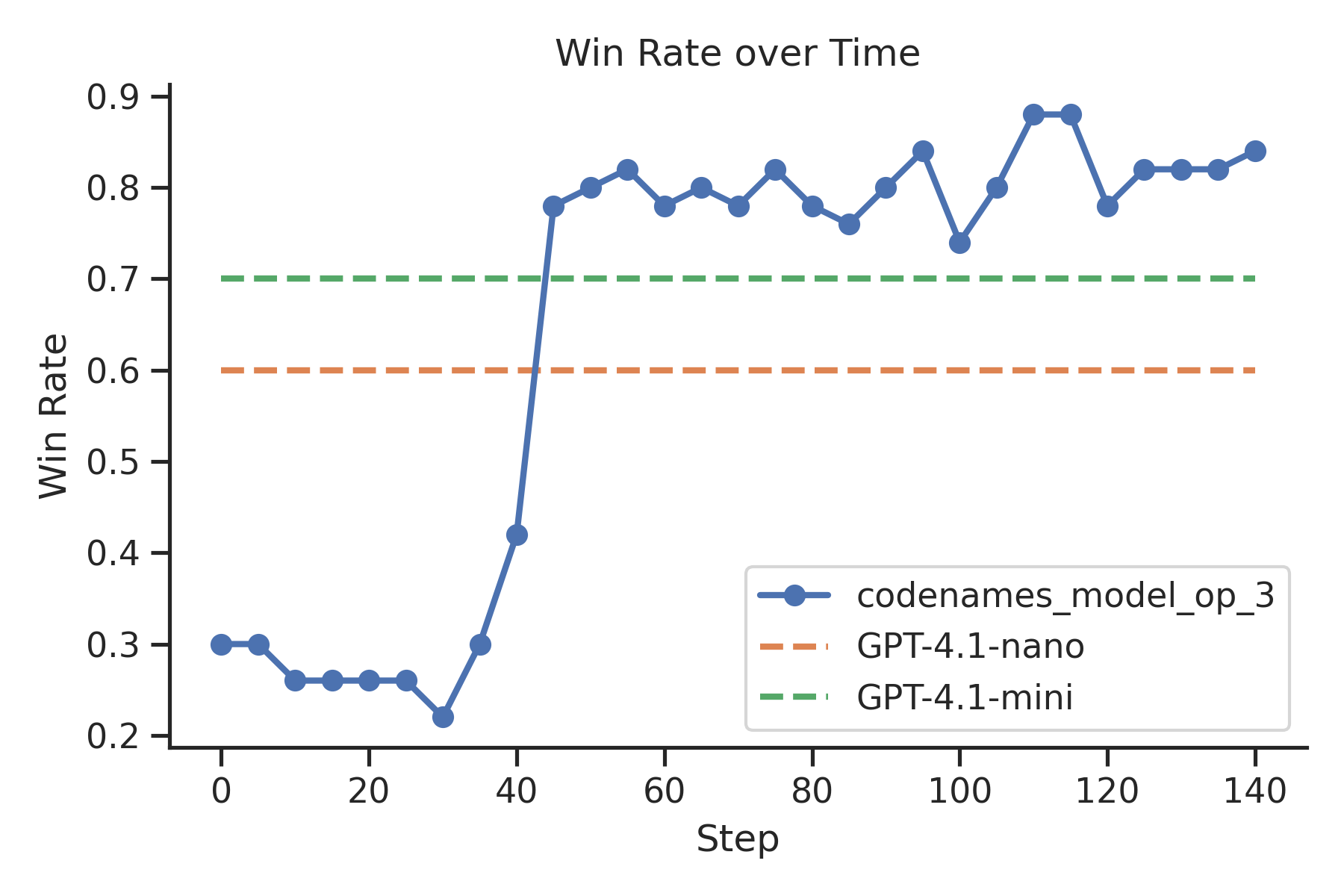 benchmarks benchmarks |
| AutoRL [RULER] | 🏋️ Train agent | Train Qwen 2.5 7B to master any task | [Link coming soon] |
📰 ART News
Explore our latest research and updates on building SOTA agents.
- 🗞️ ART now integrates seamlessly with LangGraph - Train your LangGraph agents with reinforcement learning for smarter multi-step reasoning and improved tool usage.
- 🗞️ MCP•RL: Teach Your Model to Master Any MCP Server - Automatically train models to effectively use MCP server tools through reinforcement learning.
- 🗞️ AutoRL: Zero-Data Training for Any Task - Train custom AI models without labeled data using automatic input generation and RULER evaluation.
- 🗞️ RULER: Easy Mode for RL Rewards is now available for automatic reward generation in reinforcement learning.
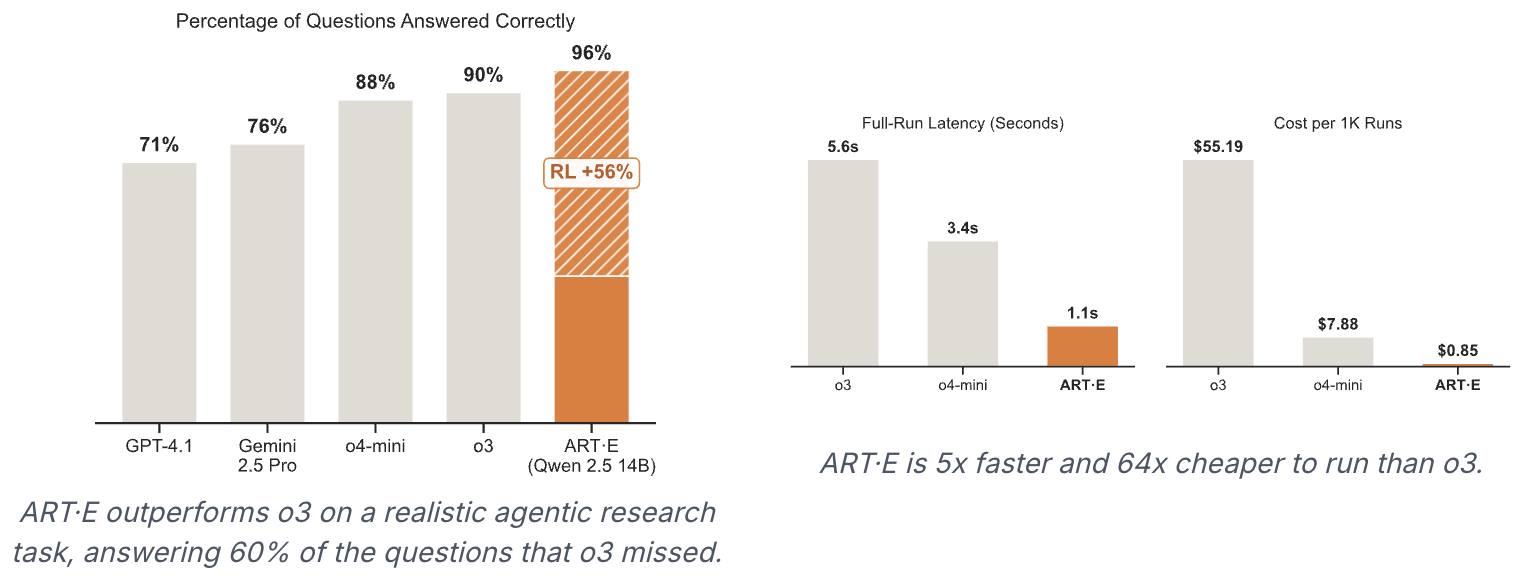
- 🗞️ ART·E: How We Built an Email Research Agent That Beats o3 demonstrates a Qwen 2.5 14B email agent outperforming OpenAI's o3.
- 🗞️ ART Trainer: A New RL Trainer for Agents enables easy training of LLM-based agents using GRPO.
Why ART?
- ART provides convenient wrappers for introducing RL training into existing applications. We abstract the training server into a modular service that your code doesn't need to interface with.
- Train from anywhere. Run the ART client on your laptop and let the ART server kick off an ephemeral GPU-enabled environment, or run on a local GPU.
- Integrations with hosted platforms like W&B, Langfuse, and OpenPipe provide flexible observability and simplify debugging.
- ART is customizable with intelligent defaults. You can configure training parameters and inference engine configurations to meet specific needs, or take advantage of the defaults, which have been optimized for training efficiency and stability.
Installation
ART agents can be trained from any client machine that runs python. To add to an existing project, run this command:
pip install openpipe-art
🤖 ART•E Agent
Curious about how to use ART for a real-world task? Check out the ART•E Agent blog post, where we detail how we trained Qwen 2.5 14B to beat o3 at email retrieval!
🔁 Training Loop Overview
ART's functionality is divided into a client and a server. The OpenAI-compatible client is responsible for interfacing between ART and your codebase. Using the client, you can pass messages and get completions from your LLM as it improves. The server runs independently on any machine with a GPU. It abstracts away the complexity of the inference and training portions of the RL loop while allowing for some custom configuration. An outline of the training loop is shown below:
-
Inference
- Your code uses the ART client to perform an agentic workflow (usually executing several rollouts in parallel to gather data faster).
- Completion requests are routed to the ART server, which runs the model's latest LoRA in vLLM.
- As the agent executes, each
system,user, andassistantmessage is stored in a Trajectory. - When a rollout finishes, your code assigns a
rewardto its Trajectory, indicating the performance of the LLM.
-
Training
- When each rollout has finished, Trajectories are grouped and sent to the server. Inference is blocked while training executes.
- The server trains your model using GRPO, initializing from the latest checkpoint (or an empty LoRA on the first iteration).
- The server saves the newly trained LoRA to a local directory and loads it into vLLM.
- Inference is unblocked and the loop resumes at step 1.
This training loop runs until a specified number of inference and training iterations have completed.
🧩 Supported Models
ART should work with most vLLM/HuggingFace-transformers compatible causal language models, or at least the ones supported by Unsloth. Gemma 3 does not appear to be supported for the time being. If any other model isn't working for you, please let us know on Discord or open an issue on GitHub!
🤝 Contributing
ART is in active development, and contributions are most welcome! Please see the CONTRIBUTING.md file for more information.
📖 Citation
@misc{hilton2025art,
  author = {Brad Hilton and Kyle Corbitt and David Corbitt and Saumya Gandhi and Angky William and Bohdan Kovalenskyi and Andie Jones},
  title = {ART: Agent Reinforcement Trainer},
  year = {2025},
  publisher = {GitHub},
  journal = {GitHub repository},
  howpublished = {\url{https://github.com/openpipe/art}}
}
⚖️ License
This repository's source code is available under the Apache-2.0 License.
🙏 Credits
ART stands on the shoulders of giants. While we owe many of the ideas and early experiments that led to ART's development to the open source RL community at large, we're especially grateful to the authors of the following projects:
Finally, thank you to our partners who've helped us test ART in the wild! We're excited to see what you all build with it.
Release history Release notifications | RSS feed


Download files
Download the file for your platform. If you're not sure which to choose, learn more about installing packages.
Source Distribution
Built Distribution
Filter files by name, interpreter, ABI, and platform.
If you're not sure about the file name format, learn more about wheel file names.
Copy a direct link to the current filters
File details
Details for the file openpipe_art-0.5.7.tar.gz.
File metadata
- Download URL: openpipe_art-0.5.7.tar.gz
- Upload date:
- Size: 8.1 MB
- Tags: Source
- Uploaded using Trusted Publishing? No
- Uploaded via: twine/6.1.0 CPython/3.13.7
File hashes
| Algorithm | Hash digest | |
|---|---|---|
| SHA256 |
4cedf9f78f7472b335d69be500192914b2b2533fedeeaf5cae78156218089096
|
|
| MD5 |
da2f29bfb366692421bd17b94f529d1b
|
|
| BLAKE2b-256 |
9a0f6f7045aac3a0ad41171d69f51e24e7d345396cb50f044a26c18a35cd0895
|
File details
Details for the file openpipe_art-0.5.7-py3-none-any.whl.
File metadata
- Download URL: openpipe_art-0.5.7-py3-none-any.whl
- Upload date:
- Size: 186.8 kB
- Tags: Python 3
- Uploaded using Trusted Publishing? No
- Uploaded via: twine/6.1.0 CPython/3.13.7
File hashes
| Algorithm | Hash digest | |
|---|---|---|
| SHA256 |
dee8f49bd5d03abb1be3c82164be5bcba7677090c7659a8788245f097bd59ecc
|
|
| MD5 |
48364a996e13b336ad08f1b0cd38e300
|
|
| BLAKE2b-256 |
47c778143c757154cf3d10bda0479cf13e0f756425a07ea4e3cc1d8b059f7c2f
|






