






What is OpenReflex
OpenReflex gives AI coding agents muscle memory. It plugs into Claude Code, Codex, Cursor, and OpenCode through lifecycle hooks and MCP, quietly records how each task actually went, and hands the next similar task what worked before: the approach, the files that mattered, and the fix for the error you hit last time.
You install it once and keep working normally. Everything stays on your machine in a local SQLite database. There is no account, no service, and no telemetry.
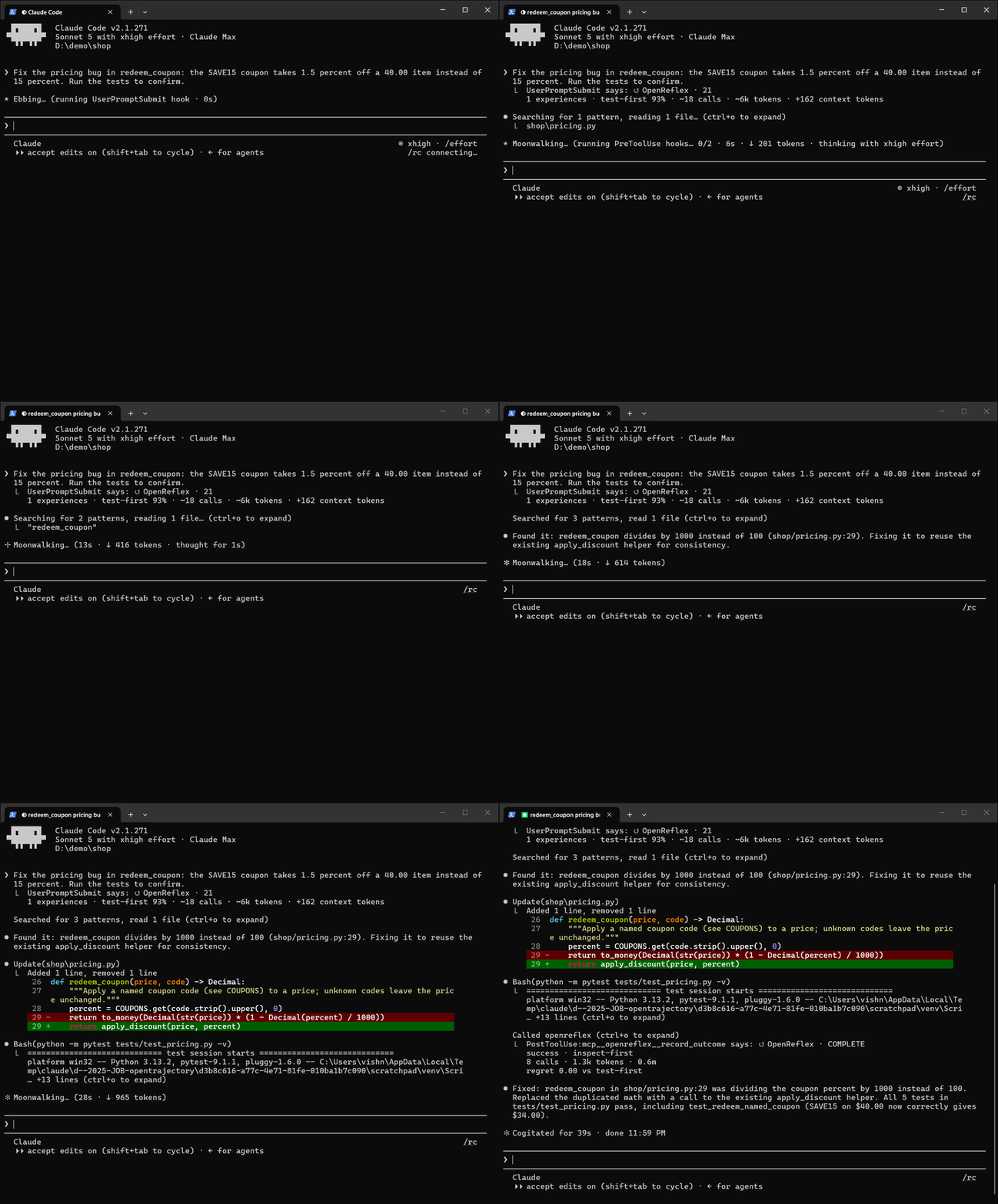
A real Claude Code session, recorded from the terminal and sped up. OpenReflex had seen one similar task in this repository, so it adds 162 tokens of context before the first tool call; after the fix, Claude records the outcome through OpenReflex's MCP tool. The step-by-step walkthrough is in docs/walkthrough.md.
Why OpenReflex
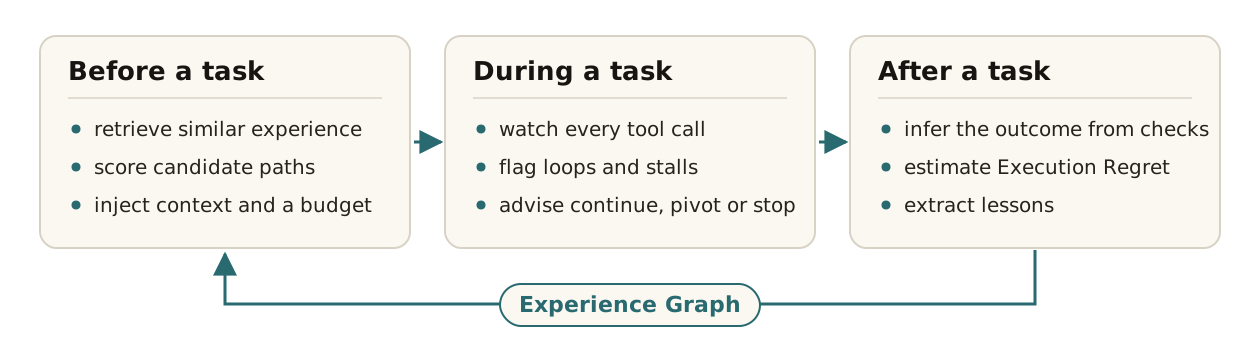
- It remembers what worked. Before a substantial task, OpenReflex retrieves similar past tasks and injects a compact Execution Context: a suggested approach with alternatives, the files that were changed, and lessons such as which edit resolved a recurring error.
- It catches loops while they happen. Repeated failing commands, identical retries, stalled progress, and runaway context growth raise one alert that says whether to continue, pivot to another approach, or stop and check in with you, never a stream of nags.
- It learns after every task. OpenReflex infers the outcome from real verification (a test or build that passed or failed after the last edit), estimates Execution Regret against the alternatives, and extracts lessons.
- It is private by design. Only coarse, project-relative metadata is stored. File contents, commands, tool output, and transcripts never are, and capture is off until you approve a project.
Quick start
Requires Python 3.11 or newer.
pipx install openreflex            # or: uv tool install openreflex
cd your-project
openreflex install claude-code     # writes hooks + MCP config and enables this project
OPENREFLEX / CONNECT
  agent       claude-code
  project     D:\demo\shop
  config      updated 2 files
              D:\demo\shop\.claude\settings.json
              D:\demo\shop\.mcp.json
  memory      enabled
  storage     local

  [ok] reflex active
Then work as usual. After a few tasks:
openreflex context "fix the login redirect bug"   # preview the context a task would receive
openreflex status                                 # what has been captured and learned
openreflex doctor                                 # installation checks and recent hook errors
Use it with your agent
OpenReflex installs per project with openreflex install <agent>, or as a plugin.
| Agent | Connects through | Install | Verified |
|---|---|---|---|
| Claude Code | Plugin, or hooks + MCP | claude plugin marketplace add vishnu-77/openreflex then claude plugin install openreflex@openreflex, or openreflex install claude-code |
Live sessions |
| Codex | Plugin, or hooks + MCP | codex plugin marketplace add vishnu-77/openreflex, or openreflex install codex, then trust the hooks once in /hooks |
Live sessions |
| Cursor | Hooks + MCP | openreflex install cursor |
Protocol and fuzz tests |
| OpenCode | Plugin + MCP | openreflex install opencode |
Protocol and fuzz tests |
With a plugin install, enable each project with openreflex approve. Per-agent guides:
Claude Code, Codex, Cursor,
OpenCode.
How it works
Hooks send lifecycle events (prompt, tool start, tool end, compaction, stop) to the OpenReflex engine, which stores them in an Experience Graph:
Task -caused-> Execution -used-> Context -used-> Experience
CandidatePath -recommended_for-> Task            Lesson -recommended_for-> Task
Execution -failed_with-> ToolCall -resolved_by-> ToolCall
Execution -caused-> Outcome -caused-> Experience -caused-> Lesson
- Before a task: similar experiences are retrieved and three strategies (
inspect-first,test-first,incremental) are estimated on success probability, time, tool calls, context cost, risk, uncertainty, reversibility, and expected regret. Strategies that another one beats on every measure are dropped as dominated (Pareto efficiency), the rest are ranked by utility within any limits you set, and the chosen path gets an execution budget for time, tool calls, and context. A context of at most 1,400 characters is injected; nothing is injected without relevant experience. - During a task: when a detector finds a failure loop, repeated calls, stalled progress, context growth, or work past the budget, OpenReflex estimates the marginal value of more work. The current path's success estimate is updated with each call that makes no progress or fails, and compared with the cost of the work left and with the best untried alternative. The alert ends with a recommendation to continue, pivot to another strategy, or stop and ask the user. Each problem, pivot, or stop is raised once, with a cooldown between messages.
- After a task: outcome and chosen path come from the agent's
record_outcome/choose_pathMCP calls when available, and are otherwise inferred from tool activity. Execution Regret compares the path taken with the best plausible alternative; it is withheld when the outcome is unknown, and feeds back into how strategies are ranked next time, along with success, cost, and how often a strategy ran into trouble.
Every recommendation is stored as a decision snapshot with a Reflex Score (0-100): how strong the
recommendation is, which is separate from the estimated chance that the task succeeds. openreflex why explains
the latest decision and openreflex trace shows the timeline. In Claude Code, a short recap appears when a task
starts, when OpenReflex recommends a pivot or stop or detects trouble, and when the task completes.
Set optional limits for every task with OPENREFLEX_BUDGET, for example calls=40,minutes=20,tokens=60000.
Routing, scoring, budget and recap settings come from a versioned policy: the packaged defaults, overridden by
~/.openreflex/config.toml and then by .openreflex.toml in the project.
Agents can also query OpenReflex directly through its MCP server.
The 12 MCP tools
| Tool | What it does |
|---|---|
get_execution_context |
Plan a task: similar past tasks, the suggested strategy with alternatives, a budget, likely files, lessons. Optional max_tool_calls, max_minutes, max_context_tokens. |
check_progress |
Whether more work on the current path is worth it: continue, pivot or stop. |
choose_path |
Declare the strategy being followed when it differs from the suggestion. |
record_outcome |
Record a verified outcome (tests passed, user confirmed, or failure) and learn from it. |
explain_decision |
Why the latest recommendation was made: Reflex Score, signals, confidence, next-best route. |
get_execution_trace |
The decision timeline of the most recent task. |
get_reflex_score |
The latest Reflex Score and its components as JSON. |
search_experience |
Past tasks in the project by description similarity, with their lessons. |
explain_node |
One Experience Graph node and its relations. |
get_project_insights |
What has been recorded, reused and learned in the project. |
approve_project |
Enable capture, only when the user explicitly asks. |
forget_experience |
Delete one past task's memory, only when the user explicitly asks. |
CLI
| Command | Purpose |
|---|---|
install <agent> [--dry-run] |
Write project hooks and MCP config, and enable the project |
uninstall <agent> [--dry-run] |
Remove OpenReflex's project hooks and MCP config; captured memory is kept |
approve / revoke |
Enable or disable capture for the current project |
context "<task>" |
Preview the Execution Context a task would receive |
status [--json] |
What has been captured, reused, and learned |
why / trace |
Explain the latest recommendation, or show the decision timeline |
doctor |
Installation, project resolution, and recent hook activity checks |
forget --yes |
Delete the project's data |
benchmark |
Run the simulated benchmark |
hook <agent> <event> / mcp |
Used by agent configs |
Privacy
| Stored | Never stored |
|---|---|
Tool name and a coarse category (read, edit, search, test, ...) |
File contents |
| A fingerprint of the arguments | Command text |
| Project-relative file paths | Tool output |
| Pass or fail, duration, output size | Transcripts and model output |
| A masked one-line error signature | Paths outside the project |
| The prompt as a task description (up to 1,000 characters, secrets redacted) | Anything sent to a server: there is none |
Data lives in ~/.openreflex/projects/<hash>/experience.sqlite3. Set OPENREFLEX_HOME to move it,
OPENREFLEX_DISABLE=1 to turn capture off everywhere, openreflex forget --yes to delete a project's data, or ask
your agent to forget_experience a single task.
Research
OpenReflex is also a research project in budget-aware execution: instead of treating success as a yes or no, it studies how agents choose execution paths, spend tool calls and context, respond to uncertainty, and whether more computation still adds value. The loop is experience retrieval, Pareto path selection, budget-aware execution and counterfactual regret. The Researcher view on the site explains the idea, lets you step through one reflex forming in the graph, and places it next to related work.
Community & Contributing
-
Issues and ideas: GitHub Issues
-
Support the project: Buy me a coffee
-
Develop locally:
git clone https://github.com/vishnu-77/openreflex && cd openreflex
pip install -e ".[dev]"
pytest && ruff check src tests scripts

OpenReflex is listed in the MCP Registry as io.github.vishnu-77/openreflex and on Glama:
License
OpenReflex is released under the MIT License.
1 maintainer

Release files for openreflex 0.3.2
For a detailed explanation of source distributions (sdists) and built distributions (wheels), please see the package formats documentation.
Source distribution (sdist)
| File | Size | Uploaded | |
|---|---|---|---|
| openreflex-0.3.2.tar.gz | 82.0 kB | Details |
Built distribution (wheel)
| File | Interpreter | ABI | Platform | Reset |
|---|---|---|---|---|
| openreflex-0.3.2-py3-none-any.whl | Python 3 | none | any | Details |
Total release size: 150.7 kB
Release files / openreflex-0.3.2.tar.gz
| Download URL | openreflex-0.3.2.tar.gz |
|---|---|
| Size | 82.0 kB |
| Tags | Source |
|
SHA-256 checksum How to use checksums |
eea715262840c4ffdbce69946f6f3846a26200c84cb60d99aabe9fc8971dc404
|
|
BLAKE2b-256 checksum How to use checksums |
3ebbf07054f237d02180b64efff91496bb28c22bbc46aa6442c329d446316a9f
|
| Upload date | |
|
Uploaded using Trusted Publishing? What is trusted publishing? |
Yes |
| Uploaded via |
twine/7.0.0 CPython/3.13.14
|
Provenance
Provenance describes where a file came from. On PyPI, provenance is shared via attestations, which provide a verifiable record of the build or publishing details. View details, limitations and caveats.


PyPI Publish Attestation
PyPI verified that this artifact, at this checksum, originated from the publisher listed below.
Signed by GitHub Actions, verified by PyPI on Sep 14, 2026.
Transparency logRelease files / openreflex-0.3.2-py3-none-any.whl
| Download URL | openreflex-0.3.2-py3-none-any.whl |
|---|---|
| Size | 68.6 kB |
| Tags | Python 3 |
|
SHA-256 checksum How to use checksums |
0c9822ec257ff997dba8b630ec7e404d1006daab6073ccf85af610a7245d07ed
|
|
BLAKE2b-256 checksum How to use checksums |
4be27216812a173500184b19f48bd297cb243cb33c96405b2921428b92d488b9
|
| Upload date | |
|
Uploaded using Trusted Publishing? What is trusted publishing? |
Yes |
| Uploaded via |
twine/7.0.0 CPython/3.13.14
|
Provenance
Provenance describes where a file came from. On PyPI, provenance is shared via attestations, which provide a verifiable record of the build or publishing details. View details, limitations and caveats.
PyPI Publish Attestation
PyPI verified that this artifact, at this checksum, originated from the publisher listed below.
Signed by GitHub Actions, verified by PyPI on Sep 14, 2026.
Transparency log













