
Retail Data Science Tools

Project description

Installation
To get the latest release:
pip install openretailscience
Alternatively, if you want the very latest version of the package you can install it from GitHub:
pip install git+https://github.com/Data-Simply/openretailscience.git
Features
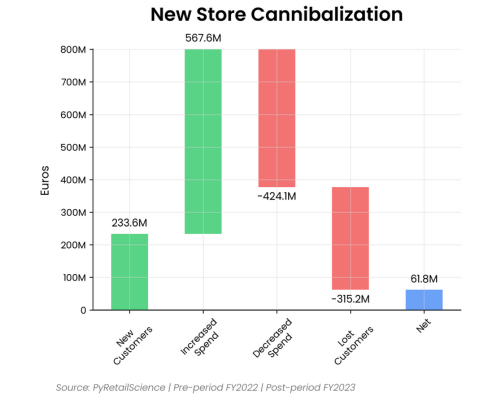
- Tailored for Retail: Leverage pre-built functions designed specifically for retail analytics. From customer segmentations to gains loss analysis, OpenRetailScience provides over a dozen building blocks you need to tackle retail-specific challenges efficiently and effectively.
-
Reliable Results: Built with extensive unit testing and best practices, OpenRetailScience ensures the accuracy and reliability of your analyses. Confidently present your findings, knowing they're backed by a robust, well-tested framework.
-
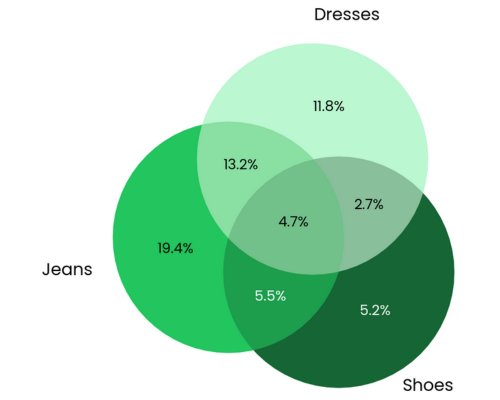
Professional Charts: Say goodbye to hours of tweaking chart styles. OpenRetailScience delivers beautifully standardized visualizations that are presentation-ready with just a few lines of code. Impress stakeholders and save time with our pre-built, customizable chart templates.
- Workflow Automation: OpenRetailScience streamlines your workflow by automating common retail analytics tasks. Easily loop analyses over different dimensions like product categories or countries, and seamlessly use the output of one analysis as input for another. Spend less time on data manipulation and more on generating valuable insights.
Examples
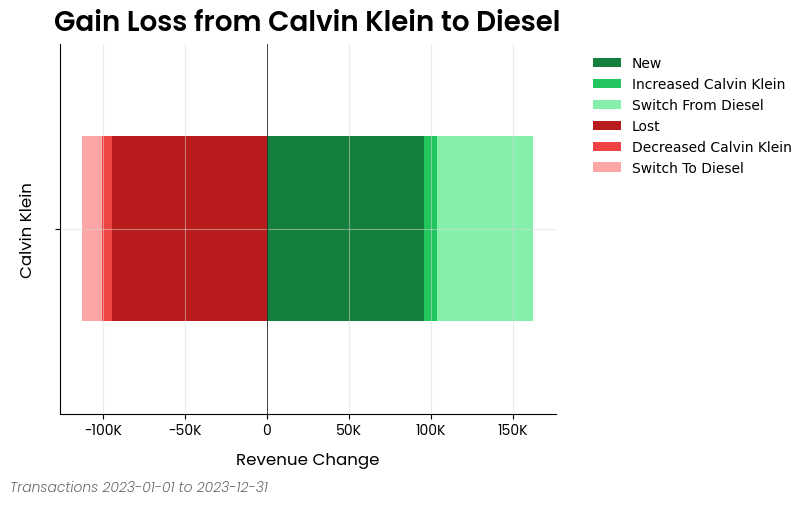
Gains Loss Analysis
Here is an excerpt from the gain loss analysis example notebook
from openretailscience.analysis.gain_loss import GainLoss

gl = GainLoss(
    df,
    # Flag the rows of period 1
    p1_index=time_period_1,
    # Flag the rows of period 2
    p2_index=time_period_2,
    # Flag which rows are part of the focus group.
    # Namely, which rows are Calvin Klein sales
    focus_group_index=df["brand_name"] == "Calvin Klein",
    focus_group_name="Calvin Klein",
    # Flag which rows are part of the comparison group.
    # Namely, which rows are Diesel sales
    comparison_group_index=df["brand_name"] == "Diesel",
    comparison_group_name="Diesel",
    # Finally we specifiy that we want to calculate
    # the gain/loss in total revenue
    value_col="total_price",
)
# Ok now let's plot the result
gl.plot(
    x_label="Revenue Change",
    source_text="Transactions 2023-01-01 to 2023-12-31",
    move_legend_outside=True,
)
plt.show()
Cross Shop Analysis
Here is an excerpt from the cross shop analysis example notebook
from openretailscience.analysis import cross_shop

cs = cross_shop.CrossShop(
    df,
    group_1_col="category_name",
    group_1_val="Jeans",
    group_2_col="category_name",
    group_2_val="Shoes",
    group_3_col="category_name",
    group_3_val="Dresses",
    labels=["Jeans", "Shoes", "Dresses"],
)
cs.plot(
    title="Jeans are a popular cross-shopping category with dresses",
    source_text="Source: Transactions 2023-01-01 to 2023-12-31",
    figsize=(6, 6),
)
plt.show()
# Let's see which customers were in which groups
display(cs.cross_shop_df.head())
# And the totals for all groups
display(cs.cross_shop_table_df)
Customer Retention Analysis
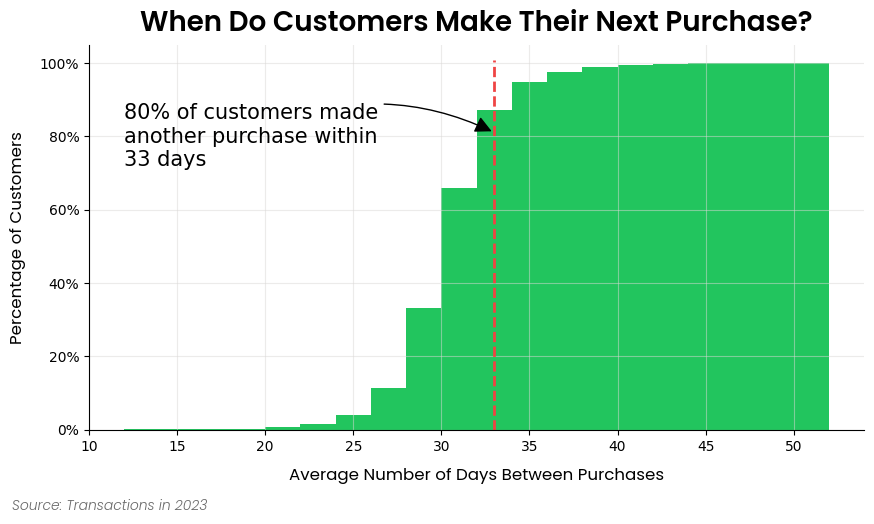
Here is an excerpt from the customer retention analysis example notebook
ax = dbp.plot(
    figsize=(10, 5),
    bins=20,
    cumulative=True,
    draw_percentile_line=True,
    percentile_line=0.8,
    source_text="Source: Transactions in 2023",
    title="When Do Customers Make Their Next Purchase?",
)

# Let's dress up the chart a bit of text and get rid of the legend
churn_period = dbp.purchases_percentile(0.8)
ax.annotate(
    f"80% of customers made\nanother purchase within\n{round(churn_period)} days",
    xy=(churn_period, 0.81),
    xytext=(dbp.purchase_dist_s.min(), 0.8),
    fontsize=15,
    ha="left",
    va="center",
    arrowprops=dict(facecolor="black", arrowstyle="-|>", connectionstyle="arc3,rad=-0.25", mutation_scale=25),
)
ax.legend().set_visible(False)
plt.show()
Documentation
Please see this site for full documentation, which includes:
- Analysis Modules: Overview of the framework and the structure of the docs.
- Examples: If you're looking to build something specific or are more of a hands-on learner, check out our examples. This is the best place to get started.
- API Reference: Thorough documentation of every class and method.
Contributing
We welcome contributions from the community to enhance and improve OpenRetailScience. To contribute, please follow these steps:
- Fork the repository.
- Create a new branch for your feature or bug fix.
- Make your changes and commit them with clear messages.
- Push your changes to your fork.
- Open a pull request to the main repository's
mainbranch.
Please make sure to follow the existing coding style and provide unit tests for new features.
Contact / Support
This repository is supported by Data simply.
If you are interested in seeing what Data Simply can do for you, then please email email us. We work with companies at a variety of scales and with varying levels of data and retail analytics sophistication, to help them build, scale or streamline their analysis capabilities.
Contributors

Made with contrib.rocks.
Acknowledgements
Built with expertise doing analytics and data science for scale-ups to multi-nationals, including:
- Loblaws
- Dominos
- Sainbury's
- IKI
- Migros
- Sephora
- Nectar
- Metro
- Coles
- GANNI
- Mindful Chef
- Auchan
- Attraction Tickets Direct
- Roman Originals
Testing
OpenRetailScience includes comprehensive unit and integration tests to ensure reliability across different backends.
Unit Tests
Run unit tests using pytest:
# Install dependencies
uv sync

# Run all unit tests
uv run pytest

# Run specific test file
uv run pytest tests/test_file.py

# Run with coverage
uv run pytest --cov=openretailscience
Multi-Python Version Testing
OpenRetailScience supports Python 3.10, 3.11, 3.12, and 3.13. You can test across all supported versions locally using tox:
# Test all supported Python versions
tox -e py310,py311,py312,py313

# Test specific Python version
tox -e py313

# Run tests in parallel across versions
tox -p auto
Prerequisites:
- Multiple Python versions installed on your system
- tox installed (
uv syncinstalls it automatically)
Integration Tests
Integration tests verify that all analysis modules work correctly with distributed computing engines (PySpark, BigQuery, and Snowflake). These tests ensure the Ibis-based code paths function properly across different execution environments.
PySpark Integration Tests
The PySpark integration tests run locally using the same pytest framework as other tests.
Prerequisites:
- Python environment with dependencies installed (
uv sync)
Running locally:
# Run all PySpark tests
uv run pytest tests/integration -k "pyspark" -v

# Run specific PySpark test
uv run pytest tests/integration/test_cohort_analysis.py -k "pyspark" -v
BigQuery Integration Tests
The BigQuery integration tests verify compatibility with Google BigQuery as a backend.
Prerequisites:
- Access to a Google Cloud Platform account
- A service account with BigQuery permissions
- The service account key JSON file
- The test dataset loaded in BigQuery (dataset:
test_data, table:transactions)
Running locally:
# Set up authentication
export GOOGLE_APPLICATION_CREDENTIALS=/path/to/your/service-account-key.json
export GCP_PROJECT_ID=your-project-id

# Install dependencies
uv sync

# Run all BigQuery tests
uv run pytest tests/integration -k "bigquery" -v

# Run specific test module
uv run pytest tests/integration/bigquery/test_cohort_analysis.py -v
Snowflake Integration Tests
The Snowflake integration tests verify compatibility with Snowflake as a backend.
Prerequisites:
- Access to a Snowflake account with a warehouse, database, and schema configured
- A key-pair authentication private key (PEM format) for the Snowflake user
- The test dataset loaded in Snowflake (table:
TRANSACTIONS)
Running locally:
# Set up Snowflake connection
export SNOWFLAKE_CI_ACCOUNT=your-account-identifier
export SNOWFLAKE_CI_USER=your-username
export SNOWFLAKE_CI_WAREHOUSE=your-warehouse
export SNOWFLAKE_CI_DATABASE=your-database
export SNOWFLAKE_CI_SCHEMA=your-schema
export SNOWFLAKE_CI_PRIVATE_KEY_PATH=/path/to/your/private-key.p8

# Install dependencies
uv sync

# Run all Snowflake tests
uv run pytest tests/integration -k "snowflake" -v

# Run specific test module
uv run pytest tests/integration/test_cohort_analysis.py -k "snowflake" -v
License
This project is licensed under the Elastic License 2.0 - see the LICENSE file for details.
Release history Release notifications | RSS feed


Download files
Download the file for your platform. If you're not sure which to choose, learn more about installing packages.
Source Distribution
Built Distribution
Filter files by name, interpreter, ABI, and platform.
If you're not sure about the file name format, learn more about wheel file names.
Copy a direct link to the current filters
File details
Details for the file openretailscience-0.46.0.tar.gz.
File metadata
- Download URL: openretailscience-0.46.0.tar.gz
- Upload date:
- Size: 10.0 MB
- Tags: Source
- Uploaded using Trusted Publishing? Yes
- Uploaded via: twine/6.1.0 CPython/3.13.12
File hashes
| Algorithm | Hash digest | |
|---|---|---|
| SHA256 |
448098a76a17a791743218745481c79e4b1704ff557b9fd6c7047a870cf9ba0a
|
|
| MD5 |
c65f6857270689a89632565d75824351
|
|
| BLAKE2b-256 |
18aa50bb6e4b36f24f04f7a51d049c2172f21b28bd4b25ce356a4b02c6425d40
|
Provenance
The following attestation bundles were made for openretailscience-0.46.0.tar.gz:
Publisher:
release.yml on Data-Simply/openretailscience
-
Statement:
-
Statement type:
https://in-toto.io/Statement/v1 -
Predicate type:
https://docs.pypi.org/attestations/publish/v1 -
Subject name:
openretailscience-0.46.0.tar.gz -
Subject digest:
448098a76a17a791743218745481c79e4b1704ff557b9fd6c7047a870cf9ba0a - Sigstore transparency entry: 1593552053
- Sigstore integration time:
-
Permalink:
Data-Simply/openretailscience@a909589b65feda078ffd4fbe9d191c82c1aa5fc1 -
Branch / Tag:
refs/heads/main - Owner: https://github.com/Data-Simply
-
Access:
public
-
Token Issuer:
https://token.actions.githubusercontent.com -
Runner Environment:
github-hosted -
Publication workflow:
release.yml@a909589b65feda078ffd4fbe9d191c82c1aa5fc1 -
Trigger Event:
workflow_dispatch
-
Statement type:
File details
Details for the file openretailscience-0.46.0-py3-none-any.whl.
File metadata
- Download URL: openretailscience-0.46.0-py3-none-any.whl
- Upload date:
- Size: 532.1 kB
- Tags: Python 3
- Uploaded using Trusted Publishing? Yes
- Uploaded via: twine/6.1.0 CPython/3.13.12
File hashes
| Algorithm | Hash digest | |
|---|---|---|
| SHA256 |
87ec95b01cbb9b3c1e29469cdf428302eefcac0f95f2bb994cb9b36f4d9cfb7e
|
|
| MD5 |
7b23428cbdad8faafd90755bfd63e1af
|
|
| BLAKE2b-256 |
bd84e43db17a8d063ab93c66f5c42f54a6ea101c5448efae364399e9fa95801c
|
Provenance
The following attestation bundles were made for openretailscience-0.46.0-py3-none-any.whl:
Publisher:
release.yml on Data-Simply/openretailscience
-
Statement:
-
Statement type:
https://in-toto.io/Statement/v1 -
Predicate type:
https://docs.pypi.org/attestations/publish/v1 -
Subject name:
openretailscience-0.46.0-py3-none-any.whl -
Subject digest:
87ec95b01cbb9b3c1e29469cdf428302eefcac0f95f2bb994cb9b36f4d9cfb7e - Sigstore transparency entry: 1593552229
- Sigstore integration time:
-
Permalink:
Data-Simply/openretailscience@a909589b65feda078ffd4fbe9d191c82c1aa5fc1 -
Branch / Tag:
refs/heads/main - Owner: https://github.com/Data-Simply
-
Access:
public
-
Token Issuer:
https://token.actions.githubusercontent.com -
Runner Environment:
github-hosted -
Publication workflow:
release.yml@a909589b65feda078ffd4fbe9d191c82c1aa5fc1 -
Trigger Event:
workflow_dispatch
-
Statement type:






