
OpenRGB Tempglow
Simple per-part RGB lighting for Linux PCs — with fans that turn red when things get too hot.
한국어
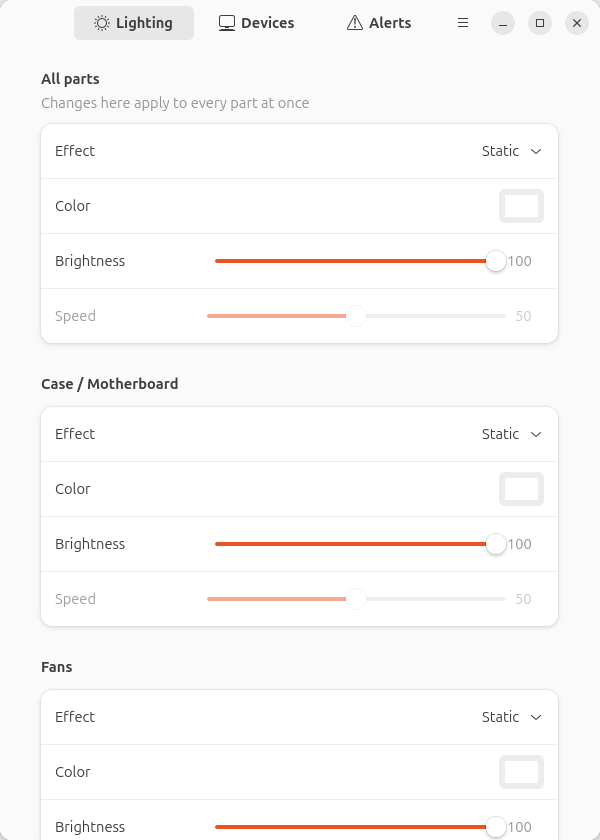
OpenRGB can talk to almost every RGB controller, but setting up "white case, slowly breathing fans, red when overheating" means juggling devices, zones and profiles. Tempglow sits on top of OpenRGB and turns your PC into four simple parts:
| Part | Typical hardware |
|---|---|
| Case / Motherboard | on-board LEDs, case strips |
| Fans | ARGB fan headers, coolers |
| Graphics card | GPU lighting |
| RAM | memory sticks |
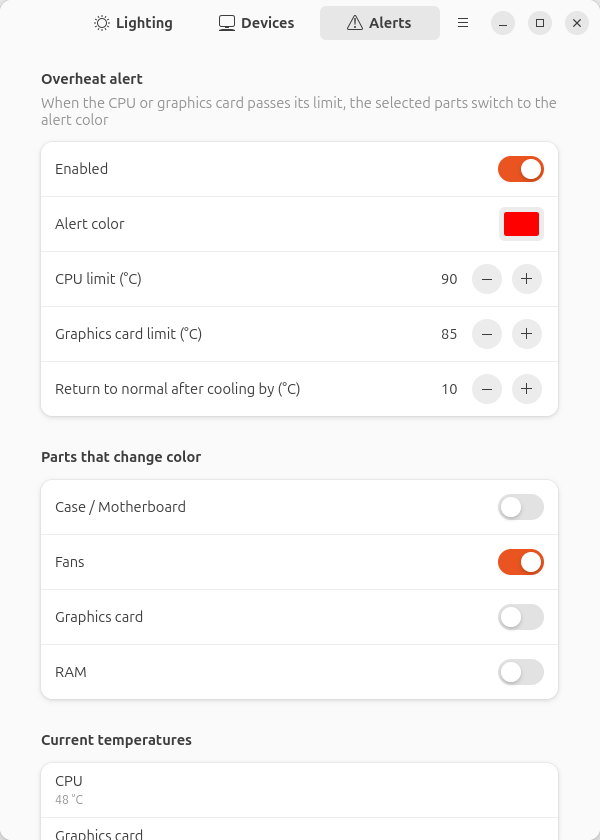
Each part gets its own effect (static, breathing, rainbow, off), color, brightness and speed — or change everything at once. A small background service applies your settings and watches CPU/GPU temperatures; past the limit, the parts you choose switch to an alert color, and switch back once things cool down. Schedules can turn parts off, dim them or change their lighting at set times.
Features
- Per-part and all-at-once lighting control, applied live as you drag a slider
- Schedules: during a daily time window, turn chosen parts off, dim them or switch them to another effect and color (weekday selection, windows may cross midnight)
- Overheat alert with hysteresis (CPU via
k10temp/zenpower/coretemp, GPU vianvidia-smior discreteamdgpu) - Automatic device discovery; assign any OpenRGB zone to a part and set ARGB LED counts in the Devices tab
- Starts an OpenRGB server for you (installed package, Flatpak or AppImage) when none is running
- Built-in driver for Colorful iGame NVIDIA cards that OpenRGB doesn't list yet (e.g. RTX 5080)
- GTK 4 / libadwaita app, English and Korean UI
Requirements
- Linux with systemd (user services)
- OpenRGB 1.0 or newer — distro package, Flatpak or AppImage
- Python 3.10+, PyGObject, GTK 4 and libadwaita 1.5+ (Ubuntu 24.04+, Fedora 40+, Debian 13+, Arch)
Install
Ubuntu / Debian (.deb)
Download openrgb-tempglow_*_all.deb from the latest release:
sudo apt install ./openrgb-tempglow_*_all.deb
systemctl --user start openrgb-tempglow   # or log out and back in
Any distro (install script)
git clone https://github.com/yoobinkim541/openrgb-tempglow
cd openrgb-tempglow
./install.sh            # add --udev to also install OpenRGB's udev rules
Everything goes into your home directory (~/.local); no root is needed except for --udev.
Remove it with ./install.sh --uninstall.
pipx
pipx install --system-site-packages openrgb-tempglow   # system site-packages provide PyGObject/GTK
tempglow-setup install                                  # desktop entry, icon and user service
First run
- Permissions. OpenRGB needs udev rules to reach devices without root. If the Devices tab is
empty or missing hardware, run
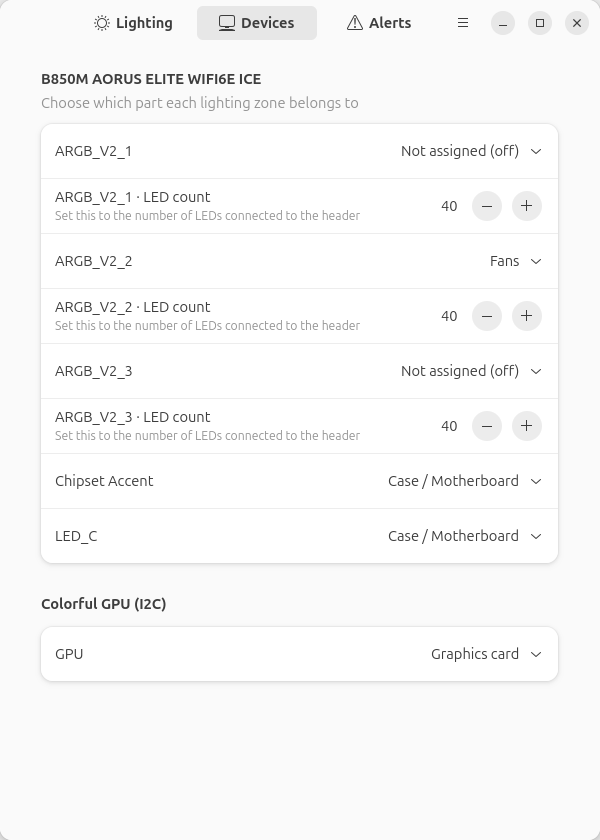
tempglow-setup udev(uses OpenRGB's own rules, asks for sudo), then reboot or replug. - Assign zones. Open OpenRGB Tempglow → Devices. Zones get a part based on the device type (motherboard → case, RAM → RAM, cooler → fans, GPU → graphics card); fan headers usually need to be set to Fans by hand. For ARGB headers, set LED count to the number of LEDs connected. Keyboards, mice and other peripherals are left alone unless you assign them.
- Pick colors on the Lighting tab, and alert settings on Alerts.
Tip: not sure which header is which? Give each one a different color under Lighting and look inside the case.
Command line
tempglowd --list-devices    show every zone and the part it belongs to (read-only)
tempglowd --simulate-hot    run in the foreground pretending the PC is overheating
tempglowd -v                foreground with debug logging
tempglow-setup install|uninstall|udev
journalctl --user -u openrgb-tempglow -f     service log
Settings live in ~/.config/openrgb-tempglow/config.json (edited by the app; the service reloads
it automatically). status.json next to it is written by the service.
Troubleshooting
RAM isn't detected (AMD boards, often Gigabyte). Check sudo dmesg | grep -i "ACPI.*conflict".
If you see SystemIO range ... conflicts with OpRegion ... SMBI, the BIOS has claimed the SMBus and
the i2c_piix4 driver can't bind. The usual fix (also recommended by OpenRGB) is adding the kernel
parameter acpi_enforce_resources=lax:
echo 'GRUB_CMDLINE_LINUX_DEFAULT="$GRUB_CMDLINE_LINUX_DEFAULT acpi_enforce_resources=lax"' \
  | sudo tee /etc/default/grub.d/99-openrgb.cfg && sudo update-grub   # then reboot
This lets the kernel use a bus the firmware also uses; understand the trade-off before enabling it.
"OpenRGB was not found". Install OpenRGB 1.0+. AppImages are picked up from ~/Applications,
~/.local/bin or ~/Downloads; anything else can be set via openrgb.command in config.json,
e.g. "command": ["/opt/openrgb/openrgb"].
Using the OpenRGB app at the same time. Tempglow connects to whatever server is listening on port 6742, so you can keep the OpenRGB window open with its SDK server enabled. Don't run another tool that also drives the same devices continuously.
How it works
 tempglow (GTK app) ── writes ──▶ config.json ◀── watches ── tempglowd (systemd user service)
                                                                │  25 fps effects, temps every 2 s
                                       OpenRGB SDK server ◀─────┤
                                       extra I2C drivers  ◀─────┘
Contributing
Bug reports and pull requests are welcome. Run the tests with:
python3 -m venv --system-site-packages .venv && .venv/bin/pip install -e '.[test]'
.venv/bin/pytest
New hardware that OpenRGB doesn't support is best added to OpenRGB itself; small built-in drivers
here are a stop-gap (see src/openrgb_tempglow/drivers/).
License
GPL-3.0-or-later. Built on OpenRGB (GPL-2.0-or-later)
and openrgb-python (GPL-3.0). The Colorful GPU protocol
is ported from OpenRGB's ColorfulGPUController.
1 maintainer

Metadata
1 maintainer
Release files for openrgb-tempglow 0.2.0
For a detailed explanation of source distributions (sdists) and built distributions (wheels), please see the package formats documentation.
Source distribution (sdist)
| File | Size | Uploaded | |
|---|---|---|---|
| openrgb_tempglow-0.2.0.tar.gz | 219.1 kB | Details |
Built distribution (wheel)
| File | Interpreter | ABI | Platform | Reset |
|---|---|---|---|---|
| openrgb_tempglow-0.2.0-py3-none-any.whl | Python 3 | none | any | Details |
Total release size: 435.4 kB
Release files / openrgb_tempglow-0.2.0.tar.gz
| Download URL | openrgb_tempglow-0.2.0.tar.gz |
|---|---|
| Size | 219.1 kB |
| Tags | Source |
|
SHA-256 checksum How to use checksums |
ee0ff5987b9f4462145c54ae20aa92a118905c7b6a4b35bb25261a11e12204c7
|
|
BLAKE2b-256 checksum How to use checksums |
5e998e74e12686e06a83a7c9d791530a52bfa43643456029c8bf03d2bba90bb2
|
| Upload date | |
|
Uploaded using Trusted Publishing? What is trusted publishing? |
Yes |
| Uploaded via |
twine/7.0.0 CPython/3.13.14
|
Provenance
Provenance describes where a file came from. On PyPI, provenance is shared via attestations, which provide a verifiable record of the build or publishing details. View details, limitations and caveats.


PyPI Publish Attestation
PyPI verified that this artifact, at this checksum, originated from the publisher listed below.
Signed by GitHub Actions, verified by PyPI on Oct 6, 2026.
Transparency logRelease files / openrgb_tempglow-0.2.0-py3-none-any.whl
| Download URL | openrgb_tempglow-0.2.0-py3-none-any.whl |
|---|---|
| Size | 216.4 kB |
| Tags | Python 3 |
|
SHA-256 checksum How to use checksums |
a6e431f387b586fc71508c9972847b1488ce043fb73156b227334a1a5f973376
|
|
BLAKE2b-256 checksum How to use checksums |
e20b2273d53477ca1374a8d84db9854a75e0a7c8cad46691e8901aac558642ac
|
| Upload date | |
|
Uploaded using Trusted Publishing? What is trusted publishing? |
Yes |
| Uploaded via |
twine/7.0.0 CPython/3.13.14
|
Provenance
Provenance describes where a file came from. On PyPI, provenance is shared via attestations, which provide a verifiable record of the build or publishing details. View details, limitations and caveats.
PyPI Publish Attestation
PyPI verified that this artifact, at this checksum, originated from the publisher listed below.
Signed by GitHub Actions, verified by PyPI on Oct 6, 2026.
Transparency log













